Java Variables
Updated 7 min read Aimerscrew
Every useful program has to remember things: the items in a shopping cart, a player's score, the number of free seats on a flight. In Java, you store those values in variables. This lesson shows you how Java variables are declared, given values, changed and named, and how to dodge the errors beginners hit most often.
🌍 Real-life example
Picture moving house. You pack things into cardboard boxes and write a label on each one: Books, Kitchen, Winter clothes. Later you find what you need by reading the label, not by opening every box. A Java variable is a labeled box too, with one extra rule: each box is made for one kind of thing. A box made for numbers can't hold text.
What is a variable in Java?
A variable is a named storage location that holds a value of a specific type. The type says what kind of value fits in the box (a whole number, a decimal number, text, true/false), and the name is how you refer to the box in your code.
public class PlayerProfile {
    public static void main(String[] args) {
        String playerName = "Maya";
        int level = 7;

        System.out.println(playerName);
        System.out.println(level);
    }
}
Maya
7Here playerName and level are variables. String means "text" and int means "whole number". You'll meet all of Java's types in the next lesson, Java data types; for now, int, double (decimal number), boolean (true or false) and String are enough.
How do you declare a variable in Java?
Declaring a variable means creating the box: you tell Java its type and its name. Initializing means putting the first value into it. You can do these as two steps or as one.
int freeSeats;          // declaration: an int box named freeSeats
freeSeats = 42;         // initialization: put 42 in the box

double price = 19.99;   // declaration and initialization together
boolean isOpen = true;
The general pattern is always the same:
| Part | Example | Meaning |
|---|---|---|
| Type | double | what kind of value the box can hold |
| Name | price | the label you use in your code |
= | = | the assignment operator: "store this value" |
| Value | 19.99 | what goes into the box |
; | ; | ends the statement |
💡 Tip
Read price = 19.99; as "price gets 19.99". The single = stores a value; it doesn't ask whether two things are equal. Comparing uses ==, which you'll learn in Java comparison operators.
How a Java variable works: a labeled box
When Java runs int score = 10;, it sets aside a box big enough for an int, labels it score and puts 10 inside. When you later write score = 15;, the same box is reused: the 10 is replaced by 15. The label and the type never change.
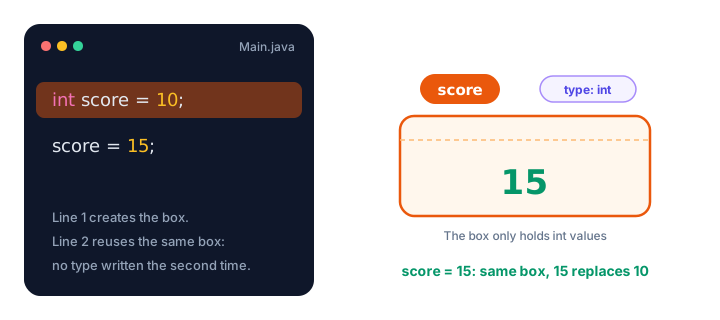
This is different from Python, where a variable is a label that can be moved to any value of any type (see Python variables if you're curious). Java is statically typed: the type is fixed when you declare the variable, and the compiler checks every assignment.
Changing the value of a variable
A variable's value can change as often as you like. You can even use the current value to work out the new one:
public class ParkingLot {
    public static void main(String[] args) {
        int freeSpaces = 50;
        System.out.println("Opening: " + freeSpaces);

        freeSpaces = freeSpaces - 3;   // three cars park
        System.out.println("After 3 cars: " + freeSpaces);

        freeSpaces = freeSpaces + 1;   // one car leaves
        System.out.println("After 1 leaves: " + freeSpaces);
    }
}
Opening: 50
After 3 cars: 47
After 1 leaves: 48The line freeSpaces = freeSpaces - 3; means: read the current value (50), subtract 3, and store the result (47) back in the same box. The + between text and a number joins them into one piece of text, which is handy for printing labels.
What you can't do is put a different kind of value in the box:
int seats = 180;
seats = "full";   // does not compile
error: incompatible types: String cannot be converted to intDeclaring multiple variables at once
If several variables share a type, you can declare them on one line, separated by commas. Each one can have its own starting value, or none:
public class Scoreboard {
    public static void main(String[] args) {
        int home = 2, away = 1, extraTime;
        extraTime = 0;

        System.out.println("Home " + home + " - " + away + " Away");
        System.out.println("Extra time goals: " + extraTime);
    }
}
Home 2 - 1 Away
Extra time goals: 0📝 Note
One variable per line is usually easier to read, and it gives you space for a short comment. Save the comma style for tightly related values like int x = 0, y = 0;.
Java variable naming rules
Java is strict about names. A name (officially an identifier) must follow these rules, or the program won't compile:
- It can contain letters, digits,
_and$. - It can't start with a digit.
- It can't contain spaces or symbols like
-,#or!. - It can't be a reserved keyword such as
class,int,publicornew. - It is case-sensitive:
total,TotalandTOTALare three different names.
| Name | Valid? | Why |
|---|---|---|
cartTotal | ✅ Yes | letters only, camelCase |
player2 | ✅ Yes | digits are fine after the first character |
2ndPlayer | ❌ No | starts with a digit |
order-id | ❌ No | - is the minus sign |
first name | ❌ No | contains a space |
class | ❌ No | reserved keyword |
Naming conventions: camelCase
Beyond the rules, Java programmers follow a style called camelCase for variables: start with a lowercase letter and capitalize each new word, like deliveryFee, isLoggedIn or booksBorrowed. Pick names that say what the value means. minutesLeft tells a reader far more than m or x1.
A boolean reads best as a yes/no question: isOpen, hasTicket, canVote.
Real-world example: a food delivery order
Variables really shine when they work together. Each value gets a clear name, and later lines combine them:
public class DeliveryOrder {
    public static void main(String[] args) {
        String dish = "Veggie burrito";
        double dishPrice = 8.50;
        int quantity = 3;
        double deliveryFee = 2.50;

        double foodCost = dishPrice * quantity;
        double total = foodCost + deliveryFee;

        System.out.println("Order: " + quantity + " x " + dish);
        System.out.println("Food: " + foodCost);
        System.out.println("Total: " + total);
    }
}
Order: 3 x Veggie burrito
Food: 25.5
Total: 28.0If the restaurant raises the price, you change one line and every calculation follows. (Printing money neatly with exactly two decimals is covered in Java output formatting.)
Swapping two variables
A classic beginner puzzle: how do you swap the values of two variables? If you copy one into the other directly, you lose a value. The fix is a third, temporary variable, just like you'd need an empty glass to swap the drinks in two full glasses.
public class SwapSeats {
    public static void main(String[] args) {
        String seatA = "Leo";
        String seatB = "Ana";

        String temp = seatA;   // remember Leo
        seatA = seatB;         // Ana moves to seat A
        seatB = temp;          // Leo moves to seat B

        System.out.println("Seat A: " + seatA);
        System.out.println("Seat B: " + seatB);
    }
}
Seat A: Ana
Seat B: LeoCommon mistakes with Java variables
1. Using a variable before giving it a value
int total;
System.out.println(total);
error: variable total might not have been initializedJava refuses to read a box that was never filled. Give the variable a value first, even if it's just 0.
2. Declaring the same name twice
int score = 10;
int score = 20;
error: variable score is already defined in method main(String[])Write the type only once, when you create the variable. To change it later, drop the type: score = 20;.
3. Getting the capitalization wrong
If you declare score and then type Score, the compiler reports cannot find symbol, because as far as Java knows, Score doesn't exist.
4. Forgetting quotes around text
String city = Paris; fails because, without quotes, Java looks for a variable called Paris. Text values always go in double quotes: "Paris".
Practice exercise
🏋️ Try it yourself
You're tracking a video game session. Create variables for the player's name ("Kai"), lives (3) and score (0). Then the player collects a coin worth 50 points, loses one life, and collects another coin worth 50 points. Update the variables and print the final state.
Show solution
public class GameSession {
    public static void main(String[] args) {
        String playerName = "Kai";
        int lives = 3;
        int score = 0;

        score = score + 50;   // first coin
        lives = lives - 1;    // hit an enemy
        score = score + 50;   // second coin

        System.out.println(playerName + " has " + lives + " lives and " + score + " points.");
    }
}
Kai has 2 lives and 100 points.What's next?
You can now create and update variables. Next, take a closer look at what can go inside them in Java data types, where you'll learn the eight primitive types and how String is different.
Key takeaways
- A Java variable is a named box in memory that holds one value of a fixed type.
- Declare a variable with a type and a name (int seats;), and initialize it with = (seats = 180;), or do both at once.
- You can change a variable's value any time, but not its type: an int variable can never hold text.
- Java will not let you read a local variable before it has been given a value.
- Names may use letters, digits, _ and $, cannot start with a digit and cannot be keywords; they are case-sensitive.
- By convention, Java variable names use camelCase, such as deliveryFee or isOpen.
Frequently asked questions
How do you declare a variable in Java?
Write the type followed by the name and a semicolon, for example int age;. You can give it a starting value at the same time: int age = 30;.
What is the difference between declaring and initializing a variable?
Declaring creates the variable by giving it a type and a name. Initializing stores its first value. int count; is a declaration, count = 0; is an initialization, and int count = 0; does both.
Can a Java variable change its type?
No. Java is statically typed, so the type is fixed when you declare the variable. You can change its value as often as you like, as long as the new value fits the type.
Are Java variable names case-sensitive?
Yes. total, Total and TOTAL are three different names. Most Java code uses camelCase for variables, starting with a lowercase letter.
Can I declare several variables on one line in Java?
Yes, if they share a type: int x = 0, y = 0, z;. Separate them with commas. One variable per line is often easier to read, though.