Java Date and Time
Updated 11 min read Aimerscrew
Booking a flight, sending a bill on the first of the month, counting the days until a sale, showing "Saturday, March 14" on a receipt: almost every real program works with Java date and time values. Modern Java does this with the java.time package, which is clear, safe and hard to misuse. In this lesson you'll learn the main classes (LocalDate, LocalTime, LocalDateTime and ZonedDateTime), how to add and subtract time, measure gaps with Period, Duration and ChronoUnit, format and parse dates, and handle time zones.
🌍 Real-life example
A calendar on your wall and the clock on your phone answer different questions. The calendar says "March 14" (a date), the wall clock says "7:30" (a time), and a boarding pass says "18:30 in New York" (a date, a time and a place). Java has a separate class for each of these, so you always say exactly what you mean.
The java.time classes at a glance
| Class | Holds | Example value | Use it for |
|---|---|---|---|
LocalDate | Date only | 2026-03-14 | Birthdays, due dates, holidays |
LocalTime | Time only | 19:30 | Opening hours, alarms |
LocalDateTime | Date and time | 2026-03-14T20:15 | Events in one known place |
ZonedDateTime | Date, time and time zone | 2026-03-14T18:30-04:00[America/New_York] | Flights, meetings across countries |
Period | Years, months, days | P16Y6M21D | Ages, subscription lengths |
Duration | Hours, minutes, seconds | PT2H25M | Parking time, flight length |
"Local" means no time zone: just what a calendar or wall clock would show.
Creating dates and times with LocalDate, LocalTime and LocalDateTime
You create values with the static of(...) method. Here's a concert ticket app:
import java.time.LocalDate;
import java.time.LocalDateTime;
import java.time.LocalTime;

public class ConcertTickets {
    public static void main(String[] args) {
        LocalDate concertDay = LocalDate.of(2026, 3, 14);
        LocalTime doorsOpen = LocalTime.of(19, 30);
        LocalDateTime showStart = LocalDateTime.of(2026, 3, 14, 20, 15);

        System.out.println("Date: " + concertDay);
        System.out.println("Doors: " + doorsOpen);
        System.out.println("Show: " + showStart);

        System.out.println("Year: " + concertDay.getYear());
        System.out.println("Month: " + concertDay.getMonth());
        System.out.println("Day of month: " + concertDay.getDayOfMonth());
        System.out.println("Weekday: " + concertDay.getDayOfWeek());
        System.out.println("Combined: " + concertDay.atTime(doorsOpen));
    }
}
Date: 2026-03-14
Doors: 19:30
Show: 2026-03-14T20:15
Year: 2026
Month: MARCH
Day of month: 14
Weekday: SATURDAY
Combined: 2026-03-14T19:30Printing a date gives the international ISO format, year-month-day. A LocalDateTime puts a T between the date and the time. getMonth() and getDayOfWeek() return enums such as MARCH and SATURDAY, and months are numbered 1 to 12, as on a real calendar.
📝 Note
To get the current date or time, call LocalDate.now(), LocalTime.now() or LocalDateTime.now(). This lesson uses fixed dates instead, so the outputs you see here match exactly what you'll get when you run the code.
Adding and subtracting: plusDays, minusMonths and more
Every date class has plus... and minus... methods for days, weeks, months and years. A streaming subscription works out its key dates like this:
import java.time.LocalDate;

public class Subscription {
    public static void main(String[] args) {
        LocalDate signUp = LocalDate.of(2026, 1, 31);

        LocalDate trialEnds = signUp.plusDays(14);
        LocalDate firstBill = signUp.plusMonths(1);
        LocalDate reminder = firstBill.minusWeeks(1);
        LocalDate lastYear = signUp.minusYears(1);

        System.out.println("Signed up:   " + signUp);
        System.out.println("Trial ends:  " + trialEnds);
        System.out.println("First bill:  " + firstBill);
        System.out.println("Reminder:    " + reminder);
        System.out.println("A year ago:  " + lastYear);

        System.out.println("Bill before trial ends? " + firstBill.isBefore(trialEnds));
        System.out.println("2028 is a leap year? " + LocalDate.of(2028, 1, 1).isLeapYear());
    }
}
Signed up: 2026-01-31
Trial ends: 2026-02-14
First bill: 2026-02-28
Reminder: 2026-02-21
A year ago: 2025-01-31
Bill before trial ends? false
2028 is a leap year? trueTwo important details:
- Dates are immutable.
signUp.plusDays(14)does not changesignUp; it returns a new date. That's why every result is stored in its own variable. - Month math is smart. January 31 plus one month would be "February 31", which doesn't exist, so Java picks the last valid day, February 28.
isBefore, isAfter and isEqual compare dates, and isLeapYear() checks for February 29.
Period vs Duration: measuring time between two values
Use Period for calendar amounts (years, months, days) and Duration for clock amounts (hours, minutes, seconds):
import java.time.Duration;
import java.time.LocalDate;
import java.time.LocalDateTime;
import java.time.Period;

public class PeriodAndDuration {
    public static void main(String[] args) {
        // Period: years, months and days between two dates
        LocalDate birthday = LocalDate.of(2009, 8, 21);
        LocalDate today = LocalDate.of(2026, 3, 14);
        Period age = Period.between(birthday, today);
        System.out.println("Age: " + age.getYears() + " years, " + age.getMonths()
                + " months, " + age.getDays() + " days");
        System.out.println("As a Period: " + age);

        // Duration: hours, minutes and seconds between two moments
        LocalDateTime parkedAt = LocalDateTime.of(2026, 3, 14, 9, 40);
        LocalDateTime leftAt = LocalDateTime.of(2026, 3, 14, 12, 5);
        Duration parked = Duration.between(parkedAt, leftAt);
        System.out.println("Parked: " + parked.toHours() + "h " + parked.toMinutesPart() + "m");
        System.out.println("As a Duration: " + parked);

        long startedHours = (parked.toMinutes() + 59) / 60;
        System.out.printf("Fee at $3 per started hour: $%d%n", startedHours * 3);
    }
}
Age: 16 years, 6 months, 21 days
As a Period: P16Y6M21D
Parked: 2h 25m
As a Duration: PT2H25M
Fee at $3 per started hour: $9Printed directly, they use the ISO style: P16Y6M21D means "a period of 16 years, 6 months and 21 days", and PT2H25M means "a period of time of 2 hours and 25 minutes". Methods like getYears() and toMinutesPart() give you the separate numbers for friendlier messages.
How do you count the days between two dates?
Use ChronoUnit.DAYS.between(start, end). It returns the total number of days as a long. Let's count down to a launch party on December 25, 2026:
import java.time.DayOfWeek;
import java.time.LocalDate;
import java.time.temporal.ChronoUnit;

public class Countdown {
    public static void main(String[] args) {
        LocalDate today = LocalDate.of(2026, 3, 14);
        LocalDate launchParty = LocalDate.of(2026, 12, 25);

        long days = ChronoUnit.DAYS.between(today, launchParty);
        long weeks = ChronoUnit.WEEKS.between(today, launchParty);
        System.out.println("Days to go: " + days);
        System.out.println("Full weeks to go: " + weeks);

        DayOfWeek weekday = launchParty.getDayOfWeek();
        System.out.println("The party is on a " + weekday);

        boolean weekend = weekday == DayOfWeek.SATURDAY || weekday == DayOfWeek.SUNDAY;
        System.out.println("Weekend? " + weekend);
        System.out.println("Three days later: " + weekday.plus(3));
    }
}
Days to go: 286
Full weeks to go: 40
The party is on a FRIDAY
Weekend? false
Three days later: MONDAYChronoUnit works with other units too: WEEKS, MONTHS, YEARS, HOURS and MINUTES. It counts only complete units, so 286 days is 40 full weeks. The DayOfWeek enum can be compared with == and even does weekday math: three days after Friday is Monday.
💡 Tip
Period.between gives "9 months and 11 days", while ChronoUnit.DAYS.between gives "286 days". Pick Period for human-friendly ages and ChronoUnit for countdowns and fees.
Formatting dates with DateTimeFormatter
The ISO format is great for computers, but people expect formats like 03/14/2026 in the US or 14/03/2026 in the UK. DateTimeFormatter.ofPattern builds any format you need, and parse reads text back into a date:
import java.time.LocalDate;
import java.time.LocalDateTime;
import java.time.format.DateTimeFormatter;
import java.time.format.DateTimeParseException;
import java.util.Locale;

public class ReceiptDates {
    public static void main(String[] args) {
        LocalDateTime purchase = LocalDateTime.of(2026, 3, 14, 15, 7);

        DateTimeFormatter us = DateTimeFormatter.ofPattern("MM/dd/yyyy", Locale.US);
        DateTimeFormatter uk = DateTimeFormatter.ofPattern("dd/MM/yyyy", Locale.US);
        DateTimeFormatter longStyle = DateTimeFormatter.ofPattern("EEEE, MMMM d, yyyy 'at' h:mm a", Locale.US);
        DateTimeFormatter shortStyle = DateTimeFormatter.ofPattern("EEE d MMM yyyy, HH:mm", Locale.US);

        System.out.println("ISO:   " + purchase);
        System.out.println("US:    " + purchase.format(us));
        System.out.println("UK:    " + purchase.format(uk));
        System.out.println("Long:  " + purchase.format(longStyle));
        System.out.println("Short: " + purchase.format(shortStyle));

        // Parsing: text -> date
        LocalDate fromIso = LocalDate.parse("2026-07-04");
        LocalDate fromUs = LocalDate.parse("12/25/2026", us);
        System.out.println("Parsed: " + fromIso + " and " + fromUs);

        try {
            LocalDate.parse("2026-02-30");
        } catch (DateTimeParseException e) {
            System.out.println("Could not parse 2026-02-30: no such date");
        }
    }
}
ISO: 2026-03-14T15:07
US: 03/14/2026
UK: 14/03/2026
Long: Saturday, March 14, 2026 at 3:07 PM
Short: Sat 14 Mar 2026, 15:07
Parsed: 2026-07-04 and 2026-12-25
Could not parse 2026-02-30: no such date| Letter | Meaning | Example |
|---|---|---|
yyyy | Year | 2026 |
MM / MMM / MMMM | Month as number / short name / full name | 03 / Mar / March |
d / dd | Day of month | 14 / 14 (05 for the 5th) |
EEE / EEEE | Weekday short / full | Sat / Saturday |
HH / h | Hour (00–23) / hour (1–12) | 15 / 3 |
mm | Minutes | 07 |
a | AM or PM | PM |
Text in single quotes, like 'at', is printed as is. Watch the case: MM is month, but mm is minutes.
⚠️ Be careful
Always pass a Locale, like Locale.US, when your pattern contains month or weekday names. Without it, Java uses the computer's language, so the same program might print "Saturday" on one machine and "samedi" on another.
Time zones with ZonedDateTime and ZoneId
A LocalDateTime like "18:30" is ambiguous until you know where. ZonedDateTime adds a ZoneId such as "America/New_York" or "Europe/London", and Java's built-in time zone database handles daylight saving time for you. Here's a flight that leaves New York and lands in London:
import java.time.Duration;
import java.time.LocalDateTime;
import java.time.ZoneId;
import java.time.ZonedDateTime;
import java.time.format.DateTimeFormatter;
import java.util.Locale;

public class FlightTimes {
    public static void main(String[] args) {
        ZoneId newYork = ZoneId.of("America/New_York");
        ZoneId london = ZoneId.of("Europe/London");

        ZonedDateTime departure = ZonedDateTime.of(
                LocalDateTime.of(2026, 3, 14, 18, 30), newYork);
        Duration flightTime = Duration.ofHours(7).plusMinutes(5);

        ZonedDateTime arrivalNewYorkTime = departure.plus(flightTime);
        ZonedDateTime arrivalLondonTime = arrivalNewYorkTime.withZoneSameInstant(london);

        DateTimeFormatter fmt = DateTimeFormatter.ofPattern("EEE MMM d, HH:mm z", Locale.US);
        System.out.println("Departs New York: " + departure.format(fmt));
        System.out.println("Flight time:      " + flightTime);
        System.out.println("Arrives London:   " + arrivalLondonTime.format(fmt));
        System.out.println("(New York clock:  " + arrivalNewYorkTime.format(fmt) + ")");
        System.out.println("Full value: " + arrivalLondonTime);
    }
}
Departs New York: Sat Mar 14, 18:30 EDT
Flight time: PT7H5M
Arrives London: Sun Mar 15, 05:35 GMT
(New York clock: Sun Mar 15, 01:35 EDT)
Full value: 2026-03-15T05:35Z[Europe/London]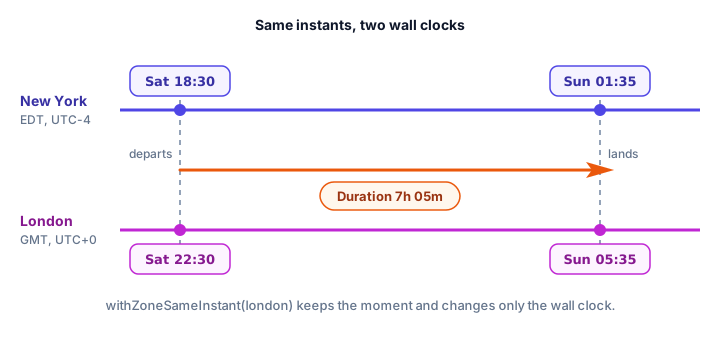
departure.plus(flightTime) adds the real elapsed time, and withZoneSameInstant(london) shows that same moment on a London clock. Notice the zones are only 4 hours apart on this date, not the usual 5: the US moved its clocks forward on March 8, 2026, but the UK doesn't switch until March 29. Code that simply added "5 hours" would be wrong; ZonedDateTime gets it right automatically.
Why not use java.util.Date?
Older Java code uses java.util.Date and Calendar. Avoid them in new code:
- They are mutable, so any code holding a reference can change your date.
- Months in
Calendarstart at 0, so January is 0 and December is 11, a classic source of bugs. - A
Dateis really an instant with no clear time zone, yet itstoString()prints one, which confuses everyone. - The old formatter,
SimpleDateFormat, is not safe to share between threads.
The java.time classes fix all of this: they're immutable, months go from 1 to 12, and each class means exactly one thing.
Common mistakes with dates and times
1. Ignoring the return value
date.plusDays(1); on its own line does nothing useful, because dates are immutable. Write date = date.plusDays(1);
2. Mixing up MM and mm
The pattern "yyyy-mm-dd" prints minutes where the month should be. Use "yyyy-MM-dd".
3. Forgetting the Locale
Patterns with MMMM or EEEE depend on the computer's language unless you pass Locale.US or another locale.
4. Using LocalDateTime for events in different places
A meeting "at 9:00" means different moments in Tokyo and Toronto. Use ZonedDateTime whenever people in different time zones are involved.
5. Expecting Period.getDays() to give the total days
Period.between(a, b).getDays() returns only the days part (like 21 in "16 years, 6 months, 21 days"). For the total, use ChronoUnit.DAYS.between(a, b).
Practice exercise
🏋️ Try it yourself
A library lends a book on March 14, 2026, for 21 days. The reader returns it on April 8, 2026. Print the due date and the return date in the format Saturday, April 4, then the number of days late and the fine at $0.25 per day (never negative).
Show solution
import java.time.LocalDate;
import java.time.format.DateTimeFormatter;
import java.time.temporal.ChronoUnit;
import java.util.Locale;

public class LibraryFine {
    public static void main(String[] args) {
        DateTimeFormatter fmt = DateTimeFormatter.ofPattern("EEEE, MMMM d", Locale.US);

        LocalDate borrowed = LocalDate.of(2026, 3, 14);
        LocalDate due = borrowed.plusDays(21);
        LocalDate returned = LocalDate.of(2026, 4, 8);

        System.out.println("Due: " + due.format(fmt));
        System.out.println("Returned: " + returned.format(fmt));

        long daysLate = Math.max(0, ChronoUnit.DAYS.between(due, returned));
        System.out.println("Days late: " + daysLate);
        System.out.printf("Fine: $%.2f%n", daysLate * 0.25);
    }
}
Due: Saturday, April 4
Returned: Wednesday, April 8
Days late: 4
Fine: $1.00What's next?
Congratulations, you've finished the Modern Java chapter! Lambdas, streams, Optional and java.time are tools you'll use in almost every program from now on. Next, start the Files and Threads chapter with Java file handling, where your programs learn to save and load data.
Key takeaways
- Use the java.time package for dates and times: LocalDate (date), LocalTime (time), LocalDateTime (both) and ZonedDateTime (with a time zone).
- Create values with of(...), for example LocalDate.of(2026, 3, 14); months run from 1 to 12.
- All java.time objects are immutable: plusDays, minusMonths and similar methods return a new object.
- Period measures years, months and days; Duration measures hours, minutes and seconds.
- ChronoUnit.DAYS.between(start, end) returns the total number of days between two dates.
- DateTimeFormatter.ofPattern formats and parses dates; pass a Locale such as Locale.US when using month or weekday names.
- ZonedDateTime and ZoneId handle time zones and daylight saving time; avoid the old java.util.Date and Calendar classes.
Frequently asked questions
How do I get the current date in Java?
Call LocalDate.now() for today's date, LocalTime.now() for the current time, or LocalDateTime.now() for both. For a specific time zone, use ZonedDateTime.now(ZoneId.of("Europe/London")).
What is the difference between LocalDateTime and ZonedDateTime?
LocalDateTime is a date and time with no time zone, like the time on a wall clock. ZonedDateTime adds a ZoneId, so it represents an exact moment and can be converted to other time zones correctly, including daylight saving changes.
How do I calculate the number of days between two dates in Java?
Use ChronoUnit.DAYS.between(startDate, endDate), which returns a long. If you want years, months and days separately, use Period.between(startDate, endDate) instead.
How do I format a date as MM/dd/yyyy in Java?
Create a formatter with DateTimeFormatter.ofPattern("MM/dd/yyyy", Locale.US) and call date.format(formatter). To read such text back, use LocalDate.parse(text, formatter).
Should I still use java.util.Date?
Not in new code. Date and Calendar are mutable, number months from 0 and are confusing with time zones. The java.time classes added in Java 8 replace them.