Java Hello World: Your First Program
Updated 8 min read Aimerscrew
The Java Hello World program is the first program almost every Java developer writes. It's only five lines long and simply prints Hello, World!, but it contains the basic shape of every Java program you'll ever create. In this lesson, you'll write it, run it, understand every word in it, and learn to fix the errors beginners run into most.
🌍 Real-life example
Hello, World! is like pressing the test button on a new smoke alarm. You're not expecting a fire; you just want to hear the beep that proves the battery, wiring and speaker all work. If your program prints Hello, World!, your JDK, your editor and your terminal are all working together.
The Hello World program in Java
Create a new file named HelloWorld.java (capital H, capital W) and type in this code. Typing it yourself, rather than pasting it, helps you remember the pattern.
public class HelloWorld {
    public static void main(String[] args) {
        System.out.println("Hello, World!");
    }
}
Hello, World!Save the file, open a terminal in the same folder, and run it:
java HelloWorld.javaYou'll see Hello, World! printed in the terminal. Congratulations, you've just run a Java program! (If you prefer the two-step way from the install lesson, run javac HelloWorld.java and then java HelloWorld.)
Java Hello World explained line by line
A Java program is built from layers, like boxes inside boxes. The outer box is the class. Inside it is the main method. Inside that are the statements that do the actual work.
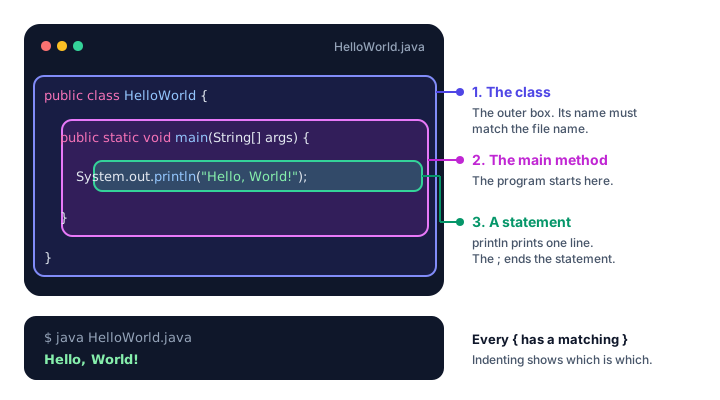
Line 1: public class HelloWorld {
In Java, all code lives inside a class. For now, think of a class as a named container for your code. You'll learn what classes can really do in Java Classes and Objects.
publicmeans the class can be used from anywhere.classis the keyword that says "a class starts here".HelloWorldis the class name. By convention it starts with a capital letter.{opens the class body. Everything up to the matching}belongs to the class.
Line 2: public static void main(String[] args) {
This line starts the main method. A method is a named block of instructions. When you run a program, the JVM looks for a method with exactly this shape and starts running the code inside it. It's the front door of your program.
| Word | What it means (for now) |
|---|---|
public | The JVM is allowed to call this method from outside the class. |
static | The method belongs to the class itself, so Java can run it without creating an object first. See Java static. |
void | The method doesn't give back a value when it finishes. |
main | The special name the JVM looks for. |
String[] args | An array of text values passed in from the command line. You'll meet arrays in Java Arrays. |
Don't worry if that's a lot. For the next several lessons, treat this line as a fixed pattern you copy into every program.
Line 3: System.out.println("Hello, World!");
This is the only line that does visible work. It's a statement: one complete instruction.
Systemis a built-in class that gives access to things like the screen and keyboard.outis the standard output, usually your terminal window.printlnmeans "print line": it prints the text and then moves to a new line."Hello, World!"is a string, a piece of text. Strings go inside double quotes.;ends the statement, like a period ends a sentence.
Lines 4 and 5: } and }
The first closing brace ends the main method; the second ends the class. Every { needs a matching }. Indenting the code inside each pair of braces makes it easy to see which brace belongs to which block.
📝 Note
Very new Java versions (Java 25 and later) also accept a shorter style without the class line. This course uses the classic form shown above because it works on every Java version and it's what you'll see in real projects.
Why must the file name match the class name?
When a class is public, Java requires it to be saved in a file with exactly the same name, plus .java. The class HelloWorld must live in HelloWorld.java. The match is case-sensitive, so helloworld.java is wrong.
This rule helps Java (and you) find classes quickly in big projects with thousands of files. If the names don't match, javac refuses to compile and reports:
Hello.java:1: error: class HelloWorld is public, should be declared in a file named HelloWorld.javaThe quick java File.java launch is more relaxed about this, but always match the names anyway; real projects compile with javac.
Printing several lines
A program can have as many statements as it needs, and Java runs them from top to bottom. Here's a parking receipt:
public class ParkingReceipt {
    public static void main(String[] args) {
        System.out.println("City Center Parking");
        System.out.println("Level 2, Space 48");
        System.out.println("Time parked: 3 hours");
        System.out.println("Thank you for visiting!");
    }
}
City Center Parking
Level 2, Space 48
Time parked: 3 hours
Thank you for visiting!What is the difference between print and println?
System.out.println prints its text and then moves to a new line. System.out.print prints the text and stays on the same line, so the next output continues right after it.
public class PrintVsPrintln {
    public static void main(String[] args) {
        System.out.print("Loading");
        System.out.print("...");
        System.out.println(" done!");
        System.out.println("Welcome back, Sam.");
        System.out.println();
        System.out.println("You have 2 new messages.");
    }
}
Loading... done!
Welcome back, Sam.
You have 2 new messages.The three pieces on the first line were printed by two print calls and one println. An empty System.out.println() prints nothing but a line break, which leaves a blank line.
Escape sequences: special characters in strings
What if you want to print a double quote? Writing "She said "hi"" confuses Java, because the second quote looks like the end of the string. The fix is an escape sequence: a backslash \ followed by a character, which together stand for one special character.
| Escape sequence | Meaning |
|---|---|
\n | New line |
\t | Tab (jumps to the next tab stop) |
\" | A double quote inside a string |
\' | A single quote |
\\ | A single backslash |
public class EscapeSequences {
    public static void main(String[] args) {
        System.out.println("Playlist:\n1. Sunrise\n2. Night Drive");
        System.out.println("Song\tLength");
        System.out.println("Sunrise\t3:45");
        System.out.println("The DJ said \"Turn it up!\"");
        System.out.println("Saved in C:\\Music\\Favorites");
    }
}
Playlist:
1. Sunrise
2. Night Drive
Song Length
Sunrise 3:45
The DJ said "Turn it up!"
Saved in C:\Music\Favorites💡 Tip
A Windows path needs double backslashes in Java code: "C:\\Users". A single backslash followed by U isn't a valid escape sequence, and the compiler will complain.
Printing numbers
println can print numbers too. Without quotes, Java calculates the value first. With quotes, it's just text:
public class PrintNumbers {
    public static void main(String[] args) {
        System.out.println(42);
        System.out.println(7 + 3);
        System.out.println("7 + 3");
    }
}
42
10
7 + 3You'll do a lot more with numbers once you learn about variables and arithmetic operators.
Common mistakes in a Java Hello World program
1. Forgetting the semicolon
System.out.println("Hello, World!")The compiler stops with error: ';' expected and a little ^ arrow showing where the semicolon should go. Add ; at the end of the statement.
2. Writing system with a small s
system.out.println("Hello, World!");Java is case-sensitive. system isn't the same as System, so you get error: package system does not exist. The class names System and String always start with a capital letter.
3. Leaving out the quotes
System.out.println(Hello);Without double quotes, Java thinks Hello is the name of something in your program, and reports error: cannot find symbol. Text must be in double quotes. Single quotes don't work either: 'Hello' causes error: unclosed character literal.
4. Misspelling main
If you write Main or mian, the code may compile, but running it fails with a message like Error: Main method not found in class HelloWorld. The JVM only starts at a method spelled exactly main with String[] args.
5. A missing closing brace
Forget the last } and you'll see error: reached end of file while parsing. Java reached the end of the file while a block was still open. Count your braces: every { needs a }.
Practice exercise
🏋️ Try it yourself
Write a program called LibraryCard.java that prints a library card. Use println for each line, a \t tab between labels and values, and include the quoted motto "Read more, worry less" with its double quotes.
Show solution
public class LibraryCard {
    public static void main(String[] args) {
        System.out.println("=== Maple Street Library ===");
        System.out.println("Name:\tJordan Lee");
        System.out.println("Card:\t20481");
        System.out.println("Motto:\t\"Read more, worry less\"");
    }
}
=== Maple Street Library ===
Name: Jordan Lee
Card: 20481
Motto: "Read more, worry less"The file must be named LibraryCard.java to match the public class. \t lines the values up, and \" prints a double quote inside the string.
What's next?
You've written and run a Java program, but what actually happens between typing java HelloWorld.java and seeing the text? Find out in How Java Works: Compiler, Bytecode and the JVM.
Key takeaways
- Every Java program has at least one class, and the program starts in the main method.
- The main method is written public static void main(String[] args).
- System.out.println prints text and moves to a new line; System.out.print stays on the same line.
- A public class must be saved in a file with the same name, such as HelloWorld.java.
- Statements end with a semicolon, and every opening brace needs a closing brace.
- Escape sequences like \n, \t, \" and \ put special characters inside strings.
Frequently asked questions
How do you write Hello World in Java?
Create HelloWorld.java containing public class HelloWorld { public static void main(String[] args) { System.out.println("Hello, World!"); } } and run it with java HelloWorld.java.
Why is the main method public static void?
public lets the JVM call it, static lets it run without creating an object, and void means it returns nothing. main is the exact name the JVM looks for when it starts a program.
What is the difference between print and println in Java?
println prints the text and then moves to the next line. print prints the text and leaves the cursor on the same line, so the next output continues right after it.
Does the Java file name have to match the class name?
Yes, for a public class. A public class named HelloWorld must be in a file named HelloWorld.java, with the same capitalization, or javac will refuse to compile it.
What does String[] args mean in Java?
It is an array of strings that holds any command-line arguments typed after the program name. Simple programs ignore it, but the main method must still declare it.