Java HashSet
Updated 9 min read Aimerscrew
Some problems are all about uniqueness. Who's on the guest list? Which users visited the site today? Which tags does this post have? A Java HashSet is built for exactly these questions. It stores each value at most once and can tell you instantly whether a value is in it. In this lesson, you'll learn the core HashSet methods, remove duplicates from a list in one line, combine sets with union, intersection and difference, and choose between HashSet, LinkedHashSet and TreeSet.
🌍 Real-life example
A door attendant at a wedding has a guest list. A name is either on the list or it isn't; writing "Lena" twice doesn't invite her twice. When someone arrives, the attendant just needs a quick yes-or-no answer to "Is this person on the list?" That's a set.
What is a HashSet in Java?
A HashSet is a class in java.util that implements the Set interface. A set is a collection with no duplicate elements. HashSet has three defining traits:
- Unique values only. Adding a value that's already there is ignored.
- Very fast lookups.
containsstays quick even with millions of elements. - No order and no index. There's no
get(0), and the order you see when printing isn't guaranteed.
Behind the scenes, a HashSet is a HashMap that uses only keys. Each value is placed into a bucket by its hashCode(), which is where both the speed and the lack of order come from.
Adding, checking and removing elements
The key methods are add, contains, remove and size. A useful detail: add returns true if the value was new and false if it was already in the set.
import java.util.HashSet;
import java.util.Set;
import java.util.TreeSet;

public class GuestList {
    public static void main(String[] args) {
        Set<String> guests = new HashSet<>();

        System.out.println("Add Lena:  " + guests.add("Lena"));
        System.out.println("Add Omar:  " + guests.add("Omar"));
        System.out.println("Add Kenji: " + guests.add("Kenji"));
        System.out.println("Add Lena again: " + guests.add("Lena"));   // duplicate

        System.out.println("Guests: " + guests.size());
        System.out.println("Is Omar invited?  " + guests.contains("Omar"));
        System.out.println("Is Sofia invited? " + guests.contains("Sofia"));

        guests.remove("Kenji");
        System.out.println("After Kenji cancels: " + guests.size() + " guests");

        // A TreeSet copy prints the names in alphabetical order
        System.out.println("Name badges: " + new TreeSet<>(guests));
    }
}
Add Lena: true
Add Omar: true
Add Kenji: true
Add Lena again: false
Guests: 3
Is Omar invited? true
Is Sofia invited? false
After Kenji cancels: 2 guests
Name badges: [Lena, Omar]The second "Lena" was rejected, so the set still has 3 guests. At the end, the program copies the set into a TreeSet to print the names alphabetically. Printing the HashSet directly would also work, but its order depends on the hash codes and you shouldn't rely on it.
💡 Tip
Use the boolean from add to detect duplicates as you go: if (!seen.add(email)) { System.out.println("Duplicate: " + email); }. One call both checks and adds.
How do you remove duplicates from a list in Java?
Pass the list to a set's constructor. The set keeps the first copy of each value and drops the rest. Use LinkedHashSet if you want to keep the original order:
import java.util.LinkedHashSet;
import java.util.List;
import java.util.Set;

public class UniqueVisitors {
    public static void main(String[] args) {
        List<String> pageViews = List.of("u17", "u03", "u17", "u42", "u03", "u17", "u08");

        Set<String> uniqueVisitors = new LinkedHashSet<>(pageViews);

        System.out.println("Page views:      " + pageViews.size());
        System.out.println("Unique visitors: " + uniqueVisitors.size());
        System.out.println("In order of first visit: " + uniqueVisitors);
    }
}
Page views: 7
Unique visitors: 4
In order of first visit: [u17, u03, u42, u08]If you need a list again afterwards, wrap it once more: new ArrayList<>(uniqueVisitors).
Set operations: union, intersection and difference
Sets come from math, and Java supports the three classic set operations with methods every collection has:
- Union (everything in either set):
a.addAll(b) - Intersection (only what's in both):
a.retainAll(b) - Difference (in
abut not inb):a.removeAll(b)
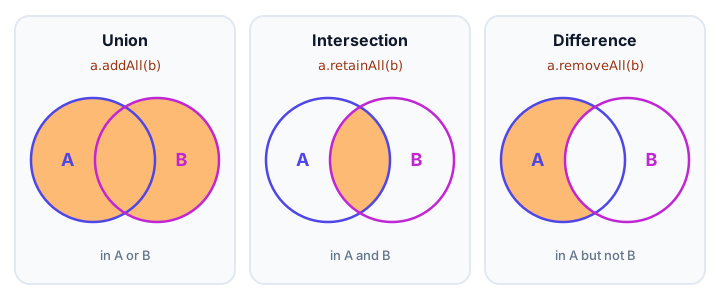
These methods change the set they're called on. So the usual pattern is: copy the first set, then call the method on the copy. Here two roommates compare their streaming subscriptions. TreeSet keeps the printouts sorted:
import java.util.Set;
import java.util.TreeSet;

public class StreamingServices {
    public static void main(String[] args) {
        Set<String> ana = new TreeSet<>(Set.of("Netflix", "Disney+", "Spotify", "Hulu"));
        Set<String> ben = new TreeSet<>(Set.of("Spotify", "Netflix", "YouTube Premium"));

        Set<String> union = new TreeSet<>(ana);
        union.addAll(ben);
        System.out.println("Union (either has):       " + union);

        Set<String> both = new TreeSet<>(ana);
        both.retainAll(ben);
        System.out.println("Intersection (both have): " + both);

        Set<String> onlyAna = new TreeSet<>(ana);
        onlyAna.removeAll(ben);
        System.out.println("Difference (only Ana):    " + onlyAna);

        System.out.println("Ana is unchanged:         " + ana);
    }
}
Union (either has): [Disney+, Hulu, Netflix, Spotify, YouTube Premium]
Intersection (both have): [Netflix, Spotify]
Difference (only Ana): [Disney+, Hulu]
Ana is unchanged: [Disney+, Hulu, Netflix, Spotify]Because each operation worked on a fresh copy, Ana's original set is untouched. There's also containsAll, which checks whether one set holds every element of another (a subset check). You'll use it in the practice exercise.
HashSet vs LinkedHashSet vs TreeSet
All three are sets with the same methods. The difference is order and speed:
import java.util.LinkedHashSet;
import java.util.Set;
import java.util.TreeSet;

public class SetOrder {
    public static void main(String[] args) {
        int[] scores = {870, 1250, 640, 1250, 990, 640};

        Set<Integer> arrivalOrder = new LinkedHashSet<>();
        Set<Integer> sortedOrder = new TreeSet<>();
        for (int score : scores) {
            arrivalOrder.add(score);
            sortedOrder.add(score);
        }

        System.out.println("LinkedHashSet: " + arrivalOrder);
        System.out.println("TreeSet:       " + sortedOrder);

        TreeSet<Integer> board = new TreeSet<>(sortedOrder);
        System.out.println("Lowest: " + board.first() + ", highest: " + board.last());
    }
}
LinkedHashSet: [870, 1250, 640, 990]
TreeSet: [640, 870, 990, 1250]
Lowest: 640, highest: 1250The duplicates 1250 and 640 were dropped in both sets. LinkedHashSet kept the order the scores arrived; TreeSet sorted them and offers extras like first() and last().
| HashSet | LinkedHashSet | TreeSet | |
|---|---|---|---|
| Order | None guaranteed | Insertion order | Sorted |
| Speed of add/contains | Fastest | Almost as fast | A bit slower (grows with log of size) |
Allows null? | Yes, one | Yes, one | No |
| Extra methods | None | None | first(), last(), floor(), ceiling(), ranges |
| Best for | Fast "is it there?" checks | Removing duplicates but keeping order | Sorted unique values, leaderboards |
📝 Note
A set decides "same or different" with equals() and hashCode(). Strings, numbers and records handle this for you. If you store your own class objects without overriding those methods, two objects with identical fields count as different, and duplicates slip in. A TreeSet instead uses sorting order, which you'll set up in Java sorting collections.
Looping over a set
A set has no indexes, so use a for-each loop: for (String guest : guests) { ... }. With a HashSet, the order of the loop isn't guaranteed; with LinkedHashSet or TreeSet it's insertion or sorted order. To remove elements while looping, use removeIf or an Iterator, just like with lists.
When should you use a set instead of a list?
Reach for a set when the question you ask most is "is this value here?" or when duplicates would be a bug. Checking contains on an ArrayList means looking at every element one by one, so a list of a million email addresses can take a million comparisons. A HashSet jumps straight to the right bucket and answers almost instantly. Stick with a list when order, positions or repeated values matter, like the songs in a playlist or the steps in a recipe.
Common mistakes with HashSet
1. Expecting a fixed order
HashSet order can look random and can change as the set grows. Use LinkedHashSet or TreeSet when you'll display the elements.
2. Trying to use get(index)
Sets have no positions, so there's no get(0). Loop over the set, or copy it into a list if you need indexes.
3. Destroying the original with retainAll or removeAll
These methods modify the set in place. Copy first: Set<String> both = new HashSet<>(a); both.retainAll(b);
4. Custom objects without equals and hashCode
Two new Guest("Lena") objects are different to a HashSet unless the class overrides both methods. A record is the simplest fix.
5. Adding to a Set.of set
Set.of(...) is immutable, and add throws UnsupportedOperationException. Wrap it: new HashSet<>(Set.of(...)).
Practice exercise
🏋️ Try it yourself
Your pantry holds flour, eggs, milk, sugar, salt and rice. Pancakes need flour, eggs, milk and butter. Use sets to print whether you can make pancakes with what you have, and then print a sorted shopping list of the missing ingredients.
Show solution
import java.util.Set;
import java.util.TreeSet;

public class PantryCheck {
    public static void main(String[] args) {
        Set<String> pantry = Set.of("flour", "eggs", "milk", "sugar", "salt", "rice");
        Set<String> pancakes = Set.of("flour", "eggs", "milk", "butter");

        boolean canCook = pantry.containsAll(pancakes);
        System.out.println("Can make pancakes? " + canCook);

        Set<String> shopping = new TreeSet<>(pancakes);
        shopping.removeAll(pantry);
        System.out.println("Shopping list: " + shopping);
    }
}
Can make pancakes? false
Shopping list: [butter]containsAll is the subset check, and a TreeSet copy of the recipe minus the pantry gives exactly what to buy.
What's next?
You've used for-each loops on lists, sets and maps, and you've seen warnings about removing elements mid-loop. Next, look under the hood at the object that makes all those loops work, and learn the safe way to remove while looping: Java Iterator.
Key takeaways
- A HashSet stores unique values only; add returns false when the value is already there.
- contains is very fast, but a HashSet has no index and no guaranteed order.
- Remove duplicates from a list with new LinkedHashSet<>(list) to keep the original order.
- Union is addAll, intersection is retainAll and difference is removeAll; they change the set in place, so copy first.
- LinkedHashSet keeps insertion order and TreeSet keeps values sorted.
- Sets compare elements with equals() and hashCode(), so custom classes must override both (records do it for you).
Frequently asked questions
What is a HashSet in Java?
A HashSet is a collection in java.util that stores unique values with no order. It is backed by a HashMap, so add, remove and contains are very fast.
Does HashSet allow duplicates?
No. If you add a value that is already in the set, the set does not change and add returns false.
Does HashSet maintain insertion order?
No. HashSet order depends on hash codes and is not guaranteed. Use LinkedHashSet to keep insertion order or TreeSet to keep elements sorted.
How do I find the intersection of two sets in Java?
Copy one set and call retainAll with the other: Set<String> both = new HashSet<>(a); both.retainAll(b);. The copy now holds only elements found in both sets.
What is the difference between HashSet and TreeSet?
HashSet is faster and unordered. TreeSet keeps its elements sorted and adds methods like first, last, floor and ceiling, but each operation is slightly slower and it does not accept null.