Java Encapsulation
Updated 9 min read Aimerscrew
Java encapsulation is the idea of wrapping an object's data and the code that works on it into one unit, and hiding the data from the outside world. Other code can only use the object through the methods it chooses to offer. In this lesson, you'll turn an unsafe bank account into a safe one, write getters and setters with validation, and make fields that can be read but never changed.
🌍 Real-life example
An ATM doesn't let you open the cash drawer and grab what you like. You use the screen and buttons: "withdraw $40". The machine checks your balance first, then hands over the money. The cash is hidden inside, and the buttons are the only way in. That's encapsulation: private data, public controls that check every request.
What is encapsulation in Java?
Encapsulation is one of the four pillars of object-oriented programming. In practice, it comes down to two rules:
- Make the fields
private, so no outside code can touch them directly. - Provide
publicmethods for the things outside code is allowed to do, and check the input inside those methods.
You learned the keywords in Java access modifiers. Encapsulation is the design habit of using them well.
The problem: public fields
Here's a bank account with ordinary fields. Nothing stops code from doing something silly:
public class OpenAccount {
    public static void main(String[] args) {
        BankAccount account = new BankAccount();
        account.owner = "Jordan";
        account.balance = 100.0;

        account.balance = account.balance - 500.0;   // nothing stops this!

        System.out.println(account.owner + " has $" + account.balance);
    }
}

class BankAccount {
    String owner;
    double balance;
}
Jordan has $-400.0Jordan just withdrew $500 from an account holding $100. The class has no way to defend itself, because any line anywhere in the program can change balance.
The fix: private fields with getters and methods
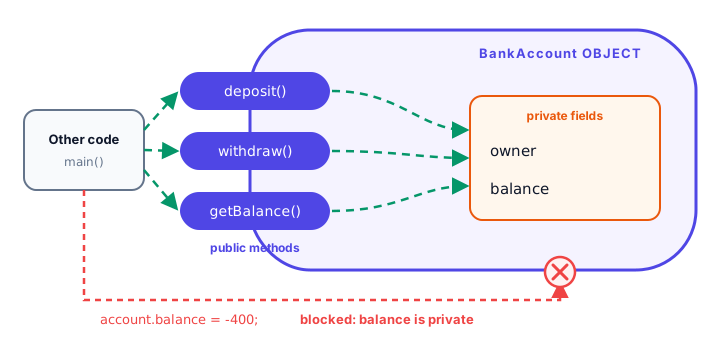
Now the fields are private, and the only ways to change the balance are deposit() and withdraw(), which refuse bad amounts:
public class SafeAccount {
    public static void main(String[] args) {
        BankAccount account = new BankAccount("Jordan", 100.0);

        account.deposit(50.0);
        account.withdraw(500.0);   // refused
        account.withdraw(30.0);
        account.deposit(-20.0);    // refused

        System.out.println(account.getOwner() + " has $" + account.getBalance());
    }
}

class BankAccount {
    private String owner;
    private double balance;

    public BankAccount(String owner, double openingDeposit) {
        this.owner = owner;
        if (openingDeposit > 0) {
            this.balance = openingDeposit;
        }
    }

    public String getOwner() {
        return owner;
    }

    public double getBalance() {
        return balance;
    }

    public void deposit(double amount) {
        if (amount <= 0) {
            System.out.println("Deposit refused: amount must be positive.");
            return;
        }
        balance += amount;
        System.out.println("Deposited $" + amount + ", balance $" + balance);
    }

    public void withdraw(double amount) {
        if (amount <= 0 || amount > balance) {
            System.out.println("Withdrawal of $" + amount + " refused.");
            return;
        }
        balance -= amount;
        System.out.println("Withdrew $" + amount + ", balance $" + balance);
    }
}
Deposited $50.0, balance $150.0
Withdrawal of $500.0 refused.
Withdrew $30.0, balance $120.0
Deposit refused: amount must be positive.
Jordan has $120.0Now the balance can't go negative, no matter what the rest of the program does. Writing account.balance = -400; is a compile error: "balance has private access in BankAccount".
What are getters and setters in Java?
A getter is a public method that returns the value of a private field. A setter is a public method that changes it. By convention:
| Field | Getter | Setter |
|---|---|---|
private String owner | public String getOwner() | public void setOwner(String owner) |
private int target | public int getTarget() | public void setTarget(int target) |
private boolean active | public boolean isActive() | public void setActive(boolean active) |
Notice the pattern: get or set plus the field name with a capital letter. Boolean getters usually start with is. Many Java tools and libraries rely on these names, so stick to them.
Validation in setters
A setter is much more than a fancy assignment. It's a checkpoint. This smart thermostat only accepts temperatures between 10 and 30 degrees:
public class SmartThermostat {
    public static void main(String[] args) {
        Thermostat living = new Thermostat();

        living.setTarget(22);
        System.out.println("Target: " + living.getTarget());

        living.setTarget(45);      // too hot
        living.setTarget(-3);      // too cold
        System.out.println("Target: " + living.getTarget());
    }
}

class Thermostat {
    private int target = 20;

    public int getTarget() {
        return target;
    }

    public void setTarget(int target) {
        if (target < 10 || target > 30) {
            System.out.println(target + " C is out of range (10-30). Keeping " + this.target + " C.");
            return;
        }
        this.target = target;
    }
}
Target: 22
45 C is out of range (10-30). Keeping 22 C.
-3 C is out of range (10-30). Keeping 22 C.
Target: 22Inside the setter, target is the parameter and this.target is the field, just as you learned in the Java this keyword.
💡 Tip
Don't write a setter for every field automatically. Ask: "Should outside code be allowed to change this?" A bank account has no setBalance(); it has deposit() and withdraw(), which describe real actions and enforce real rules.
How do you make a read-only field?
Give the field a getter but no setter. Outside code can read it but has no way to change it. Add the final keyword, which you met in Java constants, and even the class's own methods can't change it after the constructor sets it:
public class ReadOnly {
    public static void main(String[] args) {
        LibraryCard card = new LibraryCard("LC-1042", "Grace");

        card.setHolder("Grace Hopper");
        System.out.println(card.getNumber() + " belongs to " + card.getHolder());
        System.out.println("Is it active? " + card.isActive());
    }
}

class LibraryCard {
    private final String number;   // set once, never changes
    private String holder;
    private boolean active = true;

    public LibraryCard(String number, String holder) {
        this.number = number;
        this.holder = holder;
    }

    public String getNumber() {    // getter only: read-only from outside
        return number;
    }

    public String getHolder() {
        return holder;
    }

    public void setHolder(String holder) {
        this.holder = holder;
    }

    public boolean isActive() {
        return active;
    }
}
LC-1042 belongs to Grace Hopper
Is it active? trueA final field must be given a value exactly once, either where it's declared or in the constructor. If a method later tries number = newNumber;, the compiler stops it with "cannot assign a value to final variable number".
Calculated getters
A getter doesn't have to return a stored field. It can calculate a value on the fly. Callers can't tell the difference, which is another benefit of hiding the details:
public class ShoppingCart {
    public static void main(String[] args) {
        CartItem headphones = new CartItem("Headphones", 59.99);

        headphones.setQuantity(2);
        headphones.setQuantity(0);    // refused
        headphones.setQuantity(15);   // refused

        System.out.println(headphones.getName() + " x" + headphones.getQuantity());
        System.out.printf("Line total: $%.2f%n", headphones.getLineTotal());
    }
}

class CartItem {
    private final String name;
    private final double price;
    private int quantity = 1;

    public CartItem(String name, double price) {
        this.name = name;
        this.price = price;
    }

    public String getName() {
        return name;
    }

    public int getQuantity() {
        return quantity;
    }

    public void setQuantity(int quantity) {
        if (quantity < 1 || quantity > 10) {
            System.out.println("Quantity must be 1 to 10.");
            return;
        }
        this.quantity = quantity;
    }

    public double getLineTotal() {      // calculated, not stored
        return price * quantity;
    }
}
Quantity must be 1 to 10.
Quantity must be 1 to 10.
Headphones x2
Line total: $119.98Because the line total is calculated, it can never get out of sync with the price and quantity.
Immutability preview: objects that never change
Go one step further: make every field private final and offer no setters. The result is an immutable object, one whose state can never change after it's created. To "change" it, you create a new object instead:
public class Prices {
    public static void main(String[] args) {
        Price original = new Price("USD", 80.0);
        Price sale = original.discount(25);

        System.out.println("Original: " + original.getCurrency() + " " + original.getAmount());
        System.out.println("On sale:  " + sale.getCurrency() + " " + sale.getAmount());
    }
}

class Price {
    private final String currency;
    private final double amount;

    public Price(String currency, double amount) {
        this.currency = currency;
        this.amount = amount;
    }

    public String getCurrency() {
        return currency;
    }

    public double getAmount() {
        return amount;
    }

    public Price discount(int percent) {
        return new Price(currency, amount * (100 - percent) / 100);   // a NEW object
    }
}
Original: USD 80.0
On sale: USD 60.0The original price is untouched. Immutable objects are safe to share, because nobody can change them behind your back. String works exactly this way: toUpperCase() returns a new String. Modern Java even has a short way to write classes like Price; you'll meet it in Java records.
Why is encapsulation important?
- Valid objects: rules live in one place, so no code can create a negative balance or a 45-degree thermostat.
- Flexibility: you can change how data is stored (for example, store cents as an
intinstead of adouble) without changing any code that uses the class. - Simpler use: other programmers only need to learn the public methods, not the inner details.
- Easier debugging: if a private field is wrong, the bug is inside that class.
Python handles the same idea differently, with naming conventions and properties; compare with Python encapsulation.
Common mistakes with encapsulation
1. Private fields with "dumb" setters for everything
A setter that accepts any value without checking gives you the same problems as a public field, just with more typing. Validate, or leave the setter out.
2. Forgetting this in a setter
target = target; in setTarget(int target) changes nothing. Write this.target = target;.
3. Changing a final field
A final field can only be set once, in its declaration or the constructor. Any later assignment is a compile error.
4. Wrong getter names
Names like balance() or getbalance() work, but break the convention that tools and other developers expect. Use getBalance() and isActive().
Practice exercise
🏋️ Try it yourself
Create a Hero class for a game. It has a private final String name and a private int health starting at 100. Add getters for both (no setters), plus takeDamage(int amount), which never lets health drop below 0, and heal(int amount), which never lets it go above 100. Each method prints the new health. Test with 30 damage, a heal of 50 and 120 damage.
Show solution
public class GameHero {
    public static void main(String[] args) {
        Hero hero = new Hero("Nova");

        hero.takeDamage(30);
        hero.heal(50);
        hero.takeDamage(120);

        System.out.println(hero.getName() + " has " + hero.getHealth() + " HP");
    }
}

class Hero {
    private final String name;
    private int health = 100;

    public Hero(String name) {
        this.name = name;
    }

    public String getName() {
        return name;
    }

    public int getHealth() {
        return health;
    }

    public void takeDamage(int amount) {
        health = Math.max(0, health - amount);
        System.out.println(name + " took " + amount + " damage -> " + health + " HP");
    }

    public void heal(int amount) {
        health = Math.min(100, health + amount);
        System.out.println(name + " healed " + amount + " -> " + health + " HP");
    }
}
Nova took 30 damage -> 70 HP
Nova healed 50 -> 100 HP
Nova took 120 damage -> 0 HP
Nova has 0 HPMath.max(0, ...) and Math.min(100, ...) keep health inside its limits without any if statements.
What's next?
Every field so far belonged to one object. But what about data shared by all objects, like a count of how many tickets have been sold? Next, learn the Java static keyword.
Key takeaways
- Encapsulation means private fields plus public methods that control access to them.
- A getter returns a private field; a setter changes it. Name them getX(), setX() and isX() for booleans.
- Put validation in setters and action methods so objects can never become invalid.
- Leave out the setter to make a field read-only from outside the class.
- A final field is set once, in its declaration or the constructor, and never changes.
- An object with only private final fields and no setters is immutable.
Frequently asked questions
What is encapsulation in Java?
Encapsulation is bundling an object's data with the methods that work on it, and hiding the data by making the fields private. Outside code can only use the object through its public methods.
What are getters and setters?
A getter is a public method that returns a private field, such as getBalance(). A setter is a public method that changes a private field, such as setTarget(int target), usually after checking the new value.
Why use getters and setters instead of public fields?
Methods can validate values, make a field read-only, calculate values on the fly and let you change how the data is stored later, all without changing the code that uses the class.
How do you make a read-only field in Java?
Make the field private, provide a getter and no setter. Declaring it final as well guarantees that even the class itself cannot change it after the constructor.
Is encapsulation the same as data hiding?
Data hiding, making fields private, is a key part of encapsulation. Encapsulation is the bigger idea of keeping data and the code that protects it together in one class.