Java Arrays
Updated 9 min read Aimerscrew
Imagine tracking your steps for a whole week. You could make seven variables named monday, tuesday and so on, but what about a whole year? Java arrays solve this problem: one variable holds a whole row of values of the same type. In this lesson, you'll learn how to create arrays, read and change their elements, find their length, and understand what really happens when you copy an array variable.
🌍 Real-life example
Think of a row of lockers at a gym. They all look the same, they sit side by side, and each one has a number painted on the door. To grab your bag, you don't search every locker; you go straight to number 4. An array is a row of lockers for values: same type, side by side, each with a number.
What is an array in Java?
An array is an object that stores a fixed number of values of the same type, one after another. Each value is called an element, and each element has a position number called its index. Once an array is created, its size can't grow or shrink.
public class WeeklySteps {
    public static void main(String[] args) {
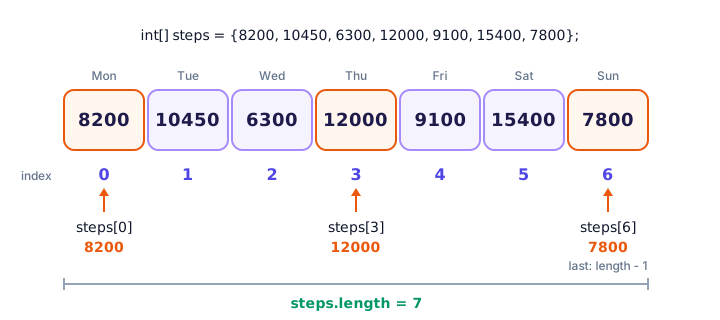
        int[] steps = {8200, 10450, 6300, 12000, 9100, 15400, 7800};

        System.out.println("Monday: " + steps[0]);
        System.out.println("Thursday: " + steps[3]);
        System.out.println("Sunday: " + steps[6]);
        System.out.println("Days tracked: " + steps.length);
    }
}
Monday: 8200
Thursday: 12000
Sunday: 7800
Days tracked: 7The type int[] reads as "array of int". The square brackets after a variable name, like steps[3], pick out one element by its index.
Array indexes start at 0
The first element of a Java array is at index 0, not 1. So an array with 7 elements has indexes 0 to 6. The last index is always length - 1. You saw the same rule for characters in a String in Java strings.
💡 Tip
Think of the index as "how many steps from the start". The first element is 0 steps away, the second is 1 step away, and so on. That's why counting starts at 0.
How do you declare and create an array in Java?
There are two common ways to create an array. Use an array initializer (values in curly braces) when you already know the values:
int[] lapTimes = {58, 61, 57, 60};
String[] colors = {"red", "green", "blue"};
double[] prices = {4.99, 12.50, 0.99};
Use the new keyword with a size when you know how many values you need, but not the values yet:
int[] seatNumbers = new int[120];      // room for 120 ints
String[] guestNames = new String[50];  // room for 50 Strings
Here's a full program that creates an empty playlist with room for four songs, then fills each slot one at a time:
public class Playlist {
    public static void main(String[] args) {
        String[] songs = new String[4];

        songs[0] = "Blinding Lights";
        songs[1] = "Levitating";
        songs[2] = "Shape of You";
        songs[3] = "Bad Guy";

        System.out.println("First song: " + songs[0]);
        System.out.println("Last song: " + songs[3]);
        System.out.println("Songs in playlist: " + songs.length);
    }
}
First song: Blinding Lights
Last song: Bad Guy
Songs in playlist: 4📝 Note
Java also accepts int steps[] with the brackets after the name, a style borrowed from C. It works, but int[] steps is the standard Java style because it keeps the whole type, "array of int", in one place.
What are the default values of an array?
When you create an array with new, Java doesn't leave the slots full of garbage. Every element gets a default value based on its type:
public class DefaultValues {
    public static void main(String[] args) {
        int[] scores = new int[3];
        double[] prices = new double[3];
        boolean[] booked = new boolean[3];
        char[] grades = new char[3];
        String[] names = new String[3];

        System.out.println("int: " + scores[0]);
        System.out.println("double: " + prices[0]);
        System.out.println("boolean: " + booked[0]);
        System.out.println("char code: " + (int) grades[0]);
        System.out.println("String: " + names[0]);
    }
}
int: 0
double: 0.0
boolean: false
char code: 0
String: null| Element type | Default value |
|---|---|
byte, short, int, long | 0 |
float, double | 0.0 |
boolean | false |
char | the character with code 0 (invisible) |
String and other objects | null (no object yet) |
null means "this slot doesn't refer to any object yet". Calling a method on it, such as names[0].length(), would crash your program, so fill object arrays before you use their elements.
Finding the length of an array
Every array has a length field that tells you how many elements it holds. Notice there are no parentheses: it's orders.length, not orders.length() like a String. The last element is always at length - 1:
public class LastOrder {
    public static void main(String[] args) {
        String[] orders = {"Pizza", "Sushi", "Tacos", "Pad Thai", "Burger"};

        int lastIndex = orders.length - 1;
        System.out.println("Orders today: " + orders.length);
        System.out.println("First order: " + orders[0]);
        System.out.println("Latest order: " + orders[lastIndex]);
    }
}
Orders today: 5
First order: Pizza
Latest order: BurgerUsing length - 1 instead of typing 4 means the code keeps working if the array later holds 6 or 600 orders.
How do you change an element of an array?
Put the element on the left side of =, just like a normal variable. The new value replaces the old one in that slot only:
public class ParkingLot {
    public static void main(String[] args) {
        String[] spots = {"empty", "empty", "empty", "empty"};

        spots[1] = "Blue Toyota";
        spots[3] = "Red Tesla";
        System.out.println("Spot 1: " + spots[1]);
        System.out.println("Spot 2: " + spots[2]);

        spots[1] = "empty";             // the Toyota leaves
        spots[2] = "White Ford";        // a Ford arrives
        System.out.println("Spot 1 now: " + spots[1]);
        System.out.println("Spot 2 now: " + spots[2]);
    }
}
Spot 1: Blue Toyota
Spot 2: empty
Spot 1 now: empty
Spot 2 now: White FordYou can change elements as often as you like. What you can't change is the number of spots. If you need a list that grows, you'll want an ArrayList, covered in the collections chapter.
What happens if you use an index that doesn't exist?
Java checks every index while your program runs. If you ask for an index below 0 or at length or above, Java stops the program with an ArrayIndexOutOfBoundsException. An exception is Java's way of reporting an error that happens while the program is running.
int[] medals = {12, 9, 7};   // gold, silver, bronze
System.out.println(medals[3]);   // there is no index 3!
The array has 3 elements, so the valid indexes are 0, 1 and 2. Running this prints an error that starts like this:
Exception in thread "main" java.lang.ArrayIndexOutOfBoundsException: Index 3 out of bounds for length 3The message is very helpful: it tells you the index you used (3) and the array's length (3). You'll learn how to handle exceptions in Java exceptions. For now, the fix is to keep every index between 0 and length - 1.
Arrays are reference types
Here's the part that surprises many beginners. An array variable doesn't hold the array itself. The array lives in an area of memory called the heap, and the variable holds a reference to it, like an arrow pointing at it. (You met the stack and heap in Java data types.)
So when you write int[] partnerView = myCart;, Java copies the arrow, not the array. Both variables now point to the same array:
public class SharedList {
    public static void main(String[] args) {
        int[] myCart = {2, 1, 5};
        int[] partnerView = myCart;      // copies the reference, not the array

        partnerView[0] = 10;             // change through the second variable

        System.out.println("myCart[0]: " + myCart[0]);
        System.out.println("partnerView[0]: " + partnerView[0]);
        System.out.println("Same array? " + (myCart == partnerView));
    }
}
myCart[0]: 10
partnerView[0]: 10
Same array? true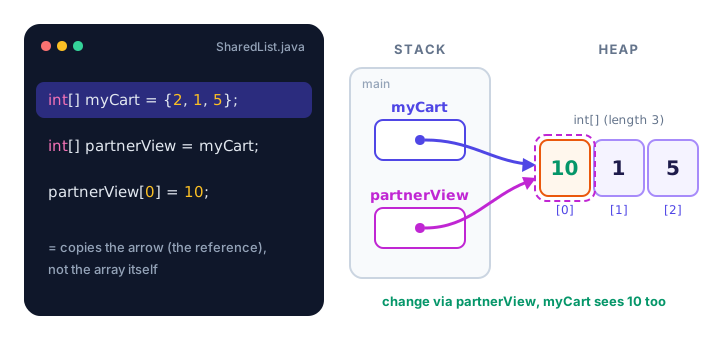
This is just like sharing a link to an online shopping list: if your partner adds milk through their link, you see it too, because there's only one list. To get a truly separate copy, you copy the elements one by one, which you'll do in Java array loops, or use Arrays.copyOf from the Java Arrays class.
⚠️ Printing an array directly
System.out.println(myCart) does not print the values. It prints something like [I@1b6d3586, which is a type code plus an internal number. To see the contents, print elements one by one or use Arrays.toString(myCart), shown in the Java Arrays class.
Real-world example: a coffee shop receipt
Arrays really shine when you combine them with a for loop. Here, three arrays line up by index: element 0 of each array describes the same item. The loop variable i goes from 0 to length - 1:
public class CartTotal {
    public static void main(String[] args) {
        String[] items = {"Coffee beans", "Oat milk", "Croissant"};
        double[] prices = {12.50, 3.25, 2.75};
        int[] quantities = {1, 2, 4};

        double total = 0;
        for (int i = 0; i < items.length; i++) {
            double lineTotal = prices[i] * quantities[i];
            System.out.printf("%-13s %d x $%5.2f = $%6.2f%n", items[i], quantities[i], prices[i], lineTotal);
            total += lineTotal;
        }
        System.out.printf("Total: $%.2f%n", total);
    }
}
Coffee beans 1 x $12.50 = $ 12.50
Oat milk 2 x $ 3.25 = $ 6.50
Croissant 4 x $ 2.75 = $ 11.00
Total: $30.00Add a fourth item to each array and the loop handles it automatically. You'll learn many more loop patterns in the next lesson.
Common mistakes with Java arrays
1. Using length as an index
orders[orders.length] is always out of bounds. The last element is orders[orders.length - 1].
2. Writing length() with parentheses
Arrays use the field length; Strings use the method length(). Mixing them up gives a "cannot find symbol" compile error.
3. Expecting = to copy an array
int[] backup = scores; doesn't make a backup. Both names point to the same array, so changing one changes "both".
4. Using an initializer after declaring
int[] lapTimes;
lapTimes = {58, 61, 57};            // compile error: illegal start of expression
lapTimes = new int[] {58, 61, 57};  // works
The short {...} form only works on the same line as the declaration. Later, write new int[] {...}.
5. Mixing types
An int[] can only hold ints. int[] data = {1, "two", 3}; doesn't compile.
Practice exercise
🏋️ Try it yourself
A smart thermostat took five readings: 19.5, 20.0, 21.5, 22.0 and 20.5 degrees. Store them in a double array. Print how many readings there are, the first reading and the last reading (use length, not a typed number). Then the sensor is recalibrated: change the third reading to 21.0 and print it.
Show solution
public class Thermostat {
    public static void main(String[] args) {
        double[] readings = {19.5, 20.0, 21.5, 22.0, 20.5};

        System.out.println("Readings taken: " + readings.length);
        System.out.println("First reading: " + readings[0]);
        System.out.println("Last reading: " + readings[readings.length - 1]);

        readings[2] = 21.0;   // the sensor was recalibrated
        System.out.println("Corrected reading 3: " + readings[2]);
    }
}
Readings taken: 5
First reading: 19.5
Last reading: 20.5
Corrected reading 3: 21.0The "third reading" is at index 2, because counting starts at 0.
What's next?
You can now create arrays and work with single elements. The real power comes when you process every element automatically. Next, learn Java array loops: the for loop, the for-each loop, and patterns like sum, maximum and search.
Key takeaways
- A Java array holds a fixed number of values of the same type under one name.
- Create an array with an initializer like {3, 7, 9} or with new int[5] when you only know the size.
- Indexes start at 0, so the last element is at length - 1.
- Arrays made with new are filled with default values: 0, 0.0, false, or null for objects.
- Use the length field (no parentheses) to get the number of elements.
- An index outside 0 to length - 1 throws an ArrayIndexOutOfBoundsException.
- Array variables hold references, so int[] b = a; makes two names for the same array.
Frequently asked questions
How do you declare an array in Java?
Write the element type followed by square brackets and a name, such as int[] scores. Then create it with new int[10] for ten empty slots, or give the values directly: int[] scores = {90, 85, 77};
Why do Java array indexes start at 0?
The index means the distance from the start of the array, so the first element is 0 positions away. Java inherited this from C, and most popular languages work the same way.
Can you change the size of an array in Java?
No. An array's length is fixed when it is created. To get more room, create a new, bigger array and copy the elements, for example with Arrays.copyOf, or use an ArrayList, which grows automatically.
What is the difference between length and length() in Java?
length is a field of arrays and is written without parentheses: scores.length. length() is a method of String and needs parentheses: name.length().
What is the default value of an array in Java?
Elements of a new array are set to 0 for whole numbers, 0.0 for decimals, false for boolean, the zero character for char, and null for objects such as String.
Why does printing an array show something like [I@1b6d3586?
println prints the array object's default text, a type code and an internal number, not its contents. Use Arrays.toString(array) or a loop to print the elements.