Java Project: Calculator
Updated 12 min read Aimerscrew
A calculator program in Java is the perfect first project: it's small enough to finish in one sitting, yet it uses almost everything you've learned so far. You'll write one method per operation, pick the right one with a switch expression, read numbers safely, handle division by zero with an exception and keep a history of results. By the end you'll have a complete, menu-driven program you built yourself, step by step.
🌍 Real-life example
Think of a self-checkout machine at a supermarket. It shows you a menu, waits for a button press, does one job (scan, weigh, pay), shows the result and goes back to the menu, again and again until you press "Finish". It also refuses nonsense, like a negative weight. Your calculator works the same way: menu, choice, action, result, repeat.
What you'll build
The finished calculator can:
- add, subtract, multiply, divide and raise a number to a power,
- keep asking until the user types a real number, so typos never crash it,
- catch division by zero and show a friendly error instead of a stack trace,
- remember every result and print the history on request,
- loop until the user chooses Quit.
Here's a quick taste (the user's typing follows each prompt):
=== Java Calculator ===

1) Add  2) Subtract  3) Multiply  4) Divide  5) Power
6) History  7) Quit
Choose an option: 4
First number: 22
Second number: 8
Result: 22 / 8 = 2.75

1) Add  2) Subtract  3) Multiply  4) Divide  5) Power
6) History  7) Quit
Choose an option: 7
Goodbye!
Concepts used in this project
| Concept | Where it's used | Lesson |
|---|---|---|
| Static methods with parameters and return values | add(), divide(), calculate() | methods, return values |
| Switch expressions and arrow labels | Picking the operation and the menu option | switch |
while loop with a boolean flag | The menu loop | while loop |
Scanner and nextLine() | Reading the choice and the numbers | user input |
try/catch and throw | Bad numbers and division by zero | try-catch, throw and throws |
ArrayList<String> | The history of results | ArrayList |
Math.pow() | The power operation | Math class |
How does the calculator work?
The whole program is one loop. Each trip around it shows the menu, reads a choice and hands it to a switch. Options 1 to 5 read two numbers and call calculate(); option 6 prints the history; option 7 ends the loop.
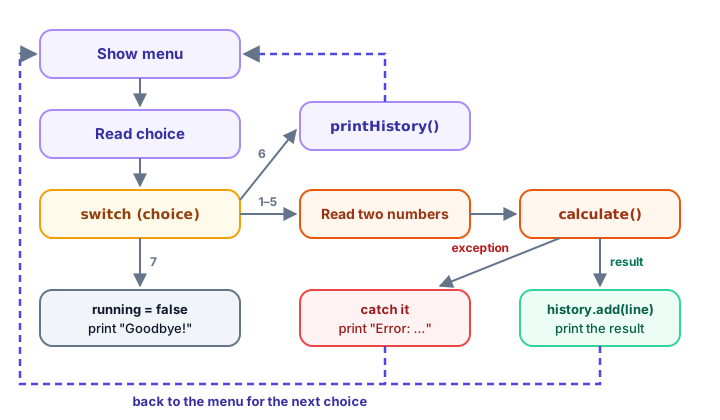
Step 1: One method per operation
Start with the "engine": the part that does the maths, with no input at all. Each operation gets its own small method, and a calculate() method uses a switch expression to pick the right one. A switch expression is a switch that produces a value, so you can return it directly.
public class CalculatorEngine {
    public static void main(String[] args) {
        show('+', 12, 30);
        show('*', 7.5, 4);
        show('/', 10, 4);
        show('^', 2, 10);
        show('/', 5, 0);
        show('%', 9, 2);
    }

    static void show(char operator, double a, double b) {
        try {
            double result = calculate(operator, a, b);
            System.out.println(format(a) + " " + operator + " " + format(b) + " = " + format(result));
        } catch (ArithmeticException | IllegalArgumentException e) {
            System.out.println("Error: " + e.getMessage());
        }
    }

    static double calculate(char operator, double a, double b) {
        return switch (operator) {
            case '+' -> add(a, b);
            case '-' -> subtract(a, b);
            case '*' -> multiply(a, b);
            case '/' -> divide(a, b);
            case '^' -> power(a, b);
            default -> throw new IllegalArgumentException("Unknown operator: " + operator);
        };
    }

    static double add(double a, double b) {
        return a + b;
    }

    static double subtract(double a, double b) {
        return a - b;
    }

    static double multiply(double a, double b) {
        return a * b;
    }

    static double divide(double a, double b) {
        if (b == 0) {
            throw new ArithmeticException("Cannot divide by zero.");
        }
        return a / b;
    }

    static double power(double base, double exponent) {
        return Math.pow(base, exponent);
    }

    /** Shows 42.0 as "42" but keeps decimals such as 2.5. */
    static String format(double value) {
        if (value == Math.rint(value) && Math.abs(value) < 1e15) {
            return String.valueOf((long) value);
        }
        return String.valueOf(value);
    }
}
12 + 30 = 42
7.5 * 4 = 30
10 / 4 = 2.5
2 ^ 10 = 1024
Error: Cannot divide by zero.
Error: Unknown operator: %Let's look at the important parts:
- Small methods.
add()and friends are one line each. That seems like overkill, but it gives every operation a name, and you can later make one smarter (for example,divide()) without touching the others. divide()throws an exception. Dividing adoubleby zero doesn't crash in Java; it quietly givesInfinity. That's not a useful answer, so wethrow new ArithmeticException(...)ourselves and let the caller decide what to do.- The
defaultbranch throws anIllegalArgumentExceptionfor an unknown operator like%. A switch expression must produce a value for every possible input, and throwing counts. format()prints42.0as42. If the value equals its rounded version (Math.rint()), we print it as along; otherwise we keep the decimals.
📝 Note: why catch two exceptions?
show() uses a multi-catch: catch (ArithmeticException | IllegalArgumentException e) handles either exception with the same code. You met this in the try-catch lesson.
Step 2: Read numbers without crashing
Users make typos. If you call scanner.nextDouble() and someone types twelve, you get an InputMismatchException. A safer pattern is to read the whole line with nextLine() and convert it yourself with Double.parseDouble(). If the text isn't a number, parseDouble() throws a NumberFormatException, which we catch and ask again:
import java.util.Scanner;

public class ReadNumbers {
    static final Scanner input = new Scanner(System.in);

    public static void main(String[] args) {
        Double first = readNumber("First number: ");
        Double second = readNumber("Second number: ");
        if (first == null || second == null) {
            System.out.println("No more input.");
            return;
        }
        System.out.println("Their sum is " + (first + second));
    }

    /** Asks until the user types a valid number. Returns null if input ends. */
    static Double readNumber(String prompt) {
        while (true) {
            System.out.print(prompt);
            if (!input.hasNextLine()) {
                System.out.println();
                return null;
            }
            String text = input.nextLine().trim();
            try {
                return Double.parseDouble(text);
            } catch (NumberFormatException e) {
                System.out.println("\"" + text + "\" is not a number. Try again.");
            }
        }
    }
}
Here's a sample run (the user's typing follows each prompt):
First number: twelve
"twelve" is not a number. Try again.
First number: 12
Second number: 8.5
Their sum is 20.5
Three details make readNumber() robust:
while (true)keeps asking until areturnhappens, so the caller always gets a valid number.hasNextLine()checks whether there is any input left. If the input ends (for example, the user presses Ctrl+D, or Ctrl+Z then Enter on Windows), the method returnsnullinstead of looping forever or crashing.- The return type is
Doublewith a capital D, the wrapper class, because a primitivedoublecan't benull.
💡 Tip: parseDouble() ignores your computer's language
Double.parseDouble("8.5") always expects a dot as the decimal point. Scanner.nextDouble() follows your computer's regional settings, so in Germany or France it may expect 8,5 instead. Reading a line and parsing it gives the same behavior everywhere.
Step 3: The menu loop and the history
Now connect everything. main() runs a while (running) loop. The menu choice is read as a String, so a switch on text handles anything the user types, including 9 or hello, through the default branch:
switch (choice) {
    case "1" -> runOperation('+');
    case "2" -> runOperation('-');
    case "3" -> runOperation('*');
    case "4" -> runOperation('/');
    case "5" -> runOperation('^');
    case "6" -> printHistory();
    case "7" -> running = false;
    default -> System.out.println("Please choose a number from 1 to 7.");
}
This one is a switch statement (it does something) rather than a switch expression (it produces a value), but it still uses the tidy arrow labels, so there's no break to forget.
runOperation() reads two numbers, calls calculate() inside a try block, and only adds the line to the history if no exception happened:
try {
    double result = calculate(operator, a, b);
    String line = format(a) + " " + operator + " " + format(b) + " = " + format(result);
    history.add(line);
    System.out.println("Result: " + line);
} catch (ArithmeticException e) {
    System.out.println("Error: " + e.getMessage());
}
If calculate() throws, Java jumps straight to the catch block, so history.add(line) never runs. Failed calculations never pollute the history. The history itself is an ArrayList<String> declared as a static field, so every method in the class can use it.
The complete calculator program in Java
Save this as Calculator.java and run it with java Calculator.java:
import java.util.ArrayList;
import java.util.List;
import java.util.Scanner;

public class Calculator {
    static final Scanner input = new Scanner(System.in);
    static final List<String> history = new ArrayList<>();

    public static void main(String[] args) {
        System.out.println("=== Java Calculator ===");

        boolean running = true;
        while (running) {
            System.out.println();
            System.out.println("1) Add  2) Subtract  3) Multiply  4) Divide  5) Power");
            System.out.println("6) History  7) Quit");
            System.out.print("Choose an option: ");
            if (!input.hasNextLine()) {
                System.out.println();
                break;
            }
            String choice = input.nextLine().trim();

            switch (choice) {
                case "1" -> runOperation('+');
                case "2" -> runOperation('-');
                case "3" -> runOperation('*');
                case "4" -> runOperation('/');
                case "5" -> runOperation('^');
                case "6" -> printHistory();
                case "7" -> running = false;
                default -> System.out.println("Please choose a number from 1 to 7.");
            }
        }
        System.out.println("Goodbye!");
    }

    /** Reads two numbers, calculates, prints and saves the result. */
    static void runOperation(char operator) {
        Double a = readNumber("First number: ");
        if (a == null) {
            return;
        }
        Double b = readNumber("Second number: ");
        if (b == null) {
            return;
        }
        try {
            double result = calculate(operator, a, b);
            String line = format(a) + " " + operator + " " + format(b) + " = " + format(result);
            history.add(line);
            System.out.println("Result: " + line);
        } catch (ArithmeticException e) {
            System.out.println("Error: " + e.getMessage());
        }
    }

    static void printHistory() {
        if (history.isEmpty()) {
            System.out.println("No calculations yet.");
            return;
        }
        System.out.println("History:");
        for (int i = 0; i < history.size(); i++) {
            System.out.println("  " + (i + 1) + ". " + history.get(i));
        }
    }

    /** Asks until the user types a valid number. Returns null if input ends. */
    static Double readNumber(String prompt) {
        while (true) {
            System.out.print(prompt);
            if (!input.hasNextLine()) {
                System.out.println();
                return null;
            }
            String text = input.nextLine().trim();
            try {
                return Double.parseDouble(text);
            } catch (NumberFormatException e) {
                System.out.println("\"" + text + "\" is not a number. Try again.");
            }
        }
    }

    static double calculate(char operator, double a, double b) {
        return switch (operator) {
            case '+' -> add(a, b);
            case '-' -> subtract(a, b);
            case '*' -> multiply(a, b);
            case '/' -> divide(a, b);
            case '^' -> power(a, b);
            default -> throw new IllegalArgumentException("Unknown operator: " + operator);
        };
    }

    static double add(double a, double b) {
        return a + b;
    }

    static double subtract(double a, double b) {
        return a - b;
    }

    static double multiply(double a, double b) {
        return a * b;
    }

    static double divide(double a, double b) {
        if (b == 0) {
            throw new ArithmeticException("Cannot divide by zero.");
        }
        return a / b;
    }

    static double power(double base, double exponent) {
        return Math.pow(base, exponent);
    }

    /** Shows 42.0 as "42" but keeps decimals such as 2.5. */
    static String format(double value) {
        if (value == Math.rint(value) && Math.abs(value) < 1e15) {
            return String.valueOf((long) value);
        }
        return String.valueOf(value);
    }
}
Sample run
Here's a sample run (the user's typing follows each prompt). It adds two numbers, tries to divide by zero and then by 0, picks an option that doesn't exist, and finally shows the history:
=== Java Calculator ===

1) Add  2) Subtract  3) Multiply  4) Divide  5) Power
6) History  7) Quit
Choose an option: 1
First number: 12
Second number: 30
Result: 12 + 30 = 42

1) Add  2) Subtract  3) Multiply  4) Divide  5) Power
6) History  7) Quit
Choose an option: 4
First number: 10
Second number: zero
"zero" is not a number. Try again.
Second number: 0
Error: Cannot divide by zero.

1) Add  2) Subtract  3) Multiply  4) Divide  5) Power
6) History  7) Quit
Choose an option: 3
First number: 7.5
Second number: 4
Result: 7.5 * 4 = 30

1) Add  2) Subtract  3) Multiply  4) Divide  5) Power
6) History  7) Quit
Choose an option: 9
Please choose a number from 1 to 7.

1) Add  2) Subtract  3) Multiply  4) Divide  5) Power
6) History  7) Quit
Choose an option: 5
First number: 2
Second number: 10
Result: 2 ^ 10 = 1024

1) Add  2) Subtract  3) Multiply  4) Divide  5) Power
6) History  7) Quit
Choose an option: 4
First number: 22
Second number: 8
Result: 22 / 8 = 2.75

1) Add  2) Subtract  3) Multiply  4) Divide  5) Power
6) History  7) Quit
Choose an option: 6
History:
  1. 12 + 30 = 42
  2. 7.5 * 4 = 30
  3. 2 ^ 10 = 1024
  4. 22 / 8 = 2.75

1) Add  2) Subtract  3) Multiply  4) Divide  5) Power
6) History  7) Quit
Choose an option: 7
Goodbye!
Notice that the failed division isn't in the history, and that typing zero only repeated the question for the second number; the first number (10) was kept.
Common mistakes in this project
1. Mixing nextInt() and nextLine()
If you read the menu choice with nextInt() and the next value with nextLine(), the second call returns an empty string, because nextInt() leaves the Enter key in the input. Reading every value with nextLine() and converting it, as this project does, avoids the problem completely. The user input lesson explains it in detail.
2. Expecting Java to stop division by zero
double result = 5.0 / 0;    // Infinity, no error!
int whole = 5 / 0;          // ArithmeticException: / by zero
Only integer division by zero throws. With double values you get Infinity (or NaN for 0.0 / 0), so check the divisor yourself, as divide() does.
3. Comparing strings with ==
A switch on a String compares the text correctly. But if you rewrite the menu with if (choice == "1"), it may never be true, because == compares references, not text. Use choice.equals("1"); see string comparison.
4. Surprised by 0.1 + 0.2
Adding 0.1 and 0.2 prints 0.30000000000000004. That's not a bug in your calculator: double stores numbers in binary and can't hold most decimal fractions exactly. For display you can round with String.format("%.2f", value); see output formatting.
Level up: challenges
🏋️ Challenges
- Remainder. Add option
%for the remainder (a % b). It should refuse a zero divisor just likedivide(). - Square root. Add an option that needs only one number and uses
Math.sqrt(). Refuse negative numbers with an exception. - Clear history. Add a menu option that empties the history with
history.clear()and prints how many entries were removed. - Use the last result. Let the user type
ansinstead of a number to reuse the previous result. - Expression mode. Let the user type
12 * 4on one line. Split it withsplit(" "), parse both numbers and use the middle part as the operator.
Show a hint for challenge 4
Keep the last result in a static field and check for ans before parsing:
static double lastResult = 0;

// inside readNumber(), before Double.parseDouble(text):
if (text.equalsIgnoreCase("ans")) {
    return lastResult;
}

// inside runOperation(), after a successful calculation:
lastResult = result;
Show a hint for challenge 5
"12 * 4".split(" ") gives the array {"12", "*", "4"}. Check that the array has exactly 3 parts, parse parts 0 and 2 with Double.parseDouble(), and pass parts[1].charAt(0) to calculate(). Catch NumberFormatException and IllegalArgumentException for bad input.
What's next?
Your calculator does exactly what the user asks. Next, you'll build a game where the computer keeps a secret from the player: the number guessing game in Java, with random numbers, hints, replays and a best score.
Key takeaways
- A calculator program in Java is a menu loop: show options, read a choice, run one action, print the result and repeat until the user quits.
- Give every operation its own small method, and use a switch expression in calculate() to pick the right one.
- Read input with nextLine() and convert it with Double.parseDouble() inside try/catch, so typos ask again instead of crashing.
- Dividing a double by zero gives Infinity, not an error, so check the divisor and throw an ArithmeticException yourself.
- Add a result to the ArrayList history only after the calculation succeeds; a thrown exception skips the rest of the try block.
- Check hasNextLine() before reading so the program ends cleanly when the input runs out.
Frequently asked questions
How do you make a simple calculator program in Java?
Write a method for each operation, read two numbers and an operator or menu choice with Scanner, and use a switch to call the right method. Put it in a while loop so the user can do several calculations, and print the result each time.
How do you handle division by zero in a Java calculator?
Check whether the divisor is zero before dividing. If it is, throw an ArithmeticException with a clear message, and catch it where you call the method so you can print a friendly error and show the menu again.
Why does 5.0 / 0 not throw an exception in Java?
Floating-point division follows the IEEE 754 standard, which defines dividing by zero as positive or negative Infinity, and 0.0 / 0 as NaN. Only integer division by zero throws an ArithmeticException.
Should I use a switch statement or if-else for the calculator menu?
A switch with arrow labels is easier to read when you compare one value against many fixed options, and it cannot fall through by accident. if-else is better when the conditions are ranges or combinations of values.
How can my calculator remember previous results?
Store each result as a string, such as "12 + 30 = 42", in an ArrayList<String>. Add to it after every successful calculation and loop over it with an index to print a numbered history.