Java Custom Exceptions
Updated 8 min read Aimerscrew
Java comes with dozens of built-in exceptions, but none of them is called InsufficientFundsException or SeatAlreadyTakenException. Java custom exceptions let you create exception classes that describe the problems of your program in your own words. In this lesson you'll learn how to create one, when to make it checked or unchecked, how to add useful extra data to it, and how to wrap one exception inside another.
🌍 Real-life example
A hospital doesn't just have a single "something's wrong" alarm. It has specific codes for specific emergencies, so the right team knows exactly what to do the moment they hear it. A generic Exception is like a vague "something's wrong" shout. A custom exception like InsufficientFundsException is a precise code: everyone who catches it knows exactly what happened.
What is a custom exception in Java?
A custom exception is a class you write that extends one of Java's exception classes. Because exceptions are ordinary classes, creating your own uses plain inheritance. Your class gets everything a normal exception has, like getMessage() and a stack trace, for free.
Why bother? Custom exceptions make your code easier to read and easier to handle:
- The name explains the problem:
catch (InsufficientFundsException e)reads like plain English. - Callers can catch your problem without accidentally catching unrelated ones.
- You can attach extra information, such as how much money was missing.
How to create a custom exception
A basic custom exception needs just a class that extends Exception and a constructor that passes the message up to the parent with super(message):
class InsufficientFundsException extends Exception {
    InsufficientFundsException(String message) {
        super(message);
    }
}
That's all. super(message) stores the message in the parent Exception class, which is why getMessage() works without you writing it. You throw it just like a built-in exception: throw new InsufficientFundsException("Not enough money");.
Checked or unchecked: Exception vs RuntimeException
The parent class you choose decides what kind of exception you get:
| You extend | You get | Callers must | Use it when |
|---|---|---|---|
Exception | A checked exception | Catch it or declare it with throws | The caller can reasonably recover, like a payment being declined |
RuntimeException | An unchecked exception | Nothing; handling is optional | It signals a programming mistake or bad input that should have been checked first |
If you're unsure, ask: "Should every caller be forced to think about this?" If yes, extend Exception. If not, extend RuntimeException. Many modern libraries lean towards unchecked exceptions because they keep code shorter, but both are perfectly valid.
A checked custom exception with extra data
Let's build a full bank example. The exception stores a message and the amount the customer was short, so the catching code can show a helpful message:
public class BankApp {
    public static void main(String[] args) {
        Account account = new Account("Sofia", 120);
        int[] withdrawals = {50, 100};

        for (int amount : withdrawals) {
            try {
                account.withdraw(amount);
                System.out.println("Withdrew $" + amount
                        + ", balance $" + account.getBalance());
            } catch (InsufficientFundsException e) {
                System.out.println(e.getMessage());
                System.out.println("You need $" + e.getAmountNeeded() + " more.");
            }
        }
    }
}

class InsufficientFundsException extends Exception {
    private static final long serialVersionUID = 1L;
    private final int amountNeeded;

    InsufficientFundsException(String message, int amountNeeded) {
        super(message);
        this.amountNeeded = amountNeeded;
    }

    int getAmountNeeded() {
        return amountNeeded;
    }
}

class Account {
    private final String owner;
    private int balance;

    Account(String owner, int balance) {
        this.owner = owner;
        this.balance = balance;
    }

    void withdraw(int amount) throws InsufficientFundsException {
        if (amount > balance) {
            throw new InsufficientFundsException(
                    owner + " can't withdraw $" + amount, amount - balance);
        }
        balance -= amount;
    }

    int getBalance() {
        return balance;
    }
}
Withdrew $50, balance $70
Sofia can't withdraw $100
You need $30 more.Notice three things:
withdrawdeclaresthrows InsufficientFundsException, because it's a checked exception (see throw and throws).- The extra field
amountNeededisprivate finalwith a getter, just like any well-encapsulated class. - The catch block uses both the message and the extra data to tell the customer exactly what to do.
📝 Note
What's serialVersionUID? Exceptions can be saved and sent between programs (this is called serialization), and this number acts as a version stamp for that. Your code works without it, but if you compile with all warnings turned on (javac -Xlint:all), Java warns you when it's missing. Adding private static final long serialVersionUID = 1L; keeps things tidy.
An unchecked custom exception
Now an online shop that rejects unknown coupon codes. A wrong coupon is bad input that the shop should validate, so an unchecked exception that extends RuntimeException fits well. Notice that no throws clause is needed:
public class CouponCheckout {
    public static void main(String[] args) {
        String[] codes = {"SAVE10", "FREESTUFF"};

        for (String code : codes) {
            try {
                int total = applyCoupon(80, code);
                System.out.println(code + " accepted, new total $" + total);
            } catch (InvalidCouponException e) {
                System.out.println(e.getMessage());
            }
        }
    }

    static int applyCoupon(int total, String code) {
        if (!code.equals("SAVE10")) {
            throw new InvalidCouponException(code);
        }
        return total - 10;
    }
}

class InvalidCouponException extends RuntimeException {
    private static final long serialVersionUID = 1L;

    InvalidCouponException(String code) {
        super("Unknown coupon code: " + code);
    }
}
SAVE10 accepted, new total $70
Unknown coupon code: FREESTUFFHere the constructor takes the coupon code and builds the message itself. This keeps the message wording in one place, so every throw produces a consistent message.
Exception chaining: constructors with a cause
Often a low-level problem causes a high-level one. For example, a payment fails because the amount couldn't be parsed. You want to throw your meaningful PaymentFailedException, but without losing the original NumberFormatException. The solution is exception chaining: you pass the original exception as the cause.
Every exception class has a constructor that accepts a message and a cause (a Throwable). Add one to your class and pass both to super. Later, getCause() gives the original back:
public class PaymentDemo {
    public static void main(String[] args) {
        String[] amounts = {"1250", "12,50"};

        for (String amount : amounts) {
            try {
                pay(amount);
            } catch (PaymentFailedException e) {
                System.out.println("Payment failed: " + e.getMessage());
                System.out.println("Caused by: " + e.getCause());
            }
        }
    }

    static void pay(String amountInCents) throws PaymentFailedException {
        try {
            int cents = Integer.parseInt(amountInCents);
            System.out.println("Charged " + cents + " cents");
        } catch (NumberFormatException e) {
            throw new PaymentFailedException(
                    "could not read amount '" + amountInCents + "'", e);
        }
    }
}

class PaymentFailedException extends Exception {
    private static final long serialVersionUID = 1L;

    PaymentFailedException(String message) {
        super(message);
    }

    PaymentFailedException(String message, Throwable cause) {
        super(message, cause);
    }
}
Charged 1250 cents
Payment failed: could not read amount '12,50'
Caused by: java.lang.NumberFormatException: For input string: "12,50"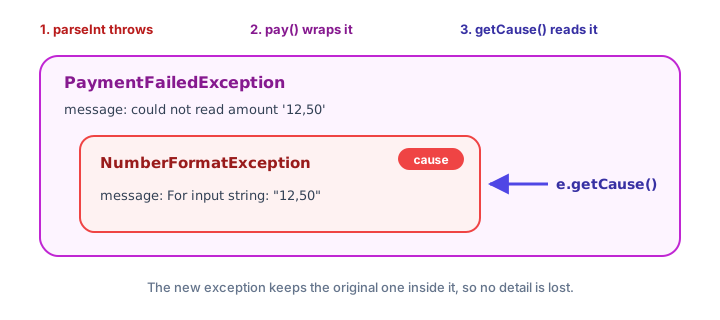
The caller only needs to know about payments, so it catches PaymentFailedException. But if a developer needs to debug, the full story is still there: if this exception were never caught, its stack trace would include a "Caused by:" section showing the original problem.
How to name a custom exception
Good names make catch blocks read like sentences. Follow these conventions:
- End the name with
Exception:SeatAlreadyTakenException, notSeatAlreadyTaken. - Describe the problem, not where it happened:
InvalidCouponExceptionbeatsCheckoutException. - Avoid vague names like
MyException,BadExceptionorErrorException. - Don't reinvent built-ins: for a simple bad argument,
IllegalArgumentExceptionalready exists.
💡 Tip
It's common to give a custom exception the same constructors its parent has: one with (String message) and one with (String message, Throwable cause). Then it works smoothly both on its own and for chaining.
Common mistakes with custom exceptions
1. Forgetting to call super(message)
class LateReturnException extends Exception {
    LateReturnException(String message) {
    }
}
This compiles, but the message is thrown away, so getMessage() returns null. Always pass it on with super(message);.
2. Extending Throwable or Error
Custom exceptions should extend Exception or RuntimeException. Error is reserved for serious JVM problems.
3. Losing the cause when wrapping
Writing throw new PaymentFailedException("failed") inside a catch block drops the original exception. Pass it along: new PaymentFailedException("failed", e).
4. Making everything a custom exception
You don't need a new class for every tiny check. Create one when callers would want to catch that specific problem, or when it carries extra data.
Practice exercise
🏋️ Try it yourself
A library allows each member to borrow at most 3 books. Create a checked BorrowLimitException with an extra field limit. Write a method borrow(int booksAlreadyBorrowed) that throws it when the member already has 3 or more books, and otherwise prints Book borrowed. In main, call it with 1 and then 3, catching the exception and printing its message and limit.
Show solution
public class Library {
    public static void main(String[] args) {
        int[] members = {1, 3};

        for (int borrowed : members) {
            try {
                borrow(borrowed);
            } catch (BorrowLimitException e) {
                System.out.println(e.getMessage());
                System.out.println("Limit is " + e.getLimit() + " books.");
            }
        }
    }

    static void borrow(int booksAlreadyBorrowed) throws BorrowLimitException {
        if (booksAlreadyBorrowed >= 3) {
            throw new BorrowLimitException("Return a book first", 3);
        }
        System.out.println("Book borrowed");
    }
}

class BorrowLimitException extends Exception {
    private static final long serialVersionUID = 1L;
    private final int limit;

    BorrowLimitException(String message, int limit) {
        super(message);
        this.limit = limit;
    }

    int getLimit() {
        return limit;
    }
}
Book borrowed
Return a book first
Limit is 3 books.What's next?
You can now create, throw and chain your own exceptions. Next, learn the cleanest way to make sure things get closed even when exceptions happen, with Java try-with-resources.
Key takeaways
- A custom exception is a class that extends Exception (checked) or RuntimeException (unchecked).
- Pass the message to the parent with super(message) so getMessage() works.
- Choose Exception when callers should be forced to handle the problem, RuntimeException when handling is optional.
- Custom exceptions can carry extra data, such as the amount of money that was missing, through private final fields and getters.
- Add a (String message, Throwable cause) constructor and call super(message, cause) to support exception chaining.
- getCause() returns the original exception that was wrapped.
- Name custom exceptions after the problem and end the name with Exception.
Frequently asked questions
How do you create a custom exception in Java?
Write a class that extends Exception or RuntimeException and give it a constructor that calls super(message). Then throw it with throw new YourException("message"), just like a built-in exception.
Should a custom exception extend Exception or RuntimeException?
Extend Exception if every caller should be forced to catch or declare it, usually for problems they can recover from. Extend RuntimeException for programming mistakes or invalid input that callers are not required to handle.
What is exception chaining in Java?
Exception chaining means wrapping one exception inside another by passing it as the cause, for example new PaymentFailedException("failed", e). The original can be retrieved with getCause(), and stack traces show it in a Caused by section.
Why does my custom exception need serialVersionUID?
Exceptions are serializable, so javac with -Xlint warnings reminds you to add a serialVersionUID version number. The code works without it, but adding private static final long serialVersionUID = 1L; removes the warning.
Can a custom exception have extra fields?
Yes. A custom exception is a normal class, so you can add fields, constructor parameters and getters. For example, an InsufficientFundsException can store how much money was missing.