Java Exercises for Beginners (With Solutions)
Updated 21 min read Aimerscrew
Reading about Java is a great start, but you only really learn it by typing programs, running them and fixing what breaks. This page gives you 25 Java exercises for beginners, each with a hint and a complete, tested solution. They follow the order of this tutorial and go from beginner to intermediate to advanced, so you can work through them in order or jump straight to the topic you want to practice.
🌍 Real-life example
Learning to code is like learning to cook. Watching cooking shows teaches you the idea, but you only get good once you chop the onions yourself and burn a few pancakes. These exercises are small recipes from everyday life: a coffee order, a gym timetable, a cinema seat map, a leaderboard and a library search. Each one takes a few minutes and leaves you a little more confident.
How to use these Java exercises
Every exercise has a short task, a hint and a link to the lesson that teaches the idea. The solution is hidden behind a Show solution button, together with the exact output it prints.
- Create a file such as
Exercise.javaand write your own solution. - Run it with
java Exercise.java. Since Java 11, you can run a single-file program directly, without a separate compile step. (Need a refresher? See how to install Java.) - Compare your output with the solution's output. Your code doesn't have to look like mine: if the output matches, you solved it.
java Exercise.java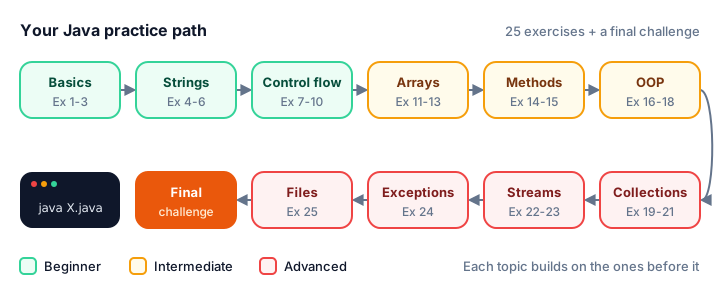
💡 Tip
Stuck for more than 15 minutes? Read the hint, then reread the linked lesson and try again. That bit of struggle is exactly where the learning happens. Only open the solution once you have a working attempt, or a very clear question.
Basics exercises (beginner)
1. Coffee order with tax
A latte costs $4.75. A customer buys 3, and sales tax is 8%. Print the subtotal, the tax and the total, each with exactly two decimal places. Related lesson: output formatting.
Hint: System.out.printf("%.2f%n", value) rounds to two decimals and ends the line.
Show solution
public class CoffeeOrder {
    public static void main(String[] args) {
        double lattePrice = 4.75;
        int quantity = 3;
        double taxRate = 0.08;

        double subtotal = lattePrice * quantity;
        double tax = subtotal * taxRate;
        double total = subtotal + tax;

        System.out.printf("Subtotal: $%.2f%n", subtotal);
        System.out.printf("Tax:      $%.2f%n", tax);
        System.out.printf("Total:    $%.2f%n", total);
    }
}
Subtotal: $14.25
Tax: $1.14
Total: $15.392. Flight time in hours and minutes
A flight from London to New York takes 437 minutes. Print it as hours and minutes. Related lesson: arithmetic operators.
Hint: Integer division / gives the whole hours, and the remainder operator % gives the minutes left over.
Show solution
public class FlightTime {
    public static void main(String[] args) {
        int flightMinutes = 437;

        int hours = flightMinutes / 60;
        int minutes = flightMinutes % 60;

        System.out.println("London to New York: " + hours + " h " + minutes + " min");
    }
}
London to New York: 7 h 17 min3. Quiz average without losing the decimals
A student scored 88, 92 and 79 on three quizzes. Print the sum, the (wrong) average you get with integer division, the real average with two decimals, and the real average rounded down with a cast. Related lesson: type casting.
Hint: Cast before dividing: (double) sum / 3. Writing (double) (sum / 3) is too late; the decimals are already gone.
Show solution
public class QuizAverage {
    public static void main(String[] args) {
        int quiz1 = 88;
        int quiz2 = 92;
        int quiz3 = 79;
        int sum = quiz1 + quiz2 + quiz3;

        int wrongAverage = sum / 3;
        double average = (double) sum / 3;

        System.out.println("Sum: " + sum);
        System.out.println("Integer division: " + wrongAverage);
        System.out.printf("Real average: %.2f%n", average);
        System.out.println("Rounded down: " + (int) average);
    }
}
Sum: 259
Integer division: 86
Real average: 86.33
Rounded down: 86Casting a double to int doesn't round; it simply chops off everything after the decimal point.
String exercises (beginner)
4. Initials from a full name
Given the messy input " grace brewster hopper ", remove the extra spaces, split the name into words and print the initials in capitals, like G.B.H.. Related lesson: string methods.
Hint: trim(), then split(" ") gives an array of words. charAt(0) is the first letter, and Character.toUpperCase capitalizes it.
Show solution
public class Initials {
    public static void main(String[] args) {
        String fullName = "  grace brewster hopper ";

        String[] parts = fullName.trim().split(" ");
        String initials = "";
        for (String part : parts) {
            initials += Character.toUpperCase(part.charAt(0)) + ".";
        }

        System.out.println("Name parts: " + parts.length);
        System.out.println("Initials: " + initials);
    }
}
Name parts: 3
Initials: G.B.H.5. Count vowels and consonants
Count the vowels and the consonants in "Java powers Android apps". Spaces don't count as either. Related lesson: Java strings.
Hint: Lowercase the string first. "aeiou".indexOf(c) >= 0 is a short way to ask "is c a vowel?", and Character.isLetter(c) skips spaces.
Show solution
public class VowelCounter {
    public static void main(String[] args) {
        String sentence = "Java powers Android apps";
        String lower = sentence.toLowerCase();

        int vowels = 0;
        int consonants = 0;
        for (int i = 0; i < lower.length(); i++) {
            char c = lower.charAt(i);
            if ("aeiou".indexOf(c) >= 0) {
                vowels++;
            } else if (Character.isLetter(c)) {
                consonants++;
            }
        }

        System.out.println("Vowels: " + vowels);
        System.out.println("Consonants: " + consonants);
    }
}
Vowels: 8
Consonants: 136. Palindrome checker
A palindrome reads the same backward, like "level". For the words Racecar, level, rocket and Noon, print each word, its reverse and whether it's a palindrome, ignoring upper and lower case. Related lesson: StringBuilder.
Hint: new StringBuilder(text).reverse().toString() reverses a string. Compare with equals, never ==.
Show solution
public class PalindromeCheck {
    public static void main(String[] args) {
        String[] words = {"Racecar", "level", "rocket", "Noon"};

        for (String word : words) {
            String lower = word.toLowerCase();
            String reversed = new StringBuilder(lower).reverse().toString();
            boolean isPalindrome = lower.equals(reversed);
            System.out.println(word + " -> " + reversed + " -> " + isPalindrome);
        }
    }
}
Racecar -> racecar -> true
level -> level -> true
rocket -> tekcor -> false
Noon -> noon -> trueControl flow exercises (beginner)
7. Free shipping rule
An online store charges $7.99 shipping, or $4.99 for orders of $25 or more, and shipping is free from $50. For an order of $32.50, print the shipping cost and the amount to pay. Related lesson: if-else.
Hint: Check the biggest threshold first. If you test >= 25 first, a $60 order would never reach the free-shipping branch.
Show solution
public class ShippingCost {
    public static void main(String[] args) {
        double orderTotal = 32.50;
        double shipping;

        if (orderTotal >= 50) {
            shipping = 0.0;
        } else if (orderTotal >= 25) {
            shipping = 4.99;
        } else {
            shipping = 7.99;
        }

        System.out.printf("Order: $%.2f%n", orderTotal);
        System.out.printf("Shipping: $%.2f%n", shipping);
        System.out.printf("You pay: $%.2f%n", orderTotal + shipping);
    }
}
Order: $32.50
Shipping: $4.99
You pay: $37.498. Gym opening hours
A gym opens 6am-10pm on weekdays and 8am-4pm on weekends. Loop over the day numbers 1 (Monday) to 7 (Sunday) and print each short day name with its hours. Related lesson: switch.
Hint: A switch expression with arrows returns a value, and one case can list several labels: case 6, 7 -> ....
Show solution
public class GymHours {
    public static void main(String[] args) {
        for (int day = 1; day <= 7; day++) {
            String name = switch (day) {
                case 1 -> "Mon";
                case 2 -> "Tue";
                case 3 -> "Wed";
                case 4 -> "Thu";
                case 5 -> "Fri";
                case 6 -> "Sat";
                default -> "Sun";
            };
            String hours = switch (day) {
                case 6, 7 -> "8am-4pm";
                default -> "6am-10pm";
            };
            System.out.println(name + ": " + hours);
        }
    }
}
Mon: 6am-10pm
Tue: 6am-10pm
Wed: 6am-10pm
Thu: 6am-10pm
Fri: 6am-10pm
Sat: 8am-4pm
Sun: 8am-4pm9. FizzBuzz
Print the numbers 1 to 15, but print "Fizz" for multiples of 3, "Buzz" for multiples of 5 and "FizzBuzz" for multiples of both. It's a classic warm-up in coding interviews. Related lesson: for loop.
Hint: Test "multiple of both" (i % 15 == 0) first, otherwise 15 stops at "Fizz".
Show solution
public class FizzBuzz {
    public static void main(String[] args) {
        for (int i = 1; i <= 15; i++) {
            if (i % 15 == 0) {
                System.out.println("FizzBuzz");
            } else if (i % 3 == 0) {
                System.out.println("Fizz");
            } else if (i % 5 == 0) {
                System.out.println("Buzz");
            } else {
                System.out.println(i);
            }
        }
    }
}
1
2
Fizz
4
Buzz
Fizz
7
8
Fizz
Buzz
11
Fizz
13
14
FizzBuzz10. Savings goal
You save $150 every month, and your bank adds 1% interest on your balance each month before the deposit. How many months until you reach $1,000, and what's the balance then? Related lesson: while loop.
Hint: You don't know the number of months in advance, which is exactly when a while loop beats a for loop.
Show solution
public class SavingsGoal {
    public static void main(String[] args) {
        double goal = 1000.0;
        double monthlyDeposit = 150.0;
        double monthlyInterest = 0.01;

        double balance = 0.0;
        int months = 0;
        while (balance < goal) {
            balance = balance + balance * monthlyInterest + monthlyDeposit;
            months++;
        }

        System.out.println("Months needed: " + months);
        System.out.printf("Final balance: $%.2f%n", balance);
    }
}
Months needed: 7
Final balance: $1082.03Array exercises (intermediate)
11. Weekly step report
Store a week of step counts in an array: 8200, 10450, 6300, 12100, 9800, 4500, 11000. Print the total, the daily average with one decimal, and the best day by name. Related lesson: looping through arrays.
Hint: Keep the index of the best day, not just its value; then a second array of day names gives you the name.
Show solution
public class StepTracker {
    public static void main(String[] args) {
        String[] days = {"Mon", "Tue", "Wed", "Thu", "Fri", "Sat", "Sun"};
        int[] steps = {8200, 10450, 6300, 12100, 9800, 4500, 11000};

        int total = 0;
        int best = 0;
        for (int i = 0; i < steps.length; i++) {
            total += steps[i];
            if (steps[i] > steps[best]) {
                best = i;
            }
        }

        System.out.println("Total steps: " + total);
        System.out.printf("Daily average: %.1f%n", (double) total / steps.length);
        System.out.println("Best day: " + days[best] + " (" + steps[best] + ")");
    }
}
Total steps: 62350
Daily average: 8907.1
Best day: Thu (12100)12. Sort, slice and search prices
Sort the prices 45, 12, 99, 30, 7 and 64, print the sorted array, copy the cheapest three into a new array, and find the index of 64. Related lesson: the Arrays class.
Hint: Arrays.sort, Arrays.copyOfRange and Arrays.binarySearch do the work. Binary search only works on a sorted array.
Show solution
import java.util.Arrays;

public class PriceList {
    public static void main(String[] args) {
        int[] prices = {45, 12, 99, 30, 7, 64};

        Arrays.sort(prices);
        System.out.println("Sorted: " + Arrays.toString(prices));

        int[] cheapestThree = Arrays.copyOfRange(prices, 0, 3);
        System.out.println("Cheapest three: " + Arrays.toString(cheapestThree));

        int position = Arrays.binarySearch(prices, 64);
        System.out.println("64 is at index " + position);
    }
}
Sorted: [7, 12, 30, 45, 64, 99]
Cheapest three: [7, 12, 30]
64 is at index 413. Cinema seat map
A small cinema has 3 rows (A to C) of 5 seats. Seats A2, B3, B4 and C1 are booked. Print a map with X for booked and O for free seats, then the number of free seats. Related lesson: multidimensional arrays.
Hint: A boolean[3][5] starts out all false. Seat A2 is [0][1], because indexes start at 0. (char) ('A' + row) turns a row number into a letter.
Show solution
public class CinemaSeats {
    public static void main(String[] args) {
        boolean[][] booked = new boolean[3][5];
        booked[0][1] = true;
        booked[1][2] = true;
        booked[1][3] = true;
        booked[2][0] = true;

        int free = 0;
        for (int row = 0; row < booked.length; row++) {
            System.out.print("Row " + (char) ('A' + row) + ":");
            for (int seat = 0; seat < booked[row].length; seat++) {
                if (booked[row][seat]) {
                    System.out.print(" X");
                } else {
                    System.out.print(" O");
                    free++;
                }
            }
            System.out.println();
        }
        System.out.println("Free seats: " + free);
    }
}
Row A: O X O O O
Row B: O O X X O
Row C: X O O O O
Free seats: 11Method exercises (intermediate)
14. Prime numbers with a method
Write a method static boolean isPrime(int n) and use it to print every prime number up to 30. Related lessons: methods and return values.
Hint: Numbers below 2 aren't prime. You only need to test divisors while divisor * divisor <= n, and you can return false as soon as one divides evenly.
Show solution
public class PrimeFinder {
    public static void main(String[] args) {
        System.out.print("Primes up to 30:");
        for (int n = 1; n <= 30; n++) {
            if (isPrime(n)) {
                System.out.print(" " + n);
            }
        }
        System.out.println();
    }

    static boolean isPrime(int n) {
        if (n < 2) {
            return false;
        }
        for (int divisor = 2; divisor * divisor <= n; divisor++) {
            if (n % divisor == 0) {
                return false;
            }
        }
        return true;
    }
}
Primes up to 30: 2 3 5 7 11 13 17 19 23 2915. Digit sum with recursion
Write a recursive method digitSum(int n) that adds up the digits of a number (4096 becomes 4 + 0 + 9 + 6 = 19). Test it with 7, 4096 and 123456. Related lesson: recursion.
Hint: n % 10 is the last digit and n / 10 is the rest of the number. The base case is a single-digit number.
Show solution
public class DigitSum {
    public static void main(String[] args) {
        int[] numbers = {7, 4096, 123456};
        for (int number : numbers) {
            System.out.println("digitSum(" + number + ") = " + digitSum(number));
        }
    }

    static int digitSum(int n) {
        if (n < 10) {
            return n;
        }
        return n % 10 + digitSum(n / 10);
    }
}
digitSum(7) = 7
digitSum(4096) = 19
digitSum(123456) = 21OOP exercises (intermediate)
16. A safe bank account
Create a BankAccount class with a private balance. deposit must reject amounts of zero or less, and withdraw must return false instead of letting the balance go negative. Open an account for Maya with $100, deposit $50, try to withdraw $500 and then $30, and try to deposit -$20. Related lesson: encapsulation.
Hint: Keep fields private and offer methods that check the rules. Nobody outside the class can write account.balance = 1000000.
Show solution
public class BankApp {
    public static void main(String[] args) {
        BankAccount account = new BankAccount("Maya", 100.0);

        account.deposit(50.0);
        System.out.println("Withdraw $500: " + account.withdraw(500.0));
        System.out.println("Withdraw $30: " + account.withdraw(30.0));
        account.deposit(-20.0);

        System.out.printf("%s has $%.2f%n", account.getOwner(), account.getBalance());
    }
}

class BankAccount {
    private final String owner;
    private double balance;

    BankAccount(String owner, double openingBalance) {
        this.owner = owner;
        this.balance = openingBalance;
    }

    void deposit(double amount) {
        if (amount <= 0) {
            System.out.println("Deposit must be positive.");
            return;
        }
        balance += amount;
    }

    boolean withdraw(double amount) {
        if (amount > balance) {
            return false;
        }
        balance -= amount;
        return true;
    }

    String getOwner() {
        return owner;
    }

    double getBalance() {
        return balance;
    }
}
Withdraw $500: false
Withdraw $30: true
Deposit must be positive.
Maya has $120.0017. Room areas with polymorphism
Make an abstract class Shape with a name and an abstract area() method, plus Rectangle and Circle subclasses. Put a 5 × 4 living room, a round hall with a 1.5 m radius and a 3.5 × 3 bedroom in one Shape[] array and print each area and the total. Related lessons: abstract classes and polymorphism.
Hint: The loop only calls room.area(). Java picks the right version for each object at run time; that's polymorphism.
Show solution
public class FloorPlan {
    public static void main(String[] args) {
        Shape[] rooms = {
            new Rectangle("Living room", 5.0, 4.0),
            new Circle("Round hall", 1.5),
            new Rectangle("Bedroom", 3.5, 3.0)
        };

        double total = 0;
        for (Shape room : rooms) {
            System.out.printf("%-12s %6.2f m2%n", room.getName(), room.area());
            total += room.area();
        }
        System.out.printf("%-12s %6.2f m2%n", "Total", total);
    }
}

abstract class Shape {
    private final String name;

    Shape(String name) {
        this.name = name;
    }

    String getName() {
        return name;
    }

    abstract double area();
}

class Rectangle extends Shape {
    private final double width;
    private final double length;

    Rectangle(String name, double width, double length) {
        super(name);
        this.width = width;
        this.length = length;
    }

    @Override
    double area() {
        return width * length;
    }
}

class Circle extends Shape {
    private final double radius;

    Circle(String name, double radius) {
        super(name);
        this.radius = radius;
    }

    @Override
    double area() {
        return Math.PI * radius * radius;
    }
}
Living room 20.00 m2
Round hall 7.07 m2
Bedroom 10.50 m2
Total 37.57 m2%-12s pads the name to 12 characters, left-aligned, and %6.2f right-aligns the number in 6 characters, so the columns line up.
18. Coffee sizes with an enum and a record
Create an enum Size (SMALL $3.00, MEDIUM $3.75, LARGE $4.50) that stores its price, and a record Drink(String name, Size size) with a price() method. Print an order of three drinks, the total, and one drink printed directly. Related lessons: enums and records.
Hint: Enum constants can take constructor arguments: SMALL(3.00). A record gives you name(), size() and a readable toString() for free.
Show solution
public class CoffeeShop {
    public static void main(String[] args) {
        Drink[] order = {
            new Drink("Latte", Size.LARGE),
            new Drink("Mocha", Size.SMALL),
            new Drink("Cappuccino", Size.MEDIUM)
        };

        double total = 0;
        for (Drink drink : order) {
            System.out.printf("%s (%s): $%.2f%n", drink.name(), drink.size(), drink.price());
            total += drink.price();
        }
        System.out.printf("Total: $%.2f%n", total);
        System.out.println(order[0]);
    }
}

enum Size {
    SMALL(3.00), MEDIUM(3.75), LARGE(4.50);

    private final double price;

    Size(double price) {
        this.price = price;
    }

    double getPrice() {
        return price;
    }
}

record Drink(String name, Size size) {
    double price() {
        return size.getPrice();
    }
}
Latte (LARGE): $4.50
Mocha (SMALL): $3.00
Cappuccino (MEDIUM): $3.75
Total: $11.25
Drink[name=Latte, size=LARGE]Collection and stream exercises (advanced)
19. Word frequency in a review
Count how often each word appears in "Great food great service and great prices and friendly staff", ignoring case, and print the words in alphabetical order. Related lesson: HashMap.
Hint: A TreeMap keeps its keys sorted. counts.merge(word, 1, Integer::sum) means "start at 1, or add 1 if the word is already there".
Show solution
import java.util.Map;
import java.util.TreeMap;

public class WordCount {
    public static void main(String[] args) {
        String review = "Great food great service and great prices and friendly staff";

        Map<String, Integer> counts = new TreeMap<>();
        for (String word : review.toLowerCase().split(" ")) {
            counts.merge(word, 1, Integer::sum);
        }

        for (Map.Entry<String, Integer> entry : counts.entrySet()) {
            System.out.println(entry.getKey() + ": " + entry.getValue());
        }
    }
}
and: 2
food: 1
friendly: 1
great: 3
prices: 1
service: 1
staff: 120. Remove duplicate songs
A playlist has the songs Halo, Yellow, Halo, Hello, Yellow and Viva. Remove the duplicates but keep the original order, and print both versions with their sizes. Related lesson: HashSet.
Hint: Any Set drops duplicates, but only a LinkedHashSet remembers the order items were added.
Show solution
import java.util.LinkedHashSet;
import java.util.List;
import java.util.Set;

public class PlaylistCleaner {
    public static void main(String[] args) {
        List<String> playlist = List.of("Halo", "Yellow", "Halo", "Hello", "Yellow", "Viva");

        Set<String> unique = new LinkedHashSet<>(playlist);

        System.out.println("Before: " + playlist.size() + " songs " + playlist);
        System.out.println("After:  " + unique.size() + " songs " + unique);
        System.out.println("Has Viva? " + unique.contains("Viva"));
    }
}
Before: 6 songs [Halo, Yellow, Halo, Hello, Yellow, Viva]
After: 4 songs [Halo, Yellow, Hello, Viva]
Has Viva? true21. Game leaderboard
Sort the players Zoe (870), Liam (940), Ava (870) and Noah (720) by score from highest to lowest. Players with the same score go in alphabetical order. Print a numbered leaderboard. Related lesson: sorting collections.
Hint: Chain comparators: Comparator.comparingInt(Player::score).reversed().thenComparing(Player::name). The :: syntax is a method reference, covered in lambda expressions.
Show solution
import java.util.ArrayList;
import java.util.Comparator;
import java.util.List;

public class Leaderboard {
    public static void main(String[] args) {
        List<Player> players = new ArrayList<>(List.of(
            new Player("Zoe", 870),
            new Player("Liam", 940),
            new Player("Ava", 870),
            new Player("Noah", 720)
        ));

        players.sort(Comparator.comparingInt(Player::score).reversed()
                .thenComparing(Player::name));

        int rank = 1;
        for (Player p : players) {
            System.out.println(rank + ". " + p.name() + " - " + p.score());
            rank++;
        }
    }
}

record Player(String name, int score) {
}
1. Liam - 940
2. Ava - 870
3. Zoe - 870
4. Noah - 720List.of(...) creates a list that can't be changed, so it's copied into an ArrayList before sorting.
22. Shopping cart report with streams
Given a cart of products (name, price, category), use streams to print the names of products over $30 in alphabetical order, and the total price of everything in the "Tech" category. Related lesson: streams.
Hint: filter keeps matching items, map transforms them, and mapToDouble(...).sum() adds up numbers.
Show solution
import java.util.List;
import java.util.stream.Collectors;

public class ProductReport {
    public static void main(String[] args) {
        List<Product> cart = List.of(
            new Product("Headphones", 59.99, "Tech"),
            new Product("Notebook", 4.50, "Office"),
            new Product("Keyboard", 34.00, "Tech"),
            new Product("Pen set", 12.25, "Office"),
            new Product("Webcam", 45.00, "Tech")
        );

        List<String> pricey = cart.stream()
                .filter(p -> p.price() > 30)
                .map(Product::name)
                .sorted()
                .collect(Collectors.toList());

        double techTotal = cart.stream()
                .filter(p -> p.category().equals("Tech"))
                .mapToDouble(Product::price)
                .sum();

        System.out.println("Over $30: " + pricey);
        System.out.printf("Tech total: $%.2f%n", techTotal);
    }
}

record Product(String name, double price, String category) {
}
Over $30: [Headphones, Keyboard, Webcam]
Tech total: $138.9923. Library search with Optional
Write authorOf(shelf, title) that searches a list of books (case-insensitive) and returns "title is by author", or "title is not on the shelf". Don't use null anywhere. Related lesson: Optional.
Hint: findFirst() returns an Optional<Book>. Use map to build the message and orElse for the "not found" case.
Show solution
import java.util.List;
import java.util.Optional;

public class LibrarySearch {
    public static void main(String[] args) {
        List<Book> shelf = List.of(
            new Book("Dune", "Frank Herbert"),
            new Book("Emma", "Jane Austen"),
            new Book("Beloved", "Toni Morrison")
        );

        System.out.println(authorOf(shelf, "Emma"));
        System.out.println(authorOf(shelf, "Hamlet"));
    }

    static String authorOf(List<Book> shelf, String title) {
        Optional<Book> found = shelf.stream()
                .filter(b -> b.title().equalsIgnoreCase(title))
                .findFirst();
        return found.map(b -> title + " is by " + b.author())
                .orElse(title + " is not on the shelf");
    }
}

record Book(String title, String author) {
}
Emma is by Jane Austen
Hamlet is not on the shelfException and file exercises (advanced)
24. ATM with a custom exception
Create a checked exception InsufficientFundsException. A Wallet holding $80 throws it when a withdrawal is bigger than the balance. Try to withdraw $50, $40 and $20, and print a clear message for each attempt. Related lessons: custom exceptions and throw and throws.
Hint: Extend Exception (not RuntimeException) to make it checked, declare throws on withdraw, and catch it inside the loop so one failure doesn't stop the others.
Show solution
public class AtmWithdrawal {
    public static void main(String[] args) {
        Wallet wallet = new Wallet(80.0);
        double[] requests = {50.0, 40.0, 20.0};

        for (double amount : requests) {
            try {
                wallet.withdraw(amount);
                System.out.printf("Took $%.2f, left $%.2f%n", amount, wallet.getBalance());
            } catch (InsufficientFundsException e) {
                System.out.println("Declined: " + e.getMessage());
            }
        }
    }
}

class InsufficientFundsException extends Exception {
    private static final long serialVersionUID = 1L;

    InsufficientFundsException(String message) {
        super(message);
    }
}

class Wallet {
    private double balance;

    Wallet(double balance) {
        this.balance = balance;
    }

    void withdraw(double amount) throws InsufficientFundsException {
        if (amount > balance) {
            throw new InsufficientFundsException(
                String.format("need $%.2f but only $%.2f available", amount, balance));
        }
        balance -= amount;
    }

    double getBalance() {
        return balance;
    }
}
Took $50.00, left $30.00
Declined: need $40.00 but only $30.00 available
Took $20.00, left $10.0025. Save and number a to-do list
Write three tasks to a file called tasks.txt, then read the file back and print the tasks numbered from 1. Related lessons: writing files and reading files.
Hint: Files.write(path, list) writes one line per item, and Files.readAllLines(path) reads them back as a List<String>. Both can throw IOException.
Show solution
import java.io.IOException;
import java.nio.file.Files;
import java.nio.file.Path;
import java.util.List;

public class TaskFile {
    public static void main(String[] args) throws IOException {
        Path file = Path.of("tasks.txt");

        Files.write(file, List.of("Buy groceries", "Call the dentist", "Water the plants"));

        List<String> lines = Files.readAllLines(file);
        for (int i = 0; i < lines.size(); i++) {
            System.out.println((i + 1) + ". " + lines.get(i));
        }
        System.out.println("Saved " + lines.size() + " tasks to " + file);
    }
}
1. Buy groceries
2. Call the dentist
3. Water the plants
Saved 3 tasks to tasks.txtThe file is created in the folder you run the program from. Run it twice and you still get three tasks, because Files.write replaces the file's contents by default.
Common mistakes when solving Java exercises
1. Integer division by accident
When both sides of / are integers, Java throws the fraction away:
public class IntegerDivision {
    public static void main(String[] args) {
        int slices = 7;
        int people = 2;

        System.out.println(slices / people);
        System.out.println((double) slices / people);
    }
}
3
3.5Cast one side to double when you need decimals. More in type casting.
2. Comparing strings with ==
public class StringEquals {
    public static void main(String[] args) {
        String saved = "admin";
        String typed = new String("admin");

        System.out.println(saved == typed);
        System.out.println(saved.equals(typed));
    }
}
false
true== checks whether two variables point to the same object; equals compares the text. Always use equals for strings. See string comparison.
3. Going one past the end of an array
An array of 5 elements has indexes 0 to 4. A loop like for (int i = 0; i <= arr.length; i++) crashes on the last step with ArrayIndexOutOfBoundsException: Index 5 out of bounds for length 5. Use i < arr.length, or a for-each loop.
4. Removing items from a list inside a for-each loop
Calling list.remove(...) while looping over the same list with for-each throws a ConcurrentModificationException. Use list.removeIf(item -> ...) or an Iterator instead.
5. Forgetting that nextInt() leaves a newline behind
When you read a number with Scanner.nextInt() and then a line with nextLine(), the second call returns an empty string. Call an extra nextLine() after the number. Details in user input.
Final challenge
🏋️ Try it yourself
A library charges $0.25 per day for late books, up to a maximum of $5.00 per book. Create a record Loan(String title, int daysLate) and a method fee(int daysLate). For the loans Dune (2 days late), Emma (0 days) and Beloved (30 days), print each fee in neat columns, then use a stream to print the total owed.
Show solution
import java.util.List;

public class LateFees {
    public static void main(String[] args) {
        List<Loan> loans = List.of(
            new Loan("Dune", 2),
            new Loan("Emma", 0),
            new Loan("Beloved", 30)
        );

        for (Loan loan : loans) {
            System.out.printf("%-8s %2d days late: $%.2f%n", loan.title(), loan.daysLate(), fee(loan.daysLate()));
        }

        double total = loans.stream().mapToDouble(loan -> fee(loan.daysLate())).sum();
        System.out.printf("Total owed: $%.2f%n", total);
    }

    static double fee(int daysLate) {
        return Math.min(daysLate * 0.25, 5.00);
    }
}

record Loan(String title, int daysLate) {
}
Dune 2 days late: $0.50
Emma 0 days late: $0.00
Beloved 30 days late: $5.00
Total owed: $5.50Without the cap, 30 days would cost 30 × $0.25 = $7.50, so Math.min lowers it to the $5.00 maximum.
What's next?
Feeling more confident? Review the theory behind everything you just practiced with the top Java interview questions and answers, from == vs equals and the String pool to HashMap internals, records and threads.
Key takeaways
- The fastest way to learn Java is to write and run small programs yourself before reading a solution.
- Run single-file programs directly with java Exercise.java; no separate compile step is needed for practice.
- Watch for integer division: cast one side to double before dividing when you need decimals.
- Compare strings with equals, never ==, and remember that array indexes run from 0 to length - 1.
- Use the right collection: TreeMap for sorted keys, LinkedHashSet to remove duplicates but keep order, and a Comparator to sort objects.
- If your output matches the expected output exactly, your solution is correct, even if your code looks different.
Frequently asked questions
How can a beginner practice Java?
Solve small, focused exercises every day, starting with variables, printf, strings and if-else, then loops, arrays and methods, and finally classes, collections, streams, exceptions and files. Write and run the code yourself before looking at any solution.
What are good first Java exercises?
Good first exercises use everyday logic: a tip or tax calculator, converting minutes to hours, counting vowels, a palindrome checker, FizzBuzz, a savings loop and finding the largest value in an array.
Which Java topics are hardest for beginners?
Object-oriented design, generics and streams usually take the longest to click. Practice them with small programs, such as a bank account class, a sorted leaderboard and a stream that filters a shopping cart.
How many Java exercises should I solve per day?
Two or three exercises a day is plenty for most beginners. Short daily practice beats one long session a week, because you revisit ideas before you forget them.
Do I need an IDE to solve these Java exercises?
No. A text editor and the JDK are enough: save your code as Exercise.java and run java Exercise.java. An IDE like IntelliJ IDEA, Eclipse or VS Code is helpful for bigger projects but not required.