Java Iterator
Updated 9 min read Aimerscrew
You've looped over lists, sets and maps with the for-each loop, and you've been warned not to remove elements inside it. Both of those facts are about the same hidden helper: the Java Iterator. An iterator is an object that walks through a collection one element at a time. In this lesson, you'll use iterators directly, remove elements safely while looping, understand ConcurrentModificationException, meet ListIterator, and even make your own class work in a for-each loop.
🌍 Real-life example
Think of a flight attendant walking down the aisle with a drinks cart. At each row they ask "Is there another row?" (hasNext), step forward to it (next), and serve it. If a passenger in that row wants to move to a different seat, the attendant handles it on the spot (remove) and carries on. The attendant always knows where they are in the cabin, and that position is exactly what an iterator keeps track of.
What is an Iterator in Java?
An Iterator is an interface in java.util for moving through a collection element by element. Every collection can give you one by calling iterator(). It has three main methods:
| Method | What it does |
|---|---|
hasNext() | Returns true if there's at least one more element |
next() | Moves forward and returns the next element |
remove() | Removes the element that the last next() returned |
The standard pattern is a while loop: keep going while hasNext() is true, and call next() exactly once per pass.
import java.util.ArrayList;
import java.util.Iterator;
import java.util.List;

public class BoardingQueue {
    public static void main(String[] args) {
        List<String> passengers = new ArrayList<>(List.of("Aiko", "Bruno", "Chloe"));

        Iterator<String> it = passengers.iterator();
        while (it.hasNext()) {
            String name = it.next();
            System.out.println("Now boarding: " + name);
        }
        System.out.println("More passengers? " + it.hasNext());
    }
}
Now boarding: Aiko
Now boarding: Bruno
Now boarding: Chloe
More passengers? falseHow does an iterator move through a list?
A helpful way to picture an iterator is as a cursor that sits between elements. It starts before the first element. Each call to next() jumps over one element and hands it back. When the cursor is past the last element, hasNext() returns false.
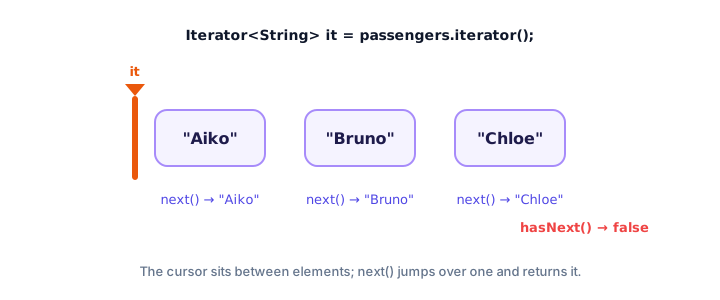
If you call next() when hasNext() is false, you get a NoSuchElementException. That's why you always check first.
How do you remove elements while iterating?
This is the main reason to use an iterator directly. Its remove() method deletes the element that next() just returned and keeps the iterator's position correct. Here a wallet app throws out expired coupons:
import java.util.ArrayList;
import java.util.Iterator;
import java.util.List;

public class ExpiredCoupons {
    public static void main(String[] args) {
        List<Coupon> wallet = new ArrayList<>();
        wallet.add(new Coupon("SPRING10", 2024));
        wallet.add(new Coupon("FREESHIP", 2027));
        wallet.add(new Coupon("WELCOME5", 2023));
        wallet.add(new Coupon("VIP20", 2028));

        int currentYear = 2026;
        Iterator<Coupon> it = wallet.iterator();
        while (it.hasNext()) {
            Coupon coupon = it.next();
            if (coupon.expiresIn() < currentYear) {
                it.remove();   // safe: removes the coupon next() just returned
                System.out.println("Removed expired " + coupon.code());
            }
        }

        System.out.println("Still valid:");
        for (Coupon coupon : wallet) {
            System.out.println("  " + coupon.code() + " (until " + coupon.expiresIn() + ")");
        }
    }
}

record Coupon(String code, int expiresIn) {
}
Removed expired SPRING10
Removed expired WELCOME5
Still valid:
FREESHIP (until 2027)
VIP20 (until 2028)Two rules for remove(): call next() first, and call remove() at most once per next(). Breaking either rule throws an IllegalStateException.
💡 Tip
For a simple condition, wallet.removeIf(c -> c.expiresIn() < currentYear) does the same job in one line (it uses an iterator internally). Use an explicit iterator when you also need to do something with each removed element, like printing it or counting it.
What is ConcurrentModificationException?
Suppose you skip the iterator and write the obvious code:
for (Coupon coupon : wallet) {
    if (coupon.expiresIn() < currentYear) {
        wallet.remove(coupon);   // changes the list behind the loop's back
    }
}
This usually crashes with java.util.ConcurrentModificationException. The for-each loop is secretly using an iterator, and every collection keeps a modification counter. When you change the list directly with wallet.remove(...), the counter changes, and the next time the hidden iterator calls next(), it notices the list changed without its knowledge and stops with this exception. That's called fail-fast behavior: Java prefers to stop immediately rather than continue with confusing results.
Despite its name, the exception has nothing to do with threads here. It simply means "the collection was modified while being iterated". The fixes are always the same: use iterator.remove(), use removeIf, or collect the items to remove in a separate list and remove them after the loop.
Removing entries from a map while iterating
Maps aren't collections, but their entrySet(), keySet() and values() views are, so you can iterate those. Removing through the view's iterator removes the entry from the map. A bakery clears sold-out items from its display:
import java.util.Iterator;
import java.util.LinkedHashMap;
import java.util.Map;

public class SoldOut {
    public static void main(String[] args) {
        Map<String, Integer> stock = new LinkedHashMap<>();
        stock.put("Bagel", 6);
        stock.put("Muffin", 0);
        stock.put("Scone", 3);
        stock.put("Brownie", 0);

        Iterator<Map.Entry<String, Integer>> it = stock.entrySet().iterator();
        while (it.hasNext()) {
            Map.Entry<String, Integer> entry = it.next();
            if (entry.getValue() == 0) {
                it.remove();
            }
        }
        System.out.println("On the counter: " + stock);
    }
}
On the counter: {Bagel=6, Scone=3}The type Iterator<Map.Entry<String, Integer>> looks long, but it just means "an iterator over the map's entries". You can shorten the declaration with var: var it = stock.entrySet().iterator();.
ListIterator: moving both ways and replacing
Lists offer a more powerful version called ListIterator, from list.listIterator(). On top of the normal methods, it can go backwards with hasPrevious() and previous(), tell you positions with nextIndex(), replace the current element with set(), and insert with add(). A store applies a 10% discount to every price in place:
import java.util.ArrayList;
import java.util.List;
import java.util.ListIterator;

public class PriceUpdate {
    public static void main(String[] args) {
        List<Double> prices = new ArrayList<>(List.of(20.0, 45.0, 12.5));

        ListIterator<Double> it = prices.listIterator();
        while (it.hasNext()) {
            int index = it.nextIndex();
            double price = it.next();
            it.set(price * 0.9);            // replace with a 10% discount
            System.out.println("Item " + index + ": " + price + " -> " + price * 0.9);
        }

        System.out.print("Backwards:");
        while (it.hasPrevious()) {
            System.out.print(" " + it.previous());
        }
        System.out.println();
    }
}
Item 0: 20.0 -> 18.0
Item 1: 45.0 -> 40.5
Item 2: 12.5 -> 11.25
Backwards: 11.25 40.5 18.0After the forward loop, the cursor sits at the end, so the backward loop starts from the last element. ListIterator only exists for lists; sets and maps don't have positions to move between.
For-each loops use an iterator under the hood
When you write a for-each loop over a collection, the compiler turns it into iterator code for you. These two loops do the same thing:
for (String name : passengers) {
    System.out.println(name);
}

// is translated into roughly:
Iterator<String> it = passengers.iterator();
while (it.hasNext()) {
    String name = it.next();
    System.out.println(name);
}
Use for-each whenever you just read elements; it's shorter and you can't misuse next(). Switch to an explicit iterator when you need remove(), or a ListIterator when you need to go backwards or replace elements. (For-each over an array uses a plain index loop instead, since arrays have no iterator.)
Making your own class Iterable
The for-each loop works with anything that implements the Iterable interface. It has one method, iterator(), that returns an Iterator. Implement it, and your own class works in for-each loops. This rocket launch timer counts down using an anonymous class as its iterator:
import java.util.Iterator;
import java.util.NoSuchElementException;

public class Countdown {
    public static void main(String[] args) {
        LaunchTimer timer = new LaunchTimer(5);
        for (int second : timer) {
            System.out.print(second + "... ");
        }
        System.out.println("Liftoff!");
    }
}

class LaunchTimer implements Iterable<Integer> {
    private final int start;

    LaunchTimer(int start) {
        this.start = start;
    }

    @Override
    public Iterator<Integer> iterator() {
        return new Iterator<Integer>() {
            private int current = start;

            @Override
            public boolean hasNext() {
                return current > 0;
            }

            @Override
            public Integer next() {
                if (!hasNext()) {
                    throw new NoSuchElementException();
                }
                return current--;
            }
        };
    }
}
5... 4... 3... 2... 1... Liftoff!The iterator keeps its own current counter, so every for-each loop over the same timer starts fresh from 5. That's why iterator() returns a new iterator each time.
Common mistakes with iterators
1. Calling next() twice in one pass
if (it.next().startsWith("A")) { print(it.next()); } reads two different elements and can run past the end. Store the result in a variable: String name = it.next();.
2. Removing through the collection instead of the iterator
Inside an iterator loop, call it.remove(), never list.remove(...), or you'll get ConcurrentModificationException.
3. Calling remove() before next()
remove() deletes the element next() just returned. Calling it first, or twice in a row, throws IllegalStateException.
4. Reusing a finished iterator
Once hasNext() is false, the iterator is used up. Call iterator() again to start over.
5. Calling remove() on an immutable collection
Iterators from List.of(...) don't support remove() and throw UnsupportedOperationException. Copy into an ArrayList first.
Practice exercise
🏋️ Try it yourself
A thermostat logs temperatures, but a faulty sensor sometimes records -999. Start with the readings 21, -999, 22, 23, -999, -999, 22 in an ArrayList. Use an Iterator to remove every -999, count how many you removed, and print the count and the clean list. (Notice the two -999s in a row: an index loop would skip one of them.)
Show solution
import java.util.ArrayList;
import java.util.Iterator;
import java.util.List;

public class SensorReadings {
    public static void main(String[] args) {
        List<Integer> readings = new ArrayList<>(List.of(21, -999, 22, 23, -999, -999, 22));

        int errors = 0;
        Iterator<Integer> it = readings.iterator();
        while (it.hasNext()) {
            if (it.next() == -999) {
                it.remove();
                errors++;
            }
        }

        System.out.println("Removed " + errors + " error readings");
        System.out.println("Clean data: " + readings);
    }
}
Removed 3 error readings
Clean data: [21, 22, 23, 22]it.next() == -999 compares an Integer with an int, so Java unboxes the Integer and compares the numbers. You'll see why that matters in the next lesson.
What's next?
Throughout this chapter you've written Integer instead of int and Double instead of double. Next, find out what these wrapper types are, how Java converts between them automatically, and the surprising == trap they hide: Java wrapper classes.
Key takeaways
- An Iterator walks through a collection with hasNext(), next() and remove().
- Call next() exactly once per loop pass and store the result in a variable.
- iterator.remove() is the safe way to delete elements while looping; removeIf is a one-line alternative.
- Changing a collection directly inside a for-each loop throws ConcurrentModificationException (fail-fast behavior).
- ListIterator can move backwards, report indexes, and replace or insert elements in a list.
- Every for-each loop over a collection uses an Iterator, and any class that implements Iterable works in a for-each loop.
Frequently asked questions
What is an Iterator in Java?
An Iterator is an object from java.util that lets you step through a collection one element at a time. You get one with collection.iterator() and use hasNext() to check for more elements, next() to get the next one and remove() to delete it.
How do I avoid ConcurrentModificationException?
Do not call the collection's own add or remove methods while looping over it with for-each. Use iterator.remove(), call removeIf, or collect the items in a separate list and remove them after the loop.
What is the difference between Iterator and ListIterator?
Iterator works with every collection and only moves forward. ListIterator works only with lists and can also move backward, report the current index, and replace or insert elements with set() and add().
What is the difference between Iterator and Iterable?
Iterable is something that can be looped over; it has one method, iterator(). Iterator is the object that does the looping, with hasNext() and next(). Collections are Iterable, and each call to iterator() returns a fresh Iterator.
Does the for-each loop use an Iterator?
Yes, for collections. The compiler turns a for-each loop into code that calls iterator(), then hasNext() and next() in a while loop. For arrays it uses an index-based loop instead.