Java Collections Framework
Updated 11 min read Aimerscrew
Real programs rarely deal with just one value. A music app holds hundreds of songs, a store tracks thousands of products, and a chat app keeps a growing list of messages. The Java Collections Framework is Java's built-in toolbox for storing and working with groups of objects like these. In this lesson, you'll see why arrays aren't enough, meet the four main kinds of collections, and learn how to choose the right one for a job.
🌍 Real-life example
Think about a kitchen. You keep a shopping list in order (and "milk" can appear twice), a spice rack where each spice appears once, a queue of orders at the counter where the first customer is served first, and a recipe index where you look up a dish name to find its page number. Those four ideas are exactly Java's List, Set, Queue and Map.
What is the Java Collections Framework?
A collection is an object that holds a group of other objects, called its elements. The Collections Framework is the family of interfaces and classes in the java.util package that Java gives you for this: lists, sets, queues and maps, plus helper methods for sorting and searching.
It's called a framework because everything follows a shared design. The interfaces (like List) describe what a collection can do, and the classes (like ArrayList) are the actual implementations that do the work. If you need a refresher on interfaces, see Java interfaces.
Why not just use arrays?
You already know Java arrays. They're fast and simple, but they have one big limitation: an array's size is fixed when you create it. If you make room for 3 guests and a fourth one shows up, you have to create a bigger array and copy everything over yourself. A collection like ArrayList does that work for you and grows automatically:
import java.util.ArrayList;
import java.util.Arrays;

public class FixedSeats {
    public static void main(String[] args) {
        String[] guestArray = new String[3];
        guestArray[0] = "Ava";
        guestArray[1] = "Ben";
        guestArray[2] = "Chen";
        // guestArray[3] = "Dina";  // would crash: the array has only 3 slots
        System.out.println("Array:     " + Arrays.toString(guestArray));

        ArrayList<String> guestList = new ArrayList<>();
        guestList.add("Ava");
        guestList.add("Ben");
        guestList.add("Chen");
        guestList.add("Dina");     // no problem, the list just grows
        guestList.add("Eli");
        System.out.println("ArrayList: " + guestList);
        System.out.println("Guests:    " + guestList.size());
    }
}
Array: [Ava, Ben, Chen]
ArrayList: [Ava, Ben, Chen, Dina, Eli]
Guests: 5Notice two more wins: the list prints nicely without Arrays.toString(), and size() tells you how many elements are actually stored, not how many slots you reserved.
The <String> part says "this list holds Strings". It's called a type parameter, and you'll learn all about it in Java generics. For now, read ArrayList<String> as "an ArrayList of Strings". The empty <> on the right (the diamond) lets Java fill in the type for you.
The main interfaces: List, Set, Queue and Map
Almost every collection you'll use belongs to one of four families:
- List: an ordered sequence. Elements keep their position (index 0, 1, 2...) and duplicates are allowed. Example: a playlist.
- Set: a group with no duplicates. Adding an element that's already there does nothing. Example: the tags on a blog post.
- Queue and Deque: elements waiting to be processed, usually first in, first out. A Deque (say "deck") is a double-ended queue that can add and remove at both ends. Example: orders at a food truck.
- Map: a lookup table of key → value pairs. Each key appears once. Example: product name → stock count.
Here's all four in one short program:
import java.util.ArrayDeque;
import java.util.ArrayList;
import java.util.Deque;
import java.util.LinkedHashMap;
import java.util.LinkedHashSet;
import java.util.List;
import java.util.Map;
import java.util.Set;

public class CollectionsTour {
    public static void main(String[] args) {
        // List: ordered, allows duplicates, access by index
        List<String> playlist = new ArrayList<>();
        playlist.add("Intro");
        playlist.add("Sunrise");
        playlist.add("Intro");
        System.out.println("List:  " + playlist + ", first = " + playlist.get(0));

        // Set: no duplicates
        Set<String> tags = new LinkedHashSet<>();
        tags.add("java");
        tags.add("beginner");
        tags.add("java");
        System.out.println("Set:   " + tags);

        // Queue (Deque): first in, first out
        Deque<String> orders = new ArrayDeque<>();
        orders.offer("Pizza");
        orders.offer("Sushi");
        orders.offer("Tacos");
        System.out.println("Queue: serving " + orders.poll() + ", waiting " + orders);

        // Map: key -> value pairs
        Map<String, Integer> stock = new LinkedHashMap<>();
        stock.put("apples", 40);
        stock.put("pears", 12);
        System.out.println("Map:   " + stock + ", pears = " + stock.get("pears"));
    }
}
List: [Intro, Sunrise, Intro], first = Intro
Set: [java, beginner]
Queue: serving Pizza, waiting [Sushi, Tacos]
Map: {apples=40, pears=12}, pears = 12The list kept the duplicate "Intro", the set silently ignored the second "java", the queue served "Pizza" first because it arrived first, and the map looked up "pears" by its key.
The collections hierarchy
List, Set and Queue all extend a parent interface called Collection, which itself extends Iterable (the thing that makes for-each loops work). Map is the odd one out: it stores pairs rather than single elements, so it has its own separate branch.
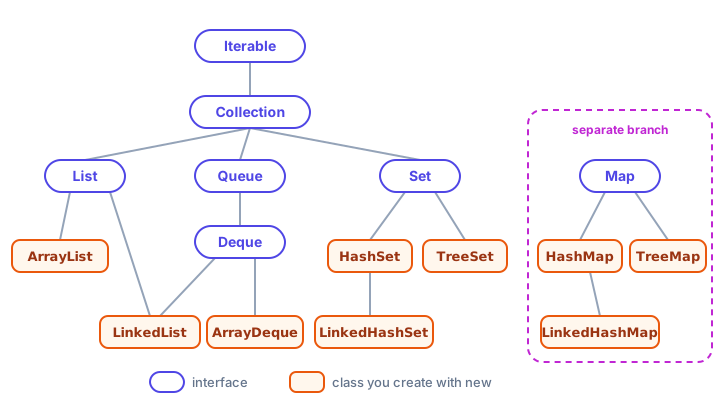
You don't need to memorize the whole tree. The classes you'll use 90% of the time are ArrayList, HashMap, HashSet and ArrayDeque, and each gets its own lesson in this chapter.
Common methods every collection has
Because List, Set and Queue all extend Collection, they share a core set of methods. Learn these once and they work everywhere:
| Method | What it does |
|---|---|
add(e) | Adds an element |
addAll(other) | Adds every element from another collection |
remove(e) | Removes one matching element |
contains(e) | Returns true if the element is in the collection |
size() | Number of elements |
isEmpty() | true when size is 0 |
clear() | Removes everything |
import java.util.ArrayList;
import java.util.Collection;
import java.util.List;

public class CommonMethods {
    public static void main(String[] args) {
        Collection<String> backpack = new ArrayList<>();
        System.out.println("Empty at start? " + backpack.isEmpty());

        backpack.add("water bottle");
        backpack.add("map");
        backpack.addAll(List.of("snacks", "jacket"));

        System.out.println(backpack);
        System.out.println("Items: " + backpack.size());
        System.out.println("Has a map? " + backpack.contains("map"));

        backpack.remove("jacket");
        System.out.println("After remove: " + backpack);

        backpack.clear();
        System.out.println("After clear: " + backpack + ", size " + backpack.size());
    }
}
Empty at start? true
[water bottle, map, snacks, jacket]
Items: 4
Has a map? true
After remove: [water bottle, map, snacks]
After clear: [], size 0Program to the interface
You may have noticed a pattern: the variable's type is the interface, and only the new part names the class.
List<String> songs = new ArrayList<>();      // interface on the left
Map<String, Integer> stock = new HashMap<>();  // class on the right
This is called programming to the interface. The rest of your code only uses List methods, so if you later decide a LinkedList fits better, you change one word and nothing else breaks. It's the same idea as polymorphism: a List variable can refer to any kind of list.
Which collection should I use?
Ask yourself two questions: Do I look things up by a key? and Do duplicates or order matter? Then use this table:
| You need... | Use | Real-life example |
|---|---|---|
| An ordered list, access by position, duplicates OK | ArrayList | Playlist, shopping cart |
| Fast adding/removing at both ends | ArrayDeque | Undo history, print queue |
| Unique items, order doesn't matter | HashSet | Unique visitors to a site |
| Unique items in the order you added them | LinkedHashSet | Guest list in arrival order |
| Unique items kept sorted | TreeSet | Leaderboard of distinct scores |
| Look up a value by a key | HashMap | Phone contacts, word counts |
| Key lookup, keys in insertion order | LinkedHashMap | Menu items in the order listed |
| Key lookup, keys sorted | TreeMap | Dictionary, calendar by date |
💡 Tip
When in doubt, start with ArrayList for sequences and HashMap for lookups. They're the fastest general-purpose choices, and switching later is easy if you programmed to the interface.
Immutable collections with List.of, Set.of and Map.of
Sometimes a group of values should never change, like the sizes on a coffee menu. Since Java 9, the factory methods List.of(), Set.of() and Map.of() create small immutable collections in one line. "Immutable" means they can't be changed after creation: adding or removing throws an UnsupportedOperationException.
import java.util.List;
import java.util.Map;
import java.util.Set;

public class FixedMenu {
    public static void main(String[] args) {
        List<String> sizes = List.of("Small", "Medium", "Large");
        Set<String> vipCodes = Set.of("GOLD", "PLATINUM");
        Map<String, Double> prices = Map.of("Small", 2.50, "Medium", 3.25, "Large", 3.90);

        System.out.println("Sizes: " + sizes);
        System.out.println("Is SILVER a VIP code? " + vipCodes.contains("SILVER"));
        System.out.println("Medium costs $" + prices.get("Medium"));

        try {
            sizes.add("Extra large");
        } catch (UnsupportedOperationException e) {
            System.out.println("Can't change a List.of list!");
        }
    }
}
Sizes: [Small, Medium, Large]
Is SILVER a VIP code? false
Medium costs $3.25
Can't change a List.of list!📝 Note
Set.of() and Map.of() don't promise any order. If you print one, the order can even change between runs of the same program. That's why the example above only asks questions (contains, get) instead of printing the whole set or map. List.of() always keeps your order. Also, these factories reject null values, and Set.of() throws an error if you pass duplicates.
Need a changeable copy? Wrap it: new ArrayList<>(List.of("a", "b")) gives you a normal, growable list that starts with those values.
Collections hold objects, not primitives
A collection can only store objects, so you can't write List<int>. Instead you use the matching wrapper class: List<Integer>, List<Double>, Set<Character>. Java converts between int and Integer automatically, so scores.add(95) just works. You'll see how in Java wrapper classes.
Common mistakes with collections
1. Using a primitive type in angle brackets
ArrayList<int> scores doesn't compile ("unexpected type"). Write ArrayList<Integer> scores.
2. Confusing Collection and Collections
Collection (no s) is the parent interface. Collections (with an s) is a helper class full of static methods like Collections.sort(), just like Arrays is for arrays.
3. Trying to change a List.of list
List.of(...) is fixed forever. Calling add or remove on it throws UnsupportedOperationException at run time. Copy it into a new ArrayList<>(...) if you need to change it.
4. Expecting a HashSet or HashMap to keep your order
Hash-based collections arrange elements for speed, not for display. Use LinkedHashSet/LinkedHashMap for insertion order or TreeSet/TreeMap for sorted order.
5. Forgetting the import
Collections live in java.util. Without import java.util.ArrayList; (or import java.util.*;) you get "cannot find symbol".
Practice exercise
🏋️ Try it yourself
For each situation, pick the best collection type: (a) the songs in a road-trip playlist, (b) the country codes of visitors, each counted once, (c) a word and how many times it appears in a book, (d) customers waiting at a bank counter. Then write a program that creates a List of three songs (one repeated) and a LinkedHashSet built from that list, and prints both.
Show solution
(a) ArrayList, (b) HashSet (or LinkedHashSet to keep arrival order), (c) HashMap<String, Integer>, (d) ArrayDeque used as a queue.
import java.util.ArrayList;
import java.util.LinkedHashSet;
import java.util.List;
import java.util.Set;

public class RoadTrip {
    public static void main(String[] args) {
        List<String> playlist = new ArrayList<>();
        playlist.add("Highway Song");
        playlist.add("Desert Wind");
        playlist.add("Highway Song");

        Set<String> uniqueSongs = new LinkedHashSet<>(playlist);

        System.out.println("Playlist: " + playlist);
        System.out.println("Unique:   " + uniqueSongs);
    }
}
Playlist: [Highway Song, Desert Wind, Highway Song]
Unique: [Highway Song, Desert Wind]Passing a list to the LinkedHashSet constructor copies its elements, dropping the duplicate but keeping the first-seen order.
What's next?
Now you know the big picture of the Java Collections Framework. Next, dive into the collection you'll use more than any other: Java ArrayList, a resizable list with methods to add, get, change and remove elements.
Key takeaways
- The Java Collections Framework is a set of interfaces and classes in java.util for storing groups of objects that can grow and shrink.
- Arrays have a fixed size; collections such as ArrayList resize automatically.
- List keeps order and allows duplicates, Set rejects duplicates, Queue/Deque processes items in order, and Map stores key-value pairs.
- List, Set and Queue extend the Collection interface; Map is a separate branch.
- Declare variables with the interface type (List, Set, Map) and create a concrete class (ArrayList, HashSet, HashMap).
- List.of, Set.of and Map.of create small immutable collections; Set.of and Map.of have no guaranteed order.
- Collections store objects, so use wrapper types like Integer instead of int.
Frequently asked questions
What is the Collections Framework in Java?
It is a group of interfaces (Collection, List, Set, Queue, Deque, Map) and classes (ArrayList, LinkedList, HashSet, TreeSet, ArrayDeque, HashMap, TreeMap and more) in the java.util package for storing and processing groups of objects.
What is the difference between an array and a collection in Java?
An array has a fixed size set when it is created and can hold primitives. A collection such as ArrayList grows and shrinks automatically, comes with many useful methods, but only stores objects, so int values are stored as Integer.
Is Map part of the Collection interface?
No. Map is part of the Collections Framework, but it does not extend Collection because it stores key-value pairs instead of single elements. You can still get its keys, values or entries as collections.
What is the difference between Collection and Collections in Java?
Collection is the root interface that List, Set and Queue extend. Collections is a utility class with static helper methods such as sort, reverse, max and unmodifiableList.
Which Java collection should I use by default?
Use ArrayList for an ordered list of items and HashMap for looking up values by key. Pick a Set when duplicates must be rejected and ArrayDeque when you need a stack or queue.