Java Streams
Updated 12 min read Aimerscrew
Java streams give you a way to ask questions about a whole collection in a few readable lines: "which orders are over $40?", "what's the average price per category?", "list the names of available books, sorted". Instead of writing a loop with counters and temporary lists, you build a pipeline of small steps and let Java run it. In this lesson, you'll learn how a stream pipeline works, the most useful intermediate and terminal operations, how Collectors group and summarize data, why streams are lazy, and when a plain loop is still the better choice.
🌍 Real-life example
Picture an airport baggage system. Suitcases come off the plane (the source), pass a scanner that pulls out anything oversized (a filter), get a destination tag stuck on (a map), and finally land on the right carousel (the terminal step). Nobody carries every bag by hand; each station does one simple job as bags flow past. A stream works exactly like that.
What is a stream in Java?
A stream is a sequence of elements that flows through a chain of operations. It's not a data structure: it doesn't store anything. It reads from a source (usually a collection), processes each element, and produces a result. Streams live in the java.util.stream package and were added in Java 8.
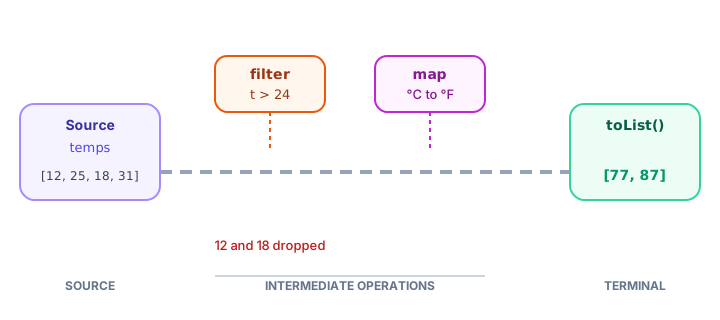
Every stream pipeline has three parts:
- Source: where elements come from, such as
list.stream(). - Intermediate operations: steps that return a new stream, such as
filter,mapandsorted. You can chain as many as you like. - Terminal operation: the final step that produces a result or side effect, such as
toList(),count()orforEach. It ends the stream.
Your first stream: loop vs stream
Here's the same task done twice: find the products in the "Audio" category and turn their names into upper case. The products are records.
import java.util.ArrayList;
import java.util.List;

public class LoopVsStream {
    public static void main(String[] args) {
        List<Product> products = List.of(
                new Product("Headphones", "Audio", 59.99),
                new Product("USB cable", "Accessories", 7.50),
                new Product("Speaker", "Audio", 89.00),
                new Product("Phone case", "Accessories", 14.99),
                new Product("Earbuds", "Audio", 29.95));

        // The loop way
        List<String> loopResult = new ArrayList<>();
        for (Product p : products) {
            if (p.category().equals("Audio")) {
                loopResult.add(p.name().toUpperCase());
            }
        }
        System.out.println("Loop:   " + loopResult);

        // The stream way
        List<String> streamResult = products.stream()
                .filter(p -> p.category().equals("Audio"))
                .map(p -> p.name().toUpperCase())
                .toList();
        System.out.println("Stream: " + streamResult);
    }
}

record Product(String name, String category, double price) {
}
Loop: [HEADPHONES, SPEAKER, EARBUDS]
Stream: [HEADPHONES, SPEAKER, EARBUDS]The loop says how to do it step by step: make a list, loop, check, add. The stream says what you want: keep the audio products, take their names in upper case, give me a list. Each lambda is a functional interface: filter takes a Predicate, and map takes a Function.
Intermediate operations: filter, map, sorted, distinct, limit, skip
These six operations cover most everyday needs. Each returns a new stream, so you can chain them.
| Operation | What it does |
|---|---|
filter(predicate) | Keeps only elements where the predicate is true |
map(function) | Turns each element into something else |
sorted() / sorted(comparator) | Sorts in natural order, or by a Comparator |
distinct() | Removes duplicates (using equals) |
limit(n) | Keeps only the first n elements |
skip(n) | Throws away the first n elements |
Let's try them on a food delivery app's recent searches:
import java.util.List;

public class IntermediateOps {
    public static void main(String[] args) {
        List<String> searches = List.of("pizza", "sushi", "tacos", "pizza", "ramen",
                "burgers", "sushi", "curry", "pho");

        System.out.println("filter:   " + searches.stream().filter(s -> s.contains("u")).toList());
        System.out.println("map:      " + searches.stream().map(String::length).toList());
        System.out.println("distinct: " + searches.stream().distinct().toList());
        System.out.println("sorted:   " + searches.stream().distinct().sorted().toList());
        System.out.println("limit:    " + searches.stream().limit(3).toList());
        System.out.println("skip:     " + searches.stream().skip(6).toList());
        System.out.println("original: " + searches);
    }
}
filter: [sushi, burgers, sushi, curry]
map: [5, 5, 5, 5, 5, 7, 5, 5, 3]
distinct: [pizza, sushi, tacos, ramen, burgers, curry, pho]
sorted: [burgers, curry, pho, pizza, ramen, sushi, tacos]
limit: [pizza, sushi, tacos]
skip: [sushi, curry, pho]
original: [pizza, sushi, tacos, pizza, ramen, burgers, sushi, curry, pho]Look at the last line: the original list is untouched. Streams never modify their source; they always produce something new.
Terminal operations: count, sum, average, min, max and more
Nothing happens in a stream until you call a terminal operation. Here's a range of them answering questions about an online store's orders:
import java.util.Comparator;
import java.util.List;

public class OrderStats {
    public static void main(String[] args) {
        List<Order> orders = List.of(
                new Order(1001, "Olivia", "London", 42.50, 3),
                new Order(1002, "Kenji", "Tokyo", 18.00, 1),
                new Order(1003, "Amara", "Lagos", 95.20, 5),
                new Order(1004, "Lucas", "Toronto", 12.30, 1),
                new Order(1005, "Sofia", "London", 67.00, 2));

        long bigOrders = orders.stream().filter(o -> o.total() > 40).count();
        int totalItems = orders.stream().mapToInt(Order::items).sum();
        double average = orders.stream().mapToDouble(Order::total).average().orElse(0);
        Order largest = orders.stream().max(Comparator.comparingDouble(Order::total)).get();
        Order smallest = orders.stream().min(Comparator.comparingDouble(Order::total)).get();

        System.out.println("Orders over $40: " + bigOrders);
        System.out.println("Items sold: " + totalItems);
        System.out.printf("Average order: $%.2f%n", average);
        System.out.println("Largest: #" + largest.id() + " by " + largest.customer());
        System.out.println("Smallest: #" + smallest.id() + " by " + smallest.customer());

        System.out.println("Any from Tokyo? " + orders.stream().anyMatch(o -> o.city().equals("Tokyo")));
        System.out.println("All over $10? " + orders.stream().allMatch(o -> o.total() > 10));
        System.out.println("None over $100? " + orders.stream().noneMatch(o -> o.total() > 100));

        int itemsByReduce = orders.stream().map(Order::items).reduce(0, (a, b) -> a + b);
        System.out.println("Items (reduce): " + itemsByReduce);

        orders.stream()
                .filter(o -> o.city().equals("London"))
                .forEach(o -> System.out.println("London order: " + o.customer()));
    }
}

record Order(int id, String customer, String city, double total, int items) {
}
Orders over $40: 3
Items sold: 12
Average order: $47.00
Largest: #1003 by Amara
Smallest: #1004 by Lucas
Any from Tokyo? true
All over $10? true
None over $100? true
Items (reduce): 12
London order: Olivia
London order: SofiaA few things to notice:
mapToIntandmapToDoubleturn a stream of objects into a stream of numbers, which unlockssum()andaverage().average(),min()andmax()return anOptional, because an empty stream has no average or maximum.orElse(0)andget()take the value out. You'll learn the safe way to do this in Java Optional.anyMatch,allMatchandnoneMatchanswer yes/no questions and stop as soon as they know the answer.reduce(0, (a, b) -> a + b)combines all elements into one value, starting from0. Here it adds up the items, the same result assum().
💡 Tip
toList() (Java 16+) returns a list you can't modify. If you need to add to the result later, use collect(Collectors.toList()) or wrap it: new ArrayList<>(stream.toList()).
Collectors: joining, groupingBy, counting and partitioningBy
The collect terminal operation takes a collector, a recipe for gathering results. The Collectors class has ready-made ones for building strings, maps and summaries:
import java.util.List;
import java.util.Map;
import java.util.TreeMap;
import java.util.stream.Collectors;

public class StoreReport {
    public static void main(String[] args) {
        List<Product> products = List.of(
                new Product("Headphones", "Audio", 59.99),
                new Product("USB cable", "Accessories", 7.50),
                new Product("Speaker", "Audio", 89.00),
                new Product("Phone case", "Accessories", 14.99),
                new Product("Earbuds", "Audio", 29.95),
                new Product("Smartwatch", "Wearables", 199.00));

        String names = products.stream()
                .map(Product::name)
                .collect(Collectors.joining(", "));
        System.out.println("All: " + names);

        Map<String, List<String>> byCategory = products.stream()
                .collect(Collectors.groupingBy(Product::category, TreeMap::new,
                        Collectors.mapping(Product::name, Collectors.toList())));
        System.out.println("By category: " + byCategory);

        Map<String, Long> countPerCategory = products.stream()
                .collect(Collectors.groupingBy(Product::category, TreeMap::new, Collectors.counting()));
        System.out.println("Count: " + countPerCategory);

        Map<String, Double> avgPrice = products.stream()
                .collect(Collectors.groupingBy(Product::category, TreeMap::new,
                        Collectors.averagingDouble(Product::price)));
        avgPrice.forEach((category, avg) -> System.out.printf("Average %s: $%.2f%n", category, avg));

        Map<Boolean, List<String>> underThirty = products.stream()
                .collect(Collectors.partitioningBy(p -> p.price() < 30,
                        Collectors.mapping(Product::name, Collectors.toList())));
        System.out.println("Under $30: " + underThirty.get(true));
        System.out.println("$30 or more: " + underThirty.get(false));
    }
}

record Product(String name, String category, double price) {
}
All: Headphones, USB cable, Speaker, Phone case, Earbuds, Smartwatch
By category: {Accessories=[USB cable, Phone case], Audio=[Headphones, Speaker, Earbuds], Wearables=[Smartwatch]}
Count: {Accessories=2, Audio=3, Wearables=1}
Average Accessories: $11.25
Average Audio: $59.65
Average Wearables: $199.00
Under $30: [USB cable, Phone case, Earbuds]
$30 or more: [Headphones, Speaker, Smartwatch]joining(", ")glues strings together with a separator.groupingBy(key, TreeMap::new, downstream)builds a map from category to something. TheTreeMap::newpart asks for aTreeMap, so the categories come out in alphabetical order. Without it you get a HashMap, whose order isn't guaranteed.- The third argument, the downstream collector, decides what each group holds:
mapping(...)for a list of names,counting()for how many,averagingDouble(...)for the average. partitioningBy(predicate)splits elements into exactly two groups,trueandfalse.
Why are streams called lazy?
Intermediate operations don't run when you write them. They only describe the work. When the terminal operation starts, Java pulls elements through the pipeline one at a time, and it stops as soon as it has enough. This program prints a message every time a lambda actually runs:
import java.util.List;

public class LazyStream {
    public static void main(String[] args) {
        List<Integer> temps = List.of(12, 25, 31, 18, 29, 33);

        List<Integer> firstTwoHot = temps.stream()
                .filter(t -> {
                    System.out.println("checking " + t);
                    return t > 24;
                })
                .map(t -> {
                    System.out.println("  converting " + t);
                    return t * 9 / 5 + 32;
                })
                .limit(2)
                .toList();

        System.out.println("Result in F: " + firstTwoHot);
    }
}
checking 12
checking 25
converting 25
checking 31
converting 31
Result in F: [77, 87]Each element goes all the way through filter and map before the next one starts. And because limit(2) was satisfied after 31, the values 18, 29 and 33 were never even checked. This is called laziness, and it saves work on big data sets.
Can you reuse a stream?
No. A stream can be used only once. After a terminal operation it's "consumed", and touching it again throws an IllegalStateException:
import java.util.List;
import java.util.stream.Stream;

public class NoReuse {
    public static void main(String[] args) {
        Stream<String> seats = List.of("1A", "1B", "1C").stream();

        System.out.println("Seats: " + seats.count());
        try {
            seats.forEach(System.out::println);   // second use of the same stream
        } catch (IllegalStateException e) {
            System.out.println("Error: " + e.getMessage());
        }
    }
}
Seats: 3
Error: stream has already been operated upon or closedThe fix is simple: don't store streams in variables. Call list.stream() again whenever you need a new pipeline, as every other example in this lesson does.
Streams vs loops: which should you use?
| Stream | Loop | |
|---|---|---|
| Style | Describes what you want | Spells out how to do it |
| Best for | Filtering, transforming, grouping, summarizing | Complex step-by-step logic, early break, changing variables |
| Changing local variables | Not allowed in lambdas | Easy |
| Checked exceptions | Awkward inside lambdas | Easy with try-catch |
| Debugging | Harder to step through | Easy to step through line by line |
| Reusable | Single use | Run as often as you like |
Neither is "better". Use a stream when the task reads naturally as a pipeline, and a for loop when you need fine control. Most real programs use both.
⚠️ Be careful
Avoid lambdas with side effects, such as adding to an outside list inside map or filter. Use forEach only as a terminal step for output, and let toList() or collect build results for you.
Common mistakes with streams
1. Forgetting the terminal operation
orders.stream().filter(o -> o.total() > 40); does nothing at all. Without a terminal operation, the pipeline never runs.
2. Reusing a stream
Calling two terminal operations on the same stream variable throws IllegalStateException. Create a new stream each time.
3. Expecting the original list to change
names.stream().sorted(); doesn't sort names. Capture the result: List<String> sorted = names.stream().sorted().toList();
4. Adding to a list returned by toList()
The list from toList() is unmodifiable, so calling add on it throws UnsupportedOperationException.
5. Printing a groupingBy map and expecting sorted keys
Plain groupingBy gives you a map with no guaranteed order (currently a HashMap). Pass TreeMap::new when you want keys in order.
Practice exercise
🏋️ Try it yourself
A library has these books as a record Book(String title, String genre, int pages, boolean borrowed): Dune (Sci-Fi, 412, borrowed), Emma (Classic, 474, available), Neuromancer (Sci-Fi, 271, available), Dracula (Classic, 418, borrowed), The Martian (Sci-Fi, 369, borrowed), Matilda (Children, 240, available). Using streams, print:
- The titles of available books, sorted alphabetically.
- The total number of pages of all books.
- How many books there are per genre, with genres in alphabetical order.
Show solution
import java.util.List;
import java.util.Map;
import java.util.TreeMap;
import java.util.stream.Collectors;

public class LibraryStats {
    public static void main(String[] args) {
        List<Book> books = List.of(
                new Book("Dune", "Sci-Fi", 412, true),
                new Book("Emma", "Classic", 474, false),
                new Book("Neuromancer", "Sci-Fi", 271, false),
                new Book("Dracula", "Classic", 418, true),
                new Book("The Martian", "Sci-Fi", 369, true),
                new Book("Matilda", "Children", 240, false));

        List<String> available = books.stream()
                .filter(b -> !b.borrowed())
                .map(Book::title)
                .sorted()
                .toList();
        System.out.println("Available: " + available);

        int totalPages = books.stream().mapToInt(Book::pages).sum();
        System.out.println("Total pages: " + totalPages);

        Map<String, Long> perGenre = books.stream()
                .collect(Collectors.groupingBy(Book::genre, TreeMap::new, Collectors.counting()));
        System.out.println("Books per genre: " + perGenre);
    }
}

record Book(String title, String genre, int pages, boolean borrowed) {
}
Available: [Emma, Matilda, Neuromancer]
Total pages: 2184
Books per genre: {Children=1, Classic=2, Sci-Fi=3}What's next?
You saw that max(), min() and average() return an Optional instead of a plain value. Next, learn what that means and how it protects you from NullPointerException in Java Optional.
Key takeaways
- A Java stream processes elements as a pipeline: a source, zero or more intermediate operations, and one terminal operation.
- Intermediate operations like filter, map, sorted, distinct, limit and skip return a new stream; terminal operations like toList, count, forEach and collect produce the result.
- Streams never change their source collection.
- Use mapToInt or mapToDouble to get sum() and average(); min, max and average return an Optional.
- Collectors.groupingBy with TreeMap::new groups data into a map with sorted keys; counting, averagingDouble and mapping summarize each group.
- Streams are lazy: nothing runs until the terminal operation, and elements flow through one at a time.
- A stream can be used only once; create a new one with list.stream() each time.
Frequently asked questions
What is a stream in Java?
A stream is a sequence of elements that flows through a pipeline of operations, such as filter, map and collect. It does not store data; it reads from a source like a list and produces a new result without changing the source.
What is the difference between intermediate and terminal operations?
Intermediate operations such as filter and map return a new stream and do not run on their own. A terminal operation such as toList, count or forEach starts the processing and ends the stream.
What is the difference between map and filter in Java streams?
filter keeps or removes elements based on a true or false test, so the stream may get shorter. map transforms every element into a new value, so the stream keeps the same length but may change type.
Are Java streams faster than loops?
Not necessarily. For small collections a plain loop is often slightly faster. Streams are chosen for readability and easy grouping and summarizing, not raw speed.
Why can a Java stream only be used once?
A stream pulls elements from its source as it runs and does not keep them, so after a terminal operation there is nothing left to process. Calling another operation throws IllegalStateException; just call stream() on the collection again.
What does Collectors.groupingBy do?
It groups stream elements into a Map using a key you choose, such as category. A second collector, like counting() or averagingDouble(), decides what each group stores. Pass TreeMap::new to keep the keys sorted.