Java Comparison Operators
Updated 7 min read Aimerscrew
Programs make decisions all the time: Is the cart big enough for free shipping? Did the player beat the high score? Is the suitcase over the weight limit? Each of those questions is answered with Java comparison operators. In this lesson, you'll learn all six, what they give back, how to compare decimal numbers safely, and the classic trap of comparing text with ==.
🌍 Real-life example
At an airport check-in desk, the agent puts your suitcase on the scale and asks one question: "Is it more than 23 kg?" The answer is only ever yes or no. A comparison in Java works the same way: bagWeight > 23.0 is either true or false, never "maybe".
What are comparison operators in Java?
A comparison operator (also called a relational operator) compares two values and gives back a boolean: true or false. You met the boolean type in Java data types.
| Operator | Meaning | Example | Result |
|---|---|---|---|
== | equal to | 5 == 5 | true |
!= | not equal to | 5 != 3 | true |
< | less than | 5 < 3 | false |
> | greater than | 5 > 3 | true |
<= | less than or equal to | 5 <= 5 | true |
>= | greater than or equal to | 3 >= 5 | false |
Two-symbol operators are written with no space in between, and the = always comes second: <= and >=, never =< or =>.
Comparison operators in action
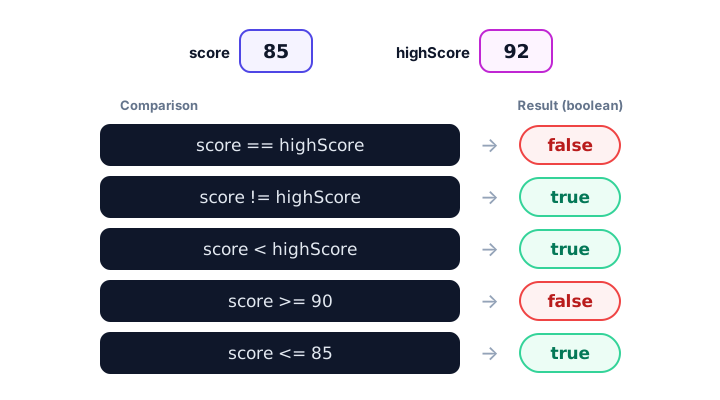
Let's compare a player's score with the high score:
public class CompareBasics {
    public static void main(String[] args) {
        int yourScore = 85;
        int highScore = 92;

        System.out.println("yourScore == highScore: " + (yourScore == highScore));
        System.out.println("yourScore != highScore: " + (yourScore != highScore));
        System.out.println("yourScore <  highScore: " + (yourScore < highScore));
        System.out.println("yourScore >  highScore: " + (yourScore > highScore));
        System.out.println("yourScore <= 85:        " + (yourScore <= 85));
        System.out.println("yourScore >= 90:        " + (yourScore >= 90));
    }
}
yourScore == highScore: false
yourScore != highScore: true
yourScore < highScore: true
yourScore > highScore: false
yourScore <= 85: true
yourScore >= 90: falseThe parentheses around each comparison matter. Without them, Java would try to join the text and the number first and then compare, which doesn't compile. You'll see why in operator precedence.
What does a comparison return in Java?
A comparison is an expression that produces a boolean value, so you can store the answer in a boolean variable and use it later. Giving the result a clear name makes code read like a sentence:
public class FreeShipping {
    public static void main(String[] args) {
        double cartTotal = 42.75;
        double freeShippingMinimum = 50.00;
        int itemsInCart = 3;
        int maxItems = 10;

        boolean getsFreeShipping = cartTotal >= freeShippingMinimum;
        boolean cartIsFull = itemsInCart == maxItems;
        double amountMissing = freeShippingMinimum - cartTotal;

        System.out.println("Free shipping? " + getsFreeShipping);
        System.out.println("Cart full? " + cartIsFull);
        System.out.println("Add $" + amountMissing + " more for free shipping.");
    }
}
Free shipping? false
Cart full? false
Add $7.25 more for free shipping.Soon you'll use these true/false values to choose what the program does next with if-else statements and to control loops.
💡 Tip
Name boolean variables like yes/no questions: isOverweight, hasTicket, canCheckout, getsFreeShipping. Then if (getsFreeShipping) reads naturally.
Comparing different number types and characters
Java can compare an int with a double: it widens the int to a double first. It can also compare char values, because each character is stored as a number (its Unicode code).
public class MixedCompare {
    public static void main(String[] args) {
        System.out.println(5 == 5.0);
        System.out.println(7 / 2 == 3);
        System.out.println('A' < 'B');
        System.out.println('a' > 'Z');
        System.out.println((int) 'a' + " vs " + (int) 'Z');
    }
}
true
true
true
true
97 vs 90Line two is true because 7 / 2 is integer division (3). The last two lines show a surprise: lowercase 'a' is "greater than" uppercase 'Z', because all uppercase letters (65 to 90) come before the lowercase ones (97 to 122) in Unicode.
How do you compare doubles in Java?
Be careful with == on decimal numbers. As you saw in arithmetic operators, many decimals can't be stored exactly, so a calculation can be off by a tiny amount:
public class DoubleCompare {
    public static void main(String[] args) {
        double coffee = 0.1;
        double cookie = 0.2;
        double total = coffee + cookie;

        System.out.println("total = " + total);
        System.out.println("total == 0.3: " + (total == 0.3));

        double tolerance = 0.000001;
        boolean closeEnough = Math.abs(total - 0.3) < tolerance;
        System.out.println("close enough: " + closeEnough);
    }
}
total = 0.30000000000000004
total == 0.3: false
close enough: trueThe safe approach is to check whether two doubles are close enough: subtract them, take the absolute value (the distance, ignoring the minus sign) with Math.abs(), and check that it's smaller than a tiny tolerance. You'll meet Math.abs() and friends properly in the Java Math class.
📝 Note
< and > are usually fine with doubles (a tiny error rarely changes which number is bigger). The problem is mostly == and !=, which demand an exact match.
Why shouldn't you use == to compare Strings?
For text, == doesn't check whether two Strings contain the same letters. It checks whether they are the same object in memory. Two Strings with identical text can be different objects:
public class StringTrap {
    public static void main(String[] args) {
        String saved = "secret";
        String typed = new String("secret");

        System.out.println(saved == typed);
        System.out.println(saved.equals(typed));
    }
}
false
trueBoth variables hold "secret", but == says false. Text typed by a user or read from a file is usually a separate object, so == gives the wrong answer exactly when it matters, like checking a password. Always compare text with .equals(). You'll learn the full story in Java string comparison.
⚠️ Be careful
Use == for primitive values (int, double, char, boolean) and .equals() for Strings and other objects.
Real-world example: checking airline baggage
public class BaggageCheck {
    public static void main(String[] args) {
        double bagWeight = 23.4;
        double weightLimit = 23.0;
        int bagsChecked = 2;
        int bagsIncluded = 1;

        boolean isOverweight = bagWeight > weightLimit;
        boolean paysExtraBag = bagsChecked > bagsIncluded;

        System.out.println("Overweight: " + isOverweight);
        System.out.println("Extra bag fee: " + paysExtraBag);
    }
}
Overweight: true
Extra bag fee: trueNotice the choice between > and >=. A bag of exactly 23.0 kg is allowed, so the rule is "more than the limit", >. Picking the wrong one is a classic "off by one" bug.
Common mistakes with comparison operators
1. Using = instead of ==
boolean won = score = 100; doesn't compile for an int, because = stores a value instead of comparing. Write score == 100.
2. Chaining comparisons like in math
18 <= age <= 65 doesn't compile in Java. Java works out 18 <= age first (a boolean) and can't compare a boolean with 65. You need two comparisons joined with &&, which you'll learn in logical operators.
3. Comparing doubles with ==
0.1 + 0.2 == 0.3 is false. Compare against a small tolerance instead.
4. Comparing Strings with ==
Use name.equals("Alice"), not name == "Alice".
Practice exercise
🏋️ Try it yourself
A parking garage has 120 spaces and 117 cars inside. A car is 2.1 meters tall, and the height limit is 2.1 meters (cars exactly at the limit may enter). Store the answers to "Are there free spaces?", "Is the garage full?" and "Does the car fit under the barrier?" in boolean variables and print them.
Show solution
public class GarageCheck {
    public static void main(String[] args) {
        int totalSpaces = 120;
        int carsInside = 117;
        double carHeight = 2.1;
        double heightLimit = 2.1;

        boolean hasFreeSpaces = carsInside < totalSpaces;
        boolean isFull = carsInside == totalSpaces;
        boolean carFits = carHeight <= heightLimit;

        System.out.println("Free spaces: " + hasFreeSpaces);
        System.out.println("Garage full: " + isFull);
        System.out.println("Car fits: " + carFits);
    }
}
Free spaces: true
Garage full: false
Car fits: trueBecause a car exactly at the limit may enter, the right operator is <=, not <.
What's next?
A single comparison answers one question. Real rules often combine several, like "at least 18 and has a ticket". Learn how in Java logical operators.
Key takeaways
- Java has six comparison operators: ==, !=, <, >, <= and >=.
- Every comparison produces a boolean value, true or false, which you can store in a boolean variable.
- Java widens an int to a double before comparing them, so 5 == 5.0 is true.
- Characters compare by their Unicode numbers, so uppercase letters come before lowercase ones.
- Do not compare doubles with ==; check that the difference is smaller than a tiny tolerance instead.
- Use == for primitive values and .equals() for Strings, because == on objects checks whether they are the same object.
Frequently asked questions
What are the comparison operators in Java?
Java has six: == (equal to), != (not equal to), < (less than), > (greater than), <= (less than or equal to) and >= (greater than or equal to). They all return a boolean.
What is the difference between == and equals() in Java?
For objects such as Strings, == checks whether two variables refer to the very same object, while equals() checks whether their contents are the same. For text, you almost always want equals().
Why is 0.1 + 0.2 == 0.3 false in Java?
Doubles are stored in binary, and 0.1 and 0.2 cannot be stored exactly, so their sum is 0.30000000000000004. Compare doubles by checking that Math.abs(a - b) is smaller than a small tolerance.
Can you write 1 < x < 10 in Java?
No. That does not compile, because 1 < x produces a boolean that cannot be compared with 10. Write x > 1 && x < 10 instead.
Can you compare characters in Java?
Yes. A char is stored as a Unicode number, so you can use <, >, == and the others. For example, 'A' < 'B' is true, and 'a' > 'Z' is also true because lowercase letters have higher codes.