Java Type Casting
Updated 7 min read Aimerscrew
Sooner or later you'll have a value of one type and need it as another: a double price you want as a whole number, or an int total you want to divide precisely. Java type casting is how you convert between types. In this lesson you'll learn which conversions Java does for you, which ones you must ask for, and how to turn text like "42" into a real number.
🌍 Real-life example
Imagine pouring drinks. Pouring a small cup into a big jug is always safe; nothing spills. Pouring a big jug into a small cup is risky: some of it may overflow and be lost, so you'd only do it on purpose. Java treats types the same way. Small-to-big conversions happen automatically. Big-to-small conversions need you to say "yes, I know, do it anyway".
What is type casting in Java?
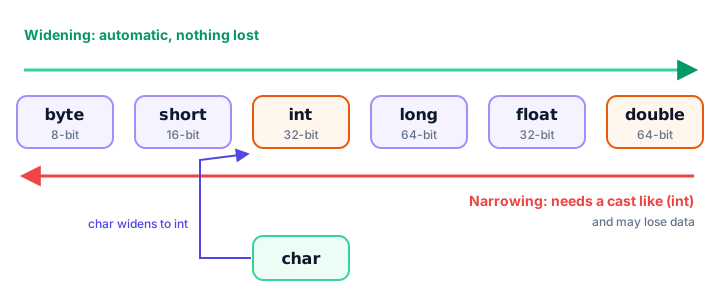
Type casting means converting a value from one data type to another. There are two directions:
- Widening (implicit casting): from a smaller type to a larger one, like
inttodouble. Java does it automatically. - Narrowing (explicit casting): from a larger type to a smaller one, like
doubletoint. You must write the target type in parentheses, such as(int).
Widening casting: automatic and safe
When the target type can hold every value of the source type, Java converts silently. You don't write anything special:
public class Widening {
    public static void main(String[] args) {
        int booksBorrowed = 42;
        long asLong = booksBorrowed;      // int to long
        double asDouble = booksBorrowed;  // int to double

        System.out.println(booksBorrowed);
        System.out.println(asLong);
        System.out.println(asDouble);
    }
}
42
42
42.0The value didn't change; it just moved into a bigger box. The double prints with .0 because it's now a decimal type.
Narrowing casting: you must ask for it
Going the other way could lose information, so Java won't do it alone. Writing int whole = 19.99; fails with error: incompatible types: possible lossy conversion from double to int. To convert anyway, put the target type in parentheses in front of the value:
public class Narrowing {
    public static void main(String[] args) {
        double price = 19.99;
        int wholeDollars = (int) price;

        double temperature = -3.8;
        int roundedTowardZero = (int) temperature;

        System.out.println(wholeDollars);
        System.out.println(roundedTowardZero);
    }
}
19
-3⚠️ Casting cuts, it doesn't round
(int) 19.99 is 19, not 20. Casting a decimal to a whole number simply chops off everything after the decimal point (toward zero, so -3.8 becomes -3). To round properly, use Math.round(), covered in the Java Math class.
Why does 7 / 2 give 3 in Java?
This surprises almost every beginner. When you divide two int values, Java does integer division: the result is an int, and the decimal part is thrown away. To get a decimal answer, at least one side must be a double.
public class Division {
    public static void main(String[] args) {
        System.out.println(7 / 2);
        System.out.println(7 / 2.0);
        System.out.println((double) 7 / 2);
        System.out.println((double) (7 / 2));
    }
}
3
3.5
3.5
3.0Look closely at the last two lines. (double) 7 / 2 casts 7 first, so the division is decimal. (double) (7 / 2) divides first (giving 3) and then casts, which is too late: the .5 is already gone.
Here's where it matters in real code, calculating an average product rating:
public class AverageRating {
    public static void main(String[] args) {
        int totalStars = 23;
        int reviews = 5;

        double wrong = totalStars / reviews;
        double right = (double) totalStars / reviews;

        System.out.println("Wrong average: " + wrong);
        System.out.println("Right average: " + right);
    }
}
Wrong average: 4.0
Right average: 4.6The "wrong" version stores the result in a double, but the division already happened in int, so the answer was 4 before it was widened to 4.0. Integer and decimal arithmetic are covered in more depth in Java arithmetic operators.
Casting between char and int
Every char is stored as a number, its Unicode code. The letter 'A' is 65, 'B' is 66, and so on. Casting lets you move between the character and its number, which is handy for things like seat letters on a plane:
public class SeatLetters {
    public static void main(String[] args) {
        char firstSeat = 'A';
        int code = firstSeat;            // char to int is widening
        System.out.println(code);

        char thirdSeat = (char) (firstSeat + 2);
        System.out.println(thirdSeat);

        System.out.println((char) 70);
        System.out.println(firstSeat + 1);
    }
}
65
C
F
66The last line prints 66, not B. Adding a number to a char produces an int, so you need the (char) cast to see a letter again.
What happens when a narrowing cast doesn't fit?
Narrowing a whole number into a type that's too small doesn't cause an error. Java keeps only the lowest bits, and the result can look random. This is overflow:
public class NarrowingOverflow {
    public static void main(String[] args) {
        int bigScore = 300;
        byte squeezed = (byte) bigScore;
        System.out.println(squeezed);

        long fileSize = 3_000_000_000L;
        int truncated = (int) fileSize;
        System.out.println(truncated);

        double huge = 1e10;
        System.out.println((int) huge);
    }
}
44
-1294967296
2147483647Why 44? A byte only holds 256 different values (-128 to 127). 300 doesn't fit, so it wraps around: 300 - 256 = 44. The long wraps into a negative number for the same reason. A double that's too big behaves differently: it's clamped to the largest int, 2147483647. (1e10 is scientific notation for 10,000,000,000.)
💡 Tip
A cast tells the compiler "trust me". Only narrow when you're sure the value fits, or when losing the extra part (like cents) is exactly what you want.
How do you convert a String to a number in Java?
A String like "42" looks like a number, but it's text. You can't cast it: (int) "42" gives error: incompatible types: String cannot be converted to int. Instead, you parse it with a built-in method:
| You have | You want | Use |
|---|---|---|
"42" | int | Integer.parseInt("42") |
"9000000000" | long | Long.parseLong("9000000000") |
"19.99" | double | Double.parseDouble("19.99") |
"true" | boolean | Boolean.parseBoolean("true") |
| any value | String | String.valueOf(42) or "" + 42 |
Text from a web form, a file or the keyboard always arrives as a String, so you'll parse all the time. Here's a small shopping cart where the values came in as text:
public class CartFromText {
    public static void main(String[] args) {
        String quantityText = "3";
        String priceText = "4.75";

        int quantity = Integer.parseInt(quantityText);
        double price = Double.parseDouble(priceText);
        double total = quantity * price;

        System.out.println("Total: " + total);

        String joined = quantityText + priceText;
        System.out.println("Text joined: " + joined);

        String back = String.valueOf(quantity * 2);
        System.out.println("Back to text: " + back + "!");
    }
}
Total: 14.25
Text joined: 34.75
Back to text: 6!Notice the difference: quantityText + priceText glues the two pieces of text together ("34.75"), while the parsed numbers multiply as expected.
📝 Note
If the text isn't a valid number, parsing fails while the program runs. Integer.parseInt("3 items") stops the program with java.lang.NumberFormatException: For input string: "3 items". You'll learn to catch problems like this in Java try-catch.
Common mistakes with type casting
- Expecting a cast to round.
(int) 9.99is 9. UseMath.round()when you want rounding. - Casting too late.
(double) (a / b)casts after the integer division. Write(double) a / b. - Trying to cast a String. Text needs
Integer.parseInt()orDouble.parseDouble(), not(int). - Narrowing values that don't fit.
(byte) 300silently becomes 44. Check the range first, or use a bigger type. - Forgetting char math gives an int.
'A' + 1is 66. Cast with(char)to get'B'.
Practice exercise
🏋️ Try it yourself
A fitness app stores a workout as text: the distance "7.6" kilometers and the time "38" minutes. Parse both values, then print: the average pace in minutes per kilometer as a decimal, the distance as whole kilometers (cut off, not rounded), and the time in hours as a decimal.
Show solution
public class WorkoutStats {
    public static void main(String[] args) {
        double distance = Double.parseDouble("7.6");
        int minutes = Integer.parseInt("38");

        double pace = minutes / distance;
        int wholeKm = (int) distance;
        double hours = (double) minutes / 60;

        System.out.println("Pace: " + pace + " min/km");
        System.out.println("Whole km: " + wholeKm);
        System.out.println("Hours: " + hours);
    }
}
Pace: 5.0 min/km
Whole km: 7
Hours: 0.6333333333333333minutes / distance is already decimal division because distance is a double. For the hours, the cast is needed, or 38 / 60 would be 0.
What's next?
You can now convert values between types safely. Next, learn how to lock a value so it can never change by accident, in Java constants.
Key takeaways
- Widening (byte to short to int to long to float to double) happens automatically because no data is lost.
- Narrowing needs an explicit cast such as (int) price, because data can be lost.
- Casting a decimal to an int cuts off the fraction instead of rounding: (int) 19.99 is 19.
- Dividing two ints gives an int (7 / 2 is 3); cast one side first, like (double) 7 / 2, to get 3.5.
- A char is stored as a number: (int) 'A' is 65 and (char) 66 is 'B'.
- Narrowing a value that does not fit wraps around: (byte) 300 is 44.
- Convert text to numbers with Integer.parseInt and Double.parseDouble, and numbers to text with String.valueOf.
Frequently asked questions
What is the difference between implicit and explicit casting in Java?
Implicit casting (widening) happens automatically when converting to a larger type, such as int to double. Explicit casting (narrowing) converts to a smaller type, such as double to int, and you must write the target type in parentheses: (int) value.
Does casting a double to an int round the number?
No. The cast removes the fractional part and moves toward zero, so (int) 9.99 is 9 and (int) -3.8 is -3. Use Math.round if you want normal rounding.
Why does 5 / 2 equal 2 in Java?
Both values are int, so Java performs integer division and drops the remainder. Make one operand a double, for example 5 / 2.0 or (double) 5 / 2, to get 2.5.
How do I convert a String to an int in Java?
Use Integer.parseInt, for example int age = Integer.parseInt("30");. For decimals use Double.parseDouble. If the text is not a valid number, a NumberFormatException is thrown.
What is (byte) 300 in Java?
It is 44. A byte can only hold -128 to 127, so the value wraps around: Java keeps the lowest 8 bits, which is the same as 300 minus 256.