Java Output Formatting (printf)
Updated 8 min read Aimerscrew
Printing 28.490000000000002 on a receipt, or a table where every column wobbles left and right, doesn't look professional. Java output formatting fixes both: you decide how many decimals to show, how wide each column is and where commas go. In this lesson you'll learn print, println and printf, the most useful format specifiers, String.format, and text blocks for multi-line text.
🌍 Real-life example
Look at a printed receipt from a café. Item names line up on the left, prices line up on the right, every price has exactly two decimals, and the total sits neatly at the bottom. The numbers inside the computer may be messy, but the receipt template formats them before printing. printf is your receipt template.
print vs println: what's the difference?
System.out.println() prints its value and then moves to a new line. System.out.print() prints the value and stays on the same line. An empty println() just prints a blank line.
public class PrintVsPrintln {
    public static void main(String[] args) {
        System.out.print("Loading");
        System.out.print("...");
        System.out.println(" done!");
        System.out.println();
        System.out.println("Ready.");
    }
}
Loading... done!
Ready.Both are fine for simple messages. When you need control over how numbers look, switch to printf.
What is printf in Java?
System.out.printf() ("print formatted") takes a format string containing placeholders, followed by the values that fill them in, in order. Each placeholder starts with % and is called a format specifier.
public class FirstPrintf {
    public static void main(String[] args) {
        String name = "Lena";
        int points = 1250;
        double balance = 84.5;

        System.out.printf("%s has %d points.%n", name, points);
        System.out.printf("Wallet balance: $%.2f%n", balance);
    }
}
Lena has 1250 points.
Wallet balance: $84.50%s was replaced by the text, %d by the whole number and %.2f by the decimal, shown with exactly two digits after the point. %n starts a new line. Unlike println, printf doesn't add a new line by itself, so you'll end most format strings with %n.
💡 Tip
Prefer %n over \n inside printf. %n uses the correct line ending for whichever operating system runs the program (Windows, macOS or Linux).
Java format specifiers cheat sheet
| Specifier | Used for | Example | Result |
|---|---|---|---|
%d | whole numbers (int, long) | printf("%d", 42) | 42 |
%f | decimals (6 digits by default) | printf("%f", 2.5) | 2.500000 |
%.2f | decimals, rounded to 2 places | printf("%.2f", 3.14159) | 3.14 |
%s | text (any value, really) | printf("%s", "Hi") | Hi |
%c | a single char | printf("%c", 'A') | A |
%b | a boolean | printf("%b", true) | true |
%,d | whole number with thousands separators | printf("%,d", 1500000) | 1,500,000 |
%10s | text right-aligned in 10 characters | printf("%10s", "tea") | 7 spaces, then tea |
%-10s | text left-aligned in 10 characters | printf("%-10s", "tea") | tea, then 7 spaces |
%05d | whole number padded with zeros to 5 digits | printf("%05d", 42) | 00042 |
%n | new line | ||
%% | a literal percent sign | printf("%d%%", 15) | 15% |
How do you print 2 decimal places in Java?
Use %.2f. The number after the dot is the precision: how many decimal places to show. Java rounds the displayed value; the variable itself doesn't change.
public class Decimals {
    public static void main(String[] args) {
        double price = 4.5678;
        double total = 25.5 + 2.99;

        System.out.printf("%.2f%n", price);
        System.out.printf("%.1f%n", price);
        System.out.printf("%.0f%n", price);
        System.out.println("Raw total: " + total);
        System.out.printf("Formatted total: %.2f%n", total);
    }
}
4.57
4.6
5
Raw total: 28.490000000000002
Formatted total: 28.49That raw total is the floating-point rounding you met in Java data types. %.2f hides it for display.
Width and alignment: printing neat columns
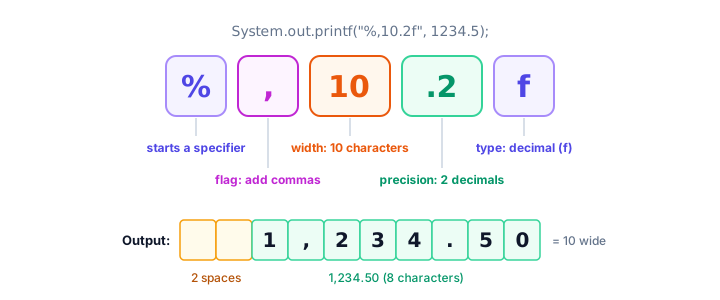
A number between % and the letter sets the width: the minimum number of characters the value takes up. Values are right-aligned by default; add a minus sign (-) to left-align. Text usually reads best left-aligned and numbers right-aligned, so their digits line up.
public class Playlist {
    public static void main(String[] args) {
        System.out.printf("%-18s %10s%n", "Song", "Plays");
        System.out.printf("%-18s %,10d%n", "Midnight Drive", 1204553);
        System.out.printf("%-18s %,10d%n", "Paper Planes", 87210);
        System.out.printf("%-18s %,10d%n", "Golden Hour", 9932);
    }
}
Song Plays
Midnight Drive 1,204,553
Paper Planes 87,210
Golden Hour 9,932%-18s reserves 18 characters for the song name, padded with spaces on the right. %,10d reserves 10 characters for the play count, adds commas, and pads on the left so the numbers end in the same column.
Zero padding: order numbers and clock times
Put a 0 before the width to pad with zeros instead of spaces. It's perfect for IDs, tracking numbers and times:
public class ZeroPadding {
    public static void main(String[] args) {
        int orderNumber = 427;
        int hours = 9;
        int minutes = 5;

        System.out.printf("Order #%05d%n", orderNumber);
        System.out.printf("Departs at %02d:%02d%n", hours, minutes);
    }
}
Order #00427
Departs at 09:05String.format: format without printing
Sometimes you want the formatted text in a variable, to save it, combine it or print it later. String.format() takes exactly the same format string as printf but returns a String instead of printing. Since Java 15 you can also call .formatted() directly on the format string.
public class FormatToString {
    public static void main(String[] args) {
        double temperature = 21.456;

        String reading = String.format("Living room: %.1f C", temperature);
        String label = "Battery: %d%%".formatted(87);

        System.out.println(reading);
        System.out.println(label);
        System.out.println("Characters in reading: " + reading.length());
    }
}
Living room: 21.5 C
Battery: 87%
Characters in reading: 19Text blocks for multi-line text
Writing several lines of text with \n and + gets messy fast. A text block (Java 15 and newer) starts with three double quotes and a line break, and ends with three double quotes. Everything in between is kept exactly as you typed it, line breaks included:
public class WelcomeBanner {
    public static void main(String[] args) {
        String banner = """
                ==========================
                  Welcome to City Library
                  Open 9:00 to 18:00
                ==========================
                """;
        System.out.print(banner);
    }
}
==========================
Welcome to City Library
Open 9:00 to 18:00
==========================Java removes the shared indentation on the left, which is lined up with the closing """, so you can indent the block to match your code. Because the last line ends with a line break before """, print (not println) is enough. You can combine a text block with .formatted() to fill in values, as the receipt below does.
Real-world example: a café receipt
public class CafeReceipt {
    static final double TAX_RATE = 0.08;

    public static void main(String[] args) {
        String header = """
                ---------------------------------
                   THE CORNER CAFE   Order #%04d
                ---------------------------------
                """.formatted(73);
        System.out.print(header);

        double latte = 2 * 4.25;
        double croissant = 3 * 3.10;
        double juice = 1 * 5.50;
        double subtotal = latte + croissant + juice;
        double tax = subtotal * TAX_RATE;

        System.out.printf("%-4s %-16s %10s%n", "Qty", "Item", "Price");
        System.out.printf("%-4d %-16s %10.2f%n", 2, "Latte", latte);
        System.out.printf("%-4d %-16s %10.2f%n", 3, "Croissant", croissant);
        System.out.printf("%-4d %-16s %10.2f%n", 1, "Orange juice", juice);
        System.out.println("---------------------------------");
        System.out.printf("%-21s %10.2f%n", "Subtotal", subtotal);
        System.out.printf("%-21s %10.2f%n", "Tax (8%)", tax);
        System.out.printf("%-21s %10.2f%n", "TOTAL", subtotal + tax);
    }
}
---------------------------------
THE CORNER CAFE Order #0073
---------------------------------
Qty Item Price
2 Latte 8.50
3 Croissant 9.30
1 Orange juice 5.50
---------------------------------
Subtotal 23.30
Tax (8%) 1.86
TOTAL 25.16Every column lines up because each value gets a fixed width. Notice that "Tax (8%)" is passed as a value, so its % is printed as is. Only the format string itself treats % as special.
📝 Note
Formatting follows your computer's language and region settings. On a computer set to German, for example, %,.2f prints 1.234,50 instead of 1,234.50. The outputs in this lesson come from an English setup.
Common mistakes with printf
- Using the wrong specifier for the type.
printf("%d", 9.99)crashes withjava.util.IllegalFormatConversionException: d != java.lang.Double. Use%f(or%.2f) for decimals and%dfor whole numbers. - Forgetting %n. Two
printfcalls without%nend up on the same line. - Too few values.
printf("%s scored %d%n", "Ana")crashes withMissingFormatArgumentException: Format specifier '%d'. Every placeholder needs a value. - A lone % in the format string. To print a percent sign from the format string, write
%%. - Thinking %.2f changes the number. It only changes how the number is shown. The variable keeps its full value.
Practice exercise
🏋️ Try it yourself
Print a parking garage ticket. Use these values: ticket number 58 (show it as 6 digits with leading zeros), license plate KX-4471, 3 hours parked at 2.75 per hour, entry time 8:05 (show it as 08:05). Print the cost with two decimals and align the labels in a 12-character column.
Show solution
public class ParkingTicket {
    public static void main(String[] args) {
        int ticket = 58;
        String plate = "KX-4471";
        int hours = 3;
        double rate = 2.75;

        System.out.printf("%-12s %06d%n", "Ticket:", ticket);
        System.out.printf("%-12s %s%n", "Plate:", plate);
        System.out.printf("%-12s %02d:%02d%n", "Entry:", 8, 5);
        System.out.printf("%-12s %d x %.2f%n", "Time:", hours, rate);
        System.out.printf("%-12s %.2f%n", "Amount due:", hours * rate);
    }
}
Ticket: 000058
Plate: KX-4471
Entry: 08:05
Time: 3 x 2.75
Amount due: 8.25What's next?
You can now print clean, well-aligned output. In the last lesson of this chapter, discover how Java can work out a variable's type for you with Java var.
Key takeaways
- println adds a new line after printing; print stays on the same line.
- printf takes a format string with placeholders such as %d, %f, %s, %c and %b, followed by the values in order.
- %.2f shows exactly two decimal places, rounding only the displayed value.
- A width like %10s right-aligns, %-10s left-aligns, %05d pads with zeros and %,d adds thousands separators.
- End printf format strings with %n for a portable new line, and use %% for a literal percent sign.
- String.format and .formatted() return the formatted text instead of printing it.
- Text blocks, written between triple quotes, hold multi-line text exactly as typed.
Frequently asked questions
How do I print a double with 2 decimal places in Java?
Use printf or String.format with %.2f, for example System.out.printf("%.2f%n", price);. The displayed value is rounded to two places, while the variable keeps its full value.
What is the difference between printf and println in Java?
println prints a value and moves to a new line. printf prints a format string with placeholders filled in by values, gives you control over decimals, width and alignment, and does not add a new line unless you include %n.
What does %n mean in Java printf?
%n inserts a line break using the correct line separator for the operating system the program runs on. It is preferred over \n in format strings.
What is the difference between printf and String.format?
They use the same format strings. printf prints the result immediately, while String.format returns it as a String you can store, combine or print later.
What is a text block in Java?
A text block is a multi-line string literal written between triple double quotes, available since Java 15. It keeps line breaks as typed and removes the shared leading indentation.