Java Method Parameters
Updated 8 min read Aimerscrew
A method that always does exactly the same thing is useful, but a method you can customize each time you call it is far more powerful. Java method parameters are how you hand information to a method: a name to greet, a price to discount, a list of scores to average. In this lesson, you'll learn the difference between parameters and arguments, how to use several parameters, what "pass-by-value" really means in Java, and how varargs let a method accept any number of values.
🌍 Real-life example
A food delivery app has an order form with blank fields: dish, quantity, address. Those blank fields are like parameters. When you actually order "2 × pad thai to 12 Oak Street", the values you fill in are the arguments. The form is the same every time; the values change with each order.
What are method parameters in Java?
A parameter is a variable declared inside the parentheses of a method header. It acts as a placeholder: when someone calls the method, the parameter receives a value, and the method body can use it like any other variable.
public class Greetings {
    public static void main(String[] args) {
        welcome("Priya");
        welcome("Tom");
    }

    public static void welcome(String name) {
        System.out.println("Welcome back, " + name + "!");
    }
}
Welcome back, Priya!
Welcome back, Tom!The method welcome has one parameter, name, of type String. Each call supplies a different value, so the same method prints two different messages.
What is the difference between parameters and arguments?
People often mix up these two words, so here's a clear definition you can remember:
- A parameter is the variable in the method definition:
String name. - An argument is the actual value you pass in the method call:
"Priya".
| Parameter | Argument | |
|---|---|---|
| Where it appears | In the method header | In the method call |
| Example | int quantity | 3 or itemsInCart |
| Has a type written next to it? | Yes, always | No |
| Also called | Formal parameter | Actual parameter |
An argument can be a literal value (3), a variable (itemsInCart) or even an expression (itemsInCart + 1). Java works out its value first, then passes the result.
How do you use multiple parameters?
Separate parameters with commas. Each one needs its own type, even if the types are the same. When you call the method, the arguments are matched to the parameters by position: first to first, second to second, and so on.
public class FlightBooking {
    public static void main(String[] args) {
        bookSeat("Lena Fischer", 14, 'C');
        bookSeat("Omar Haddad", 3, 'A');
    }

    public static void bookSeat(String passenger, int row, char seat) {
        System.out.println(passenger + " -> seat " + row + seat);
    }
}
Lena Fischer -> seat 14C
Omar Haddad -> seat 3AThe call must give the right number of arguments, in the right order, with compatible types. If you write bookSeat("Lena", 14), the compiler refuses:
error: method bookSeat in class FlightBooking cannot be applied to given types;
  required: String,int,char
  found:    String,int
Parameters are local variables
Inside the method, a parameter behaves exactly like a variable you declared at the top of the body. You can read it, use it in calculations and even change it. It exists only while the method runs and disappears when the method ends. (More on this in Java variable scope.)
public class Thermostat {
    public static void main(String[] args) {
        showInFahrenheit(21.0);
        showInFahrenheit(-5.0);
    }

    public static void showInFahrenheit(double celsius) {
        double fahrenheit = celsius * 9 / 5 + 32;
        System.out.println(celsius + " C = " + fahrenheit + " F");
    }
}
21.0 C = 69.8 F
-5.0 C = 23.0 FIs Java pass-by-value or pass-by-reference?
Java is always pass-by-value. That means when you call a method, Java copies the value of each argument into the matching parameter. The method works on its copy. What gets copied depends on the type:
- For a primitive (
int,double,boolean...), the number or true/false value itself is copied. - For an array (or any object), the variable holds a reference, which is like the address of the array in memory. The reference is copied, so both variables point to the same array.
Primitives: the method gets its own copy
public class PointsCopy {
    public static void main(String[] args) {
        int points = 50;
        addBonus(points);
        System.out.println("Back in main: " + points);
    }

    public static void addBonus(int points) {
        points = points + 10;
        System.out.println("Inside addBonus: " + points);
    }
}
Inside addBonus: 60
Back in main: 50Even though both variables are called points, they're separate boxes. The method changed its own copy to 60; the original in main is still 50. To get a new value back to the caller, you return it.
Arrays: the method can change the contents
Now let's pass an array. The method receives a copy of the reference, so it can reach the very same array and change the values inside:
import java.util.Arrays;

public class SaleDay {
    public static void main(String[] args) {
        int[] prices = {40, 25, 90};
        applyDiscount(prices);
        System.out.println(Arrays.toString(prices));
    }

    public static void applyDiscount(int[] items) {
        for (int i = 0; i < items.length; i++) {
            items[i] = items[i] - 5;
        }
    }
}
[35, 20, 85]The changes are visible in main because prices and items point to one array. (Arrays.toString comes from the Arrays class.)
But reassigning the parameter doesn't affect the caller
If the method points its parameter at a new array, only its own copy of the reference changes. The caller's variable still points to the original:
import java.util.Arrays;

public class NewPlaylist {
    public static void main(String[] args) {
        int[] ratings = {3, 4, 5};
        replace(ratings);
        System.out.println(Arrays.toString(ratings));
    }

    public static void replace(int[] list) {
        list = new int[] {0, 0, 0};
        list[0] = 99;
        System.out.println("Inside replace: " + Arrays.toString(list));
    }
}
Inside replace: [99, 0, 0]
[3, 4, 5]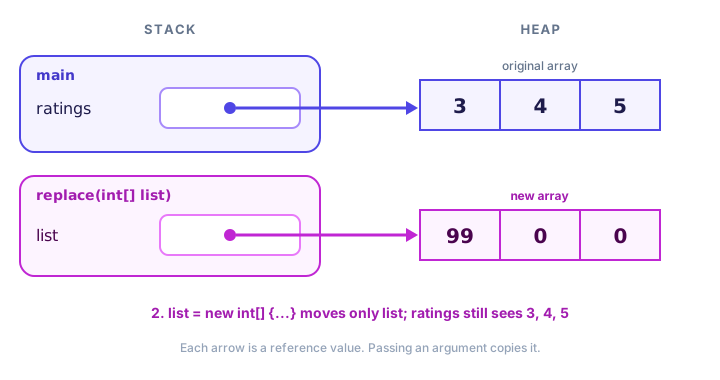
📝 Note
Strings are objects too, but a String can never be changed after it's created (it's immutable, as you saw in Java strings). So a method can't modify the caller's string; anything like text = text + "!" creates a new string and only moves the parameter.
What are varargs in Java?
Sometimes you don't know how many values a caller will pass. Varargs (short for "variable number of arguments") lets a method accept zero, one or many values of the same type. You write the type, three dots, then the name: int... numbers. Inside the method, the parameter is simply an array.
public class CartTotal {
    public static void main(String[] args) {
        total();
        total(12);
        total(12, 8, 30);
        total(new int[] {5, 5, 5, 5});
    }

    public static void total(int... prices) {
        int sum = 0;
        for (int price : prices) {
            sum += price;
        }
        System.out.println("Items: " + prices.length + ", total: $" + sum);
    }
}
Items: 0, total: $0
Items: 1, total: $12
Items: 3, total: $50
Items: 4, total: $20You've already been using varargs: System.out.printf takes a format string followed by any number of values.
Varargs come with two rules:
- A method can have only one varargs parameter.
- It must be the last parameter.
void report(String title, int... scores)is fine;void report(int... scores, String title)won't compile.
public class GameScores {
    public static void main(String[] args) {
        report("Ana", 120, 95, 140);
        report("Ben", 80);
    }

    public static void report(String player, int... scores) {
        int best = 0;
        for (int score : scores) {
            if (score > best) {
                best = score;
            }
        }
        System.out.println(player + ": games " + scores.length + ", best " + best);
    }
}
Ana: games 3, best 140
Ben: games 1, best 80💡 Tip
Use varargs for convenience when callers usually pass a few loose values. If the data already lives in an array, a plain int[] parameter is just as good and makes the intent clear.
Common mistakes with method parameters
1. Passing arguments in the wrong order
If two parameters have different types, the compiler catches the mix-up (incompatible types: int cannot be converted to String). But if they share a type, it can't. A call like transfer(toAccount, fromAccount, 100) compiles fine and silently moves money the wrong way. Double-check the order, and give parameters clear names.
2. Expecting a method to change a primitive variable
As the addBonus example showed, changing an int parameter never changes the caller's variable. Return the new value instead.
3. Leaving out the type of a parameter
Writing void area(int width, height) is an error. Each parameter needs its own type: void area(int width, int height).
4. Putting varargs anywhere but last
The varargs parameter has to come at the end of the list, and there can only be one.
Practice exercise
🏋️ Try it yourself
Write a method printAverage(String student, int... marks) that prints the student's name and the average of their marks with one decimal place. If no marks are passed, print no marks yet instead. Call it for "Kenji" with marks 72, 85 and 90, and for "Sara" with no marks.
Show solution
public class ReportCard {
    public static void main(String[] args) {
        printAverage("Kenji", 72, 85, 90);
        printAverage("Sara");
    }

    public static void printAverage(String student, int... marks) {
        if (marks.length == 0) {
            System.out.println(student + ": no marks yet");
            return;
        }
        int sum = 0;
        for (int mark : marks) {
            sum += mark;
        }
        double average = (double) sum / marks.length;
        System.out.printf("%s: %.1f%n", student, average);
    }
}
Kenji: 82.3
Sara: no marks yetThe bare return; ends a void method early. You'll see more of it in the next lesson.
What's next?
Your methods can now take input. Next, learn how they hand results back with Java return values, so you can store and reuse what a method calculates.
Key takeaways
- A parameter is a variable in the method header; an argument is the value passed in the call.
- Arguments are matched to parameters by position, and their number and types must fit.
- Java is always pass-by-value: each argument is copied into its parameter.
- Changing a primitive parameter never affects the caller's variable.
- For arrays, the reference is copied, so a method can change the contents but cannot make the caller's variable point to a new array.
- Varargs (int... values) accept any number of arguments and arrive as an array; they must be the last parameter.
Frequently asked questions
What is the difference between a parameter and an argument in Java?
A parameter is the variable declared in the method definition, such as int quantity. An argument is the actual value supplied when the method is called, such as 3. The argument is copied into the parameter.
Is Java pass-by-value or pass-by-reference?
Java is always pass-by-value. For primitives the value itself is copied. For arrays and objects the reference is copied, so the method can modify the shared object but cannot change which object the caller's variable points to.
Why does my array change after passing it to a method?
Because the method receives a copy of the reference to the same array. Any change to its elements, like items[0] = 5, is made to the one shared array, so the caller sees it.
What does int... mean in Java?
It declares a varargs parameter that accepts zero or more int arguments. Inside the method it is an ordinary int array, so you can use length and loop over it.
How many parameters can a Java method have?
Technically up to 255, but good methods usually have only a few. If a method needs many values, that often means it is doing too much or the values belong together in an object.