Java User Input (Scanner)
Updated 8 min read Aimerscrew
Up to now, every value in your programs was typed into the code, but real programs talk to people. Java user input lets your program ask for a name, a quantity or a password and react to the answer. In this lesson you'll learn to use the Scanner class, read text and numbers from the keyboard, and fix the one Scanner bug that trips up nearly every beginner.
🌍 Real-life example
Think of a self-checkout machine at a supermarket. It asks "How many bags did you use?", waits for you to tap a number, then asks "Do you have a loyalty card?" and waits again. It reads your answers one at a time and uses them to work out the bill. A Java program with a Scanner works the same way: print a question, wait for the answer, use it.
How do you get user input in Java?
The easiest way is the Scanner class. It reads what the user types in the terminal and turns it into the type you ask for. Using it takes three steps:
- Import it at the very top of the file:
import java.util.Scanner;.Scannerlives in Java'sjava.utilpackage (a folder of ready-made classes), so you have to tell Java where to find it. Packages are covered in Java packages. - Create a Scanner connected to the keyboard:
Scanner input = new Scanner(System.in);.System.inis the standard input, which is normally the keyboard. - Call a method to read a value, such as
input.nextLine().
import java.util.Scanner;

public class Greeting {
    public static void main(String[] args) {
        Scanner input = new Scanner(System.in);

        System.out.print("What's your name? ");
        String name = input.nextLine();

        System.out.println("Welcome aboard, " + name + "!");
        input.close();
    }
}
Here's a sample run (the user typed Priya Shah and pressed Enter):
What's your name? Priya Shah
Welcome aboard, Priya Shah!
Notice the prompt uses print, not println. That keeps the cursor on the same line, so the user types right after the question.
Reading numbers with nextInt and nextDouble
nextLine() always gives you a String. To get a number you can calculate with, use nextInt() for whole numbers or nextDouble() for decimals:
import java.util.Scanner;

public class TipCalculator {
    public static void main(String[] args) {
        Scanner input = new Scanner(System.in);

        System.out.print("Bill amount: ");
        double bill = input.nextDouble();

        System.out.print("Tip percent: ");
        int percent = input.nextInt();

        double tip = bill * percent / 100;
        System.out.println("Tip: " + tip);
        System.out.println("Total: " + (bill + tip));
        input.close();
    }
}
Here's a sample run (the user typed 40 and then 15):
Bill amount: 40
Tip percent: 15
Tip: 6.0
Total: 46.0
📝 Note
nextDouble() follows your computer's language settings. On a computer set up for a country that writes decimals with a comma (such as Germany or France), it expects 12,5 instead of 12.5. If decimals are rejected, that's usually why.
Scanner methods at a glance
| Method | Reads | Returns |
|---|---|---|
nextLine() | everything up to the end of the line, spaces included | String |
next() | one word (stops at a space) | String |
nextInt() | a whole number | int |
nextLong() | a large whole number | long |
nextDouble() | a decimal number | double |
nextBoolean() | true or false | boolean |
hasNextInt() | nothing; checks whether the next input is a whole number | boolean |
What is the difference between next() and nextLine()?
next() reads a single word and stops at the first space. nextLine() reads the whole rest of the line. Watch what happens when one name is split between them:
import java.util.Scanner;

public class WordVsLine {
    public static void main(String[] args) {
        Scanner input = new Scanner(System.in);

        System.out.print("Full name: ");
        String first = input.next();
        String rest = input.nextLine();

        System.out.println("next() read: [" + first + "]");
        System.out.println("nextLine() read: [" + rest + "]");
        input.close();
    }
}
Here's a sample run (the user typed Ada Lovelace):
Full name: Ada Lovelace
next() read: [Ada]
nextLine() read: [ Lovelace]
next() took "Ada", and nextLine() picked up everything left on the line, including the space. The square brackets just make the spaces visible.
Why does nextLine() get skipped after nextInt()?
This is the most famous Scanner bug. Try this ticket booking program:
import java.util.Scanner;

public class BookingBug {
    public static void main(String[] args) {
        Scanner input = new Scanner(System.in);

        System.out.print("How many tickets? ");
        int tickets = input.nextInt();

        System.out.print("Name for the booking: ");
        String name = input.nextLine();

        System.out.println("Booking for [" + name + "]: " + tickets + " tickets");
        input.close();
    }
}
Here's a sample run (the user typed 2 and pressed Enter, and never got a chance to type a name):
How many tickets? 2
Name for the booking: Booking for []: 2 tickets
What happened? When you type 2 and press Enter, the keyboard sends two things: the character 2 and an invisible newline (the Enter key). nextInt() takes the number but leaves the newline behind. Then nextLine() reads "everything up to the end of the line", finds that leftover newline immediately, and returns an empty string.
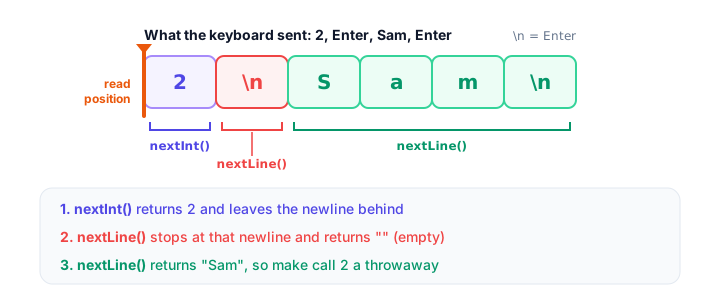
The fix is to call nextLine() once right after nextInt() (or nextDouble()) to throw away the leftover newline:
import java.util.Scanner;

public class BookingFixed {
    public static void main(String[] args) {
        Scanner input = new Scanner(System.in);

        System.out.print("How many tickets? ");
        int tickets = input.nextInt();
        input.nextLine();   // throw away the leftover newline

        System.out.print("Name for the booking: ");
        String name = input.nextLine();

        System.out.println("Booking for [" + name + "]: " + tickets + " tickets");
        input.close();
    }
}
Here's a sample run (the user typed 2, then Sam Lee):
How many tickets? 2
Name for the booking: Sam Lee
Booking for [Sam Lee]: 2 tickets
💡 Tip
Another popular fix: read every answer with nextLine() and convert numbers yourself with Integer.parseInt(input.nextLine()), as you learned in Java type casting. Then no newline is ever left behind.
Closing the Scanner
When you're finished reading, call input.close(). It releases the input stream and tells readers of your code that input is done. Two rules keep you out of trouble:
- Create one Scanner for
System.inand reuse it for every question. - Close it only at the very end. Closing it also closes
System.in, so a new Scanner created afterward can't read anything.
Later, in Java try-with-resources, you'll see a way to close things automatically.
How do you check that the user typed a number?
If nextInt() receives text like four, the program crashes with java.util.InputMismatchException. To check first, use hasNextInt(), which answers true or false without reading anything. This example uses an if statement to choose what to do; you'll study if fully in Java if-else.
import java.util.Scanner;

public class PartySize {
    public static void main(String[] args) {
        Scanner input = new Scanner(System.in);

        System.out.print("Table for how many people? ");
        if (input.hasNextInt()) {
            int people = input.nextInt();
            System.out.println("A table for " + people + " is ready.");
        } else {
            String typed = input.next();
            System.out.println("Sorry, '" + typed + "' is not a whole number.");
        }
        input.close();
    }
}
Here's a sample run (the user typed 4):
Table for how many people? 4
A table for 4 is ready.
And here's a sample run where the user typed four:
Table for how many people? four
Sorry, 'four' is not a whole number.
Once you know loops, you'll be able to keep asking until the answer is valid (see Java while loop).
Real-world example: a food delivery order
Here's everything together: text, a whole number and a decimal, with the leftover-newline fix in place.
import java.util.Scanner;

public class FoodOrder {
    static final double DELIVERY_FEE = 3.0;

    public static void main(String[] args) {
        Scanner input = new Scanner(System.in);

        System.out.print("Dish: ");
        String dish = input.nextLine();

        System.out.print("Quantity: ");
        int quantity = input.nextInt();

        System.out.print("Price each: ");
        double price = input.nextDouble();
        input.nextLine();

        System.out.print("Delivery address: ");
        String address = input.nextLine();

        double total = quantity * price + DELIVERY_FEE;
        System.out.println(quantity + " x " + dish + " to " + address);
        System.out.println("Total with delivery: " + total);
        input.close();
    }
}
Here's a sample run (the user typed Pad Thai, 2, 11.5 and 12 Baker Street):
Dish: Pad Thai
Quantity: 2
Price each: 11.5
Delivery address: 12 Baker Street
2 x Pad Thai to 12 Baker Street
Total with delivery: 26.0
Common mistakes with Scanner
- Forgetting the import. Without
import java.util.Scanner;the compiler sayserror: cannot find symbolpointing atScanner. - The skipped nextLine(). After
nextInt()ornextDouble(), add an extranextLine()before reading text. - Using next() for full names or addresses.
next()stops at the first space; usenextLine(). - Typing a decimal into nextInt().
2.5is not anint, so you get anInputMismatchException. UsenextDouble()for decimals. - Creating a new Scanner for every question. One Scanner is enough, and closing one closes the keyboard input for all of them.
Practice exercise
🏋️ Try it yourself
Write a library late-fee calculator. Ask for the borrower's full name, the number of days the book is late (a whole number) and the fee per day (a decimal). Print a message with the name and the total fee.
Show solution
import java.util.Scanner;

public class LateFee {
    public static void main(String[] args) {
        Scanner input = new Scanner(System.in);

        System.out.print("Borrower name: ");
        String name = input.nextLine();

        System.out.print("Days late: ");
        int daysLate = input.nextInt();

        System.out.print("Fee per day: ");
        double feePerDay = input.nextDouble();

        double totalFee = daysLate * feePerDay;
        System.out.println(name + " owes " + totalFee);
        input.close();
    }
}
Here's a sample run (the user typed Tom Baker, 6 and 0.25):
Borrower name: Tom Baker
Days late: 6
Fee per day: 0.25
Tom Baker owes 1.5
The name is read first, so no leftover newline gets in the way. If you asked for the name last, you'd need the extra nextLine().
What's next?
You can now read input. Next, make your output look professional, with neat columns and exactly two decimals for prices, in Java output formatting.
Key takeaways
- Read keyboard input with a Scanner: import java.util.Scanner; then Scanner input = new Scanner(System.in);.
- nextLine() reads a whole line as a String, next() reads one word, nextInt() and nextDouble() read numbers.
- Use print instead of println for prompts so the user types on the same line.
- nextInt() and nextDouble() leave the Enter newline behind, so a following nextLine() returns an empty string; call nextLine() once to clear it.
- hasNextInt() checks whether the next input is a whole number before you read it.
- Create one Scanner for System.in, reuse it, and close it once at the end.
Frequently asked questions
How do you take user input in Java?
Import java.util.Scanner, create a Scanner with new Scanner(System.in), then call a method such as nextLine() for text, nextInt() for whole numbers or nextDouble() for decimals.
Why is nextLine() skipped after nextInt() in Java?
nextInt() reads the number but leaves the newline from the Enter key in the input. The next nextLine() reads up to that newline and returns an empty string. Call input.nextLine() once after nextInt() to discard it.
What is the difference between next() and nextLine()?
next() reads a single word and stops at whitespace. nextLine() reads everything up to the end of the current line, including spaces, which makes it the right choice for full names and addresses.
Should I close a Scanner in Java?
Yes, call close() when you have finished reading. But closing a Scanner on System.in also closes System.in itself, so use one Scanner for the whole program and close it at the end.
How do I check if the input is a number?
Call hasNextInt() (or hasNextDouble()) before reading. It returns true if the next input can be read as that type, without consuming it, so you can show a friendly message instead of crashing.