Java Logical Operators
Updated 8 min read Aimerscrew
Real-world rules rarely depend on just one thing. A cinema lets you in if you're old enough and have a ticket. A shop gives a discount if you're a student or a senior. Java logical operators let you combine conditions like these. In this lesson, you'll learn &&, || and !, read their truth tables, and discover short-circuit evaluation, a feature that can save your program from crashing.
🌍 Real-life example
A theme park ride has a sign: "Riders must be at least 120 cm tall and have a ride pass." The ride attendant checks both rules; failing either one means no ride. Another sign at the ticket desk says: "Free entry for children under 5 or annual pass holders." Meeting either rule is enough. That's exactly the difference between && and ||.
What are logical operators in Java?
A logical operator works on boolean values (true/false) and produces another boolean. Usually those booleans come from comparison operators.
| Operator | Name | Example | True when… |
|---|---|---|---|
&& | logical AND | age >= 18 && hasTicket | both sides are true |
|| | logical OR | isStudent || isSenior | at least one side is true |
! | logical NOT | !isBanned | the value is false (it flips it) |
Truth tables for &&, || and !
A truth table lists every possible input and the result. Here they are for AND and OR:
a | b | a && b | a || b |
|---|---|---|---|
true | true | true | true |
true | false | false | true |
false | true | false | true |
false | false | false | false |
An easy way to remember: AND is picky (one false spoils it), OR is generous (one true is enough). NOT simply flips: !true is false and !false is true.
You can check the whole table with Java itself:
public class TruthTable {
    public static void main(String[] args) {
        boolean t = true;
        boolean f = false;

        System.out.println("AND (&&)");
        System.out.println("true  && true  = " + (t && t));
        System.out.println("true  && false = " + (t && f));
        System.out.println("false && true  = " + (f && t));
        System.out.println("false && false = " + (f && f));

        System.out.println("OR (||)");
        System.out.println("true  || true  = " + (t || t));
        System.out.println("true  || false = " + (t || f));
        System.out.println("false || true  = " + (f || t));
        System.out.println("false || false = " + (f || f));

        System.out.println("NOT (!)");
        System.out.println("!true  = " + !t);
        System.out.println("!false = " + !f);
    }
}
AND (&&)
true && true = true
true && false = false
false && true = false
false && false = false
OR (||)
true || true = true
true || false = true
false || true = true
false || false = false
NOT (!)
!true = false
!false = trueCombining real-life rules
Here's a cinema that applies several rules at once. Each rule is a single, readable line:
public class CinemaEntry {
    public static void main(String[] args) {
        int age = 15;
        boolean hasTicket = true;
        boolean isStudent = true;
        boolean isSenior = false;
        boolean isBanned = false;

        boolean canWatchTeenMovie = age >= 13 && hasTicket;
        boolean canWatchAdultMovie = age >= 18 && hasTicket;
        boolean getsDiscount = isStudent || isSenior;
        boolean mayEnter = hasTicket && !isBanned;

        System.out.println("Teen movie (13+): " + canWatchTeenMovie);
        System.out.println("Adult movie (18+): " + canWatchAdultMovie);
        System.out.println("Discount: " + getsDiscount);
        System.out.println("May enter: " + mayEnter);
    }
}
Teen movie (13+): true
Adult movie (18+): false
Discount: true
May enter: trueNo parentheses are needed around age >= 13, because comparisons are worked out before && and ||. More on that in operator precedence.
Checking if a value is in a range
In math you might write 19 ≤ temp ≤ 24, but Java needs two comparisons joined with &&. To check the opposite ("outside the range"), use ||:
public class RangeCheck {
    public static void main(String[] args) {
        double roomTemp = 26.5;

        boolean isComfortable = roomTemp >= 19 && roomTemp <= 24;
        boolean needsAction = roomTemp < 19 || roomTemp > 24;

        System.out.println("Comfortable: " + isComfortable);
        System.out.println("Turn on heating or cooling: " + needsAction);
    }
}
Comfortable: false
Turn on heating or cooling: trueWhat is short-circuit evaluation in Java?
&& and || are lazy in a clever way. Java evaluates the left side first, and if that already decides the answer, it skips the right side completely. This is called short-circuit evaluation.
- With
&&: if the left side isfalse, the result must befalse, so the right side is skipped. - With
||: if the left side istrue, the result must betrue, so the right side is skipped.
This is more than a speed trick. It lets you write safety checks. A String variable can hold null, which means "no object at all". Calling a method like length() on null crashes the program. Short-circuiting lets you check for null first:
public class NullSafeCheck {
    public static void main(String[] args) {
        String couponCode = null;

        boolean hasCoupon = couponCode != null && couponCode.length() > 0;
        System.out.println("Has coupon: " + hasCoupon);

        couponCode = "SAVE10";
        hasCoupon = couponCode != null && couponCode.length() > 0;
        System.out.println("Has coupon: " + hasCoupon);
    }
}
Has coupon: false
Has coupon: true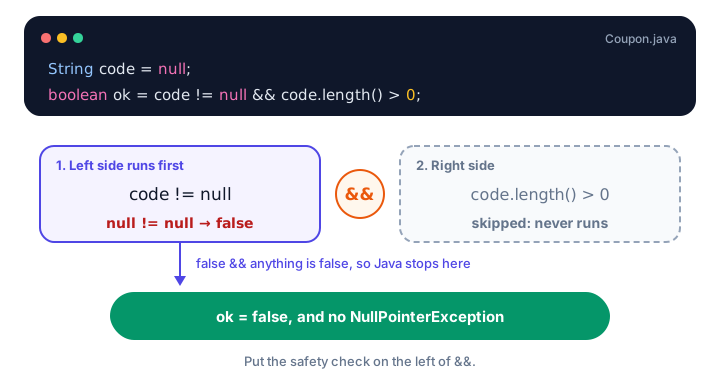
&& is false, the right side never runs.Order matters. If you swap the two sides, couponCode.length() > 0 && couponCode != null, Java calls length() on null first, and the program crashes with a NullPointerException ("Cannot invoke String.length() because … is null"). You'll learn more about null and exceptions in Java exceptions.
💡 Tip
Put the cheap or protective check on the left: "is it not null?", "is the list non-empty?", "is the divisor not zero?". For example, count != 0 && total / count > 10 never divides by zero.
What is the difference between & and && in Java?
Java also has single-character versions, & and |. With booleans they give the same result as && and ||, but they always evaluate both sides. You can see the difference with a counter that only goes up when the right side runs:
public class ShortCircuitCount {
    public static void main(String[] args) {
        int checks = 0;
        boolean doorOpen = false;

        boolean result1 = doorOpen && ++checks > 0;
        System.out.println("&&  result: " + result1 + ", checks = " + checks);

        boolean result2 = doorOpen & ++checks > 0;
        System.out.println("&   result: " + result2 + ", checks = " + checks);

        boolean alarmOn = true;
        boolean result3 = alarmOn || ++checks > 0;
        System.out.println("||  result: " + result3 + ", checks = " + checks);

        boolean result4 = alarmOn | ++checks > 0;
        System.out.println("|   result: " + result4 + ", checks = " + checks);
    }
}
&& result: false, checks = 0
& result: false, checks = 1
|| result: true, checks = 1
| result: true, checks = 2With && and ||, the ++checks was skipped. With & and |, it ran every time. In everyday code, use && and ||. The single versions are rare with booleans and mostly used for the bitwise work shown below.
There's also ^ (exclusive OR, "XOR"), which is true when exactly one side is true: true ^ false is true, but true ^ true is false.
Bonus: bitwise operators and shifts
When &, | and ^ are used with integers, they work on the individual bits (the 1s and 0s) of the numbers. These bitwise operators are used for things like permission flags, colors and compact data. You won't need them often as a beginner, but it's good to recognize them.
public class BitwiseDemo {
    public static void main(String[] args) {
        int a = 6;   // binary 110
        int b = 3;   // binary 011

        System.out.println("a & b  = " + (a & b));
        System.out.println("a | b  = " + (a | b));
        System.out.println("a ^ b  = " + (a ^ b));
        System.out.println("~a     = " + (~a));
        System.out.println("a << 2 = " + (a << 2));
        System.out.println("a >> 1 = " + (a >> 1));
        System.out.println("-16 >> 2  = " + (-16 >> 2));
        System.out.println("-16 >>> 28 = " + (-16 >>> 28));
        System.out.println("6 in binary: " + Integer.toBinaryString(a));
    }
}
a & b = 2
a | b = 7
a ^ b = 5
~a = -7
a << 2 = 24
a >> 1 = 3
-16 >> 2 = -4
-16 >>> 28 = 15
6 in binary: 110| Operator | What it does | Example |
|---|---|---|
& | bit is 1 only if both bits are 1 | 110 & 011 = 010 (2) |
| | bit is 1 if either bit is 1 | 110 | 011 = 111 (7) |
^ | bit is 1 if the bits differ | 110 ^ 011 = 101 (5) |
~ | flips every bit | ~6 = -7 |
<< | shifts bits left (multiplies by 2 per step) | 6 << 2 = 24 |
>> | shifts bits right, keeping the sign | -16 >> 2 = -4 |
>>> | shifts bits right, filling with zeros | -16 >>> 28 = 15 |
If you're curious about bits, the C bitwise operators lesson explains them in more depth; they work almost the same way in Java.
Common mistakes with logical operators
1. Writing a range like math
0 < level < 10 doesn't compile. Write level > 0 && level < 10.
2. Using || when you mean &&
day != 6 || day != 7 is always true, because every day is either "not 6" or "not 7". To mean "neither 6 nor 7", write day != 6 && day != 7.
3. Putting the null check second
name.length() > 0 && name != null crashes when name is null. The safety check must come first.
4. Using a single & or | by accident
It gives the same answer but evaluates both sides, so it loses the short-circuit protection.
Practice exercise
🏋️ Try it yourself
A parking garage gate opens only if the driver has a permit or a paid ticket, there is at least one free space, and the time is between 6 and 22 o'clock (hour 6 up to, but not including, 23). Write one boolean expression for gateOpens and test it with: no permit, a paid ticket, 4 free spaces, hour 22.
Show solution
public class ParkingGate {
    public static void main(String[] args) {
        boolean hasPermit = false;
        boolean paidTicket = true;
        int hour = 22;
        int freeSpaces = 4;

        boolean gateOpens = (hasPermit || paidTicket) && freeSpaces > 0 && hour >= 6 && hour < 23;
        System.out.println("Gate opens: " + gateOpens);
    }
}
Gate opens: trueThe parentheses around hasPermit || paidTicket are essential. Without them, && would bind first and a driver with a permit would get in even when the garage is full.
What's next?
You've now met all the main operator families. Next, find out which operator Java applies first when an expression mixes several of them, in Java operator precedence.
Key takeaways
- && (AND) is true only when both sides are true; || (OR) is true when at least one side is true; ! (NOT) flips a boolean.
- Java needs two comparisons for a range check: x >= 1 && x <= 10.
- && and || short-circuit: they skip the right side when the left side already decides the result.
- Put safety checks such as name != null on the left of && to avoid a NullPointerException.
- & and | give the same boolean result as && and || but always evaluate both sides.
- With integers, &, |, ^, ~, <<, >> and >>> are bitwise operators that work on individual bits.
Frequently asked questions
What are the logical operators in Java?
The main ones are && (logical AND), || (logical OR) and ! (logical NOT). They work on boolean values and produce a boolean result.
What is short-circuit evaluation in Java?
With && and ||, Java evaluates the left side first and skips the right side if the answer is already known: false && anything is false, and true || anything is true. This makes null checks like s != null && s.length() > 0 safe.
What is the difference between & and && in Java?
Both perform a logical AND on booleans, but && short-circuits and skips the right side when the left is false, while & always evaluates both sides. With integers, & is the bitwise AND operator.
Which is evaluated first, && or ||?
&& has higher precedence than ||, so a || b && c means a || (b && c). Use parentheses when you mean something else, or simply to make the intent clear.
What does ^ mean in Java?
The ^ operator is exclusive OR (XOR). With booleans it is true when exactly one side is true. With integers it compares bits and sets a 1 where the bits differ. It is not a power operator; use Math.pow() for powers.