Java While Loop
Updated 7 min read Aimerscrew
A for loop is great when you know the count in advance: 10 laps, 12 months, 7 rows. But often you don't. How many months until you've saved $1,000? How many guesses until the player wins? The Java while loop handles exactly these "keep going until..." situations. In this lesson, you'll learn its syntax, two classic patterns, and how to spot and stop an infinite loop.
🌍 Real-life example
Filling a car at a gas station: while the tank isn't full, keep pumping. You don't decide "I'll pump for exactly 43 seconds" beforehand. You check the condition and stop when it's no longer true. That's a while loop.
What is a while loop in Java?
A while loop checks a boolean condition, runs its body if the condition is true, then goes back and checks again. It stops the first time the condition is false.
while (condition) {
    // body: runs again and again while condition is true
}
Here's a phone battery that loses 15% every hour. The loop runs until the battery drops to 20% or below:
public class BatteryDrain {
    public static void main(String[] args) {
        int battery = 100;
        int hours = 0;

        while (battery > 20) {
            battery -= 15;
            hours++;
            System.out.println("Hour " + hours + ": " + battery + "%");
        }

        System.out.println("Low battery after " + hours + " hours. Please charge!");
    }
}
Hour 1: 85%
Hour 2: 70%
Hour 3: 55%
Hour 4: 40%
Hour 5: 25%
Hour 6: 10%
Low battery after 6 hours. Please charge!Every while loop needs three things, even though only the condition sits in the header:
- A variable set up before the loop (
battery = 100). - A condition that uses it (
battery > 20). - Code inside the loop that changes it (
battery -= 15), so the condition can eventually become false.
How does a while loop work step by step?
Let's follow a savings plan: you put $150 into savings every month, and your goal is $1,000. You don't know the number of months yet; the loop works it out.
public class SavingsGoal {
    public static void main(String[] args) {
        int goal = 1000;
        int monthlyDeposit = 150;
        int balance = 0;
        int months = 0;

        while (balance < goal) {
            balance += monthlyDeposit;
            months++;
            System.out.println("Month " + months + ": $" + balance);
        }

        System.out.println("Goal reached in " + months + " months!");
    }
}
Month 1: $150
Month 2: $300
Month 3: $450
Month 4: $600
Month 5: $750
Month 6: $900
Month 7: $1050
Goal reached in 7 months!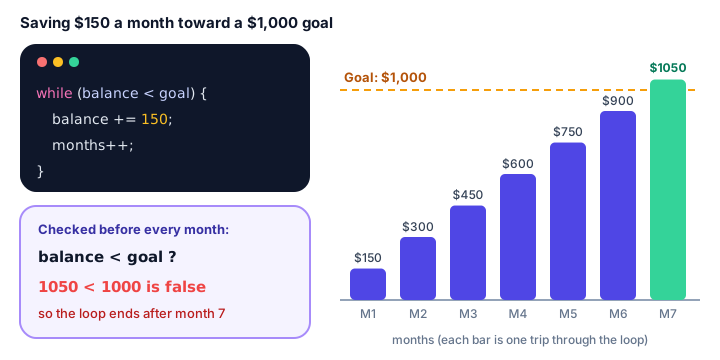
After month 6 the balance is $900, still less than $1,000, so the loop runs once more. After month 7 it's $1,050, the check 1050 < 1000 is false, and Java continues with the line after the loop.
What happens if the condition is false at the start?
The body never runs, not even once. A while loop is a "look before you leap" loop:
public class AlreadyFull {
    public static void main(String[] args) {
        int seatsTaken = 180;
        int capacity = 180;

        while (seatsTaken < capacity) {
            System.out.println("Selling seat " + (seatsTaken + 1));
            seatsTaken++;
        }

        System.out.println("Flight is full. Seats sold today: 0");
    }
}
Flight is full. Seats sold today: 0If you need the body to run at least once no matter what, use the do-while loop instead.
Condition-controlled loops
A condition-controlled loop runs until some state is reached, rather than for a fixed count. Here, an investment grows by 7% a year. How long until it doubles?
public class DoubleMyMoney {
    public static void main(String[] args) {
        double start = 1000.0;
        double balance = start;
        int years = 0;

        while (balance < start * 2) {
            balance = balance * 1.07;
            years++;
        }

        System.out.printf("Doubled after %d years: $%.2f%n", years, balance);
    }
}
Doubled after 11 years: $2104.85Another classic: counting the digits of a number by chopping off the last digit with / 10 until nothing is left.
public class DigitCounter {
    public static void main(String[] args) {
        int number = 4096201;
        int digits = 0;
        int remaining = number;

        while (remaining > 0) {
            remaining = remaining / 10;
            digits++;
        }

        System.out.println(number + " has " + digits + " digits");
    }
}
4096201 has 7 digitsWhat is a sentinel loop?
A sentinel is a special value that means "stop". A sentinel loop keeps reading input until the user types that value. It's perfect when the user decides how many items there are. This checkout program uses Scanner from Java user input and stops when the user enters 0:
import java.util.Scanner;

public class CheckoutTotal {
    public static void main(String[] args) {
        Scanner input = new Scanner(System.in);
        double total = 0;
        int items = 0;

        System.out.print("Item price (0 to finish): ");
        double price = input.nextDouble();

        while (price != 0) {
            total += price;
            items++;
            System.out.print("Item price (0 to finish): ");
            price = input.nextDouble();
        }

        System.out.printf("%d items, total $%.2f%n", items, total);
    }
}
Here's a sample run (the user typed 12.99, 4.50, 20 and finally 0):
Item price (0 to finish): 12.99
Item price (0 to finish): 4.50
Item price (0 to finish): 20
Item price (0 to finish): 0
3 items, total $37.49
Notice the pattern: read the first value before the loop, then read the next value as the last step inside the loop. That way the sentinel is checked before it's ever added to the total.
What is an infinite loop, and how do you stop one?
An infinite loop is a loop whose condition never becomes false, so it runs forever. The most common cause is forgetting to update the variable:
int balance = 0;
while (balance < 1000) {
    System.out.println("Saving...");
    // forgot: balance += 150;
}
This prints "Saving..." until you stop it. To stop a running Java program in the terminal, press Ctrl + C. In an IDE such as IntelliJ IDEA or VS Code, click the red square Stop button.
Sometimes an infinite loop is on purpose, for example a game loop or a server waiting for requests. Programmers write while (true) and leave the loop from the inside with break, which you'll learn in Java break and continue.
⚠️ Be careful
Comparing double values with != or == can cause surprise infinite loops, because decimals like 0.1 aren't stored exactly. For example, while (x != 1.0) { x += 0.1; } starting from x = 0 never stops, because x jumps from 0.9999999999999999 straight past 1.0. Use < or > with decimals. (Checking a typed sentinel like 0 is fine, because the user types it exactly.)
While loop vs for loop
| for loop | while loop | |
|---|---|---|
| Best when | You know the number of repetitions | You repeat until something happens |
| Counter setup and update | In the header | Before the loop and inside the body |
| Typical example | Print months 1 to 12 | Save until the goal is reached |
| Runs zero times if condition starts false | Yes | Yes |
Any for loop can be rewritten as a while loop and vice versa. Pick the one that makes your intent clearest.
Common mistakes with the Java while loop
1. Forgetting to change the condition variable
The result is an infinite loop. Before running, ask: "What line inside the loop moves me toward the end?"
2. A semicolon after the condition
while (balance < goal);   // empty body that loops forever
{
    balance += 150;
}
3. Updating in the wrong place
In a sentinel loop, reading the next value at the start of the body instead of the end means the first value is skipped and the sentinel gets processed.
4. Off-by-one conditions
while (balance <= goal) keeps saving even when the balance equals the goal. Decide whether "exactly reached" should stop the loop.
Practice exercise
🏋️ Try it yourself
A bacteria culture starts with 50 cells and doubles every hour. Write a while loop that prints the cell count each hour and stops once there are at least 10,000 cells. Finally, print how many hours it took.
Show solution
public class BacteriaGrowth {
    public static void main(String[] args) {
        int cells = 50;
        int hours = 0;

        while (cells < 10000) {
            cells *= 2;
            hours++;
            System.out.println("Hour " + hours + ": " + cells + " cells");
        }

        System.out.println("Reached " + cells + " cells in " + hours + " hours");
    }
}
Hour 1: 100 cells
Hour 2: 200 cells
Hour 3: 400 cells
Hour 4: 800 cells
Hour 5: 1600 cells
Hour 6: 3200 cells
Hour 7: 6400 cells
Hour 8: 12800 cells
Reached 12800 cells in 8 hoursWhat's next?
A while loop may run zero times. Next, learn the Java do-while loop, which always runs its body at least once, perfect for menus and input checking.
Key takeaways
- A while loop repeats its body as long as the condition is true and checks the condition before every iteration.
- If the condition is false at the start, the body runs zero times.
- Set up the variable before the loop and change it inside the loop so the condition can become false.
- Use while for condition-controlled repetition when you do not know the count in advance.
- A sentinel loop reads input until a special stop value, reading once before the loop and again at the end of the body.
- An infinite loop never ends; stop it with Ctrl + C, and avoid it by always updating the condition variable.
Frequently asked questions
What is the syntax of a while loop in Java?
while (condition) { body }. Java checks the boolean condition, runs the body if it is true, and repeats until the condition becomes false.
Can a while loop run zero times in Java?
Yes. The condition is checked first, so if it is false from the start, the body never runs. Use do-while if the body must run at least once.
How do I stop an infinite loop in Java?
Press Ctrl + C in the terminal or click Stop in your IDE. In code, make sure something inside the loop changes the condition, or exit with break.
What is the difference between a while loop and a for loop in Java?
A for loop keeps its counter setup, condition and update in one header and suits a known number of repetitions. A while loop only has a condition and suits repeating until something happens.
What is a sentinel value?
A special input value, such as 0 or -1, that tells a loop to stop reading more data. It must be a value that can never be real data.