Java Access Modifiers
Updated 8 min read Aimerscrew
Right now, any code in your program can reach into an object and change its fields, even to values that make no sense. Java access modifiers let you decide who is allowed to see and use each part of a class. In this lesson, you'll learn the four access levels, see the compile errors they produce, and understand why most fields should be private.
🌍 Real-life example
Think of a restaurant. The menu and the dining room are public: anyone can walk in. The kitchen is for staff only, a bit like package-private. The safe in the manager's office is private: only the manager opens it. Customers still get their food, because the waiter (a public method) passes orders to the kitchen for them.
What are access modifiers in Java?
An access modifier is a keyword you put in front of a class, field, method or constructor to control where it can be used from. Java has four access levels, but only three keywords, because the fourth level is what you get when you write no keyword at all.
class Account {
    public String owner;       // anyone can use it
    protected String branch;   // package + subclasses
    String accountType;        // no keyword: package-private
    private double balance;    // this class only
}
Access levels table: who can see what?
Here's the whole picture in one table. "Package" means the group of classes in the same package (folder); you'll create packages in Java packages. "Subclass" means a class that extends this one, covered in Java inheritance.
| Modifier | Same class | Same package | Subclass (other package) | Everywhere else |
|---|---|---|---|---|
public | Yes | Yes | Yes | Yes |
protected | Yes | Yes | Yes | No |
| (none) package-private | Yes | Yes | No | No |
private | Yes | No | No | No |
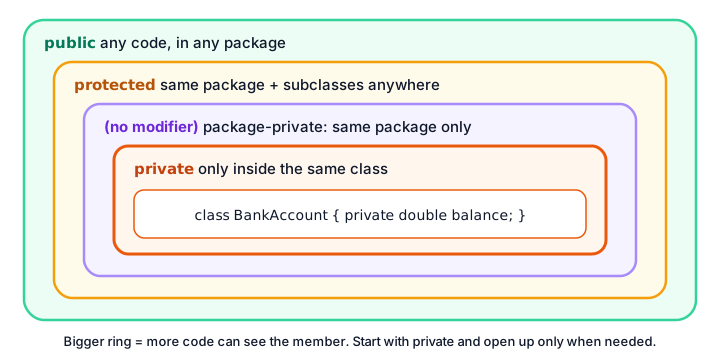
The private modifier
private is the strictest level. A private field or method can be used only by code inside the same class. Even another class in the same file can't touch it:
public class PrivateError {
    public static void main(String[] args) {
        Wallet wallet = new Wallet();
        wallet.cash = 1_000_000;   // not allowed!
    }
}

class Wallet {
    private double cash;
}
This program doesn't compile. The compiler points straight at the problem:
error: cash has private access in Wallet
        wallet.cash = 1_000_000;   // not allowed!
              ^
That error is a good thing. It means nobody can hand themselves a million dollars by accident (or on purpose). If outside code needs to work with the cash, the Wallet class must offer a method for it, and that method can check the request first.
Why should fields be private?
Making fields private and offering public methods is the most important habit in object-oriented Java. Here's a snack machine whose stock can only change through buy():
public class VendingMachine {
    public static void main(String[] args) {
        SnackMachine machine = new SnackMachine("Lobby", 3);

        machine.buy();
        machine.buy();
        machine.buy();
        machine.buy();   // sold out

        System.out.println("Snacks left: " + machine.getStock());
    }
}

class SnackMachine {
    private String location;
    private int stock;

    public SnackMachine(String location, int stock) {
        this.location = location;
        this.stock = stock;
    }

    public void buy() {
        if (isEmpty()) {
            System.out.println(location + ": sorry, sold out!");
            return;
        }
        stock--;
        System.out.println(location + ": here's your snack. " + stock + " left.");
    }

    public int getStock() {
        return stock;
    }

    private boolean isEmpty() {         // a helper only this class needs
        return stock == 0;
    }
}
Lobby: here's your snack. 2 left.
Lobby: here's your snack. 1 left.
Lobby: here's your snack. 0 left.
Lobby: sorry, sold out!
Snacks left: 0Because stock is private, the stock can never go below zero: the only way to lower it is buy(), and buy() checks first. The method getStock() lets outside code read the stock without being able to change it. Private fields bring three big benefits:
- Safety: objects can't be put into an invalid state, like a negative stock.
- Freedom to change: you can rename or restructure private fields later without breaking code in other classes.
- Easier debugging: if a private field has a wrong value, the bug must be inside that one class.
Private methods
Methods can be private too. In SnackMachine, isEmpty() is a helper that's useful inside the class but not part of what the machine offers to the outside world. Calling it from main fails with error: isEmpty() has private access in SnackMachine.
A good way to think about it: public methods are the buttons on the front of the machine; private methods are the wiring inside.
Package-private: the default access level
When you write no modifier, the member is package-private: any class in the same package can use it, but classes in other packages can't. All the classes in one file belong to the same package, which is why the examples in earlier lessons worked without any modifiers:
public class LibraryShelf {
    public static void main(String[] args) {
        LibraryBook book = new LibraryBook();
        book.title = "Dune";          // package-private: OK in the same package
        book.shelf = "B4";

        System.out.println(book.title + " is on shelf " + book.shelf);
    }
}

class LibraryBook {
    String title;   // no modifier = package-private
    String shelf;
}
Dune is on shelf B4Package-private is handy for classes that work closely together inside one package. In Java packages, you'll see the error you get when a class in a different package tries to use a package-private member.
The public modifier
public means "anyone, anywhere". Use it for the parts of a class that other code is meant to use: constructors you want people to call, and the methods that make up the class's job, such as buy() and getStock(). That's also why main is public: the Java launcher, which lives outside your class, has to be able to call it.
What does protected mean?
protected sits between package-private and public. A protected member can be used by any class in the same package and by subclasses, even subclasses in other packages. It's designed for inheritance: a parent class can share something with its children without making it public to the whole world. You'll see it in action in Java inheritance.
📝 Note
Because protected also includes the same package, it's actually more open than package-private, not less. Many beginners get this backwards.
Access modifiers on classes
Top-level classes (classes not inside another class) can only be public or package-private:
- A
publicclass can be used from any package. Its name must match the file name, so a file holds at most one public class. - A class with no modifier can only be used inside its own package. That's why helper classes in our single-file examples have no
public.
Writing private class Wallet at the top level is a compile error. (Classes nested inside other classes can be private; see Java inner classes.)
💡 Tip
Start with the most restrictive level that works: make fields private, helper methods private, and only the methods other classes really need public. Opening access later is easy; closing it later can break other people's code.
Real-world example: a smart thermostat
This thermostat keeps its room and target temperature private. Outside code can raise, lower and read the temperature, but every change goes through a private log() helper that records it:
public class Thermostat {
    public static void main(String[] args) {
        SmartThermostat hall = new SmartThermostat("Hall", 21);

        hall.raise(2);
        hall.lower(5);
        System.out.println(hall.getRoom() + " is set to " + hall.getTarget() + " C");
    }
}

class SmartThermostat {
    private String room;
    private int target;

    public SmartThermostat(String room, int target) {
        this.room = room;
        this.target = target;
    }

    public void raise(int degrees) {
        target += degrees;
        log("raised by " + degrees);
    }

    public void lower(int degrees) {
        target -= degrees;
        log("lowered by " + degrees);
    }

    public String getRoom() {
        return room;
    }

    public int getTarget() {
        return target;
    }

    private void log(String message) {
        System.out.println("[" + room + "] " + message + ", now " + target + " C");
    }
}
[Hall] raised by 2, now 23 C
[Hall] lowered by 5, now 18 C
Hall is set to 18 CNotice the file is named Thermostat.java after the public class with main, while SmartThermostat has no class-level modifier.
Common mistakes with access modifiers
1. Making every field public
It's tempting because it "just works", but public fields let any code set nonsense values. Make fields private and add methods.
2. Expecting private to allow access from the same file
Private means same class, not same file. Another class in the same file still gets "has private access".
3. Thinking no modifier means public
No modifier means package-private. Code in other packages can't use it.
4. Two public classes in one file
Only the class matching the file name may be public. The compiler reports "class X is public, should be declared in a file named X.java".
5. Marking a local variable private
Access modifiers belong to class members. private int count = 0; inside a method is a compile error; local variables are already visible only inside their method.
Practice exercise
🏋️ Try it yourself
Build a PiggyBank class that stores quarters (25-cent coins). Keep the number of coins in a private field. Add a public addCoins(int amount) method that ignores amounts of zero or less (print "Ignored: ..."), a public report() method, and a private helper toDollars() that report() uses. Add 40 coins, try to add -10, add 25 more, then print the report. Bonus: try bank.coins = 1000; in main and read the error.
Show solution
public class PiggyBankApp {
    public static void main(String[] args) {
        PiggyBank bank = new PiggyBank();

        bank.addCoins(40);
        bank.addCoins(-10);   // ignored
        bank.addCoins(25);

        bank.report();
    }
}

class PiggyBank {
    private int coins;   // each coin is worth 25 cents

    public void addCoins(int amount) {
        if (amount <= 0) {
            System.out.println("Ignored: " + amount);
            return;
        }
        coins += amount;
    }

    public void report() {
        System.out.println(coins + " coins = $" + toDollars());
    }

    private double toDollars() {
        return coins * 0.25;
    }
}
Ignored: -10
65 coins = $16.25The bonus line fails with error: coins has private access in PiggyBank. The only way to change the coins is addCoins(), which rejects bad amounts.
What's next?
Private fields plus public methods is the heart of one of the four pillars of OOP. Next, learn Java encapsulation, where you'll write getters and setters that validate every change.
Key takeaways
- Access modifiers control where a class, field, method or constructor can be used.
- private: only inside the same class, even other classes in the same file are blocked.
- No modifier (package-private): any class in the same package.
- protected: same package plus subclasses in other packages.
- public: any code, anywhere.
- Make fields private and expose only the methods other classes need.
- Top-level classes can only be public or package-private, and a public class must match its file name.
Frequently asked questions
What are the four access modifiers in Java?
public, protected, package-private (no keyword) and private. They go from the most open, public, to the most restrictive, private.
What is the default access modifier in Java?
When you write no modifier, the member is package-private. It can be used by any class in the same package, but not from other packages.
What is the difference between private and protected?
private members can only be used inside their own class. protected members can be used anywhere in the same package and by subclasses, even in other packages.
Why should fields be private in Java?
Private fields can only be changed through the class's own methods, which can check every value. This keeps objects valid, makes bugs easier to find and lets you change the class later without breaking other code.
Can a top-level class be private in Java?
No. A top-level class can only be public or package-private. Only nested classes, which are declared inside another class, can be private or protected.