Java Project: Library Management System
Updated 17 min read Aimerscrew
A library management system in Java is the project where object-oriented programming really clicks. Instead of loose variables, you'll model real things as objects: each Book knows its own title and whether it's on the shelf, and a Library object looks after the whole collection. Along the way you'll use a HashMap, sort lists with a Comparator, search without caring about capital letters and create your own exceptions.
🌍 Real-life example
At your local library, every book has a barcode number. The librarian scans it to find the book instantly, checks whether it's already on loan and stamps it out to you. If someone else has it, you're told politely that it's unavailable. Your program does the same: book IDs work like barcodes, and borrowing a book that's already out triggers a BookNotAvailableException.
What you'll build
The finished system can:
- list all books, or only the available ones, sorted by title,
- search by title or author, ignoring upper and lower case,
- add new books, giving each one the next ID automatically,
- borrow and return books by ID, with clear messages for unknown IDs and books that are already out,
- run everything from a menu until the user quits.
Here's a quick taste (the user's typing follows each prompt):
=== City Library ===

1) All books  2) Available  3) Search  4) Add book
5) Borrow  6) Return  7) Quit
Choose an option: 3
Title or author contains: austen
2 match(es):
#3   Emma                     Jane Austen          1815  available
#4   Pride and Prejudice      Jane Austen          1813  available

1) All books  2) Available  3) Search  4) Add book
5) Borrow  6) Return  7) Quit
Choose an option: 7
Library closed. Goodbye!
Concepts used in this project
| Concept | Where it's used | Lesson |
|---|---|---|
| Classes, constructors and private fields | Book, Library | classes and objects, encapsulation |
Overriding toString() | Printing a book as one table row | Object class |
HashMap<Integer, Book> | Finding a book by ID | HashMap |
ArrayList and sorting with a Comparator | Lists sorted by title | ArrayList, sorting collections |
| Custom checked exceptions | BookNotFoundException, BookNotAvailableException | custom exceptions |
throws and multi-catch | borrowBook() and the menu | throw and throws |
String.format() widths | Lining up the columns | output formatting |
How are the classes organized?
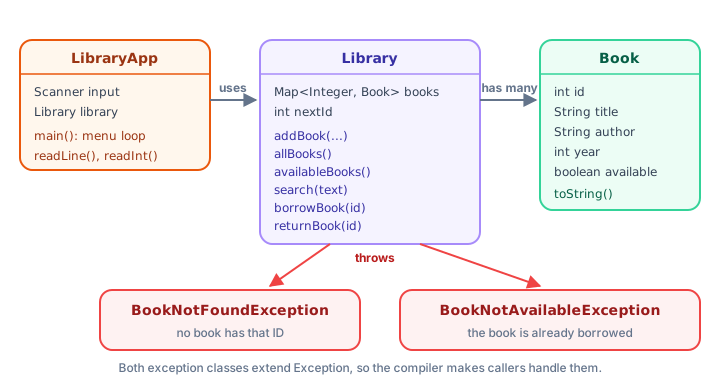
Splitting the program into classes keeps each one focused. LibraryApp talks to the user, Library holds the rules, and Book holds the data for one title. The library never prints anything itself; when something goes wrong, it throws an exception and lets the app decide what to say.
Step 1: The Book class
A book's ID, title, author and year never change, so those fields are private final. Only available changes, and it has a setter. Overriding toString() means System.out.println(book) prints a neat row instead of something like Book@1b6d3586:
public class BookDemo {
    public static void main(String[] args) {
        Book hobbit = new Book(1, "The Hobbit", "J.R.R. Tolkien", 1937);
        Book dune = new Book(2, "Dune", "Frank Herbert", 1965);

        dune.setAvailable(false);

        System.out.println(hobbit);
        System.out.println(dune);
    }
}

class Book {
    private final int id;
    private final String title;
    private final String author;
    private final int year;
    private boolean available = true;

    Book(int id, String title, String author, int year) {
        this.id = id;
        this.title = title;
        this.author = author;
        this.year = year;
    }

    int getId() {
        return id;
    }

    String getTitle() {
        return title;
    }

    String getAuthor() {
        return author;
    }

    boolean isAvailable() {
        return available;
    }

    void setAvailable(boolean available) {
        this.available = available;
    }

    @Override
    public String toString() {
        String status = available ? "available" : "borrowed";
        return String.format("#%-3d %-24s %-20s %d  %s", id, title, author, year, status);
    }
}
#1 The Hobbit J.R.R. Tolkien 1937 available
#2 Dune Frank Herbert 1965 borrowedThe format string "#%-3d %-24s %-20s %d %s" lines up the columns. %-24s means "a string, padded with spaces to 24 characters, aligned left". The status uses the ternary operator to turn the boolean into a word.
📝 Note: why not a record?
A record would be perfect for the fixed details, but all record fields are final, and a book's availability must change. A normal class with mostly final fields gives you the best of both: safe data plus one controlled piece of state.
Step 2: Custom exceptions for the rules
Two things can go wrong when borrowing: the ID doesn't exist, or the book is already out. Each gets its own exception class, so the code that catches them can tell them apart and the names explain the problem:
class BookNotFoundException extends Exception {
    private static final long serialVersionUID = 1L;

    BookNotFoundException(int id) {
        super("No book with ID " + id + ".");
    }
}

class BookNotAvailableException extends Exception {
    private static final long serialVersionUID = 1L;

    BookNotAvailableException(Book book) {
        super("\"" + book.getTitle() + "\" is already borrowed.");
    }
}
Both extend Exception, which makes them checked: any method that might throw them must say so with throws, and the compiler forces callers to handle them. That's a good fit here, because a book being out is a normal situation the menu must always deal with. Each constructor builds the message from the data, so throwing one is a single short line. The serialVersionUID line just silences a compiler warning, as explained in the custom exceptions lesson.
Step 3: The Library class
The library stores books in a HashMap<Integer, Book>, so finding a book by ID is instant, no matter how many books there are. A nextId counter makes sure IDs are unique. This test program adds four books, lists and searches them, and tries three borrow requests:
import java.util.ArrayList;
import java.util.Comparator;
import java.util.HashMap;
import java.util.List;
import java.util.Map;

public class LibraryTest {
    public static void main(String[] args) {
        Library library = new Library();
        library.addBook("The Hobbit", "J.R.R. Tolkien", 1937);
        library.addBook("Dune", "Frank Herbert", 1965);
        library.addBook("Emma", "Jane Austen", 1815);
        library.addBook("Pride and Prejudice", "Jane Austen", 1813);

        System.out.println("All books:");
        for (Book book : library.allBooks()) {
            System.out.println(book);
        }

        System.out.println();
        System.out.println("Search \"austen\":");
        for (Book book : library.search("austen")) {
            System.out.println(book);
        }

        System.out.println();
        int[] requests = {2, 2, 9};
        for (int id : requests) {
            try {
                Book book = library.borrowBook(id);
                System.out.println("You borrowed \"" + book.getTitle() + "\".");
            } catch (BookNotFoundException | BookNotAvailableException e) {
                System.out.println("Sorry: " + e.getMessage());
            }
        }

        System.out.println();
        System.out.println("Available now: " + library.availableBooks().size() + " of "
                + library.allBooks().size());
    }
}

class Library {
    private final Map<Integer, Book> books = new HashMap<>();
    private int nextId = 1;

    Book addBook(String title, String author, int year) {
        Book book = new Book(nextId, title, author, year);
        books.put(nextId, book);
        nextId++;
        return book;
    }

    /** All books, sorted by title (a HashMap has no useful order of its own). */
    List<Book> allBooks() {
        List<Book> result = new ArrayList<>(books.values());
        result.sort(Comparator.comparing(Book::getTitle, String.CASE_INSENSITIVE_ORDER));
        return result;
    }

    List<Book> availableBooks() {
        List<Book> result = new ArrayList<>();
        for (Book book : allBooks()) {
            if (book.isAvailable()) {
                result.add(book);
            }
        }
        return result;
    }

    /** Books whose title or author contains the text, ignoring upper/lower case. */
    List<Book> search(String text) {
        String wanted = text.toLowerCase();
        List<Book> result = new ArrayList<>();
        for (Book book : allBooks()) {
            if (book.getTitle().toLowerCase().contains(wanted)
                    || book.getAuthor().toLowerCase().contains(wanted)) {
                result.add(book);
            }
        }
        return result;
    }

    Book findById(int id) throws BookNotFoundException {
        Book book = books.get(id);
        if (book == null) {
            throw new BookNotFoundException(id);
        }
        return book;
    }

    Book borrowBook(int id) throws BookNotFoundException, BookNotAvailableException {
        Book book = findById(id);
        if (!book.isAvailable()) {
            throw new BookNotAvailableException(book);
        }
        book.setAvailable(false);
        return book;
    }

    /** Returns false if the book wasn't borrowed in the first place. */
    boolean returnBook(int id) throws BookNotFoundException {
        Book book = findById(id);
        if (book.isAvailable()) {
            return false;
        }
        book.setAvailable(true);
        return true;
    }
}

class Book {
    private final int id;
    private final String title;
    private final String author;
    private final int year;
    private boolean available = true;

    Book(int id, String title, String author, int year) {
        this.id = id;
        this.title = title;
        this.author = author;
        this.year = year;
    }

    int getId() {
        return id;
    }

    String getTitle() {
        return title;
    }

    String getAuthor() {
        return author;
    }

    boolean isAvailable() {
        return available;
    }

    void setAvailable(boolean available) {
        this.available = available;
    }

    @Override
    public String toString() {
        String status = available ? "available" : "borrowed";
        return String.format("#%-3d %-24s %-20s %d  %s", id, title, author, year, status);
    }
}

class BookNotFoundException extends Exception {
    private static final long serialVersionUID = 1L;

    BookNotFoundException(int id) {
        super("No book with ID " + id + ".");
    }
}

class BookNotAvailableException extends Exception {
    private static final long serialVersionUID = 1L;

    BookNotAvailableException(Book book) {
        super("\"" + book.getTitle() + "\" is already borrowed.");
    }
}
All books:
#2 Dune Frank Herbert 1965 available
#3 Emma Jane Austen 1815 available
#4 Pride and Prejudice Jane Austen 1813 available
#1 The Hobbit J.R.R. Tolkien 1937 available
Search "austen":
#3 Emma Jane Austen 1815 available
#4 Pride and Prejudice Jane Austen 1813 available
You borrowed "Dune".
Sorry: "Dune" is already borrowed.
Sorry: No book with ID 9.
Available now: 3 of 4A few design decisions are worth a closer look:
- Sorted output from an unsorted map. A
HashMapdoesn't keep any useful order, soallBooks()copies the values into anArrayListand sorts it withComparator.comparing(Book::getTitle, String.CASE_INSENSITIVE_ORDER). That reads as "compare books by their title, ignoring case". The output is always the same order: Dune, Emma, Pride and Prejudice, The Hobbit. - Case-insensitive search.
search()lowers both the search text and each title and author before callingcontains(), soAUSTEN,austenandAustenall match. - Reuse.
availableBooks()andsearch()loop overallBooks(), so their results come out sorted too, for free. - One place for "not found". Both
borrowBook()andreturnBook()callfindById(), which throwsBookNotFoundException. Because they don't catch it, it passes straight up to the caller, and theirthrowsclauses say so.
💡 Tip: check, then change
borrowBook() checks every rule before calling setAvailable(false). If any check fails, an exception leaves the method and nothing has changed. Ordering your code as "validate first, change second" prevents half-finished updates.
Step 4: The menu
LibraryApp adds a menu loop on top. Two helpers keep input handling in one place: readLine() prints a prompt and returns the trimmed line (or null when the input ends), and readInt() repeats the question until the user types a whole number. Borrowing then becomes short and readable:
static void borrowBook() {
    Integer id = readInt("Book ID to borrow: ");
    if (id == null) {
        return;
    }
    try {
        Book book = library.borrowBook(id);
        System.out.println("You borrowed \"" + book.getTitle() + "\". Enjoy!");
    } catch (BookNotFoundException | BookNotAvailableException e) {
        System.out.println("Sorry: " + e.getMessage());
    }
}
The multi-catch handles both problems the same way, because each exception already carries a helpful message. If you wanted different reactions (say, suggesting a search when the ID is unknown), you'd write two separate catch blocks instead.
The complete library management system in Java
Save this as LibraryApp.java and run it with java LibraryApp.java. The library starts with four sample books so you can try it straight away:
import java.util.ArrayList;
import java.util.Comparator;
import java.util.HashMap;
import java.util.List;
import java.util.Map;
import java.util.Scanner;

public class LibraryApp {
    static final Scanner input = new Scanner(System.in);
    static final Library library = new Library();

    public static void main(String[] args) {
        library.addBook("The Hobbit", "J.R.R. Tolkien", 1937);
        library.addBook("Dune", "Frank Herbert", 1965);
        library.addBook("Emma", "Jane Austen", 1815);
        library.addBook("Pride and Prejudice", "Jane Austen", 1813);

        System.out.println("=== City Library ===");
        boolean running = true;
        while (running) {
            System.out.println();
            System.out.println("1) All books  2) Available  3) Search  4) Add book");
            System.out.println("5) Borrow  6) Return  7) Quit");
            String choice = readLine("Choose an option: ");
            if (choice == null) {
                break;
            }
            switch (choice) {
                case "1" -> printBooks(library.allBooks());
                case "2" -> printBooks(library.availableBooks());
                case "3" -> searchBooks();
                case "4" -> addBook();
                case "5" -> borrowBook();
                case "6" -> returnBook();
                case "7" -> running = false;
                default -> System.out.println("Please choose a number from 1 to 7.");
            }
        }
        System.out.println("Library closed. Goodbye!");
    }

    static void printBooks(List<Book> books) {
        if (books.isEmpty()) {
            System.out.println("No books to show.");
            return;
        }
        for (Book book : books) {
            System.out.println(book);
        }
    }

    static void searchBooks() {
        String text = readLine("Title or author contains: ");
        if (text == null || text.isEmpty()) {
            return;
        }
        List<Book> found = library.search(text);
        System.out.println(found.size() + " match(es):");
        printBooks(found);
    }

    static void addBook() {
        String title = readLine("Title: ");
        if (title == null || title.isEmpty()) {
            return;
        }
        String author = readLine("Author: ");
        if (author == null || author.isEmpty()) {
            return;
        }
        Integer year = readInt("Year: ");
        if (year == null) {
            return;
        }
        Book book = library.addBook(title, author, year);
        System.out.println("Added \"" + book.getTitle() + "\" with ID " + book.getId() + ".");
    }

    static void borrowBook() {
        Integer id = readInt("Book ID to borrow: ");
        if (id == null) {
            return;
        }
        try {
            Book book = library.borrowBook(id);
            System.out.println("You borrowed \"" + book.getTitle() + "\". Enjoy!");
        } catch (BookNotFoundException | BookNotAvailableException e) {
            System.out.println("Sorry: " + e.getMessage());
        }
    }

    static void returnBook() {
        Integer id = readInt("Book ID to return: ");
        if (id == null) {
            return;
        }
        try {
            if (library.returnBook(id)) {
                System.out.println("Thanks for returning book #" + id + ".");
            } else {
                System.out.println("Book #" + id + " wasn't borrowed.");
            }
        } catch (BookNotFoundException e) {
            System.out.println("Sorry: " + e.getMessage());
        }
    }

    /** Prints the prompt and reads one trimmed line. Returns null when input ends. */
    static String readLine(String prompt) {
        System.out.print(prompt);
        if (!input.hasNextLine()) {
            System.out.println();
            return null;
        }
        return input.nextLine().trim();
    }

    /** Asks until the user types a whole number. Returns null when input ends. */
    static Integer readInt(String prompt) {
        while (true) {
            String text = readLine(prompt);
            if (text == null) {
                return null;
            }
            try {
                return Integer.parseInt(text);
            } catch (NumberFormatException e) {
                System.out.println("Please type a whole number.");
            }
        }
    }
}

class Library {
    private final Map<Integer, Book> books = new HashMap<>();
    private int nextId = 1;

    Book addBook(String title, String author, int year) {
        Book book = new Book(nextId, title, author, year);
        books.put(nextId, book);
        nextId++;
        return book;
    }

    /** All books, sorted by title (a HashMap has no useful order of its own). */
    List<Book> allBooks() {
        List<Book> result = new ArrayList<>(books.values());
        result.sort(Comparator.comparing(Book::getTitle, String.CASE_INSENSITIVE_ORDER));
        return result;
    }

    List<Book> availableBooks() {
        List<Book> result = new ArrayList<>();
        for (Book book : allBooks()) {
            if (book.isAvailable()) {
                result.add(book);
            }
        }
        return result;
    }

    /** Books whose title or author contains the text, ignoring upper/lower case. */
    List<Book> search(String text) {
        String wanted = text.toLowerCase();
        List<Book> result = new ArrayList<>();
        for (Book book : allBooks()) {
            if (book.getTitle().toLowerCase().contains(wanted)
                    || book.getAuthor().toLowerCase().contains(wanted)) {
                result.add(book);
            }
        }
        return result;
    }

    Book findById(int id) throws BookNotFoundException {
        Book book = books.get(id);
        if (book == null) {
            throw new BookNotFoundException(id);
        }
        return book;
    }

    Book borrowBook(int id) throws BookNotFoundException, BookNotAvailableException {
        Book book = findById(id);
        if (!book.isAvailable()) {
            throw new BookNotAvailableException(book);
        }
        book.setAvailable(false);
        return book;
    }

    /** Returns false if the book wasn't borrowed in the first place. */
    boolean returnBook(int id) throws BookNotFoundException {
        Book book = findById(id);
        if (book.isAvailable()) {
            return false;
        }
        book.setAvailable(true);
        return true;
    }
}

class Book {
    private final int id;
    private final String title;
    private final String author;
    private final int year;
    private boolean available = true;

    Book(int id, String title, String author, int year) {
        this.id = id;
        this.title = title;
        this.author = author;
        this.year = year;
    }

    int getId() {
        return id;
    }

    String getTitle() {
        return title;
    }

    String getAuthor() {
        return author;
    }

    boolean isAvailable() {
        return available;
    }

    void setAvailable(boolean available) {
        this.available = available;
    }

    @Override
    public String toString() {
        String status = available ? "available" : "borrowed";
        return String.format("#%-3d %-24s %-20s %d  %s", id, title, author, year, status);
    }
}

class BookNotFoundException extends Exception {
    private static final long serialVersionUID = 1L;

    BookNotFoundException(int id) {
        super("No book with ID " + id + ".");
    }
}

class BookNotAvailableException extends Exception {
    private static final long serialVersionUID = 1L;

    BookNotAvailableException(Book book) {
        super("\"" + book.getTitle() + "\" is already borrowed.");
    }
}
Sample run
Here's a sample run (the user's typing follows each prompt). It searches in capitals, borrows Emma twice, types a word and then a missing ID, adds a new book, and returns Emma twice:
=== City Library ===

1) All books  2) Available  3) Search  4) Add book
5) Borrow  6) Return  7) Quit
Choose an option: 2
#2   Dune                     Frank Herbert        1965  available
#3   Emma                     Jane Austen          1815  available
#4   Pride and Prejudice      Jane Austen          1813  available
#1   The Hobbit               J.R.R. Tolkien       1937  available

1) All books  2) Available  3) Search  4) Add book
5) Borrow  6) Return  7) Quit
Choose an option: 3
Title or author contains: AUSTEN
2 match(es):
#3   Emma                     Jane Austen          1815  available
#4   Pride and Prejudice      Jane Austen          1813  available

1) All books  2) Available  3) Search  4) Add book
5) Borrow  6) Return  7) Quit
Choose an option: 5
Book ID to borrow: 3
You borrowed "Emma". Enjoy!

1) All books  2) Available  3) Search  4) Add book
5) Borrow  6) Return  7) Quit
Choose an option: 5
Book ID to borrow: 3
Sorry: "Emma" is already borrowed.

1) All books  2) Available  3) Search  4) Add book
5) Borrow  6) Return  7) Quit
Choose an option: 5
Book ID to borrow: ten
Please type a whole number.
Book ID to borrow: 42
Sorry: No book with ID 42.

1) All books  2) Available  3) Search  4) Add book
5) Borrow  6) Return  7) Quit
Choose an option: 4
Title: The Midnight Library
Author: Matt Haig
Year: 2020
Added "The Midnight Library" with ID 5.

1) All books  2) Available  3) Search  4) Add book
5) Borrow  6) Return  7) Quit
Choose an option: 2
#2   Dune                     Frank Herbert        1965  available
#4   Pride and Prejudice      Jane Austen          1813  available
#1   The Hobbit               J.R.R. Tolkien       1937  available
#5   The Midnight Library     Matt Haig            2020  available

1) All books  2) Available  3) Search  4) Add book
5) Borrow  6) Return  7) Quit
Choose an option: 6
Book ID to return: 3
Thanks for returning book #3.

1) All books  2) Available  3) Search  4) Add book
5) Borrow  6) Return  7) Quit
Choose an option: 6
Book ID to return: 3
Book #3 wasn't borrowed.

1) All books  2) Available  3) Search  4) Add book
5) Borrow  6) Return  7) Quit
Choose an option: 7
Library closed. Goodbye!
After Emma was borrowed it disappeared from the available list, and the new book with ID 5 slotted into its alphabetical place.
Common mistakes in this project
1. Printing a HashMap and expecting an order
Looping directly over books.values() gives the books in an order that depends on the keys' hash codes, not on when you added them or their titles. Sort a copy, as allBooks() does, or use a TreeMap or LinkedHashMap if you need a specific order.
2. Case-sensitive search
book.getTitle().contains(text)                              // "hobbit" misses "The Hobbit"
book.getTitle().toLowerCase().contains(text.toLowerCase())  // matches
3. Comparing titles with ==
title == "Dune" compares references, not text, and can be false even when the words match. Use equals() or equalsIgnoreCase(); see string comparison.
4. Exposing the internal map
Adding a method like getBooks() that returns the HashMap itself lets any code put or remove books without the library's rules. Return a new list (as allBooks() does) so callers can read the data but not change the collection.
Level up: challenges
🏋️ Challenges
- Who has it? Ask for the member's name when borrowing, store it in the
Book, and show "borrowed by Sofia" in the list. - Remove a book. Add a menu option that removes a book by ID, but refuse if it's currently borrowed.
- Sort by year. Add a list option sorted from oldest to newest using
Comparator.comparingInt(...). - Borrowing limit. Allow each member at most 3 books at once. Keep a
HashMap<String, Integer>of member names to counts and throw a newBorrowLimitException. - Save the catalog. Write the books to
books.csvon quit and read them back on start, using what you learned in writing files and reading files.
Show a hint for challenge 2
Book removeBook(int id) throws BookNotFoundException, BookNotAvailableException {
    Book book = findById(id);
    if (!book.isAvailable()) {
        throw new BookNotAvailableException(book);
    }
    books.remove(id);
    return book;
}
Validate first, then call books.remove(id). The menu code can reuse the same multi-catch as borrowing.
Show a hint for challenge 3
Add a getYear() getter to Book, then copy the values into a new ArrayList and call list.sort(Comparator.comparingInt(Book::getYear));.
What's next?
You've modeled a collection of objects with rules and exceptions. Next, you'll do the same with money, where every rule really matters: the bank account project in Java, with deposits, withdrawals, transfers and a transaction history.
Key takeaways
- A library management system in Java models each title as a Book object and keeps all books in a Library class.
- A HashMap<Integer, Book> finds books by ID instantly, and a nextId counter keeps IDs unique.
- HashMap has no useful order, so copy the values into an ArrayList and sort it with a Comparator before printing.
- Lowercase both the search text and the data before calling contains() to make search case-insensitive.
- Custom checked exceptions such as BookNotAvailableException name each rule break and force callers to handle it.
- Validate first and change state second, so a failed borrow leaves every book exactly as it was.
Frequently asked questions
How do you make a library management system in Java?
Create a Book class with fields such as id, title, author and an available flag, and a Library class that stores books in a collection and has methods to add, search, borrow and return them. A main class with a Scanner menu loop calls those methods based on the user's choice.
Should I use an ArrayList or a HashMap to store books?
Use a HashMap keyed by book ID when you look books up by ID often, because lookups are fast. Use an ArrayList when you mostly loop over all books. This project uses a HashMap for storage and builds sorted ArrayLists for display.
How do you search by title in Java ignoring case?
Convert both strings to lower case and use contains(): title.toLowerCase().contains(text.toLowerCase()). For an exact match instead of a partial one, use title.equalsIgnoreCase(text).
Why create a custom BookNotAvailableException instead of returning false?
An exception carries a descriptive message, cannot be silently ignored when it is checked, and keeps the success path clean because the method can simply return the borrowed book. A boolean only says that something failed, not why.
How do you sort books by title in Java?
Call list.sort(Comparator.comparing(Book::getTitle)) on an ArrayList of books. Add String.CASE_INSENSITIVE_ORDER as the second argument to comparing() so that titles starting with lower-case letters sort correctly too.