Java try-catch
Updated 9 min read Aimerscrew
In Java exceptions you saw that an uncaught exception stops your program cold. Java try catch is how you stop that from happening: you tell Java "try this risky code, and if it goes wrong, run this plan B instead". In this lesson you'll learn how try and catch work, how to catch several kinds of exceptions, what finally is for, and how to keep asking the user until they type something valid.
🌍 Real-life example
Think of a self-service checkout. You scan an item (the try). Usually it beeps and you move on. But if the barcode won't scan, the machine doesn't explode; it shows "Please wait, an assistant is coming" (the catch). And whatever happens, at the end it prints a receipt (the finally).
What is try-catch in Java?
A try-catch statement has two parts:
- The
tryblock holds code that might throw an exception. - The
catchblock holds code that runs only if a matching exception is thrown insidetry.
try {
    // code that might throw an exception
} catch (ExceptionType e) {
    // code that runs if that exception happens
}
Inside the parentheses, you name the exception type you want to catch, followed by a variable name (by tradition e). That variable holds the exception object, so you can ask it for details.
A first try-catch example
A food delivery app reads the quantity a customer typed. Integer.parseInt() turns text into a number, but it throws a NumberFormatException if the text isn't a valid whole number:
public class FoodOrder {
    public static void main(String[] args) {
        String typed = "3x";

        try {
            int quantity = Integer.parseInt(typed);
            System.out.println("Ordering " + quantity + " pizzas");
        } catch (NumberFormatException e) {
            System.out.println("\"" + typed + "\" is not a valid quantity.");
        }

        System.out.println("Order screen ready.");
    }
}
"3x" is not a valid quantity.
Order screen ready.Notice what happened. parseInt threw the exception, so Java skipped the rest of the try block (the "Ordering" line never ran) and jumped straight into catch. After the catch block finished, the program continued normally. If typed were "3", the catch block would be skipped instead and you'd see Ordering 3 pizzas.
Catching specific exceptions
A catch block only catches the type you name, plus its subclasses. A catch (NumberFormatException e) won't catch an ArithmeticException; that one would still crash the program. This is a good thing: you handle the problems you expect and understand, and real bugs still show up loudly.
⚠️ Be careful
It's tempting to write catch (Exception e) everywhere, because it catches almost everything. But then a typo-level bug, like a NullPointerException, gets quietly swallowed and you'll never know why your program misbehaves. Catch the most specific type you can.
Multiple catch blocks
One try can have several catch blocks, one per kind of problem. Java checks them from top to bottom and runs the first one that matches. Here, a flight booking app turns a seat request into an array index. Two different things can go wrong:
public class SeatPicker {
    public static void main(String[] args) {
        String[] seats = {"1A", "1B", "1C"};
        String[] requests = {"2", "seven", "5"};

        for (String request : requests) {
            try {
                int index = Integer.parseInt(request);
                System.out.println("You got seat " + seats[index]);
            } catch (NumberFormatException e) {
                System.out.println("'" + request + "' is not a number");
            } catch (ArrayIndexOutOfBoundsException e) {
                System.out.println("There is no seat number " + request);
            }
        }
    }
}
You got seat 1C
'seven' is not a number
There is no seat number 5Each request gets its own try, so one bad request doesn't stop the loop. "2" works, "seven" fails to parse, and "5" parses fine but is past the end of the array.
Why the order of catch blocks matters
Because Java uses the first matching catch, a more specific exception (a subclass) must come before a more general one (its parent). Look at this mistake:
public class CatchOrder {
    public static void main(String[] args) {
        int guests = 0;
        try {
            int perGuest = 100 / guests;
            System.out.println(perGuest);
        } catch (Exception e) {
            System.out.println("Something went wrong");
        } catch (ArithmeticException e) {
            System.out.println("Division by zero");
        }
    }
}
ArithmeticException is a kind of Exception, so the first block would always grab it and the second could never run. Java refuses to compile this:
CatchOrder.java:9: error: exception ArithmeticException has already been caughtThe fix is to swap the two blocks: ArithmeticException first, Exception last. Think of it like sorting mail: check for the specific "Fragile" label before dropping everything else into the general bin.
Multi-catch: one block for several exceptions
When two exceptions need the same handling, you can join them with a vertical bar | in a single catch. This is called multi-catch:
public class SeatPickerShort {
    public static void main(String[] args) {
        String[] seats = {"1A", "1B", "1C"};
        String[] requests = {"0", "middle", "-1"};

        for (String request : requests) {
            try {
                int index = Integer.parseInt(request);
                System.out.println("You got seat " + seats[index]);
            } catch (NumberFormatException | ArrayIndexOutOfBoundsException e) {
                System.out.println("Invalid seat request: " + request);
            }
        }
    }
}
You got seat 1A
Invalid seat request: middle
Invalid seat request: -1📝 Note
The types in a multi-catch can't be parent and child of each other. catch (IOException | FileNotFoundException e) is an error, because catching IOException already covers FileNotFoundException.
The finally block: code that always runs
A finally block goes after the catch blocks. It runs no matter what: whether the try block succeeded, or an exception was thrown and caught. It's the place for clean-up work that must happen either way, such as closing a connection or resetting a device.
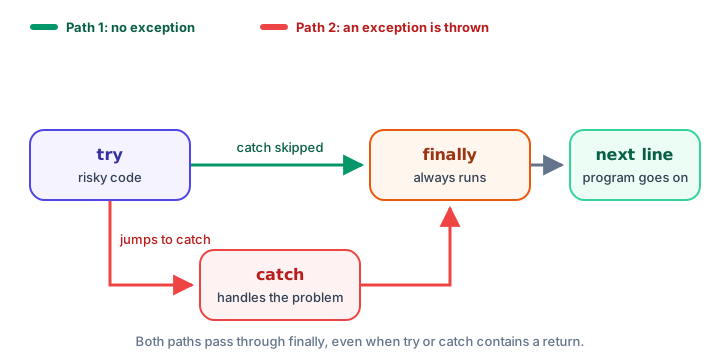
Here's a parking garage exit gate that must always close, whether the payment worked or not:
public class ParkingGate {
    public static void main(String[] args) {
        pay("12");
        pay("twelve");
    }

    static void pay(String amountText) {
        System.out.println("Gate opens for payment: " + amountText);
        try {
            int amount = Integer.parseInt(amountText);
            System.out.println("Paid $" + amount);
        } catch (NumberFormatException e) {
            System.out.println("Payment failed");
        } finally {
            System.out.println("Gate closes");
        }
    }
}
Gate opens for payment: 12
Paid $12
Gate closes
Gate opens for payment: twelve
Payment failed
Gate closesfinally even runs when the try block hits a return. The method returns its value only after finally has finished:
public class StockCheck {
    public static void main(String[] args) {
        System.out.println(checkStock(4));
        System.out.println(checkStock(0));
    }

    static String checkStock(int stock) {
        try {
            if (stock > 0) {
                return "In stock";
            }
            return "Sold out";
        } finally {
            System.out.println("(stock check logged)");
        }
    }
}
(stock check logged)
In stock
(stock check logged)
Sold outYou can also write try with just finally and no catch. Then the exception still travels on, but the clean-up runs first. For closing things like files and scanners, there's an even neater tool, try-with-resources.
Getting details with getMessage()
The exception variable e is an object with useful methods. The two you'll use most:
e.getMessage()returns just the message text.- Printing
eitself (which calls itstoString()) gives the exception's full class name plus the message.
public class LuggageWeight {
    public static void main(String[] args) {
        try {
            int kilos = Integer.parseInt("12kg");
            System.out.println(kilos);
        } catch (NumberFormatException e) {
            System.out.println("getMessage(): " + e.getMessage());
            System.out.println("toString():   " + e);
        }
    }
}
getMessage(): For input string: "12kg"
toString(): java.lang.NumberFormatException: For input string: "12kg"There's also e.printStackTrace(), which prints the full stack trace without stopping the program. It's handy while debugging, but real users would rather see a friendly sentence.
Validating user input with a loop
A very common use of try-catch is keeping a program alive when a user types the wrong thing. When you call nextInt() on a Scanner and the user types letters, it throws an InputMismatchException. Combine a loop with try-catch to keep asking until the answer is valid:
import java.util.InputMismatchException;
import java.util.Scanner;

public class TicketAge {
    public static void main(String[] args) {
        Scanner input = new Scanner(System.in);
        int age = -1;

        while (age < 0) {
            System.out.print("Enter your age: ");
            try {
                age = input.nextInt();
                if (age < 0) {
                    System.out.println("Age can't be negative.");
                }
            } catch (InputMismatchException e) {
                System.out.println("Please type a whole number.");
                input.nextLine();
            }
        }

        String ticket = age < 12 ? "child" : "adult";
        System.out.println("Ticket type: " + ticket);
        input.close();
    }
}
Here's a sample run (the user typed ten, then -3, then 34):
Enter your age: ten
Please type a whole number.
Enter your age: -3
Age can't be negative.
Enter your age: 34
Ticket type: adult
The line input.nextLine(); inside catch is essential. When nextInt() fails, the bad text "ten" stays waiting in the Scanner. Without throwing it away, the next nextInt() would fail on the same text again, and the loop would never end.
Common mistakes with try-catch
1. Empty catch blocks
try {
    total = Integer.parseInt(text);
} catch (NumberFormatException e) {
}
This hides the problem completely. At the very least, print a message so you (or the user) know something went wrong.
2. Putting too much code in try
Wrapping 50 lines in one try makes it hard to tell which line failed. Keep the try block around the risky lines only.
3. Catching a parent before a child
A catch (Exception e) above a catch (ArithmeticException e) won't compile. Always go from specific to general.
4. Using variables declared inside try after it
A variable declared inside the try block only exists there (see variable scope). If you need it later, declare it before the try, as age was declared before the loop above.
Practice exercise
🏋️ Try it yourself
A smart thermostat sends readings as text: String[] readings = {"21", "hot", "19", "", "23"};. Loop over them, add up the valid numbers, and print Skipping bad reading: plus the text for each invalid one. At the end, print the average of the valid readings as a double.
Show solution
public class Thermostat {
    public static void main(String[] args) {
        String[] readings = {"21", "hot", "19", "", "23"};
        int total = 0;
        int count = 0;

        for (String reading : readings) {
            try {
                total += Integer.parseInt(reading);
                count++;
            } catch (NumberFormatException e) {
                System.out.println("Skipping bad reading: '" + reading + "'");
            }
        }

        System.out.println("Average: " + (double) total / count);
    }
}
Skipping bad reading: 'hot'
Skipping bad reading: ''
Average: 21.0An empty string is not a number either, so it throws NumberFormatException too. If parseInt throws, count++ is skipped, so only valid readings are counted.
What's next?
So far, Java has been throwing the exceptions. Next, learn to throw your own and pass them up to the caller in Java throw and throws.
Key takeaways
- Put risky code in a try block and the handling code in a catch block; catch runs only if a matching exception is thrown.
- When an exception is thrown, the rest of the try block is skipped and Java jumps to the first matching catch.
- With multiple catch blocks, put subclasses before their parents, or the code will not compile.
- Multi-catch, such as catch (NumberFormatException | ArrayIndexOutOfBoundsException e), handles several types the same way.
- A finally block always runs, whether or not an exception happened, even if try contains a return.
- Use e.getMessage() for the message text, and never leave a catch block empty.
- To validate Scanner input, loop with try-catch and call nextLine() in the catch to discard the bad input.
Frequently asked questions
How does try-catch work in Java?
Java runs the code in the try block. If a line throws an exception, the rest of the try block is skipped and Java runs the first catch block whose type matches. If no exception happens, all catch blocks are skipped.
Can you have multiple catch blocks in Java?
Yes. One try can be followed by several catch blocks. Java checks them from top to bottom and runs only the first match, so more specific exception types must come before more general ones.
Does finally always run in Java?
Yes, in practice it runs whether the try block succeeds, an exception is caught, or the try block returns. The rare exceptions are when the JVM itself stops, for example by calling System.exit() or if the computer loses power.
What is multi-catch in Java?
Multi-catch lets one catch block handle several exception types, separated by a vertical bar, for example catch (NumberFormatException | ArrayIndexOutOfBoundsException e). The types must not be related as parent and child.
Should I catch Exception in Java?
Usually not. Catching Exception also catches bugs like NullPointerException and hides them. Catch the most specific exception types you expect, and let real bugs show up so you can fix them.