Java Arithmetic Operators
Updated 8 min read Aimerscrew
Every useful program does some math: adding up a shopping cart, counting down a game timer, splitting a restaurant bill. In Java, you do this math with Java arithmetic operators. In this lesson, you'll learn all of them, why 7 / 2 gives 3, what the % operator is good for, how ++ and -- work, and two traps every Java developer meets sooner or later: dividing by zero and integer overflow.
🌍 Real-life example
A food delivery driver has 7 pizza boxes and an insulated bag that holds 3. How many full bags can they pack, and how many boxes are left over? That's 7 / 3 (2 full bags) and 7 % 3 (1 box left). Division and remainder answer two different questions, and Java gives you an operator for each.
What are arithmetic operators in Java?
An operator is a symbol that tells Java to do something with one or more values. The values it works on are called operands. In price * 2, the operator is * and the operands are price and 2. An arithmetic operator is an operator that does math.
| Operator | Name | Example | Result |
|---|---|---|---|
+ | Addition | 17 + 5 | 22 |
- | Subtraction | 17 - 5 | 12 |
* | Multiplication | 17 * 5 | 85 |
/ | Division | 17 / 5 | 3 (both are integers) |
% | Remainder (modulus) | 17 % 5 | 2 |
Here they are in a complete program:
public class BasicMath {
    public static void main(String[] args) {
        int a = 17;
        int b = 5;

        System.out.println("a + b = " + (a + b));
        System.out.println("a - b = " + (a - b));
        System.out.println("a * b = " + (a * b));
        System.out.println("a / b = " + (a / b));
        System.out.println("a % b = " + (a % b));
    }
}
a + b = 22
a - b = 12
a * b = 85
a / b = 3
a % b = 2Notice the parentheses around (a + b). Inside println(), a + next to text joins things together instead of adding them. Without the parentheses, Java would print a + b = 175. You'll see exactly why in operator precedence.
Why does 7 / 2 give 3 in Java?
When both operands are integers (like int or long), Java does integer division: it divides and then throws away everything after the decimal point. It does not round, so even 9 / 10 is 0.
If at least one operand is a floating-point number (a double or float), Java does normal decimal division:
public class DivisionDemo {
    public static void main(String[] args) {
        System.out.println(7 / 2);
        System.out.println(7.0 / 2);
        System.out.println(7 / 2.0);
        System.out.println(9 / 10);

        int slices = 10;
        int friends = 4;
        System.out.println("Whole slices each: " + slices / friends);
        System.out.println("Exact share: " + (double) slices / friends);
    }
}
3
3.5
3.5
0
Whole slices each: 2
Exact share: 2.5The (double) in the last line is a cast: it turns slices into a double before the division, so the result keeps its decimal part. You learned about casts in Java type casting.
⚠️ Be careful
Writing double share = slices / friends; does not fix the problem. Java does the integer division first (giving 2) and only then stores it as 2.0. The cast must happen before the division.
What does the % operator do in Java?
The % operator gives the remainder after division. It's often called the modulus or "mod" operator. 17 % 5 is 2 because 5 goes into 17 three times (15) with 2 left over. It looks like a percent sign, but it has nothing to do with percentages.
The remainder turns out to be surprisingly handy:
public class RemainderUses {
    public static void main(String[] args) {
        // Even or odd: the remainder after dividing by 2
        System.out.println("14 % 2 = " + (14 % 2));
        System.out.println("15 % 2 = " + (15 % 2));

        // Turn a movie's running time into hours and minutes
        int runtime = 135;
        int hours = runtime / 60;
        int minutes = runtime % 60;
        System.out.println("Runtime: " + hours + " h " + minutes + " min");

        // Last digit of a number
        int orderNumber = 50873;
        System.out.println("Last digit: " + orderNumber % 10);
    }
}
14 % 2 = 0
15 % 2 = 1
Runtime: 2 h 15 min
Last digit: 3- Even or odd: a number is even when
n % 2is0, and odd when it's1. - Unit conversion:
/ 60gives whole hours,% 60gives the minutes left over. The same idea turns cents into dollars and cents, or inches into feet and inches. - Last digit:
n % 10gives the last digit of a whole number.
Increment and decrement: ++ and --
Adding or subtracting 1 is so common that Java has shortcuts. The increment operator ++ adds 1 to a variable, and the decrement operator -- subtracts 1. lives++ means the same as lives = lives + 1.
public class IncrementDemo {
    public static void main(String[] args) {
        int lives = 3;
        lives++;
        System.out.println("After bonus: " + lives);
        lives--;
        lives--;
        System.out.println("After two hits: " + lives);
    }
}
After bonus: 4
After two hits: 2Prefix vs postfix: what is the difference between x++ and ++x?
You can write the operator after the variable (x++, called postfix) or before it (++x, called prefix). On a line by itself there's no difference. The difference shows up when you use the value in the same expression:
- Postfix
x++: use the old value, then add 1. - Prefix
++x: add 1 first, then use the new value.
public class PrefixPostfix {
    public static void main(String[] args) {
        int x = 5;
        int y = x++;
        System.out.println("Postfix: x = " + x + ", y = " + y);

        int a = 5;
        int b = ++a;
        System.out.println("Prefix:  a = " + a + ", b = " + b);
    }
}
Postfix: x = 6, y = 5
Prefix: a = 6, b = 6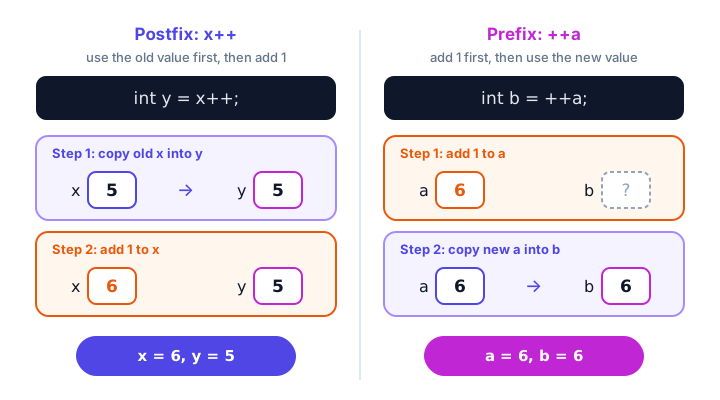
💡 Tip
Keep ++ and -- on their own line, like count++;. Lines such as total = count++ + ++count; are legal Java, but they confuse everyone who reads them, including you next week.
What happens when you divide by zero in Java?
It depends on the type. With integers, dividing by zero is an error: the program stops with an exception (Java's way of reporting a problem while the program runs).
public class IntDivideByZero {
    public static void main(String[] args) {
        int cookies = 12;
        int kids = 0;
        System.out.println(cookies / kids);
    }
}
Running this crashes with:
Exception in thread "main" java.lang.ArithmeticException: / by zeroThe same happens with cookies % kids. You'll learn to catch exceptions like this in Java try-catch.
With floating-point numbers, Java doesn't crash. It follows a math standard that has special values for these cases:
public class DivideByZero {
    public static void main(String[] args) {
        double balance = 250.0;
        System.out.println(balance / 0);
        System.out.println(-balance / 0);
        System.out.println(0.0 / 0);
    }
}
Infinity
-Infinity
NaNNaN means "Not a Number". It's the answer to a question that has no sensible answer, like zero divided by zero. No crash sounds nicer, but it can hide bugs: an Infinity can quietly spread through the rest of your calculations.
What is integer overflow?
Every number type has a limit. An int can hold values up to 2,147,483,647 (you met these limits in Java data types). If a calculation goes past the limit, Java doesn't warn you. The value wraps around to the most negative number, like a car's odometer rolling over. This is called integer overflow.
public class OverflowDemo {
    public static void main(String[] args) {
        int views = Integer.MAX_VALUE;
        System.out.println("Max int: " + views);

        views = views + 1;
        System.out.println("One more: " + views);

        long bigViews = Integer.MAX_VALUE;
        bigViews = bigViews + 1;
        System.out.println("As a long: " + bigViews);

        int secondsPerYear = 60 * 60 * 24 * 365;
        System.out.println("Wrong: " + secondsPerYear * 100);
        System.out.println("Right: " + secondsPerYear * 100L);
    }
}
Max int: 2147483647
One more: -2147483648
As a long: 2147483648
Wrong: -1141367296
Right: 3153600000The fix is to use a bigger type. A long holds numbers up to about 9.2 quintillion. In the last line, the L in 100L makes it a long, so the whole multiplication happens in long math and nothing overflows.
Real-world example: splitting a delivery bill
public class DeliveryBill {
    public static void main(String[] args) {
        double pizza = 14.50;
        double drinks = 3.25 * 2;
        double deliveryFee = 2.99;
        int people = 3;

        double total = pizza + drinks + deliveryFee;
        double perPerson = total / people;

        int boxes = 7;
        int perBag = 3;
        int fullBags = boxes / perBag;
        int leftOver = boxes % perBag;

        System.out.println("Total: $" + total);
        System.out.printf("Each person pays: $%.2f%n", perPerson);
        System.out.println("Full bags: " + fullBags + ", boxes left: " + leftOver);
    }
}
Total: $23.990000000000002
Each person pays: $8.00
Full bags: 2, boxes left: 1Look at the total: 23.990000000000002 instead of 23.99. Computers store decimals in binary, and many decimals (like 0.1) can't be stored exactly, so tiny errors creep in. That's why the second line uses printf with %.2f to round to two decimal places for display, as you saw in Java output formatting.
📝 Note
Real banking and shopping systems usually don't store money in a double. They store whole cents in a long (2399 instead of 23.99) or use a special class called BigDecimal. For learning, double is fine.
Common mistakes with arithmetic operators
1. Expecting decimals from integer division
double average = (80 + 95) / 2; stores 87.0, not 87.5. Divide by 2.0 instead, or cast one operand to double.
2. Forgetting parentheses inside println
System.out.println("Sum: " + 2 + 3); prints Sum: 23. Write "Sum: " + (2 + 3) to get Sum: 5.
3. Dividing an int by a variable that might be zero
An int division by zero crashes the program. Make sure the divisor can't be zero (you'll learn how to check with if-else).
4. Ignoring overflow with big numbers
Populations, file sizes in bytes and milliseconds over many days quickly exceed the int limit. Use long for values that can grow large.
Practice exercise
🏋️ Try it yourself
A podcast episode is 7385 seconds long. Write a program that converts it into hours, minutes and seconds using only / and %, and prints 7385 seconds = 2 h 3 min 5 s.
Show solution
public class TimeConverter {
    public static void main(String[] args) {
        int totalSeconds = 7385;

        int hours = totalSeconds / 3600;
        int minutes = totalSeconds % 3600 / 60;
        int seconds = totalSeconds % 60;

        System.out.println(totalSeconds + " seconds = " + hours + " h " + minutes + " min " + seconds + " s");
    }
}
7385 seconds = 2 h 3 min 5 sThere are 3600 seconds in an hour. totalSeconds % 3600 gives the seconds left after removing the whole hours (185), and dividing that by 60 gives the minutes (3).
What's next?
You can now do math in Java. Next, learn the shortcuts for updating a variable with the result of a calculation, like score += 10, in Java assignment operators.
Key takeaways
- Java has five arithmetic operators: + (add), - (subtract), * (multiply), / (divide) and % (remainder).
- Dividing two integers drops the decimal part: 7 / 2 is 3. Make one operand a double to get 3.5.
- The % operator gives the remainder, which is useful for even/odd checks and unit conversions like minutes to hours.
- x++ uses the old value and then adds 1; ++x adds 1 first and then uses the new value.
- Integer division by zero throws an ArithmeticException, while double division by zero gives Infinity or NaN.
- If an int calculation goes past 2,147,483,647 it silently wraps around (overflow); use long for big numbers.
Frequently asked questions
What are the arithmetic operators in Java?
Java has five binary arithmetic operators: + for addition, - for subtraction, * for multiplication, / for division and % for the remainder. It also has ++ and -- to add or subtract 1 from a variable.
Why does 5 / 2 equal 2 in Java?
Because both numbers are integers, Java performs integer division and discards the decimal part. Write 5.0 / 2 or cast one operand with (double) to get 2.5.
What is the difference between i++ and ++i in Java?
Both add 1 to i. In an expression, i++ gives the old value and then increments, while ++i increments first and gives the new value. On a line by itself there is no difference.
What happens if you divide by zero in Java?
Dividing an int or long by zero throws an ArithmeticException with the message "/ by zero". Dividing a double by zero does not crash; it gives Infinity, -Infinity or NaN.
Does the % operator work with decimals in Java?
Yes. Java allows % with double values, so 7.5 % 2 gives 1.5. It is most often used with integers, though.