Java Array Loops
Updated 9 min read Aimerscrew
An array with a thousand prices is only useful if you can process all of them without writing a thousand lines. That's where loops come in. In this lesson, you'll learn two ways to loop through an array in Java, the classic for loop and the enhanced for-each loop, and then use them for the jobs programmers do every day: totals, averages, highest and lowest values, searching, counting, reversing and copying.
🌍 Real-life example
A supermarket cashier scans every item in your basket, one after another, adding each price to the total. They don't care how many items there are; they just keep going until the basket is empty. Looping through an array works exactly like that checkout.
How do you loop through an array with a for loop?
The classic for loop runs an index variable from 0 up to, but not including, array.length. Inside the loop, array[i] is the current element:
public class TrackList {
    public static void main(String[] args) {
        String[] tracks = {"Blinding Lights", "Levitating", "Shape of You", "Bad Guy"};

        for (int i = 0; i < tracks.length; i++) {
            System.out.println((i + 1) + ". " + tracks[i]);
        }
    }
}
1. Blinding Lights
2. Levitating
3. Shape of You
4. Bad GuyTwo details matter here. The condition uses <, not <=, because the last index is length - 1. And the printed number is i + 1, because people count from 1 even though arrays count from 0.
The enhanced for loop (for-each)
When you just want every value, Java offers a shorter loop called the enhanced for loop, usually called for-each. Read the colon as "in": "for each item in packingList".
public class PackingList {
    public static void main(String[] args) {
        String[] packingList = {"passport", "charger", "toothbrush", "sunglasses"};

        for (String item : packingList) {
            System.out.println("Packed: " + item);
        }
    }
}
Packed: passport
Packed: charger
Packed: toothbrush
Packed: sunglassesThere's no index, no condition and no i++, so there's nothing to get wrong. Java hands you each element in order, from first to last. The variable type (String) must match the array's element type.
for vs for-each: which should you use?
| You want to... | Classic for | for-each |
|---|---|---|
| Read every value | Yes | Yes (simpler) |
| Know the position (index) | Yes | No |
| Change elements in the array | Yes | No |
| Go backwards or skip elements | Yes | No |
Compare neighbors (a[i] and a[i + 1]) | Yes | No |
A good rule: start with for-each, and switch to the classic for loop the moment you need the index.
Sum, average, max and min of an array
These four calculations come up constantly. The pattern for a sum is: start a total at 0 before the loop, add each element inside it. For max and min, start with the first element as your best guess, then update it whenever you find something bigger or smaller.
public class GameScores {
    public static void main(String[] args) {
        int[] scores = {420, 385, 510, 298, 475, 510, 330};

        int sum = 0;
        for (int score : scores) {
            sum += score;
        }
        double average = (double) sum / scores.length;

        int highest = scores[0];
        int lowest = scores[0];
        for (int score : scores) {
            if (score > highest) {
                highest = score;
            }
            if (score < lowest) {
                lowest = score;
            }
        }

        System.out.println("Games played: " + scores.length);
        System.out.println("Total points: " + sum);
        System.out.printf("Average: %.1f%n", average);
        System.out.println("Best game: " + highest);
        System.out.println("Worst game: " + lowest);
    }
}
Games played: 7
Total points: 2928
Average: 418.3
Best game: 510
Worst game: 298💡 Tip
Start highest at scores[0], not at 0. If every value were negative (say, temperatures in a freezer), a starting value of 0 would wrongly "win". The first element is always a real candidate.
The (double) cast stops integer division from chopping off the decimals, as explained in Java type casting.
When do you need the index?
Knowing the highest sales figure is nice, but your manager wants to know which day it was. A value alone can't tell you that; the index can. Here, two arrays line up by position, so the winning index works for both:
public class BestDay {
    public static void main(String[] args) {
        String[] days = {"Mon", "Tue", "Wed", "Thu", "Fri", "Sat", "Sun"};
        int[] sales = {340, 295, 410, 388, 520, 610, 450};

        int bestIndex = 0;
        for (int i = 1; i < sales.length; i++) {
            if (sales[i] > sales[bestIndex]) {
                bestIndex = i;
            }
        }

        System.out.println("Best day: " + days[bestIndex] + " with $" + sales[bestIndex]);
    }
}
Best day: Sat with $610The loop starts at i = 1 because index 0 is already the starting guess. Storing the index of the best value, instead of the value, gives you both pieces of information.
How do you search an array in Java?
The simplest way is a linear search: check each element from the start until you find a match. If you reach the end without one, the item isn't there. A common convention is to use -1 to mean "not found", because it can never be a real index.
public class BookFinder {
    public static void main(String[] args) {
        String[] shelf = {"Dune", "Emma", "Matilda", "The Hobbit", "Beloved", "Ulysses"};
        String wanted = "The Hobbit";

        int foundAt = -1;
        for (int i = 0; i < shelf.length; i++) {
            if (shelf[i].equals(wanted)) {
                foundAt = i;
                break;
            }
        }

        if (foundAt == -1) {
            System.out.println(wanted + " is not on this shelf.");
        } else {
            System.out.println(wanted + " is in slot " + foundAt + ".");
        }
    }
}
The Hobbit is in slot 3.break stops the loop as soon as the book is found, so Java doesn't waste time checking the rest (see Java break and continue). Notice the comparison uses equals(), not ==, because these are Strings, as you learned in Java string comparison.
📝 Note
Linear search works on any array, sorted or not. If the array is sorted, a much faster method called binary search is available, which you'll use in the Java Arrays class.
Counting elements that match a condition
To count, start a counter at 0 and add 1 each time an element passes your test. This food delivery app counts the late orders:
public class LateDeliveries {
    public static void main(String[] args) {
        int[] minutes = {25, 41, 18, 33, 29, 52, 30, 37};
        int limit = 30;

        int lateCount = 0;
        for (int time : minutes) {
            if (time > limit) {
                lateCount++;
            }
        }

        System.out.println(lateCount + " of " + minutes.length + " deliveries took over " + limit + " minutes.");
    }
}
4 of 8 deliveries took over 30 minutes.The delivery that took exactly 30 minutes isn't counted, because 30 > 30 is false. Pick > or >= carefully to match the rule you want.
Reversing an array in place
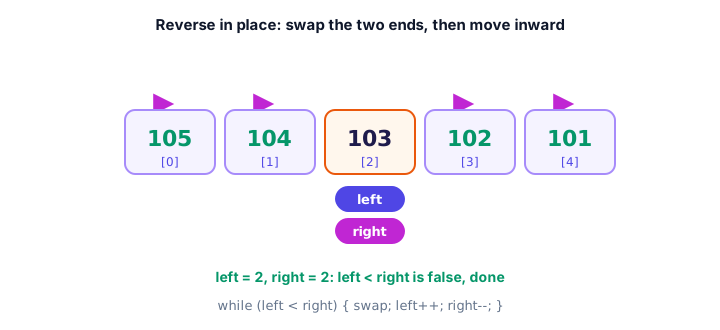
"In place" means you rearrange the elements inside the same array, without making a second one. The trick is to swap the first and last elements, then the second and second-to-last, and keep moving inward until the two positions meet:
public class ReverseQueue {
    public static void main(String[] args) {
        int[] tickets = {101, 102, 103, 104, 105};

        int left = 0;
        int right = tickets.length - 1;
        while (left < right) {
            int temp = tickets[left];
            tickets[left] = tickets[right];
            tickets[right] = temp;
            left++;
            right--;
        }

        for (int i = 0; i < tickets.length; i++) {
            System.out.println("Position " + i + ": ticket " + tickets[i]);
        }
    }
}
Position 0: ticket 105
Position 1: ticket 104
Position 2: ticket 103
Position 3: ticket 102
Position 4: ticket 101The temp variable is essential. Without it, tickets[left] = tickets[right] would overwrite 101 before you had a chance to move it. This uses a while loop because two variables change on each step.
Copying an array with a loop
In Java arrays you saw that int[] backup = scores; only copies the reference. For a real, independent copy, create a new array of the same length and copy each element across:
public class BackupScores {
    public static void main(String[] args) {
        int[] scores = {88, 92, 75};

        int[] backup = new int[scores.length];
        for (int i = 0; i < scores.length; i++) {
            backup[i] = scores[i];
        }

        scores[0] = 0;   // oops, a score was wiped

        System.out.println("scores[0]: " + scores[0]);
        System.out.println("backup[0]: " + backup[0]);
    }
}
scores[0]: 0
backup[0]: 88The backup kept the original 88, because it's a separate array. Later, you'll see shortcuts such as Arrays.copyOf that do this loop for you.
Common mistakes when looping through arrays
1. Using <= instead of <
for (int i = 0; i <= prices.length; i++) tries to read prices[prices.length] on the last pass and throws an ArrayIndexOutOfBoundsException.
2. Trying to change elements with for-each
The for-each variable is a copy of each element. Changing it doesn't touch the array:
public class PriceDrop {
    public static void main(String[] args) {
        double[] prices = {20.0, 50.0, 80.0};

        for (double price : prices) {
            price = price * 0.9;   // changes the copy only
        }
        System.out.println("After for-each: " + prices[0] + ", " + prices[1] + ", " + prices[2]);

        for (int i = 0; i < prices.length; i++) {
            prices[i] = prices[i] * 0.9;   // changes the array
        }
        System.out.println("After classic for: " + prices[0] + ", " + prices[1] + ", " + prices[2]);
    }
}
After for-each: 20.0, 50.0, 80.0
After classic for: 18.0, 45.0, 72.03. Starting max at 0
If all values are negative, a max that starts at 0 is never replaced. Start with the first element instead.
4. Forgetting break in a search
Without break, the loop keeps going. It still works if there's one match, but with duplicates it reports the last match instead of the first.
Practice exercise
🏋️ Try it yourself
Your electricity bills for January to June were $92.40, $88.10, $71.25, $60.80, $58.30 and $97.65. Store the month names and the bills in two arrays. Print the average bill (2 decimal places), the month with the highest bill, and how many months were above the average.
Show solution
public class ElectricBills {
    public static void main(String[] args) {
        String[] months = {"Jan", "Feb", "Mar", "Apr", "May", "Jun"};
        double[] bills = {92.40, 88.10, 71.25, 60.80, 58.30, 97.65};

        double total = 0;
        for (double bill : bills) {
            total += bill;
        }
        double average = total / bills.length;

        int highestIndex = 0;
        int aboveAverage = 0;
        for (int i = 0; i < bills.length; i++) {
            if (bills[i] > bills[highestIndex]) {
                highestIndex = i;
            }
            if (bills[i] > average) {
                aboveAverage++;
            }
        }

        System.out.printf("Average bill: $%.2f%n", average);
        System.out.println("Highest bill: " + months[highestIndex] + " ($" + bills[highestIndex] + ")");
        System.out.println("Months above average: " + aboveAverage);
    }
}
Average bill: $78.08
Highest bill: Jun ($97.65)
Months above average: 3The first loop needs only values, so it uses for-each. The second needs the index to report the month, so it uses the classic for loop.
What's next?
So far, every array has been a single row of values. But a cinema seating plan or a weekly temperature chart has rows and columns. Next, learn how to build grids with Java multidimensional arrays.
Key takeaways
- Loop through an array with for (int i = 0; i < array.length; i++) when you need the index.
- The enhanced for-each loop, for (int value : array), is the simplest way to read every element.
- For-each cannot change array elements or tell you the position; use the classic for loop for that.
- Sum: start at 0 and add each element. Max and min: start with the first element and update.
- Linear search checks each element in turn and uses -1 to mean not found.
- Reverse in place by swapping from both ends with a temporary variable until the ends meet.
- Copy an array by creating a new one and copying each element; = only copies the reference.
Frequently asked questions
How do you loop through an array in Java?
Use a classic for loop, for (int i = 0; i < arr.length; i++), and read arr[i], or use a for-each loop, for (int value : arr), which gives you each element in order without an index.
What is the difference between for and for-each in Java?
The classic for loop gives you an index, so you can change elements, go backwards or skip items. For-each is shorter and safer but only gives you a copy of each value, with no position.
Can you modify an array inside a for-each loop?
Assigning to the loop variable does not change the array, because the variable holds a copy of the element. To change elements, use a classic for loop and assign to arr[i].
How do you find the largest number in a Java array?
Store the first element as the current maximum, loop through the rest, and replace the maximum whenever an element is bigger. Keep the index too if you need to know where it was.
How do you check if an array contains a value in Java?
Loop through the array and compare each element to the value, using == for primitives and equals() for Strings. Stop with break when you find it. For sorted arrays, Arrays.binarySearch is faster.