Java Assignment Operators
Updated 7 min read Aimerscrew
Programs constantly update values: a bank balance after a payment, a game score after a level, the number of seats left on a flight. Java assignment operators are how you store and update those values. In this lesson, you'll learn the basic = operator, the handy compound shortcuts like +=, a hidden cast that surprises many developers, and chained assignment.
🌍 Real-life example
Think of a coffee shop loyalty card. Every time you buy a coffee, the barista doesn't write a brand-new card; they take your current stamps and add one more. In Java, that's stamps += 1: take the current value, change it, and store the result back in the same place.
What is the assignment operator in Java?
The assignment operator = stores the value on its right in the variable on its left. Java always works out the right side first, then stores the result.
int seatsLeft = 180;            // store 180
seatsLeft = seatsLeft - 2;      // work out 180 - 2, then store 178
The line seatsLeft = seatsLeft - 2 would be nonsense in math class, but in Java it simply means "take the current value, subtract 2, and put the answer back". You first met = in Java variables.
💡 Tip
Read = as "gets" or "becomes": "seatsLeft becomes seatsLeft minus 2". To compare two values, Java uses ==, which you'll meet in comparison operators.
What are compound assignment operators?
Because "update a variable using its own value" is so common, Java has compound assignment operators. Each one combines an arithmetic operator with =:
| Operator | Example | Same as | If x is 20, x becomes |
|---|---|---|---|
= | x = 5 | store 5 | 5 |
+= | x += 5 | x = x + 5 | 25 |
-= | x -= 5 | x = x - 5 | 15 |
*= | x *= 5 | x = x * 5 | 100 |
/= | x /= 5 | x = x / 5 | 4 |
%= | x %= 6 | x = x % 6 | 2 |
Here's every compound operator working on one variable, one step after another:
public class CompoundAll {
    public static void main(String[] args) {
        int points = 20;

        points += 5;
        System.out.println("points += 5  -> " + points);
        points -= 3;
        System.out.println("points -= 3  -> " + points);
        points *= 2;
        System.out.println("points *= 2  -> " + points);
        points /= 4;
        System.out.println("points /= 4  -> " + points);
        points %= 4;
        System.out.println("points %= 4  -> " + points);
    }
}
points += 5 -> 25
points -= 3 -> 22
points *= 2 -> 44
points /= 4 -> 11
points %= 4 -> 3Notice points /= 4: 44 divided by 4 is exactly 11. If it had been 45, the result would still be 11, because points is an int and integer division drops the decimal part.
Using compound operators with a bank balance
Compound operators make "running total" code short and readable. Here's a month of activity on a bank account:
public class BankBalance {
    public static void main(String[] args) {
        double balance = 500.0;
        System.out.println("Opening balance: " + balance);

        balance += 1200.0;   // salary arrives
        System.out.println("After salary:    " + balance);

        balance -= 350.0;    // rent is paid
        System.out.println("After rent:      " + balance);

        balance *= 1.01;     // 1% interest is added
        System.out.println("After interest:  " + balance);

        balance /= 2;        // half moves to savings
        System.out.println("Half to savings: " + balance);
    }
}
Opening balance: 500.0
After salary: 1700.0
After rent: 1350.0
After interest: 1363.5
Half to savings: 681.75Each line reads almost like English: "balance plus-equals 1200" means "add 1200 to the balance".
How does += work behind the scenes?
A compound operator does three things: it reads the variable's current value, does the math, and stores the result back in the same variable. There's also a fourth, hidden step: it casts the result back to the variable's type.
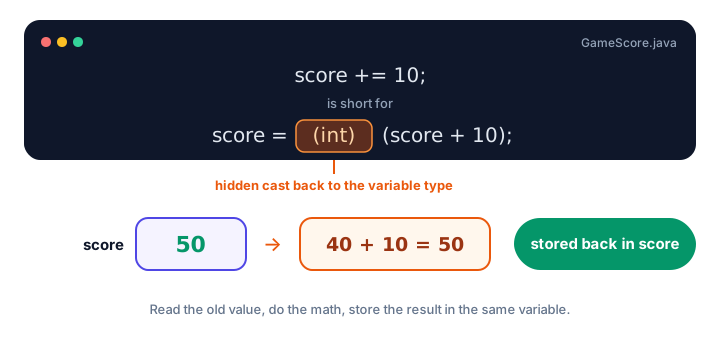
score += 10 reads the old value, adds 10 and stores the result, with a hidden cast to the variable's type.The hidden cast: why byte b += 1 works
In Java, math on small types like byte and short is always done as int. So volume + 5 is an int, and storing an int in a byte needs a cast. That's why this doesn't compile:
byte volume = 10;
volume = volume + 5;   // error!
error: incompatible types: possible lossy conversion from int to byteBut the compound version works fine, because volume += 5 really means volume = (byte) (volume + 5):
public class HiddenCast {
    public static void main(String[] args) {
        byte volume = 10;
        volume += 5;
        System.out.println("Volume: " + volume);

        int seats = 7;
        seats /= 2;
        System.out.println("Seats: " + seats);

        byte level = 120;
        level += 10;
        System.out.println("Level: " + level);
    }
}
Volume: 15
Seats: 3
Level: -126The first two results are what you'd expect. The last one is the danger of a hidden cast: a byte can only hold values from -128 to 127. 120 + 10 is 130, which doesn't fit, so the cast silently wraps it around to -126. With the plain = version, the compiler would have stopped you.
The same hidden cast lets you multiply an int by a decimal:
int stock = 10;
stock *= 2.5;   // stock = (int) (10 * 2.5), so stock is now 25
This compiles, but the decimal part of the answer is silently dropped. Newer compilers (JDK 20 and later) can warn about it ("possibly lossy") when you compile with javac -Xlint:all.
⚠️ Be careful
The hidden cast is convenient, but it can quietly lose information. If a compound operator mixes types (like an int variable and a double value), ask yourself whether you'd be happy with the decimal part being cut off.
What is chained assignment in Java?
An assignment is also an expression: it produces a value (the value that was stored). That lets you chain assignments to give several variables the same value in one line:
public class ChainedAssignment {
    public static void main(String[] args) {
        int home, away, extraTime;
        home = away = extraTime = 0;
        System.out.println(home + " - " + away + " (extra time: " + extraTime + ")");

        home += 2;
        System.out.println(home + " - " + away);
    }
}
0 - 0 (extra time: 0)
2 - 0Assignment works right to left: first extraTime = 0, then away gets that value, then home. After that, the variables are completely separate; changing home doesn't change away.
📝 Note
Chaining only works for variables that are already declared. int a = b = 0; fails unless b exists. Use it for simple resets like the one above, and prefer separate lines when things get complicated.
Using += with Strings
+= also works with text. For a String, + means "join together", so += adds text to the end:
public class PlaylistBuilder {
    public static void main(String[] args) {
        String playlist = "Road trip:";
        int totalSeconds = 0;

        playlist += " Song A";
        totalSeconds += 215;

        playlist += ", Song B";
        totalSeconds += 187;

        playlist += ", Song C";
        totalSeconds += 242;

        System.out.println(playlist);
        System.out.println("Length: " + totalSeconds / 60 + " min " + totalSeconds % 60 + " s");
    }
}
Road trip: Song A, Song B, Song C
Length: 10 min 44 sYou'll learn much more about text in Java strings, including a faster way to build long strings with StringBuilder.
Common mistakes with assignment operators
1. Writing =+ instead of +=
score =+ 5; compiles, but it means score = +5 (store positive 5), not "add 5". The math symbol always comes before the equals sign.
2. Using = when you meant ==
= stores a value; == compares two values. Mixing them up is one of the most common beginner mistakes.
3. Forgetting that /= on an int drops decimals
If int price = 15;, then price /= 2; leaves 7, not 7.5. Use a double when you need decimals.
4. Trusting the hidden cast with big values
byte and short wrap around silently with compound operators. Use int for everyday counting unless you have a good reason not to.
Practice exercise
🏋️ Try it yourself
A smart thermostat starts at 18.0 °C. Using only compound assignment operators, warm it up by 3.5 degrees, then lower it by 1.5 for eco mode, and print the temperature after each change. Finally, convert it to Fahrenheit (multiply by 9.0 / 5, then add 32) and print that too.
Show solution
public class Thermostat {
    public static void main(String[] args) {
        double temperature = 18.0;

        temperature += 3.5;
        System.out.println("Warming up: " + temperature);

        temperature -= 1.5;
        System.out.println("Eco mode:   " + temperature);

        temperature *= 9.0 / 5;
        temperature += 32;
        System.out.println("Fahrenheit: " + temperature);
    }
}
Warming up: 21.5
Eco mode: 20.0
Fahrenheit: 68.0Note that 9.0 / 5 uses 9.0, not 9. With 9 / 5, integer division would give 1 and the conversion would be wrong.
What's next?
You can now calculate and store values. Next, learn how to ask Java questions like "is the cart total at least $50?" with Java comparison operators.
Key takeaways
- The assignment operator = works out the right side first and stores the result in the variable on the left.
- Compound operators +=, -=, *=, /= and %= are shortcuts: x += 5 means x = x + 5.
- Compound operators include a hidden cast to the variable type, so byte b += 1 compiles while b = b + 1 does not.
- The hidden cast can silently lose data, such as a byte wrapping from 130 to -126 or an int dropping decimals.
- Chained assignment like a = b = c = 0 works right to left and gives all variables the same value.
- For Strings, += adds text to the end of the existing value.
Frequently asked questions
What does += mean in Java?
x += 5 adds 5 to the current value of x and stores the result back in x. It is a shortcut for x = x + 5, with an automatic cast back to the type of x.
Why does byte b += 1 compile but b = b + 1 does not?
Java does arithmetic on byte values as int, so b + 1 is an int. A plain = needs an explicit cast to store it in a byte, but compound operators like += include that cast automatically.
What is the difference between = and == in Java?
A single = assigns a value to a variable. A double == compares two values and produces true or false.
Can you assign the same value to multiple variables in Java?
Yes, with chained assignment: a = b = c = 0. The assignments run from right to left, and each variable gets its own copy of the value.
Is x =+ 1 the same as x += 1?
No. x =+ 1 means x = +1, which simply stores 1 in x. The compound operator is written with the math symbol first: x += 1.