Java For Loop
Updated 7 min read Aimerscrew
Imagine printing 100 tickets, one line each. You could write System.out.println 100 times, or you could write it once and tell Java to repeat it. The Java for loop is the tool for that kind of counted repetition. In this lesson, you'll learn the three parts of a for loop, how to count up, down and in steps, where the loop variable lives, and how to use loops for totals and averages.
🌍 Real-life example
A running coach says: "Start at lap 1. As long as you've run 5 laps or fewer, run another lap, then add one to your lap count." That's a start value, a condition and an update, the exact three ingredients of a for loop.
What is a for loop in Java?
A for loop runs a block of code repeatedly while a condition stays true, with the counting logic packed into one line at the top. Each run of the block is called an iteration.
for (initialization; condition; update) {
    // body: runs once per iteration
}
public class Laps {
public static void main(String[] args) {
for (int i = 1; i <= 5; i++) {
System.out.println("Lap " + i);
}
System.out.println("Workout done!");
}
}Lap 1
Lap 2
Lap 3
Lap 4
Lap 5
Workout done!The three parts of a for loop
- Initialization (
int i = 1) runs once, before anything else. It usually creates the loop variable (also called the counter). - Condition (
i <= 5) is checked before every iteration. If it'strue, the body runs. If it'sfalse, the loop ends and Java moves on to the code after it. - Update (
i++) runs after every iteration. It moves the counter toward the end.i++adds 1, as you saw in Java arithmetic operators.
The order is: initialize, then check, body, update, check, body, update... until the check fails. Watch it happen with a 3-lap version:
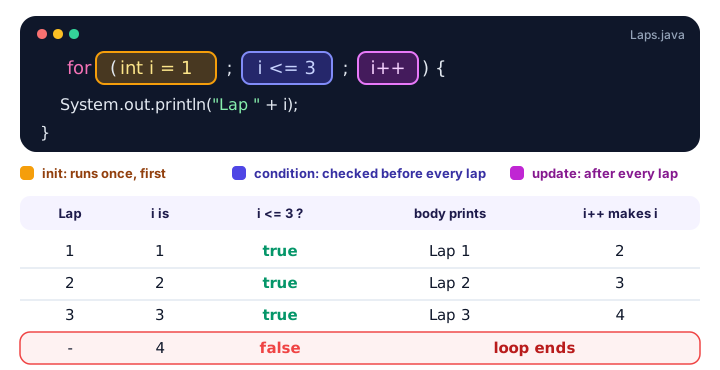
Notice the condition is tested 4 times for 3 laps. The last test is the one that says "stop".
How do you count down with a for loop?
Start high, keep going while the counter is above the limit, and subtract with i--:
public class RocketLaunch {
    public static void main(String[] args) {
        for (int seconds = 5; seconds >= 1; seconds--) {
            System.out.println(seconds + "...");
        }
        System.out.println("Liftoff!");
    }
}
5...
4...
3...
2...
1...
Liftoff!The loop variable doesn't have to be called i. A descriptive name like seconds makes the loop explain itself.
Counting in steps
The update can change the counter by any amount. Use i += 2, i += 20 or even i *= 2. This shuttle bus leaves every 20 minutes between 8:00 and 9:00:
public class ShuttleTimes {
    public static void main(String[] args) {
        for (int minutes = 0; minutes <= 60; minutes += 20) {
            int hour = 8 + minutes / 60;
            int minute = minutes % 60;
            System.out.printf("Shuttle departs at %d:%02d%n", hour, minute);
        }
    }
}
Shuttle departs at 8:00
Shuttle departs at 8:20
Shuttle departs at 8:40
Shuttle departs at 9:00Here the loop counts minutes, and integer division (/) and remainder (%) turn them into a clock time. %02d pads the minute with a zero, as covered in Java output formatting.
Where can you use the loop variable?
A variable declared in the for header only exists inside the loop. This is called its scope. Once the loop ends, the variable is gone:
for (int i = 1; i <= 3; i++) {
    System.out.println(i);   // fine: i exists here
}
System.out.println(i);       // error: cannot find symbol
If you need the final value after the loop, declare the variable before the loop:
public class PagesRead {
    public static void main(String[] args) {
        int page;
        for (page = 1; page * 30 < 100; page++) {
            System.out.println("Reading page " + page);
        }
        System.out.println("Stopped at page " + page);
    }
}
Reading page 1
Reading page 2
Reading page 3
Stopped at page 4You'll explore scope in more depth in Java variable scope.
Using a for loop to add up totals
A very common pattern: create a total variable set to 0 before the loop, add to it inside the loop, and use it after the loop. Here, someone saves $5 in week 1, $10 in week 2, $15 in week 3, and so on for 8 weeks:
public class SavingsJar {
    public static void main(String[] args) {
        int weeks = 8;
        int total = 0;

        for (int week = 1; week <= weeks; week++) {
            int deposit = week * 5;
            total += deposit;
            System.out.println("Week " + week + ": +$" + deposit + " (jar: $" + total + ")");
        }

        double average = (double) total / weeks;
        System.out.println("Total saved: $" + total);
        System.out.println("Average per week: $" + average);
    }
}
Week 1: +$5 (jar: $5)
Week 2: +$10 (jar: $15)
Week 3: +$15 (jar: $30)
Week 4: +$20 (jar: $50)
Week 5: +$25 (jar: $75)
Week 6: +$30 (jar: $105)
Week 7: +$35 (jar: $140)
Week 8: +$40 (jar: $180)
Total saved: $180
Average per week: $22.5The (double) cast matters. Without it, 180 / 8 is integer division and gives 22, not 22.5. See Java type casting for a refresher.
Example: one row of a multiplication table
public class TimesTable {
    public static void main(String[] args) {
        int number = 7;

        for (int i = 1; i <= 10; i++) {
            System.out.printf("%d x %2d = %2d%n", number, i, number * i);
        }
    }
}
7 x 1 = 7
7 x 2 = 14
7 x 3 = 21
7 x 4 = 28
7 x 5 = 35
7 x 6 = 42
7 x 7 = 49
7 x 8 = 56
7 x 9 = 63
7 x 10 = 70Want the whole table, 1 to 10 on every row? That needs a loop inside a loop, which you'll build in Java nested loops.
Looping over the characters of a String
Strings have positions numbered from 0 to length() - 1, so a for loop can visit each character with charAt(), which you met in Java string methods:
public class VowelCounter {
    public static void main(String[] args) {
        String song = "Bohemian Rhapsody";
        int vowels = 0;

        for (int i = 0; i < song.length(); i++) {
            char letter = Character.toLowerCase(song.charAt(i));
            if (letter == 'a' || letter == 'e' || letter == 'i' || letter == 'o' || letter == 'u') {
                vowels++;
            }
        }

        System.out.println("\"" + song + "\" has " + vowels + " vowels");
    }
}
"Bohemian Rhapsody" has 6 vowelsNote the condition i < song.length(), with < rather than <=, because the last position is one less than the length.
📝 Note
Java also has an enhanced for loop (often called for-each), written for (type item : collection), which visits every element of an array or list without a counter. You'll use it in Java array loops.
Common mistakes with the Java for loop
1. Off-by-one errors
for (int i = 1; i < 10; i++) runs 9 times, not 10. Decide whether your end value should be included, then pick < or <= on purpose. A handy habit: start at 0 and use < (runs exactly n times), or start at 1 and use <=.
2. A semicolon after the header
for (int i = 1; i <= 5; i++);  // the ; is an empty loop body
{
    System.out.println("Hello");  // runs only once
}
3. Updating in the wrong direction
for (int i = 10; i >= 1; i++) counts up from 10, so i >= 1 stays true for a very long time. When counting down, use i--.
4. Changing the counter inside the body
Adding i++ inside the body as well as in the header skips iterations and makes the loop hard to follow. Let the header do the counting.
Practice exercise
🏋️ Try it yourself
A gym charges $30 for the first month, and the price goes up by $2 every month after that. Write a for loop that prints the price for months 1 to 6, then prints the total paid and the average monthly price.
Show solution
public class GymFees {
    public static void main(String[] args) {
        int total = 0;

        for (int month = 1; month <= 6; month++) {
            int price = 30 + (month - 1) * 2;
            total += price;
            System.out.println("Month " + month + ": $" + price);
        }

        System.out.println("Total: $" + total);
        System.out.println("Average: $" + (double) total / 6);
    }
}
Month 1: $30
Month 2: $32
Month 3: $34
Month 4: $36
Month 5: $38
Month 6: $40
Total: $210
Average: $35.0What's next?
A for loop is perfect when you know how many times to repeat. When you don't, for example "keep going until the savings goal is reached", you need the Java while loop.
Key takeaways
- A for loop repeats code a counted number of times using the header for (init; condition; update).
- Initialization runs once, the condition is checked before every iteration, and the update runs after every iteration.
- Count down with i-- and count in steps with i += n.
- A variable declared in the for header only exists inside the loop; declare it before the loop if you need it afterwards.
- For totals, create the variable before the loop, add inside it, and use it after it.
- Watch for off-by-one errors: choose < or <= on purpose.
- The enhanced for-each loop is used for arrays and collections, covered in the arrays chapter.
Frequently asked questions
What is the syntax of a for loop in Java?
for (initialization; condition; update) { body }. For example, for (int i = 0; i < 5; i++) { System.out.println(i); } prints 0 to 4.
Can I leave parts of a Java for loop empty?
Yes, all three parts are optional, but the two semicolons must stay. for (;;) with no condition is an infinite loop that you must end with break.
Why can't I use the loop variable after the for loop?
A variable declared in the for header has loop scope, so it disappears when the loop ends. Declare it before the loop if you need its final value.
What is the difference between i++ and ++i in a for loop update?
In the update part there is no difference, because the result of the expression is not used. Both add 1 to i after each iteration.
When should I use a for loop instead of a while loop?
Use a for loop when you know how many times to repeat, such as counting from 1 to 10. Use a while loop when you repeat until something happens and you do not know the count in advance.