Java Exceptions
Updated 9 min read Aimerscrew
Sooner or later every program meets a situation it didn't plan for: a user types "two" instead of 2, a file is missing, or a list turns out to be empty. Java exceptions are how Java reports these problems while your program is running. In this lesson you'll learn what an exception is, how errors differ from exceptions, the difference between checked and unchecked exceptions, and how to read the error report Java prints when something goes wrong.
🌍 Real-life example
Picture a smoke alarm in a kitchen. Most of the time it stays quiet while you cook. But when there's smoke, it goes off and interrupts whatever you were doing. You can't just keep chopping onions; someone has to deal with the alarm. A Java exception is that alarm: normal work stops, and either some code handles the problem or the whole program shuts down.
What is an exception in Java?
An exception is an event that interrupts the normal flow of a program while it runs. In Java, an exception is also an object: when something goes wrong, Java creates an exception object that describes the problem (its type and a message) and "throws" it. If no code catches it, the program stops.
Here's a program that splits a restaurant bill between friends. Unfortunately, the number of friends is 0:
public class SplitBill {
    public static void main(String[] args) {
        int bill = 90;
        int friends = 0;

        System.out.println("Splitting the bill...");
        int share = bill / friends;
        System.out.println("Each person pays " + share);
        System.out.println("Thanks for dining with us!");
    }
}
The program prints Splitting the bill..., then crashes on the division. The last two lines never run. Java prints this error (plus one more line showing where it happened):
Exception in thread "main" java.lang.ArithmeticException: / by zeroDividing a whole number by zero has no sensible answer, so Java throws an ArithmeticException. Nothing in the program handles it, so the program ends right there.
Handling an exception: a first look
The good news is that you can catch an exception and decide what to do instead of crashing. You'll learn the details in Java try-catch, but here's a preview. The risky code goes inside try, and the plan B goes inside catch:
public class SplitBillSafe {
    public static void main(String[] args) {
        int bill = 90;
        int friends = 0;

        System.out.println("Splitting the bill...");
        try {
            int share = bill / friends;
            System.out.println("Each person pays " + share);
        } catch (ArithmeticException e) {
            System.out.println("Can't split a bill between 0 people.");
        }
        System.out.println("Thanks for dining with us!");
    }
}
Splitting the bill...
Can't split a bill between 0 people.
Thanks for dining with us!This time the program prints a friendly message and keeps going. The alarm went off, someone dealt with it, and the rest of the program carried on.
Errors vs exceptions: what's the difference?
Java separates problems into two big groups:
- An Error is a serious problem with the Java Virtual Machine (JVM) itself, such as running out of memory (
OutOfMemoryError) or a method calling itself forever (StackOverflowError, which you may have seen in Java recursion). Your program usually can't fix these, so you don't catch them. - An Exception is a problem your program can reasonably expect and recover from: bad input, a missing file, a network that's down.
Both come from the same parent class, Throwable. "Throwable" simply means "something that can be thrown".
The Java exception hierarchy
Exceptions are classes, and they're organized in a family tree using inheritance. Knowing this tree helps you understand which exceptions you must handle and which ones signal a bug.
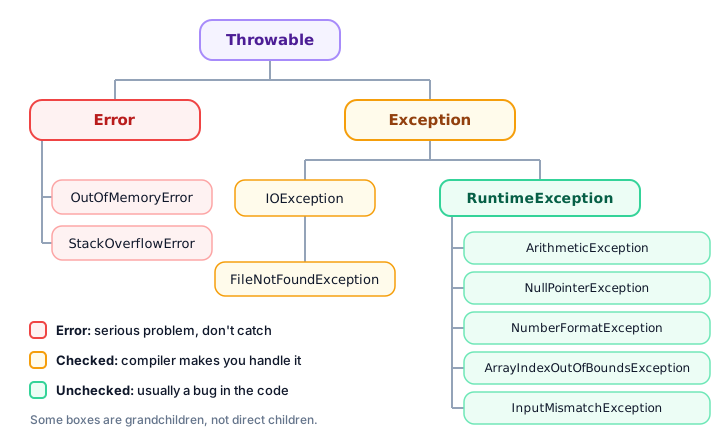
Because of inheritance, a FileNotFoundException is an IOException, which is an Exception. That matters later: code that catches IOException also catches FileNotFoundException.
Checked vs unchecked exceptions
This is the most important idea in this lesson. Java splits exceptions into two kinds:
| Checked exceptions | Unchecked exceptions | |
|---|---|---|
| Which classes? | Subclasses of Exception, except the RuntimeException branch | RuntimeException and its subclasses (and, technically, Error) |
| Checked when? | At compile time: the compiler refuses to build your code until you handle them | Not checked by the compiler |
| Usually caused by | Things outside your control: files, networks, databases | Bugs in the code: bad index, null, dividing by zero |
| Examples | IOException, FileNotFoundException | ArithmeticException, NullPointerException |
A checked exception is one the compiler checks for. If a line of code might throw one, you must either catch it or declare it. Try to open a file without doing either:
import java.io.FileReader;

public class ReadNotes {
    public static void main(String[] args) {
        FileReader reader = new FileReader("notes.txt");
        System.out.println("File opened");
    }
}
This program doesn't even compile. The compiler stops with:
ReadNotes.java:5: error: unreported exception FileNotFoundException; must be caught or declared to be thrownJava knows the file might not exist, and it wants you to have a plan for that. You'll learn the two ways to fix it in try-catch and throw and throws.
An unchecked exception is one the compiler doesn't force you to handle. The division by zero earlier compiled without complaint. Unchecked exceptions usually mean the code itself needs fixing, for example by checking that friends isn't 0 before dividing.
💡 Tip
A quick way to remember: checked = "the world might let you down" (a file, a server). Unchecked = "the code let you down" (a bug you should fix).
Common Java exceptions
You'll meet these exceptions again and again. Learning their names makes error messages much less scary:
| Exception | Kind | When it happens |
|---|---|---|
ArithmeticException | Unchecked | Integer division by zero, like 10 / 0 |
NullPointerException | Unchecked | Calling a method on a variable that holds null instead of an object |
ArrayIndexOutOfBoundsException | Unchecked | Using an index below 0 or at/after the array's length |
NumberFormatException | Unchecked | Turning text that isn't a number into one, like Integer.parseInt("two") |
InputMismatchException | Unchecked | A Scanner expects a number but the user types something else |
IOException | Checked | Reading or writing files, network connections and other input/output fails |
FileNotFoundException | Checked | Opening a file that doesn't exist (a kind of IOException) |
Here are three of them in action. Each risky line is wrapped in its own try/catch, so the program survives all three. getMessage() returns the exception's message:
public class CommonExceptions {
    public static void main(String[] args) {
        int[] scores = {88, 92, 75};
        String nickname = null;

        try {
            System.out.println(scores[3]);
        } catch (ArrayIndexOutOfBoundsException e) {
            System.out.println("Bad index: " + e.getMessage());
        }

        try {
            int quantity = Integer.parseInt("two");
            System.out.println(quantity);
        } catch (NumberFormatException e) {
            System.out.println("Bad number: " + e.getMessage());
        }

        try {
            System.out.println(nickname.length());
        } catch (NullPointerException e) {
            System.out.println("Oops, nickname is null");
        }

        System.out.println("The program is still running!");
    }
}
Bad index: Index 3 out of bounds for length 3
Bad number: For input string: "two"
Oops, nickname is null
The program is still running!How to read a stack trace in Java
When an exception isn't caught, Java prints a stack trace: a report showing the exception and the chain of method calls that led to it. Take this program, which works out the average rating of a product that has no ratings yet:
public class Checkout {
    public static void main(String[] args) {
        int[] ratings = {};
        printSummary(ratings);
    }

    static void printSummary(int[] ratings) {
        System.out.println("Average rating: " + average(ratings));
    }

    static int average(int[] ratings) {
        int total = 0;
        for (int r : ratings) {
            total += r;
        }
        return total / ratings.length;
    }
}
The array is empty, so ratings.length is 0 and line 16 divides by zero. The first line of the report is:
Exception in thread "main" java.lang.ArithmeticException: / by zeroBelow it come three lines starting with at: at Checkout.average(Checkout.java:16), then at Checkout.printSummary(Checkout.java:8), then at Checkout.main(Checkout.java:4). Here's how to read the whole thing:
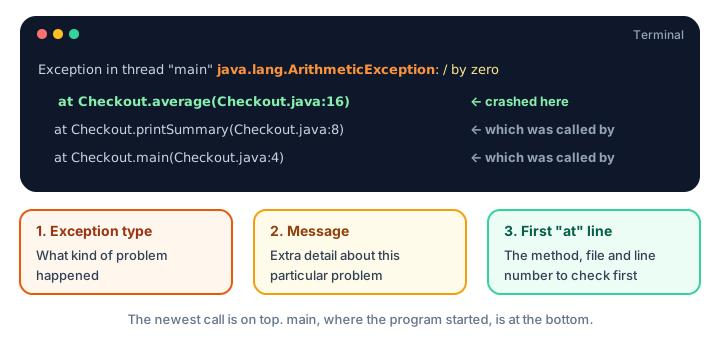
- Exception type:
ArithmeticExceptiontells you what kind of problem happened. - Message:
/ by zerogives the details. - First
atline: the method, file and line number where it crashed. Start debugging here. - The other
atlines: who called that method, all the way back tomain. They're useful when the real mistake happened earlier, like passing an empty array.
📝 Note
In bigger programs, the stack trace can include many lines from Java's own libraries. Scan down for the first at line that mentions your class: that's usually where to look.
Common mistakes with exceptions
1. Ignoring the stack trace
Beginners often see red text and panic. Instead, read the first line (type and message) and the first at line (where). Those two lines solve most problems.
2. Thinking every exception must be caught
Unchecked exceptions such as NullPointerException usually mean there's a bug. The best fix is often to correct the code (check for null, check the index) rather than wrapping it in try/catch.
3. Trying to catch Errors
An OutOfMemoryError or StackOverflowError means something is badly wrong. Catching it rarely helps; fix the cause instead, such as a recursive method with no base case.
4. Confusing compile errors with exceptions
"unreported exception FileNotFoundException" is a compile error: your program never ran. An exception like ArithmeticException happens while the program runs.
Practice exercise
🏋️ Try it yourself
A parking garage has 5 levels, stored as int[] freeSpots = {12, 0, 7, 3, 9};. Write a program that tries to print freeSpots[5], catches the exception, and prints No such level: followed by the exception's message. Then print Garage app still running. Which exception do you need to catch?
Show solution
public class ParkingGarage {
    public static void main(String[] args) {
        int[] freeSpots = {12, 0, 7, 3, 9};

        try {
            System.out.println(freeSpots[5]);
        } catch (ArrayIndexOutOfBoundsException e) {
            System.out.println("No such level: " + e.getMessage());
        }
        System.out.println("Garage app still running");
    }
}
No such level: Index 5 out of bounds for length 5
Garage app still runningThe valid indexes are 0 to 4, so index 5 throws an ArrayIndexOutOfBoundsException, an unchecked exception.
What's next?
You now know what Java exceptions are and how to read them. Next, learn to handle them properly with Java try-catch, including multiple catch blocks and finally.
Key takeaways
- An exception is an object Java throws when something goes wrong while the program runs; if nobody catches it, the program stops.
- Error and Exception both extend Throwable. Errors are serious JVM problems you normally do not catch.
- Checked exceptions (like IOException) must be caught or declared, or the code will not compile.
- Unchecked exceptions (RuntimeException and its subclasses) are not checked by the compiler and usually point to a bug.
- Common exceptions include ArithmeticException, NullPointerException, ArrayIndexOutOfBoundsException and NumberFormatException.
- Read a stack trace from the top: exception type, message, then the first "at" line with the file and line number.
Frequently asked questions
What is an exception in Java?
An exception is an event that interrupts the normal flow of a program while it runs. Java represents it as an object that describes the problem. If no code catches it, the program stops and prints a stack trace.
What is the difference between checked and unchecked exceptions in Java?
Checked exceptions, such as IOException, are checked by the compiler: you must catch them or declare them with throws. Unchecked exceptions, which extend RuntimeException, are not checked at compile time and usually come from bugs such as a null reference or a bad index.
What is the difference between an Error and an Exception in Java?
Both extend Throwable. An Error, such as OutOfMemoryError, is a serious problem with the JVM that a program usually cannot recover from. An Exception is a problem the program can expect and handle, such as invalid input or a missing file.
Is NullPointerException checked or unchecked?
NullPointerException is unchecked because it extends RuntimeException. The compiler does not force you to handle it; the usual fix is to make sure the variable refers to an object before calling methods on it.
How do I read a Java stack trace?
Start with the first line, which shows the exception type and message. Then look at the first line beginning with "at": it names the method, file and line number where the exception happened. The lines below show which methods called it, back to main.