Java Ternary Operator
Updated 6 min read Aimerscrew
Some decisions are so small that a full if else block feels like overkill: show "item" or "items", pick the lower price, label a product "In stock" or "Sold out". For these, Java gives you the ternary operator, written ? :. In this lesson, you'll learn how the Java ternary operator works, where it makes code cleaner, and when an ordinary if else is the better choice.
🌍 Real-life example
A traffic-light question at a crossing has exactly two answers: "Is the light green? Then walk, otherwise wait." You don't need a long discussion, just one quick choice between two outcomes. That's what the ternary operator is for.
What is the ternary operator in Java?
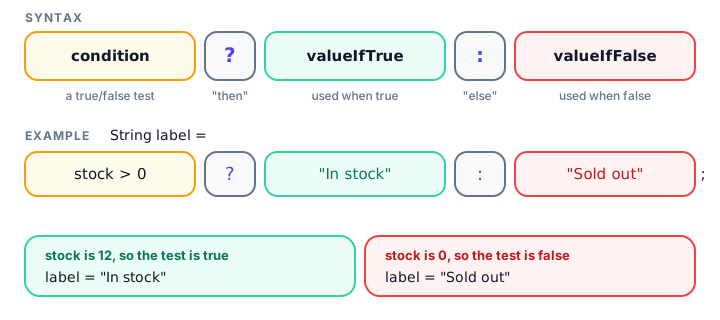
The ternary operator is the only Java operator that takes three operands (that's what "ternary" means). It checks a boolean condition and evaluates to one of two values:
condition ? valueIfTrue : valueIfFalseRead it as a question: "Is the condition true? If yes, use the first value; if not, use the second." The whole thing is an expression, which means it produces a value you can store, print or pass along.
public class StockLabel {
    public static void main(String[] args) {
        int stock = 0;

        String label = stock > 0 ? "In stock" : "Sold out";

        System.out.println("Wireless mouse: " + label);
    }
}
Wireless mouse: Sold outTernary operator vs if else
Any ternary can be rewritten as an if else. These two programs do exactly the same thing: find the cheaper of two flight prices.
public class CheaperFlightIf {
    public static void main(String[] args) {
        int airlineA = 189;
        int airlineB = 174;
        int cheapest;

        if (airlineA < airlineB) {
            cheapest = airlineA;
        } else {
            cheapest = airlineB;
        }

        System.out.println("Cheapest fare: $" + cheapest);
    }
}
Cheapest fare: $174public class CheaperFlight {
public static void main(String[] args) {
int airlineA = 189;
int airlineB = 174;
int cheapest = airlineA < airlineB ? airlineA : airlineB;
System.out.println("Cheapest fare: $" + cheapest);
}
}Cheapest fare: $174The ternary version replaces six lines with one, and the variable can be assigned in the same line it's declared. That's the sweet spot: choosing one of two values.
Ternary ? : | if else | |
|---|---|---|
| Produces a value | Yes, it's an expression | No, it's a statement |
| Best for | Picking one of two values | Running different actions or several lines |
| Can run several statements | No | Yes |
| Readability with many branches | Gets hard quickly | Stays clear |
Using the ternary operator inside other expressions
Because it's an expression, a ternary can sit right inside a println or a calculation. A favorite use is getting singular and plural words right:
public class CartSummary {
    public static void main(String[] args) {
        int itemCount = 1;
        System.out.println("Your cart has " + itemCount + (itemCount == 1 ? " item" : " items"));

        itemCount = 3;
        System.out.println("Your cart has " + itemCount + (itemCount == 1 ? " item" : " items"));
    }
}
Your cart has 1 item
Your cart has 3 itemsNotice the parentheses around the ternary. They matter, as you'll see in the common mistakes below.
Here's a ternary inside a calculation, giving members a 10% discount:
public class MemberPrice {
    public static void main(String[] args) {
        double price = 40.0;
        boolean isMember = true;

        double finalPrice = price * (isMember ? 0.90 : 1.0);

        System.out.println("You pay: $" + finalPrice);
    }
}
You pay: $36.0Can you nest ternary operators?
Yes. The value after ? or : can itself be another ternary. Put each branch on its own line so the structure is visible:
public class WeatherLabel {
    public static void main(String[] args) {
        int celsius = 17;

        String feel = celsius >= 25 ? "hot"
                    : celsius >= 15 ? "mild"
                    : "cold";

        System.out.println("At " + celsius + " degrees it feels " + feel);
    }
}
At 17 degrees it feels mildThis reads like an else if chain: hot if 25 or more, otherwise mild if 15 or more, otherwise cold. Two levels are about the limit. Beyond that, readers have to untangle the colons in their heads, and a plain if else chain or a switch is kinder.
💡 Tip
A good test: if you can read the ternary out loud as one natural sentence ("label is In stock if stock is above zero, otherwise Sold out"), keep it. If you need to pause and count colons, use if else.
What types can the two values have?
Both values should be the same type, or types Java can combine. If you mix an int and a double, Java promotes the result to double, even when the int branch is chosen. This surprises many beginners:
public class TernaryTypes {
    public static void main(String[] args) {
        boolean wholeNumber = true;

        System.out.println(wholeNumber ? 5 : 2.5);
    }
}5.0The condition was true, so Java chose 5, but the type of the whole expression is double, so it prints 5.0. And if you try to store a mixed ternary in an int, such as int x = ok ? 5 : 2.5;, the compiler refuses with "possible lossy conversion from double to int".
When should you avoid the ternary operator?
- When you need actions, not values. A ternary must produce a value. A line like
ok ? System.out.println("yes") : System.out.println("no");doesn't compile ("not a statement"). Use if else for actions. - When branches are long. If either value is a long calculation, the line becomes unreadable.
- When nesting goes deeper than two levels.
Real-world example: a game scoreboard
Here, small ternaries keep a scoreboard message tidy without a forest of if blocks:
public class Scoreboard {
    public static void main(String[] args) {
        String player = "Mia";
        int score = 1450;
        int highScore = 1200;
        int lives = 1;

        int newHighScore = score > highScore ? score : highScore;
        String badge = score > highScore ? "NEW RECORD!" : "Keep going";

        System.out.println(player + ": " + score + " points (" + badge + ")");
        System.out.println("High score: " + newHighScore);
        System.out.println(lives + (lives == 1 ? " life" : " lives") + " left");
    }
}
Mia: 1450 points (NEW RECORD!)
High score: 1450
1 life leftCommon mistakes with the Java ternary operator
1. Forgetting parentheses next to +
The + operator has higher precedence than ? :. Without parentheses, Java glues the text and number together first:
System.out.println("Items: " + count == 1 ? "one" : "many");Java reads this as ("Items: " + count) == 1, comparing a String with a number, and the compiler stops with "bad operand types for binary operator". Wrap the ternary in parentheses: "Items: " + (count == 1 ? "one" : "many").
2. Using it as a statement
A ternary on its own line that just calls println on each side won't compile. The ternary chooses values; if else chooses actions.
3. Comparing Strings with == in the condition
The condition follows the same rules as in if: write name.equals("admin") ? ... : ..., not name == "admin".
4. Deep nesting
Three or more nested ternaries on one line are a puzzle, not code. Refactor to if else.
Practice exercise
🏋️ Try it yourself
A parking lot charges nothing for the first hour and $2.50 for every hour after that. Given int hours = 4, use a ternary operator to calculate the fee and print Parking fee: $7.5. Then print Free parking! or Please pay at the machine. using a second ternary.
Show solution
public class ParkingFee {
    public static void main(String[] args) {
        int hours = 4;

        double fee = hours <= 1 ? 0.0 : (hours - 1) * 2.50;

        System.out.println("Parking fee: $" + fee);
        System.out.println(fee == 0.0 ? "Free parking!" : "Please pay at the machine.");
    }
}
Parking fee: $7.5
Please pay at the machine.What's next?
You can now make decisions with if else, switch and the ternary operator. Next, you'll make your programs repeat work automatically with the Java for loop.
Key takeaways
- The ternary operator condition ? a : b evaluates to a when the condition is true and b when it is false.
- It is an expression, so you can assign it, print it or use it inside a calculation.
- Use it to choose between two values; use if else to run different actions or several statements.
- Wrap a ternary in parentheses when it appears next to + or other operators.
- Mixing int and double branches makes the whole result a double.
- Nest at most two levels and put each branch on its own line; otherwise prefer if else or switch.
Frequently asked questions
What is the ternary operator in Java?
It is a shorthand for a simple if else that produces a value. The syntax is condition ? valueIfTrue : valueIfFalse, for example int max = a > b ? a : b;.
Is the ternary operator faster than if else in Java?
Not in any way that matters. Both compile to similar bytecode. Choose the one that makes your code easier to read.
Can a Java ternary operator have no else part?
No. Both the ? part and the : part are required, because the expression must always produce a value.
Can you nest ternary operators in Java?
Yes, a branch can be another ternary. Keep it to two levels and format each branch on its own line, or switch to if else for readability.
Why does my ternary print 5.0 instead of 5?
If one branch is an int and the other a double, Java promotes the whole expression to double. Make both branches the same type to avoid this.