Java Syntax: The Basic Rules
Updated 8 min read Aimerscrew
Every language has grammar rules. In English, sentences start with a capital letter and end with a period. Java syntax is the set of grammar rules for writing Java code that the compiler can understand. The good news: there are only a handful of core rules, and you've already seen most of them in your Hello World program. In this lesson, you'll learn them properly: statements, semicolons, braces, case sensitivity, naming, keywords and whitespace.
🌍 Real-life example
Think of filling in an online shipping form. If you type the ZIP code in the email field or leave out the @ in your email address, the form rejects it, even if a human would understand what you meant. The Java compiler is just as strict: it needs every semicolon and brace in the right place before it accepts your code.
What is Java syntax?
Java syntax is the set of rules that defines how a Java program must be written: how statements end, how code is grouped, which words are reserved, and how things can be named. If your code breaks a syntax rule, javac refuses to compile it and shows a syntax error with the line number.
Here's a small program you can use as a reference while you read the rules:
public class Thermostat {
    public static void main(String[] args) {
        System.out.println("Living room: 21 C");
        System.out.println("Heating: ON");
        System.out.println("Target reached in 15 minutes");
    }
}
Living room: 21 C
Heating: ON
Target reached in 15 minutesStatements and semicolons
A statement is one complete instruction, like "print this line". In Java, every statement ends with a semicolon ;. The semicolon tells the compiler where one instruction stops and the next begins, the way a period separates sentences.
Statements run in order, from top to bottom. Java doesn't care about line breaks, only semicolons, so two statements on one line are legal:
public class TwoPerLine {
    public static void main(String[] args) {
        System.out.println("Ready"); System.out.println("Set");
        System.out.println("Go!");
    }
}
Ready
Set
Go!Legal, but harder to read. The standard style is one statement per line.
📝 Note
Lines that open a block, such as public class Thermostat {, don't end with a semicolon. They aren't instructions on their own; they're headers for the block that follows.
Curly braces and code blocks
A block is a group of statements wrapped in curly braces { }. Blocks tell Java which code belongs together. You've already seen two kinds:
- The class body: everything between the braces after
public class Thermostat. - The method body: everything between the braces after
main(...).
Blocks nest inside each other, like boxes inside boxes, and every opening { needs a matching closing }. Later you'll use blocks for if statements and loops too.
Indentation (the spaces at the start of a line) doesn't change how Java runs your code, but it shows the nesting at a glance. The common style is 4 spaces per level, with the opening brace at the end of the header line:
public class Example {          // level 0
    public static void main(String[] args) {    // level 1
        System.out.println("Hi");   // level 2
    }
}
The text after // is a comment for humans; Java ignores it. You'll learn all about comments in the next lesson.
Is Java case-sensitive?
Yes. Java is case-sensitive: uppercase and lowercase letters are different characters. System and system are different names, and so are main and Main.
This program stores two numbers in two variables (named containers for values, which you'll learn about in Java Variables). The names differ only in their first letter, yet Java treats them as completely separate:
public class CaseSensitive {
    public static void main(String[] args) {
        int score = 10;
        int Score = 99;
        System.out.println(score);
        System.out.println(Score);
    }
}
10
99Using two names that differ only by case is legal but confusing, so don't do it in real code. Its most common effect is a typo error: if you create score and later type Score, the compiler says error: cannot find symbol.
Identifiers: the rules for names
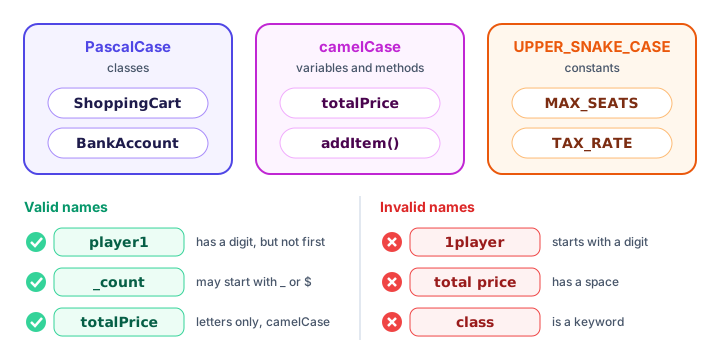
An identifier is a name you choose for a class, variable or method. Java has a few strict rules:
- It can contain letters, digits, the underscore
_and the dollar sign$. - It can't start with a digit:
player1is fine,1playerisn't. - It can't contain spaces or symbols like
-,#or@. - It can't be a keyword such as
classorint. - A single underscore
_on its own isn't allowed as a name.
Java naming conventions
The rules above are enforced by the compiler. Naming conventions are different: they're style habits that almost every Java programmer follows, so code looks familiar no matter who wrote it.
| Used for | Style | Examples |
|---|---|---|
| Classes, records, interfaces, enums | PascalCase: every word starts with a capital | ShoppingCart, BankAccount |
| Variables and methods | camelCase: first word lowercase, later words capitalized | totalPrice, addItem() |
| Constants (values that never change) | UPPER_SNAKE_CASE: all caps, words joined by underscores | MAX_SEATS, TAX_RATE |
| Packages | all lowercase, dot-separated | com.shop.orders |
Here they are together. The line static final int MAX_SEATS = 180; creates a constant that belongs to the class (more in Java Constants), and + joins text and numbers into one line (more in Java Strings):
public class FlightBooking {
    static final int MAX_SEATS = 180;

    public static void main(String[] args) {
        int seatsBooked = 172;
        String flightCode = "BA117";

        System.out.println(flightCode + ": " + seatsBooked + " of " + MAX_SEATS + " seats booked");
    }
}
BA117: 172 of 180 seats bookedWithout running it, you can already guess that FlightBooking is a class, seatsBooked is a variable and MAX_SEATS is a constant. That's the power of conventions.
💡 Tip
Choose names that describe what something holds: seatsBooked beats sb or x. Your future self, reading the code a month later, will thank you.
What are keywords in Java?
Keywords are words reserved by Java that have a special meaning, so you can't use them as names. Java has around 50 of them, and they're all lowercase. You've already met public, class, static and void. Here are some you'll learn soon:
| Group | Keywords |
|---|---|
| Data types | int, double, boolean, char, long |
| Decisions | if, else, switch, case |
| Loops | for, while, do, break, continue |
| Classes and objects | class, new, this, extends, interface |
| Access and more | public, private, static, final, return |
| Errors | try, catch, throw, finally |
The values true, false and null are also reserved. Your editor colors keywords differently from your own names, which makes them easy to spot.
Whitespace in Java
Whitespace means spaces, tabs and line breaks. Between words and symbols, Java ignores extra whitespace completely. This messy program compiles and runs perfectly:
public class Messy { public static void main(String[] args) {
System.out.println(   "Order received"   )  ;
        System.out.println("Preparing your coffee");
    }}
Order received
Preparing your coffeeNotice that the spaces inside the quotes would be printed, but the spaces around the parentheses are ignored. Whitespace does matter in two places: you need at least one space between words (publicclass isn't the same as public class), and spaces inside a string are part of the text. Your editor can reformat messy code with one shortcut, so let it keep things tidy.
Common syntax mistakes
1. A missing semicolon
The compiler reports error: ';' expected and points to the spot. Check the end of the line it names, or the line just above it.
2. Unmatched braces
An extra or missing } gives errors such as reached end of file while parsing or class, interface, enum, or record expected. Good indentation makes the culprit easy to find.
3. Wrong capitalization
string instead of String, or System.out.PrintLn instead of println, both cause cannot find symbol errors.
4. Using a keyword or a digit at the start of a name
int class = 5;
int 2ndPlace = 3;
Both lines fail with the confusing message error: not a statement. The compiler sees class or 2 and can't read the line as a declaration. Rename them to something like roomNumber and secondPlace.
5. Spaces in a name
int total price = 5; gives error: ';' expected, because Java reads total as the name and doesn't know what price is doing there. Use camelCase: totalPrice.
Practice exercise
🏋️ Try it yourself
This program has four syntax and style problems. Find and fix them so it prints the three lines of a gym check-in.
public class gym_checkin {
    public static void Main(String[] args) {
        System.out.println("Welcome to FitZone")
        system.out.println("Member: Alex Kim");
        System.out.println("Locker: 27");
    }
}
Show solution
public class GymCheckin {
    public static void main(String[] args) {
        System.out.println("Welcome to FitZone");
        System.out.println("Member: Alex Kim");
        System.out.println("Locker: 27");
    }
}
Welcome to FitZone
Member: Alex Kim
Locker: 27The fixes: the class name should be PascalCase, GymCheckin (a style fix; save the file as GymCheckin.java); Main must be main; the first println line needs a semicolon; and system must be System.
What's next?
You've seen // pop up a few times in this lesson. Next, learn how to leave helpful notes in your code, and how to generate documentation from them, in Java Comments.
Key takeaways
- Every Java statement ends with a semicolon, and statements run from top to bottom.
- Curly braces { } group statements into blocks, such as a class body or a method body, and must always come in pairs.
- Java is case-sensitive: score, Score and SCORE are three different names.
- Identifiers can use letters, digits, _ and $, but cannot start with a digit, contain spaces or be a keyword.
- Conventions: PascalCase for classes, camelCase for variables and methods, UPPER_SNAKE_CASE for constants.
- Java ignores extra whitespace between words and symbols, so indentation is for readability only.
Frequently asked questions
What are the basic syntax rules of Java?
Statements end with a semicolon, code is grouped into blocks with curly braces, all code lives inside a class, programs start in the main method, and the language is case-sensitive.
Is Java case-sensitive?
Yes. Java treats uppercase and lowercase letters as different, so System and system, or main and Main, are different names. Most typos in beginner code are capitalization mistakes.
What is camelCase in Java?
camelCase is the naming style for variables and methods: the first word is lowercase and each later word starts with a capital letter, as in totalPrice or addItem.
Why does Java use semicolons?
The semicolon marks the end of a statement. Java ignores line breaks, so the semicolon is how the compiler knows where one instruction ends and the next begins.
Can I use a keyword as a variable name in Java?
No. Keywords such as class, int, public and return are reserved for the language. Using one as a name causes a compile error, so pick a different, descriptive name.