Java Read Files
Updated 12 min read Aimerscrew
Saved data is only useful if you can load it back. In this lesson you'll learn how to read a file in Java in five different ways, when to pick each one, and how to turn lines of text into real numbers by parsing a simple CSV file. You'll also learn what to do when the file you want isn't there. If you haven't yet, read Java file handling first, since this lesson uses Path and Files throughout.
🌍 Real-life example
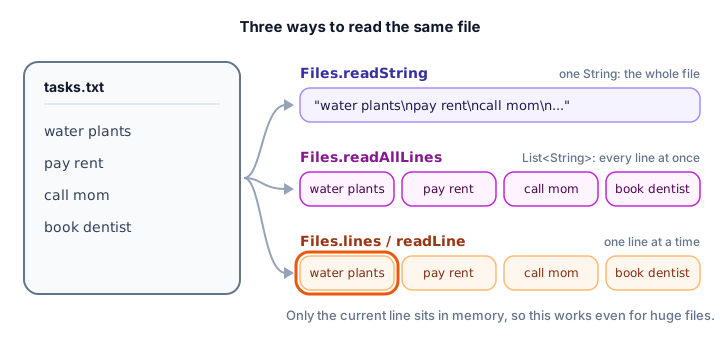
Imagine getting a long letter. You can read it all at once, sitting down with the whole thing. Or, if it's a 500-page manuscript, you read it one page at a time and put each page down before picking up the next. Java gives you both styles: load the whole file into memory, or stream it one line at a time.
📝 Note
So that each example runs anywhere, it first creates its own small sample file with Files.writeString (you'll learn it properly in writing files) and deletes it at the end. Focus on the reading part in the middle.
How to read a whole file into a String
The simplest way to read a text file is Files.readString(path). It opens the file, reads every character, closes the file and gives you the text as one String:
import java.io.IOException;
import java.nio.file.Files;
import java.nio.file.Path;

public class ReadWelcome {
    public static void main(String[] args) throws IOException {
        Path note = Path.of("welcome.txt");

        // Create a small sample file so this example runs anywhere
        Files.writeString(note, """
                Welcome to Sunny Side Hotel!
                Breakfast: 7:00 to 10:00
                Wi-Fi password: beach2026
                """);

        String text = Files.readString(note);
        System.out.print(text);
        System.out.println("Characters read: " + text.length());

        Files.delete(note);   // tidy up the sample file
    }
}
Welcome to Sunny Side Hotel!
Breakfast: 7:00 to 10:00
Wi-Fi password: beach2026
Characters read: 80The file's text already ends with a line break, so we used print instead of println to avoid an extra blank line. The 80 characters include the three invisible newline characters.
readString reads the file as UTF-8, the most common text encoding, which handles letters from every language. An encoding is the rule for turning the bytes on disk into characters. If a file uses a different encoding, pass it as a second argument, for example Files.readString(path, StandardCharsets.ISO_8859_1).
How to read all lines into a List
Often you want the file split into lines. Files.readAllLines(path) returns a List<String> with one element per line, and the line breaks removed:
import java.io.IOException;
import java.nio.file.Files;
import java.nio.file.Path;
import java.util.List;

public class ReadPlaylist {
    public static void main(String[] args) throws IOException {
        Path playlist = Path.of("road-trip.txt");
        Files.writeString(playlist, """
                Bohemian Rhapsody
                Africa
                Don't Stop Me Now
                Take On Me
                """);

        List<String> songs = Files.readAllLines(playlist);

        System.out.println("Songs in playlist: " + songs.size());
        for (int i = 0; i < songs.size(); i++) {
            System.out.println((i + 1) + ". " + songs.get(i));
        }
        System.out.println("Last song: " + songs.get(songs.size() - 1));

        Files.delete(playlist);
    }
}
Songs in playlist: 4
1. Bohemian Rhapsody
2. Africa
3. Don't Stop Me Now
4. Take On Me
Last song: Take On MeBecause you get an ordinary list, you can use size(), get(i) and loops on it, exactly like any other list.
⚠️ Be careful
readString and readAllLines load the entire file into memory. That's perfect for settings, notes or a few thousand lines, but a multi-gigabyte log file could make your program run out of memory. For big files, read line by line instead.
Reading line by line with Files.lines
Files.lines(path) returns a stream that reads lines lazily: each line is read from disk only when the stream needs it. That means you can work through a huge file while only one line is in memory at a time.
The stream keeps the file open, so always create it in a try-with-resources block. Here we pick the error messages out of a server log:
import java.io.IOException;
import java.nio.file.Files;
import java.nio.file.Path;
import java.util.stream.Stream;

public class ErrorFinder {
    public static void main(String[] args) throws IOException {
        Path log = Path.of("server.log");
        Files.writeString(log, """
                INFO  App started
                INFO  User anna logged in
                ERROR Payment service timed out
                INFO  Order 1001 placed
                ERROR Could not send email to bob
                INFO  User anna logged out
                """);

        try (Stream<String> lines = Files.lines(log)) {
            lines.filter(line -> line.startsWith("ERROR"))
                 .map(line -> line.substring(6))
                 .forEach(message -> System.out.println("Problem: " + message));
        }

        long infoCount;
        try (Stream<String> lines = Files.lines(log)) {
            infoCount = lines.filter(line -> line.startsWith("INFO")).count();
        }
        System.out.println("INFO lines: " + infoCount);

        Files.delete(log);
    }
}
Problem: Payment service timed out
Problem: Could not send email to bob
INFO lines: 4A stream can only be used once, so the second question (how many INFO lines?) opens a fresh stream. The filter, map and forEach steps use lambda expressions.
Reading a file with BufferedReader
Before streams existed, the standard way to read line by line was a BufferedReader, and you'll see it in lots of code. A buffer is a chunk of memory: the reader grabs a big block of the file at once and hands it to you line by line, which is much faster than going to the disk for every character.
Its readLine() method returns the next line, or null when the file has no more lines. This gives a classic loop:
import java.io.BufferedReader;
import java.io.IOException;
import java.nio.charset.StandardCharsets;
import java.nio.file.Files;
import java.nio.file.Path;

public class ThermostatLog {
    public static void main(String[] args) throws IOException {
        Path readings = Path.of("temperatures.txt");
        Files.writeString(readings, "19.5\n20.0\n21.5\n22.0\n20.5\n");

        double total = 0;
        double highest = Double.NEGATIVE_INFINITY;   // lower than any reading
        int count = 0;

        try (BufferedReader reader = Files.newBufferedReader(readings, StandardCharsets.UTF_8)) {
            String line;
            while ((line = reader.readLine()) != null) {
                double celsius = Double.parseDouble(line);
                total += celsius;
                highest = Math.max(highest, celsius);
                count++;
            }
        }

        System.out.println("Readings: " + count);
        System.out.println("Highest: " + highest + " C");
        System.out.printf("Average: %.1f C%n", total / count);

        Files.delete(readings);
    }
}
Readings: 5
Highest: 22.0 C
Average: 20.7 CThe condition (line = reader.readLine()) != null does two things: it stores the next line in line, then checks that it isn't null. When the file runs out, the loop stops. We passed StandardCharsets.UTF_8 to say the encoding explicitly, which is a good habit.
Reading words and numbers with Scanner
You already know Scanner from reading keyboard input. Point it at a file instead of System.in, and you can read words with next() and numbers with nextInt() or nextDouble(), no matter whether they're separated by spaces or line breaks:
import java.io.IOException;
import java.nio.charset.StandardCharsets;
import java.nio.file.Files;
import java.nio.file.Path;
import java.util.Scanner;

public class GameScores {
    public static void main(String[] args) throws IOException {
        Path scores = Path.of("scores.txt");
        Files.writeString(scores, "Mia 340\nLeo 512\nAva 275\nNoah 488\n");

        String bestPlayer = "";
        int bestScore = 0;

        try (Scanner scanner = new Scanner(scores, StandardCharsets.UTF_8)) {
            while (scanner.hasNext()) {
                String player = scanner.next();
                int score = scanner.nextInt();
                System.out.println(player + " scored " + score);
                if (score > bestScore) {
                    bestScore = score;
                    bestPlayer = player;
                }
            }
        }

        System.out.println("High score: " + bestPlayer + " with " + bestScore);
        Files.delete(scores);
    }
}
Mia scored 340
Leo scored 512
Ava scored 275
Noah scored 488
High score: Leo with 512Scanner is the easiest choice when a file holds values separated by spaces. It's slower than BufferedReader, so for very large files, read lines and split them yourself.
How to read and parse a CSV file in Java
A CSV file (comma-separated values) stores a table as plain text: one row per line, with commas between the columns. The first line is usually a header that names the columns. Spreadsheet apps like Excel and Google Sheets can open and save CSV files.
To read one, take each line, split(",") it into pieces, and convert the number columns with Double.parseDouble and Integer.parseInt. Here a shopping cart is stored as product,price,qty:
import java.io.IOException;
import java.nio.file.Files;
import java.nio.file.Path;
import java.util.List;

public class CartTotal {
    public static void main(String[] args) throws IOException {
        Path cart = Path.of("cart.csv");
        Files.writeString(cart, """
                product,price,qty
                Notebook,4.50,3
                Desk lamp,24.99,1
                Coffee mug,8.25,2
                USB cable,6.00,4
                """);

        List<String> lines = Files.readAllLines(cart);
        double grandTotal = 0;

        // Skip line 0, the header
        for (String line : lines.subList(1, lines.size())) {
            String[] parts = line.split(",");
            String product = parts[0];
            double price = Double.parseDouble(parts[1]);
            int qty = Integer.parseInt(parts[2]);

            double lineTotal = price * qty;
            grandTotal += lineTotal;
            System.out.printf("%-12s %2d x %6.2f = %7.2f%n", product, qty, price, lineTotal);
        }

        System.out.printf("%-12s %21.2f%n", "TOTAL", grandTotal);
        Files.delete(cart);
    }
}
Notebook 3 x 4.50 = 13.50
Desk lamp 1 x 24.99 = 24.99
Coffee mug 2 x 8.25 = 16.50
USB cable 4 x 6.00 = 24.00
TOTAL 78.99lines.subList(1, lines.size()) gives every line except the first, so the header is skipped. The printf widths like %-12s and %7.2f line the columns up neatly (see output formatting).
💡 Tip
A simple split(",") works for clean data like this. Real CSV files can contain quoted values with commas inside, such as "Lamp, desk",24.99. For those, use a CSV library instead of splitting by hand.
What happens if the file doesn't exist?
If you try to read a file that isn't there, Java throws a NoSuchFileException. It's a subclass of IOException, so you can catch it on its own and give the user a friendly message instead of a crash:
import java.io.IOException;
import java.nio.file.Files;
import java.nio.file.NoSuchFileException;
import java.nio.file.Path;

public class MissingFile {
    public static void main(String[] args) {
        Path settings = Path.of("settings.txt");

        try {
            String text = Files.readString(settings);
            System.out.println("Settings: " + text);
        } catch (NoSuchFileException e) {
            System.out.println("No file called " + e.getFile() + ", using default settings.");
        } catch (IOException e) {
            System.out.println("Could not read the file: " + e.getMessage());
        }

        System.out.println("The program keeps running.");
    }
}
No file called settings.txt, using default settings.
The program keeps running.e.getFile() returns the path you asked for. Catch the specific NoSuchFileException first, then the general IOException for everything else, such as a missing permission.
If you don't catch it, the program stops with a stack trace whose first line looks like this:
Exception in thread "main" java.nio.file.NoSuchFileException: settings.txtWhich way of reading a file should you use?
| Method | You get | Memory | Use it when |
|---|---|---|---|
Files.readString | One String | Whole file | The file is small and you want all the text |
Files.readAllLines | List<String> | Whole file | The file is small and you want lines |
Files.lines | Stream<String> | One line at a time | The file is big, or you like stream filters |
BufferedReader | One line per readLine() | One line at a time | The file is big and you want a plain loop |
Scanner | Words and numbers | Small buffer | Values are separated by spaces |
Common mistakes when reading files
1. Not closing Files.lines or a reader
readString and readAllLines close the file for you, but Files.lines, BufferedReader and Scanner don't. Always open them in try-with-resources.
2. Calling readLine twice per loop
Every call to readLine() moves to the next line. Writing while (reader.readLine() != null) { System.out.println(reader.readLine()); } skips every other line. Store the line in a variable once, as in the examples above.
3. Forgetting the CSV header
Calling Double.parseDouble("price") on the header line throws a NumberFormatException. Skip the first line before converting numbers.
4. Reading a huge file with readAllLines
Loading millions of lines at once can exhaust memory. Switch to Files.lines or BufferedReader for big files.
Practice exercise
🏋️ Try it yourself
A library keeps loans in a CSV file with the columns title,member,daysLate. Use a BufferedReader to read it, skip the header, print every book that is late, count the late books, and work out the total fine at $0.25 per day late. Use this data: The Hobbit (Sara, 0), Dune (Omar, 3), Matilda (Kenji, 0), Educated (Lucy, 5).
Show solution
import java.io.BufferedReader;
import java.io.IOException;
import java.nio.charset.StandardCharsets;
import java.nio.file.Files;
import java.nio.file.Path;

public class LibraryLoans {
    public static void main(String[] args) throws IOException {
        Path loans = Path.of("loans.csv");
        Files.writeString(loans, """
                title,member,daysLate
                The Hobbit,Sara,0
                Dune,Omar,3
                Matilda,Kenji,0
                Educated,Lucy,5
                """);

        int lateBooks = 0;
        int totalDaysLate = 0;

        try (BufferedReader reader = Files.newBufferedReader(loans, StandardCharsets.UTF_8)) {
            reader.readLine();   // skip the header
            String line;
            while ((line = reader.readLine()) != null) {
                String[] parts = line.split(",");
                int daysLate = Integer.parseInt(parts[2]);
                if (daysLate > 0) {
                    System.out.println(parts[0] + " is " + daysLate + " days late (" + parts[1] + ")");
                    lateBooks++;
                    totalDaysLate += daysLate;
                }
            }
        }

        System.out.println("Late books: " + lateBooks);
        System.out.printf("Fines at $0.25 a day: $%.2f%n", totalDaysLate * 0.25);
        Files.delete(loans);
    }
}
Dune is 3 days late (Omar)
Educated is 5 days late (Lucy)
Late books: 2
Fines at $0.25 a day: $2.00The first reader.readLine() call, before the loop, reads the header and throws it away.
What's next?
You can now load text, lines, numbers and CSV data from files. Next, learn the other half: writing files in Java, including how to append to a file instead of replacing it.
Key takeaways
- Files.readString(path) reads a whole text file into one String, using UTF-8 by default.
- Files.readAllLines(path) returns a List<String> with one element per line.
- For big files, read one line at a time with Files.lines or a BufferedReader, inside try-with-resources.
- BufferedReader.readLine() returns null at the end of the file, which ends the classic while loop.
- Scanner can read words and numbers from a file with next(), nextInt() and nextDouble().
- Parse a simple CSV file by skipping the header, splitting each line on commas and converting numbers.
- A missing file causes NoSuchFileException, a subclass of IOException that you can catch on its own.
Frequently asked questions
What is the easiest way to read a file in Java?
Use Files.readString(Path.of("file.txt")), available since Java 11. It reads the whole file into a String in one line and closes the file for you. Use Files.readAllLines if you want a List of lines instead.
How do I read a file line by line in Java?
Use Files.lines(path) inside try-with-resources to get a Stream of lines, or a BufferedReader from Files.newBufferedReader(path) and call readLine() in a loop until it returns null. Both keep only the current line in memory.
What is the difference between BufferedReader and Scanner?
BufferedReader reads whole lines quickly and is good for large files. Scanner is slower but can split text into words and convert numbers for you with methods like nextInt, which is handy for small, space-separated data.
How do I read a CSV file in Java?
Read the lines with Files.readAllLines or a BufferedReader, skip the header line, split each remaining line with split(","), and convert number columns with Integer.parseInt or Double.parseDouble. For CSV files with quoted commas, use a CSV library.
What does NoSuchFileException mean in Java?
It means the file at the path you gave does not exist, often because of a typo or because the program was started from a different working folder. It is a subclass of IOException, so you can catch it separately and show a friendly message.