Java Return Values
Updated 8 min read Aimerscrew
So far, our methods have mostly printed things. But often you want a method to work something out and hand the answer back, so the rest of your program can use it: a total to charge, a yes/no answer, a converted temperature. That's what Java return values are for. In this lesson, you'll learn how to declare a return type, use the return statement, write methods that answer yes/no questions, and fix the famous "missing return statement" error.
🌍 Real-life example
Think of a currency exchange counter at an airport. You hand over 100 US dollars (the argument), the clerk does the calculation (the method body), and hands you back euros (the return value). You can then spend those euros however you like. A method with a return value works exactly the same way.
What is a return value in Java?
A return value is the result a method sends back to the code that called it. Two things make it work:
- The return type in the method header says what kind of value comes back, for example
double. - The return statement inside the body,
return expression;, sends the value back and ends the method.
public class TipCalculator {
    public static void main(String[] args) {
        double tip = calculateTip(80.0);
        System.out.println("Tip: $" + tip);
    }

    public static double calculateTip(double bill) {
        return bill * 0.15;
    }
}
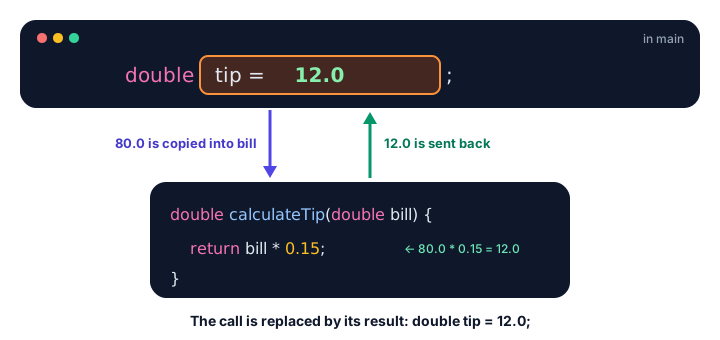
Tip: $12.0When Java runs calculateTip(80.0), the method computes 80.0 * 0.15 and returns 12.0. You can picture the whole call being replaced by the value it returns, so the line becomes double tip = 12.0;.
What return types can a method have?
The return type can be any Java type. The value after return must match it (or be automatically widened to it, like an int returned from a double method).
| Return type | Example header | Returns |
|---|---|---|
int | int countSeats(...) | A whole number |
double | double averageRating(...) | A decimal number |
boolean | boolean isOpen(...) | true or false |
String | String formatName(...) | Text |
int[] | int[] topScores(...) | An array |
void | void printMenu(...) | Nothing |
How do you use the value a method returns?
A method call that returns a value is an expression, so you can use it anywhere a value of that type fits: store it, print it, do math with it, compare it, or pass it straight into another method.
public class ShoppingCart {
    public static void main(String[] args) {
        double shirts = lineTotal(19.99, 2);
        double socks = lineTotal(4.50, 3);

        System.out.println("Shirts: $" + shirts);
        System.out.println("Socks: $" + socks);

        double total = shirts + socks;
        System.out.printf("Total: $%.2f%n", total);

        System.out.printf("With 8%% tax: $%.2f%n", addTax(lineTotal(19.99, 2) + socks));
    }

    public static double lineTotal(double price, int quantity) {
        return price * quantity;
    }

    public static double addTax(double amount) {
        return amount * 1.08;
    }
}
Shirts: $39.98
Socks: $13.5
Total: $53.48
With 8% tax: $57.76On the last line, Java first calls lineTotal, adds socks, passes that sum to addTax, then prints the result. Inner calls run first, just like brackets in math.
💡 Tip
Prefer methods that return a value over methods that print it. A method that returns 12.0 can be printed, saved, added to a total or tested. A method that only prints 12.0 is stuck on the screen.
Returning boolean values for checks
Methods that answer a yes/no question return boolean. By convention their names start with is, has or can, so an if statement reads almost like English.
public class PinCheck {
    public static void main(String[] args) {
        int[] attempts = {482, 1234, 98765};

        for (int pin : attempts) {
            if (isValidPin(pin)) {
                System.out.println(pin + " is a valid 4-digit PIN");
            } else {
                System.out.println(pin + " is not valid");
            }
        }
    }

    public static boolean isValidPin(int pin) {
        return pin >= 1000 && pin <= 9999;
    }
}
482 is not valid
1234 is a valid 4-digit PIN
98765 is not validNotice that isValidPin returns the comparison directly. There's no need to write if (condition) { return true; } else { return false; }; the condition already is true or false.
What is an early return?
A return statement ends the method immediately, even in the middle of a loop or an if. You can use this to handle special cases first and leave early. This style is called an early return (or a guard clause), and it keeps code flat and readable.
public class Shipping {
    public static void main(String[] args) {
        System.out.printf("Order $%.2f -> shipping $%.2f%n", 65.00, shippingCost(65.00));
        System.out.printf("Order $%.2f -> shipping $%.2f%n", 20.00, shippingCost(20.00));
        System.out.printf("Order $%.2f -> shipping $%.2f%n", 0.00, shippingCost(0.00));
    }

    public static double shippingCost(double orderTotal) {
        if (orderTotal <= 0) {
            return 0.0;          // nothing to ship
        }
        if (orderTotal >= 50) {
            return 0.0;          // free shipping
        }
        return 4.99;             // standard rate
    }
}
Order $65.00 -> shipping $0.00
Order $20.00 -> shipping $4.99
Order $0.00 -> shipping $0.00An early return also works inside loops. This method searches an array and stops at the first match:
public class LibrarySearch {
    public static void main(String[] args) {
        String[] shelf = {"Dune", "Emma", "Matilda", "Beloved"};
        System.out.println(findBook(shelf, "Matilda"));
        System.out.println(findBook(shelf, "Hamlet"));
    }

    public static int findBook(String[] books, String title) {
        for (int i = 0; i < books.length; i++) {
            if (books[i].equals(title)) {
                return i;        // found it: stop searching
            }
        }
        return -1;               // checked every book, no match
    }
}
2
-1Returning -1 for "not found" is a common convention, because -1 can never be a real array index.
A void method can also leave early with a bare return; (no value), as you saw in the method parameters practice exercise.
Can a Java method return two values?
No. A Java method returns exactly one value. If you need to send back several values, wrap them in a single container. With what you know so far, an array is the simplest option:
import java.util.Arrays;

public class Temperatures {
    public static void main(String[] args) {
        int[] week = {18, 22, 15, 25, 19, 14, 21};
        int[] range = minAndMax(week);
        System.out.println("Coldest: " + range[0] + ", warmest: " + range[1]);
        System.out.println(Arrays.toString(range));
    }

    public static int[] minAndMax(int[] values) {
        int min = values[0];
        int max = values[0];
        for (int value : values) {
            if (value < min) {
                min = value;
            }
            if (value > max) {
                max = value;
            }
        }
        return new int[] {min, max};
    }
}
Coldest: 14, warmest: 25
[14, 25]This works when the values share a type, but range[0] and range[1] don't say what they mean. Later you'll learn a cleaner way: a record, which lets you return a small object with named parts like min and max.
Why does Java say "missing return statement"?
If a method promises to return a value, Java checks that every possible path through the method ends with a return. If the compiler can find even one path that reaches the end without returning, it refuses to compile:
public static String result(int score) {
    if (score >= 50) {
        return "Pass";
    } else if (score < 50) {
        return "Fail";
    }
}   // error: missing return statement
You can see that one of the two conditions is always true, but the compiler doesn't reason about the conditions; it only sees an if / else if with no final else. Fix it by making the last branch a plain else, or by putting a return at the end:
public class ExamResult {
    public static void main(String[] args) {
        System.out.println(result(72));
        System.out.println(result(41));
    }

    public static String result(int score) {
        if (score >= 50) {
            return "Pass";
        }
        return "Fail";
    }
}
Pass
FailReturn value vs printing: what's the difference?
| Returning a value | Printing a value | |
|---|---|---|
| Keyword | return | System.out.println |
| Who receives it | The code that called the method | The person looking at the screen |
| Can be stored or reused? | Yes | No |
| Return type | Anything except void | Usually void |
Common mistakes with return values
1. Ignoring the returned value
A line like calculateTip(80.0); compiles, but the result is thrown away. Store it or use it: double tip = calculateTip(80.0);.
2. Returning the wrong type
An int method can't return a double such as n / 2.0. Java reports incompatible types: possible lossy conversion from double to int. Change the return type or cast the value.
3. Writing code after return
Nothing after a return in the same block can ever run, so Java flags it with error: unreachable statement.
4. Using a void method as a value
int x = printMenu(); fails with incompatible types: void cannot be converted to int, and System.out.println(printMenu()) fails with 'void' type not allowed here. A void method gives nothing back to use.
Practice exercise
🏋️ Try it yourself
Write a method applyCoupon(double price, int percentOff) that returns the discounted price. If percentOff is less than 0 or more than 100, return the original price unchanged (use an early return). Then write boolean isBargain(double price) that returns true when the price is under $20. Test both with a $45 jacket and 60% off, and with an invalid 150% coupon.
Show solution
public class CouponApp {
    public static void main(String[] args) {
        double sale = applyCoupon(45.0, 60);
        System.out.printf("Sale price: $%.2f, bargain: %b%n", sale, isBargain(sale));

        double invalid = applyCoupon(45.0, 150);
        System.out.printf("Sale price: $%.2f, bargain: %b%n", invalid, isBargain(invalid));
    }

    public static double applyCoupon(double price, int percentOff) {
        if (percentOff < 0 || percentOff > 100) {
            return price;
        }
        return price - price * percentOff / 100;
    }

    public static boolean isBargain(double price) {
        return price < 20;
    }
}
Sale price: $18.00, bargain: true
Sale price: $45.00, bargain: falseWhat's next?
Your methods can now take input and give back results. Next, discover how you can have several methods with the same name in Java method overloading.
Key takeaways
- The return type in the method header says what kind of value the method sends back.
- The return statement sends a value back and ends the method immediately.
- A call that returns a value can be stored, printed, used in math or passed to another method.
- Methods that answer yes/no questions return boolean and are often named isSomething or hasSomething.
- Early returns handle special cases first and keep methods easy to read.
- A method returns exactly one value; use an array (or later a record) to send back several.
- Every path through a non-void method must end in return, or you get "missing return statement".
Frequently asked questions
What does return do in Java?
return ends the current method immediately. In a non-void method, return expression; also sends the value of the expression back to the code that called the method.
Can a Java method return more than one value?
No, a method returns exactly one value. To send back several values, return a container such as an array, a collection or a record that holds them.
How do I fix "missing return statement" in Java?
Make sure every possible path through the method ends with a return. Usually you replace a final else if with a plain else, or add a return statement at the end of the method.
Can a void method use return?
Yes. A void method can use a bare return; with no value to leave the method early. It cannot return a value.
What is the difference between returning and printing a value?
Returning gives the value back to the calling code so it can be stored or reused. Printing only displays it on the screen; the program cannot use a printed value later.