Java Lambda Expressions
Updated 13 min read Aimerscrew
Java lambda expressions let you write a small piece of behavior, such as "compare two songs by length" or "is this item a coupon?", in a single short line and hand it to a method. Before lambdas arrived in Java 8, you needed a whole anonymous class for that, often five or six lines of ceremony around one line of real logic. In this lesson, you'll learn the lambda syntax, see an anonymous class shrink into a lambda step by step, use lambdas with forEach, removeIf and sorting, and finish with the four kinds of method references.
🌍 Real-life example
When you order food delivery, you don't hire a full-time employee to drop off one bag. You give a courier a short instruction: "leave it at the door". A lambda is that short instruction. The method you call (like sort or removeIf) is the delivery service that already knows how to do the job; your lambda just tells it the one detail it needs.
What is a lambda expression in Java?
A lambda expression is an anonymous function: a block of code with parameters and a body, but no name and no class around it. You can store a lambda in a variable or pass it straight into a method, just like a value.
Every lambda has three parts:
- Parameters in parentheses, such as
(a, b). - The arrow
->, which you can read as "goes to" or "becomes". - A body: either one expression, or a block of statements in curly braces.
A lambda can only be used where Java expects a functional interface, which is an interface with exactly one abstract method (like Comparator or Runnable). The lambda becomes the body of that one method. You'll study these interfaces in detail in the next lesson, Java functional interfaces.
From anonymous class to lambda, step by step
An anonymous class is a class without a name that you define and create in one go (covered in Java inner classes). Here's a Comparator that sorts song titles by length, written the old way:
Comparator<String> byLength = new Comparator<String>() {
    @Override
    public int compare(String a, String b) {
        return a.length() - b.length();
    }
};
Now let's remove everything Java can figure out by itself:
- Drop
new Comparator<String>() { ... }. The variable type already says it's aComparator. - Drop the method header.
Comparatorhas only one abstract method, so Java knows you meancompare. - Keep the parameters and add an arrow:
(String a, String b) -> { return a.length() - b.length(); } - Drop the parameter types. Java infers them from
Comparator<String>:(a, b) -> { return a.length() - b.length(); } - Drop the braces and
return, because the body is a single expression:(a, b) -> a.length() - b.length()
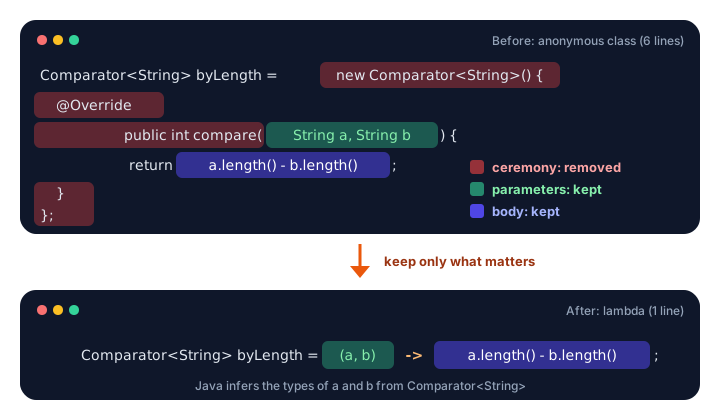
Both versions behave exactly the same, as this program proves:
import java.util.ArrayList;
import java.util.Comparator;
import java.util.List;

public class PlaylistSorter {
    public static void main(String[] args) {
        List<String> songs = List.of("Yesterday", "Hey Jude", "Let It Be", "Help");

        // Version 1: an anonymous class
        List<String> first = new ArrayList<>(songs);
        first.sort(new Comparator<String>() {
            @Override
            public int compare(String a, String b) {
                return a.length() - b.length();
            }
        });
        System.out.println("Anonymous class: " + first);

        // Version 2: exactly the same rule as a lambda
        List<String> second = new ArrayList<>(songs);
        second.sort((a, b) -> a.length() - b.length());
        System.out.println("Lambda:          " + second);
    }
}
Anonymous class: [Help, Hey Jude, Yesterday, Let It Be]
Lambda: [Help, Hey Jude, Yesterday, Let It Be]Notice that sorting is stable: "Yesterday" and "Let It Be" have the same length (9), so they keep their original order.
Lambda syntax forms
Lambdas come in a few shapes. The program below uses two small interfaces of its own, MathOperation and Greeter, each with a single method, plus Java's built-in Runnable (one method, run(), with no parameters).
public class CalculatorLambdas {
    public static void main(String[] args) {
        MathOperation add = (a, b) -> a + b;
        MathOperation multiply = (int a, int b) -> a * b;
        MathOperation safeDivide = (a, b) -> {
            if (b == 0) {
                System.out.println("Can't divide by zero, returning 0");
                return 0;
            }
            return a / b;
        };

        Greeter hello = name -> "Hello, " + name + "!";
        Runnable ping = () -> System.out.println("Ping!");

        System.out.println(add.apply(7, 5));
        System.out.println(multiply.apply(7, 5));
        System.out.println(safeDivide.apply(20, 4));
        System.out.println(safeDivide.apply(20, 0));
        System.out.println(hello.greet("Maya"));
        ping.run();
    }
}

interface MathOperation {
    int apply(int a, int b);
}

interface Greeter {
    String greet(String name);
}
12
35
5
Can't divide by zero, returning 0
0
Hello, Maya!
Ping!| Form | Example | When to use it |
|---|---|---|
| No parameters | () -> System.out.println("Ping!") | The method takes nothing |
| One parameter | name -> "Hello, " + name | Parentheses are optional for exactly one untyped parameter |
| Several parameters | (a, b) -> a + b | Parentheses are required |
| Typed parameters | (int a, int b) -> a * b | Rarely needed; type all of them or none |
| Block body | (a, b) -> { ...; return x; } | More than one statement; you must write return |
💡 Tip
Keep lambdas short. If the body grows beyond three or four lines, move the logic into a normal method with a clear name and call it from the lambda (or use a method reference, shown below). Short lambdas are what make the code easy to read.
Using lambdas with forEach and removeIf
Java's collections have methods that accept lambdas. Two of the handiest on any ArrayList:
forEach(action)runs the lambda once for every element.removeIf(condition)removes every element for which the lambda returnstrue.
import java.util.ArrayList;
import java.util.List;

public class ShoppingCart {
    public static void main(String[] args) {
        List<String> cart = new ArrayList<>(List.of("Milk", "Bread", "Expired coupon", "Eggs", "Old coupon"));

        System.out.println("Before:");
        cart.forEach(item -> System.out.println("  - " + item));

        cart.removeIf(item -> item.contains("coupon"));

        System.out.println("After removing coupons:");
        cart.forEach(item -> System.out.println("  - " + item));
    }
}
Before:
- Milk
- Bread
- Expired coupon
- Eggs
- Old coupon
After removing coupons:
- Milk
- Bread
- EggsWithout removeIf you'd need an Iterator and a loop to remove items safely. With it, the rule "anything that contains the word coupon" reads almost like English.
Sorting with a lambda Comparator
Sorting is where lambdas shine. A Comparator lambda returns a negative number if the first item should come first, a positive number if the second should, and zero if they tie. Here we sort a game leaderboard of records:
import java.util.ArrayList;
import java.util.Comparator;
import java.util.List;

public class LeaderboardSort {
    public static void main(String[] args) {
        List<Player> players = new ArrayList<>(List.of(
                new Player("Zoe", 870),
                new Player("Liam", 1200),
                new Player("Ben", 950),
                new Player("Aisha", 950)));

        players.sort((p1, p2) -> Integer.compare(p2.score(), p1.score()));
        System.out.println("By score (high to low): " + players);

        players.sort(Comparator.comparingInt((Player p) -> p.score()).reversed()
                .thenComparing(p -> p.name()));
        System.out.println("Score, then name:       " + players);

        players.sort(Comparator.comparing(p -> p.name()));
        System.out.println("By name (A to Z):       " + players);
    }
}

record Player(String name, int score) {
    @Override
    public String toString() {
        return name + "=" + score;
    }
}
By score (high to low): [Liam=1200, Ben=950, Aisha=950, Zoe=870]
Score, then name: [Liam=1200, Aisha=950, Ben=950, Zoe=870]
By name (A to Z): [Aisha=950, Ben=950, Liam=1200, Zoe=870]Comparator.comparing(...) builds a comparator from a lambda that picks the value to sort by, reversed() flips the order, and thenComparing(...) breaks ties. Ben and Aisha both have 950 points, so the second sort puts them in name order. You'll find many more sorting recipes in sorting collections in Java.
📝 Note
In comparingInt((Player p) -> p.score()).reversed() the parameter type is written out. That's because Java can't infer p's type when you chain .reversed() straight onto the lambda. Writing the type (or using a method reference like Player::score) fixes it.
What does "effectively final" mean?
A lambda can read local variables from the method around it. This is called capturing a variable. The rule is that a captured variable must be effectively final: it's never changed after it gets its first value, even if you didn't write the word final.
import java.util.List;

public class TipCalculator {
    public static void main(String[] args) {
        List<Double> bills = List.of(40.0, 26.0, 80.0);
        double tipRate = 0.15;   // never changes, so it is effectively final

        bills.forEach(bill -> {
            double tip = bill * tipRate;
            System.out.printf("Bill $%.2f -> tip $%.2f%n", bill, tip);
        });
    }
}
Bill $40.00 -> tip $6.00
Bill $26.00 -> tip $3.90
Bill $80.00 -> tip $12.00tipRate is assigned once and never changed, so the lambda can use it. But try to change a local variable inside a lambda, like counting with count++, and the compiler stops you:
error: local variables referenced from a lambda expression must be final or effectively final
        names.forEach(n -> count++);
                           ^
Java has this rule because a lambda might run later, or somewhere else, after the method has finished. Copying a value that never changes is always safe. To count or sum, use a normal loop or the streams you'll learn soon (names.size() or stream().count()).
What are method references?
A method reference is a shortcut for a lambda that does nothing except call one existing method. You write it with a double colon ::. For example, s -> System.out.println(s) becomes System.out::println. There are four kinds:
| Kind | Syntax | Lambda it replaces |
|---|---|---|
| Static method | MethodReferences::shout | s -> MethodReferences.shout(s) |
| Instance method of a particular object | printer::print | s -> printer.print(s) |
| Instance method of an arbitrary object | String::compareToIgnoreCase | (a, b) -> a.compareToIgnoreCase(b) |
| Constructor | StringBuilder::new | s -> new StringBuilder(s) |
All four in one program. Function and Supplier are built-in functional interfaces you'll meet properly in the next lesson; for now, read apply(...) and get() as "run the stored function".
import java.util.ArrayList;
import java.util.List;
import java.util.function.Function;
import java.util.function.Supplier;

public class MethodReferences {
    public static void main(String[] args) {
        List<String> cities = new ArrayList<>(List.of("tokyo", "Lagos", "berlin", "Austin"));

        // 1. Static method:  ClassName::staticMethod
        cities.forEach(MethodReferences::shout);

        // 2. Instance method of a particular object:  object::method
        Printer printer = new Printer("> ");
        cities.forEach(printer::print);

        // 3. Instance method of an arbitrary object:  ClassName::instanceMethod
        cities.sort(String::compareToIgnoreCase);
        System.out.println(cities);

        // 4. Constructor:  ClassName::new
        Function<String, StringBuilder> makeBuilder = StringBuilder::new;
        System.out.println(makeBuilder.apply("Paris").reverse());

        Supplier<ArrayList<String>> newList = ArrayList::new;
        ArrayList<String> empty = newList.get();
        System.out.println("New list size: " + empty.size());
    }

    static void shout(String text) {
        System.out.println(text.toUpperCase() + "!");
    }
}

class Printer {
    private final String prefix;

    Printer(String prefix) {
        this.prefix = prefix;
    }

    void print(String text) {
        System.out.println(prefix + text);
    }
}
TOKYO!
LAGOS!
BERLIN!
AUSTIN!
> tokyo
> Lagos
> berlin
> Austin
[Austin, berlin, Lagos, tokyo]
siraP
New list size: 0The third kind is the trickiest. In String::compareToIgnoreCase, there's no specific string named. Java calls the method on the first parameter and passes the second one in: a.compareToIgnoreCase(b).
Real-world example: sorting food delivery orders
Lambdas and method references work best together. This dispatcher screen removes cancelled orders and shows the biggest ones first:
import java.util.ArrayList;
import java.util.Comparator;
import java.util.List;

public class FoodDelivery {
    public static void main(String[] args) {
        List<Order> orders = new ArrayList<>(List.of(
                new Order(101, "Pizza Palace", 32.50, false),
                new Order(102, "Sushi Go", 18.00, true),
                new Order(103, "Burger Barn", 12.75, false),
                new Order(104, "Taco Town", 24.00, false),
                new Order(105, "Curry House", 41.20, true)));

        orders.removeIf(Order::cancelled);
        orders.sort(Comparator.comparingDouble(Order::total).reversed());

        System.out.println("Active orders, biggest first:");
        orders.forEach(o -> System.out.printf("#%d %-12s $%6.2f%n", o.id(), o.restaurant(), o.total()));
    }
}

record Order(int id, String restaurant, double total, boolean cancelled) {
}
Active orders, biggest first:
#101 Pizza Palace $ 32.50
#104 Taco Town $ 24.00
#103 Burger Barn $ 12.75Order::cancelled calls each record's cancelled() accessor, and Order::total picks the value to sort by. Two short lines replace what used to be two loops and an anonymous class.
Common mistakes with lambdas
1. Changing a captured local variable
int count = 0; list.forEach(x -> count++); doesn't compile. Captured variables must be effectively final. Use a loop, or a stream's count().
2. Forgetting return in a block body
(a, b) -> { a + b; } is an error. Once you use braces, you must write return a + b;. Without braces, the result of the expression is returned automatically.
3. Mixing typed and untyped parameters
(int a, b) -> a + b is not allowed. Give every parameter a type, or none (you may also write var for all of them).
4. Using a lambda where no functional interface is expected
Object task = () -> System.out.println("Hi"); fails with "Object is not a functional interface". A lambda needs a target type with exactly one abstract method, such as Runnable task = ....
5. Adding parentheses to a method reference
list.forEach(System.out::println()) is wrong. A method reference names the method; it doesn't call it. Write System.out::println.
Practice exercise
🏋️ Try it yourself
Create a playlist of songs as a record Song(String title, int seconds) with these tracks: Blinding Lights (200s), Intro (45s), Levitating (203s), Skit (30s), Bad Guy (194s). Use removeIf with a lambda to drop anything shorter than 60 seconds, sort the rest from shortest to longest with a method reference, and print each one with forEach.
Show solution
import java.util.ArrayList;
import java.util.Comparator;
import java.util.List;

public class Playlist {
    public static void main(String[] args) {
        List<Song> songs = new ArrayList<>(List.of(
                new Song("Blinding Lights", 200),
                new Song("Intro", 45),
                new Song("Levitating", 203),
                new Song("Skit", 30),
                new Song("Bad Guy", 194)));

        songs.removeIf(s -> s.seconds() < 60);
        songs.sort(Comparator.comparingInt(Song::seconds));
        songs.forEach(s -> System.out.println(s.title() + " (" + s.seconds() + "s)"));
    }
}

record Song(String title, int seconds) {
}
Bad Guy (194s)
Blinding Lights (200s)
Levitating (203s)What's next?
You've seen that a lambda always fills in an interface with a single method. Next, find out exactly what those interfaces are, how to write your own, and which ready-made ones Java gives you in Java functional interfaces.
Key takeaways
- A lambda expression is a short, unnamed function written as parameters, an arrow and a body, like (a, b) -> a + b.
- Lambdas can be used wherever Java expects a functional interface, an interface with exactly one abstract method.
- A lambda keeps only the parameters and body of an anonymous class; Java infers the rest, including parameter types.
- A single-expression body returns its value automatically; a block body in braces needs an explicit return.
- Lambdas can read local variables only if they are effectively final, meaning never changed after being set.
- Collections accept lambdas in methods like forEach, removeIf and sort.
- Method references (Class::staticMethod, object::method, Class::instanceMethod, Class::new) are shortcuts for lambdas that just call one method.
Frequently asked questions
What is a lambda expression in Java?
It is an anonymous function: a piece of code with parameters and a body but no name, such as x -> x * 2. You can store it in a variable or pass it to a method that expects a functional interface.
Which Java version introduced lambda expressions?
Lambdas were added in Java 8, released in 2014, together with method references, functional interfaces in java.util.function and the Stream API.
What is the difference between a lambda and an anonymous class?
Both create an implementation of an interface on the spot. A lambda is much shorter and only works for interfaces with a single abstract method, while an anonymous class can implement interfaces with several methods, extend classes and have its own fields.
Why must variables used in a lambda be effectively final?
A lambda may run later or on another thread, so Java copies the values it captures. Requiring that those variables never change keeps the copy and the original in sync and prevents confusing bugs.
What does :: mean in Java?
The double colon creates a method reference, a compact lambda that calls an existing method. For example, String::toUpperCase means s -> s.toUpperCase(), and ArrayList::new means () -> new ArrayList<>().