Java Strings
Updated 9 min read Aimerscrew
Names, email addresses, chat messages, song titles, error messages: most of the data people care about is text. Java strings are how your programs store and work with that text. In this lesson, you'll learn what a String is, how to create and join strings, how to read single characters by their position, and why Java strings can never be changed once they're made.
🌍 Real-life example
Think of a luggage tag at an airport. It holds a short piece of text, such as LHR → JFK or a passenger's name. Staff can read the whole tag, count its letters, or look at just the first letter. But nobody edits a printed tag; if something changes, a new tag is printed. Java strings behave exactly like that.
What is a String in Java?
A String is a sequence of characters, such as letters, digits, spaces and symbols, stored as one value. In Java, String is a class (a blueprint for objects) that comes built into the language, so you can use it in every program without importing anything.
public class WelcomeMessage {
    public static void main(String[] args) {
        String guest = "Maya";
        String hotel = "Harbor View Inn";

        System.out.println("Welcome, " + guest + "!");
        System.out.println("Enjoy your stay at " + hotel + ".");
    }
}
Welcome, Maya!
Enjoy your stay at Harbor View Inn.Notice the capital S in String. Unlike int or double, which are primitive types (you met them in Java data types), String is a reference type: the variable holds a reference (an arrow) to a String object stored in memory. You'll see why that matters in a moment.
How to create a String
There are two ways to create a string. The usual way is a string literal: text written directly in your code between double quotes. The other way uses the new keyword.
public class CreatingStrings {
    public static void main(String[] args) {
        String song = "Here Comes the Sun";      // string literal
        String artist = new String("The Beatles"); // new String object
        String note = "";                         // empty string

        System.out.println("Now playing: " + song);
        System.out.println("By: " + artist);
        System.out.println("Note: [" + note + "]");
    }
}
Now playing: Here Comes the Sun
By: The Beatles
Note: []The last one, "", is an empty string: a real String that simply has zero characters. Always use literals unless you have a special reason not to. The next section explains why.
⚠️ Double quotes, not single quotes
In Java, "A" is a String and 'A' is a char (exactly one character). Writing String grade = 'A'; is a compile error.
String literals and the string pool
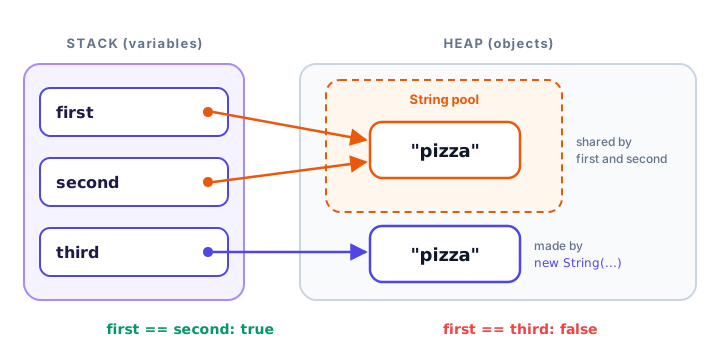
Programs often use the same text many times. To save memory, Java keeps string literals in a special area called the string pool. When your code uses a literal, Java checks the pool first. If an identical string is already there, Java reuses it instead of creating a new object. Using new String(...) skips this check and always creates a fresh object.
public class StringPool {
    public static void main(String[] args) {
        String first = "pizza";
        String second = "pizza";
        String third = new String("pizza");

        System.out.println(first == second);  // same object?
        System.out.println(first == third);   // same object?
    }
}
true
falseFor strings, == checks whether two variables point to the same object, not whether the text matches. first and second share one pooled object, so the answer is true. third points to a separate object, so the answer is false, even though all three hold "pizza".
📝 Note
To check whether two strings contain the same text, use equals(), not ==. You'll learn exactly why in Java string comparison.
Why are Java strings immutable?
Immutable means "cannot be changed". Once a String object is created, its characters never change. Methods that look like they modify a string, such as toUpperCase(), actually build and return a new string. If you don't store that result, it's lost.
public class OrderStatus {
    public static void main(String[] args) {
        String status = "shipped";

        status.toUpperCase();          // creates a NEW string, result is thrown away
        System.out.println(status);

        status = status.toUpperCase(); // store the new string in the variable
        System.out.println(status);
    }
}
shipped
SHIPPEDOn the last assignment, the original "shipped" object isn't edited. The variable status simply moves its arrow to the new "SHIPPED" object. Immutability is what makes the string pool safe: if one variable could edit a shared "pizza", every other variable pointing to it would change too.
Joining strings with + and concat()
Joining strings end to end is called concatenation. The + operator is the most common way to do it, and it also turns numbers into text automatically. The concat() method does the same job for two strings.
public class Concatenation {
    public static void main(String[] args) {
        String firstName = "Liam";
        String lastName = "Chen";
        String fullName = firstName + " " + lastName;
        System.out.println(fullName);

        int points = 1250;
        System.out.println("Score: " + points);

        String team = "Red".concat(" Rockets");
        System.out.println(team);
    }
}
Liam Chen
Score: 1250
Red RocketsBe careful when you mix numbers and strings. Java evaluates + from left to right. Once a string appears, every + after it means "join", not "add".
public class MixingNumbers {
    public static void main(String[] args) {
        int apples = 2;
        int bananas = 3;

        System.out.println("Fruit: " + apples + bananas);
        System.out.println(apples + bananas + " pieces of fruit");
        System.out.println("Fruit: " + (apples + bananas));
    }
}
Fruit: 23
5 pieces of fruit
Fruit: 5In the first line, "Fruit: " + 2 becomes "Fruit: 2", and then the 3 is joined on. In the second line, 2 + 3 is calculated first because both are numbers. Parentheses fix the first line, just as you learned in operator precedence.
Escape sequences: special characters inside strings
How do you put a double quote inside a string that's surrounded by double quotes? You use an escape sequence: a backslash \ followed by a character that has a special meaning.
| Escape sequence | Meaning |
|---|---|
\" | Double quote |
\\ | Backslash |
\n | New line |
\t | Tab (jumps to the next tab stop) |
\' | Single quote (needed inside a char, like '\'') |
public class EscapeSequences {
    public static void main(String[] args) {
        System.out.println("The coach said \"Great game!\" after the match.");
        System.out.println("Saved to C:\\Users\\maya\\scores.txt");
        System.out.println("Line one\nLine two");
        System.out.println("Item\tQty\tPrice");
        System.out.println("Latte\t2\t$9.00");
    }
}
The coach said "Great game!" after the match.
Saved to C:\Users\maya\scores.txt
Line one
Line two
Item Qty Price
Latte 2 $9.00How to get the length of a string
The length() method returns how many characters a string has. Spaces and punctuation count too. This is handy for things like character limits on a social media post.
public class LengthCheck {
    public static void main(String[] args) {
        String tweet = "Just landed in Lisbon! Sunny and 24 degrees.";
        int limit = 280;

        System.out.println("Length: " + tweet.length());
        System.out.println("Characters left: " + (limit - tweet.length()));
        System.out.println("Empty string length: " + "".length());
    }
}
Length: 44
Characters left: 236
Empty string length: 0charAt() and string indexes
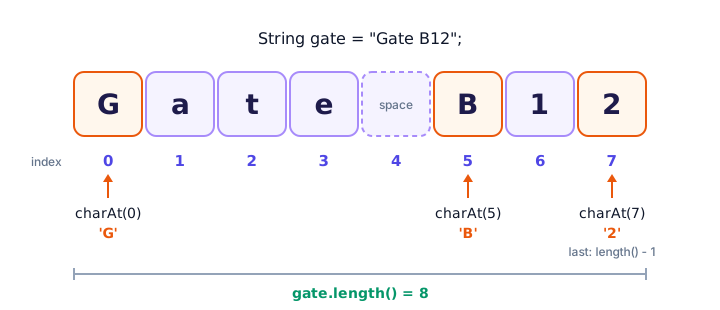
Every character in a string has a position number called an index. Indexes start at 0, not 1. So the first character is at index 0, and the last one is at index length() - 1. The charAt(index) method returns the single character (a char) at that position.
public class GateCode {
    public static void main(String[] args) {
        String gate = "Gate B12";

        System.out.println("Length: " + gate.length());
        System.out.println("First character: " + gate.charAt(0));
        System.out.println("Gate letter: " + gate.charAt(5));
        System.out.println("Last character: " + gate.charAt(gate.length() - 1));
        System.out.println("Index 4 is a space: [" + gate.charAt(4) + "]");
    }
}
Length: 8
First character: G
Gate letter: B
Last character: 2
Index 4 is a space: [ ]If you ask for an index that doesn't exist, such as gate.charAt(8), the program stops with an error:
Exception in thread "main" java.lang.StringIndexOutOfBoundsException: Index 8 out of bounds for length 8💡 Tip
Read charAt(5) as "the character after skipping 5". That simple trick makes zero-based indexes feel natural.
Text blocks: multi-line strings
Since Java 15, you can write a string across several lines with a text block. It starts with three double quotes """ followed by a line break, and ends with another """. You don't need \n for new lines, and you can use double quotes freely inside.
public class TextBlockReceipt {
    public static void main(String[] args) {
        String receipt = """
                CORNER CAFE
                -----------
                Latte      $4.50
                Bagel      $3.25
                Total      $7.75
                "Thanks for visiting!"
                """;

        System.out.print(receipt);
        System.out.println("Characters in receipt: " + receipt.length());
    }
}
CORNER CAFE
-----------
Latte $4.50
Bagel $3.25
Total $7.75
"Thanks for visiting!"
Characters in receipt: 98Java removes the indentation that all lines share, so the receipt starts at the left edge. Because the closing """ sits on its own line, the text block ends with a new line, which is why the code uses print instead of println.
Common mistakes with Java strings
1. Comparing text with ==
== compares objects, not text. It may seem to work with literals (thanks to the pool), then fail with text typed by a user. Use equals() instead.
2. Forgetting that strings are immutable
Writing name.toUpperCase(); on its own line does nothing useful. Store the result: name = name.toUpperCase();.
3. Off-by-one indexes
The last character is at length() - 1. Using charAt(text.length()) always throws StringIndexOutOfBoundsException.
4. Mixing + for numbers and text
"Total: " + 4 + 6 gives Total: 46. Wrap the math in parentheses: "Total: " + (4 + 6).
5. Using a single backslash in a file path
"C:\Users" doesn't compile, because \U isn't a valid escape sequence. Write "C:\\Users".
Practice exercise
🏋️ Try it yourself
Build a boarding pass. Create variables for a passenger ("Ana Silva"), a flight ("BA249") and a seat ("22F"). Combine them into one string with the passenger on the first line, and the flight and seat on the second line separated by a tab. Print it, then print the seat letter (the last character of the seat) and the total length of the boarding pass string.
Show solution
public class BoardingPass {
    public static void main(String[] args) {
        String passenger = "Ana Silva";
        String flight = "BA249";
        String seat = "22F";

        String pass = "Passenger: " + passenger + "\nFlight: " + flight
                + "\tSeat: " + seat;
        System.out.println(pass);
        System.out.println("Seat letter: " + seat.charAt(seat.length() - 1));
        System.out.println("Pass length: " + pass.length());
    }
}
Passenger: Ana Silva
Flight: BA249 Seat: 22F
Seat letter: F
Pass length: 44The \n and \t each count as one character in the length.
What's next?
You can now create strings, join them and read their characters. Next, put them to work with the most useful built-in tools in Java string methods, such as substring(), replace() and split().
Key takeaways
- A String is an object that holds a sequence of characters; create one with double quotes, like "Paris".
- Identical string literals share one object in the string pool; new String(...) always creates a separate object.
- Strings are immutable: methods such as toUpperCase() return a new string, so store the result.
- Join strings with + or concat(); once a string appears in a + chain, later + signs join instead of add.
- Use escape sequences such as \", \\, \n and \t for special characters, or a text block for multi-line text.
- length() returns the number of characters, and charAt(i) returns the character at index i, counting from 0.
Frequently asked questions
What is a String in Java?
A String is an object of the built-in String class that stores a sequence of characters, such as "Hello" or "Order #42". It is a reference type, not a primitive type, which is why it starts with a capital S.
Why are strings immutable in Java?
Immutability lets Java safely share one String object between many variables through the string pool, and it makes strings safe to use as keys and across threads. Methods that seem to change a string return a new String instead.
What is the string pool in Java?
The string pool is a special memory area where Java stores string literals. When the same literal appears again, Java reuses the existing object instead of creating a new one, which saves memory.
What is the difference between String s = "hi" and new String("hi")?
A literal like "hi" reuses an object from the string pool if one exists. new String("hi") always creates a brand-new object, which wastes memory, so literals are preferred.
Do Java string indexes start at 0 or 1?
They start at 0. The first character is charAt(0) and the last is charAt(length() - 1). Asking for an index outside that range throws StringIndexOutOfBoundsException.