Java Constants
Updated 7 min read Aimerscrew
Some values in a program should never change while it runs: the number of seats on a plane, a sales tax rate, the number of minutes in an hour. Java constants protect those values. In this lesson you'll learn how to create Java constants with final and static final, how to name them, and why replacing "magic numbers" with constants makes your code safer and easier to read.
🌍 Real-life example
A movie theater has exactly 120 seats. That number is printed on the fire safety sign and is used everywhere: when selling tickets, when checking if a show is sold out, when printing reports. Nobody should change it halfway through a show. If the theater is rebuilt, the manager updates the sign once. A Java constant is that sign: one official value, written in one place, that the rest of the program can read but never change.
What is a constant in Java?
A constant is a variable that can be given a value only once. After that, any attempt to change it is a compile error. Java doesn't have a separate const keyword for this (the word is reserved but unused). Instead, you add the keyword final in front of the type.
public class SalesTax {
    public static void main(String[] args) {
        final double TAX_RATE = 0.08;
        double subtotal = 50.0;

        double tax = subtotal * TAX_RATE;
        System.out.println("Tax: " + tax);
        System.out.println("Total: " + (subtotal + tax));
    }
}
Tax: 4.0
Total: 54.0The parentheses in (subtotal + tax) make Java add the numbers first; without them, it would glue them onto the text one after another.
What happens if you try to change a final variable?
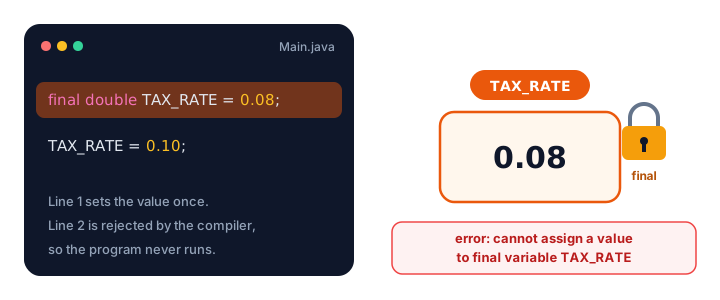
The compiler stops you before the program even runs:
final double TAX_RATE = 0.08;
TAX_RATE = 0.10;
error: cannot assign a value to final variable TAX_RATEThat's exactly what you want. A typo or a confused teammate can't accidentally change the tax rate halfway through a calculation.
📝 Note
A local final variable doesn't have to get its value on the same line. final int seats; followed later by seats = 120; is allowed. The rule is that it's assigned exactly once.
Class constants with static final
A final variable inside main only exists inside main. Real programs usually want a constant that the whole class can use. For that, declare it inside the class but outside any method, with static final:
public class FlightBooking {
    static final int MAX_SEATS = 180;
    static final double BAG_FEE = 35.0;

    public static void main(String[] args) {
        int booked = 172;
        int bags = 3;

        int seatsLeft = MAX_SEATS - booked;
        double bagCharges = bags * BAG_FEE;

        System.out.println("Seats left: " + seatsLeft + " of " + MAX_SEATS);
        System.out.println("Bag charges: " + bagCharges);
    }
}
Seats left: 8 of 180
Bag charges: 105.0Here's what each keyword does:
| Keyword | Meaning |
|---|---|
final | the value can't change after it's set |
static | the value belongs to the class itself, so there's just one copy shared by everything in the class (you'll learn the details in Java static) |
You can also add public (as in public static final) so that other classes can read the constant too. Java access modifiers explains when to do that.
How should you name constants in Java?
By convention, constants use UPPER_SNAKE_CASE: all capital letters, with underscores between words. It makes constants stand out from ordinary camelCase variables at a glance.
| Kind | Style | Example |
|---|---|---|
| Ordinary variable | camelCase | seatsLeft, cartTotal |
| Constant | UPPER_SNAKE_CASE | MAX_SEATS, TAX_RATE, MINUTES_PER_HOUR |
The compiler doesn't enforce this style, but every experienced Java developer expects it. If you see BAG_FEE in someone's code, you instantly know it's a fixed value.
What are magic numbers, and why avoid them?
A magic number is a raw number in your code with no explanation. It works, but nobody (including future you) knows what it means. Compare these two versions of a food delivery total:
double total = subtotal * 1.08 + 4.99; // what are 1.08 and 4.99?public class DeliveryTotal {
static final double TAX_RATE = 0.08;
static final double DELIVERY_FEE = 4.99;
public static void main(String[] args) {
double subtotal = 30.0;
double tax = subtotal * TAX_RATE;
double total = subtotal + tax + DELIVERY_FEE;
System.out.println("Subtotal: " + subtotal);
System.out.println("Tax: " + tax);
System.out.println("Total: " + total);
}
}Subtotal: 30.0
Tax: 2.4
Total: 37.39The second version explains itself. It's also easier to change: if the delivery fee goes up, you edit one line instead of hunting for every 4.99 in the program, and you won't accidentally change a different 4.99 that meant something else.
💡 Tip
Numbers like 0, 1 or 2 in obvious places (such as count + 1) are fine as they are. Make a constant when a number has a meaning in the real world: a price, a limit, a rate, a size.
Constants Java already gives you
Java's own libraries are full of static final constants. You've already seen Integer.MAX_VALUE. Another famous one is Math.PI:
public class PizzaArea {
    static final double DIAMETER_CM = 30.0;

    public static void main(String[] args) {
        double radius = DIAMETER_CM / 2;
        double area = Math.PI * radius * radius;

        System.out.println("Pi: " + Math.PI);
        System.out.println("Pizza area: " + area + " square cm");
        System.out.println("Largest int: " + Integer.MAX_VALUE);
    }
}
Pi: 3.141592653589793
Pizza area: 706.8583470577034 square cm
Largest int: 2147483647Notice they follow the same UPPER_SNAKE_CASE convention you just learned.
Real-world example: a gym membership
Here several constants work together. Every business rule lives at the top of the class, where it's easy to find and update:
public class GymMembership {
    static final double MONTHLY_FEE = 29.99;
    static final double JOINING_FEE = 15.0;
    static final int MONTHS_PER_YEAR = 12;

    public static void main(String[] args) {
        double firstYear = JOINING_FEE + MONTHLY_FEE * MONTHS_PER_YEAR;
        double laterYears = MONTHLY_FEE * MONTHS_PER_YEAR;

        System.out.println("First year: " + firstYear);
        System.out.println("Each later year: " + laterYears);
    }
}
First year: 374.88
Each later year: 359.88If the gym changes its price next year, you update MONTHLY_FEE once and both totals follow. The MONTHS_PER_YEAR constant may look unnecessary, but it tells the reader at a glance why the code multiplies by 12.
Common mistakes with constants
1. Assigning a final variable twice
The compiler reports cannot assign a value to final variable. If a value really needs to change, it isn't a constant; drop final.
2. Putting static final inside main
public static void main(String[] args) {
    static final int LIMIT = 5;   // not allowed here
}
error: illegal start of expressionstatic belongs at class level. Inside a method, write just final int LIMIT = 5;, or move the line up into the class.
3. Forgetting static on a class constant
If you write final int MAX_SEATS = 180; at class level (without static) and use it in main, you get error: non-static variable MAX_SEATS cannot be referenced from a static context. For now, always write static final for class constants.
4. Forgetting to give a class constant a value
static final int LIMIT; with no value doesn't compile. Give it a value on the same line.
Practice exercise
🏋️ Try it yourself
Write a cinema ticket calculator. Create class constants for the adult price (12.50), the child price (8.00) and a booking fee per order (1.50). Then calculate and print the total for an order of 2 adults and 3 children.
Show solution
public class CinemaTickets {
    static final double ADULT_PRICE = 12.50;
    static final double CHILD_PRICE = 8.00;
    static final double BOOKING_FEE = 1.50;

    public static void main(String[] args) {
        int adults = 2;
        int children = 3;

        double total = adults * ADULT_PRICE + children * CHILD_PRICE + BOOKING_FEE;
        System.out.println("Tickets: " + adults + " adults, " + children + " children");
        System.out.println("Total: " + total);
    }
}
Tickets: 2 adults, 3 children
Total: 50.5What's next?
So far every value has been written into the code. Next, make your programs interactive by reading what the user types, in Java user input.
Key takeaways
- A Java constant is a variable marked final: it can be assigned only once.
- Changing a final variable is a compile error: cannot assign a value to final variable.
- Class-wide constants are declared inside the class, outside methods, with static final.
- Name constants in UPPER_SNAKE_CASE, such as MAX_SEATS and TAX_RATE.
- Replace magic numbers with named constants so code explains itself and is changed in one place.
- Java provides its own constants, such as Math.PI and Integer.MAX_VALUE.
Frequently asked questions
How do you declare a constant in Java?
Add the final keyword before the type. Inside a method write final double TAX_RATE = 0.08;. For a constant the whole class can use, declare it at class level as static final int MAX_SEATS = 180;.
Does Java have a const keyword?
const is a reserved word in Java, but it does nothing and cannot be used. Java uses final to make a variable constant.
What is the difference between final and static final?
final means the value cannot change once set. static means it belongs to the class, so there is a single shared copy. static final together is the usual way to declare a class constant.
Why are Java constants written in capital letters?
It is a naming convention called UPPER_SNAKE_CASE. The compiler does not require it, but it lets readers spot fixed values instantly, separate from camelCase variables.
What is a magic number in programming?
A magic number is an unexplained literal value in code, like 1.08 or 4.99. Replacing it with a named constant such as TAX_RATE makes the code clearer and means the value is updated in only one place.