Java ArrayList
Updated 11 min read Aimerscrew
If you only learn one collection, make it this one. A Java ArrayList is a list that grows and shrinks as you add and remove elements, while still letting you jump to any position by index, just like an array. In this lesson, you'll create ArrayLists, add, read, change and remove elements, loop over them, and learn the two traps that catch almost every beginner.
🌍 Real-life example
A music playlist is a perfect ArrayList. Songs play in order, you can add a new song at the end or squeeze it in at position 2, swap one song for another, delete a song you're tired of, and the same song can appear twice. Nobody tells you "sorry, this playlist only has room for 10 songs".
What is an ArrayList in Java?
An ArrayList is a class in java.util that implements the List interface from the Java Collections Framework. Behind the scenes it stores its elements in a normal array, and when that array fills up, it quietly creates a bigger one and copies everything across. You get the speed of an array without having to manage its size.
An ArrayList keeps elements in insertion order, allows duplicates, and numbers positions from index 0.
How to create an ArrayList
Import the class, then create it with new. The type in angle brackets says what the list holds:
import java.util.ArrayList;
import java.util.List;

ArrayList<String> names = new ArrayList<>();            // empty list of Strings
List<Double> prices = new ArrayList<>();                // declared as the List interface
List<Integer> ids = new ArrayList<>(List.of(3, 8, 5));  // starts with three values
The type must be a class, so numbers use wrapper types such as Integer and Double (see Java wrapper classes). Passing List.of(...) to the constructor is a handy way to start with some values and still be able to change the list later.
Adding, getting and changing elements
The four methods you'll use constantly are:
add(element)appends to the end;add(index, element)inserts at a position and shifts the rest right.get(index)reads the element at an index.set(index, element)replaces the element at an index.size()returns how many elements are in the list (notlength, which is for arrays).
import java.util.ArrayList;

public class PlaylistBasics {
    public static void main(String[] args) {
        ArrayList<String> playlist = new ArrayList<>();

        playlist.add("Blue Skies");          // adds to the end
        playlist.add("Night Drive");
        playlist.add("Ocean Eyes");
        System.out.println(playlist);

        playlist.add(1, "Morning Coffee");   // inserts at index 1
        System.out.println(playlist);

        System.out.println("First song: " + playlist.get(0));
        System.out.println("Last song:  " + playlist.get(playlist.size() - 1));

        playlist.set(2, "Night Drive (Remix)");   // replaces index 2
        System.out.println(playlist);
        System.out.println("Songs: " + playlist.size());
    }
}
[Blue Skies, Night Drive, Ocean Eyes]
[Blue Skies, Morning Coffee, Night Drive, Ocean Eyes]
First song: Blue Skies
Last song: Ocean Eyes
[Blue Skies, Morning Coffee, Night Drive (Remix), Ocean Eyes]
Songs: 4The last element is always at size() - 1. Using an index that doesn't exist, such as get(10) on a 4-element list, throws an IndexOutOfBoundsException, just like with arrays.
How do you remove elements from an ArrayList?
remove comes in two versions. remove(int index) removes by position and returns the removed element. remove(Object o) removes the first element equal to o and returns true or false to tell you whether it found one.
import java.util.ArrayList;

public class RemoveSongs {
    public static void main(String[] args) {
        ArrayList<String> queue = new ArrayList<>();
        queue.add("Intro");
        queue.add("Skyline");
        queue.add("Echoes");
        queue.add("Skyline");

        String removed = queue.remove(0);           // by index: returns the element
        System.out.println("Removed " + removed + " -> " + queue);

        boolean found = queue.remove("Skyline");    // by value: first match only
        System.out.println("Removed Skyline? " + found + " -> " + queue);

        boolean missing = queue.remove("Thunder");
        System.out.println("Removed Thunder? " + missing + " -> " + queue);
    }
}
Removed Intro -> [Skyline, Echoes, Skyline]
Removed Skyline? true -> [Echoes, Skyline]
Removed Thunder? false -> [Echoes, Skyline]The Integer remove trap
With a list of Integers, those two versions collide. When you write remove(2), Java sees an int and picks the by-index version, not "remove the number 2". To remove a value, wrap it as an Integer object first:
import java.util.ArrayList;
import java.util.List;

public class RemoveIntegers {
    public static void main(String[] args) {
        ArrayList<Integer> seats = new ArrayList<>(List.of(14, 7, 21, 2));
        System.out.println("Booked seats:   " + seats);

        seats.remove(2);                    // removes INDEX 2, which holds 21
        System.out.println("remove(2):      " + seats);

        seats.remove(Integer.valueOf(2));   // removes the VALUE 2
        System.out.println("remove value 2: " + seats);
    }
}
Booked seats: [14, 7, 21, 2]
remove(2): [14, 7, 2]
remove value 2: [14, 7]⚠️ Watch out
On a List<Integer>, remove(5) means "remove index 5". If the list has fewer than 6 elements, it crashes with IndexOutOfBoundsException. Use remove(Integer.valueOf(5)) when you mean the value.
Searching an ArrayList
To check what's in a list, use contains (true or false), indexOf (position of the first match, or -1), lastIndexOf (position of the last match) and isEmpty:
import java.util.ArrayList;
import java.util.List;

public class FindItems {
    public static void main(String[] args) {
        ArrayList<String> books = new ArrayList<>(
                List.of("Dune", "Emma", "Matilda", "Dune", "Holes"));

        System.out.println("Has Emma?      " + books.contains("Emma"));
        System.out.println("Has Hamlet?    " + books.contains("Hamlet"));
        System.out.println("First Dune at  " + books.indexOf("Dune"));
        System.out.println("Last Dune at   " + books.lastIndexOf("Dune"));
        System.out.println("Hamlet at      " + books.indexOf("Hamlet"));
        System.out.println("Empty?         " + books.isEmpty());
    }
}
Has Emma? true
Has Hamlet? false
First Dune at 0
Last Dune at 3
Hamlet at -1
Empty? falseThese methods compare elements with equals(), so they work on text content for Strings. For your own classes, they only find a match if the class defines equals() (records do this for you automatically, see Java records).
Looping through an ArrayList
Use a classic for loop when you need the index, and the enhanced for-each loop when you just want each value:
import java.util.ArrayList;
import java.util.List;

public class LoopScores {
    public static void main(String[] args) {
        ArrayList<Integer> scores = new ArrayList<>(List.of(72, 95, 88, 64));

        // 1. Classic for loop: you get the index too
        for (int i = 0; i < scores.size(); i++) {
            System.out.println("Round " + (i + 1) + ": " + scores.get(i));
        }

        // 2. Enhanced for loop (for-each): simplest when you only need values
        int total = 0;
        for (int score : scores) {
            total += score;
        }
        System.out.println("Total: " + total);
        System.out.println("Average: " + (double) total / scores.size());
    }
}
Round 1: 72
Round 2: 95
Round 3: 88
Round 4: 64
Total: 319
Average: 79.75Notice the loop condition uses scores.size(), and you read elements with get(i) instead of scores[i]. Square brackets only work on arrays.
Removing elements while looping
Deleting items inside a loop is the second classic trap. There are two ways it goes wrong:
- Calling
list.remove(...)inside a for-each loop usually crashes with aConcurrentModificationException. The loop notices the list changed under it and stops. - Removing inside an index loop doesn't crash, but silently skips elements. When you remove index 0, the element at index 1 slides down to 0, and then
i++moves past it.
The easiest fix is removeIf, which removes every element that matches a condition safely in one call:
import java.util.ArrayList;
import java.util.List;

public class RemoveWhileLooping {
    public static void main(String[] args) {
        // Goal: remove every task that is marked "done"
        ArrayList<String> tasks = new ArrayList<>(
                List.of("done: email", "done: laundry", "call mom", "done: gym"));

        // Buggy: removing shifts the next element into index i, which we then skip
        for (int i = 0; i < tasks.size(); i++) {
            if (tasks.get(i).startsWith("done")) {
                tasks.remove(i);
            }
        }
        System.out.println("Buggy loop: " + tasks);

        // Correct: let removeIf do the looping for you
        ArrayList<String> tasks2 = new ArrayList<>(
                List.of("done: email", "done: laundry", "call mom", "done: gym"));
        tasks2.removeIf(task -> task.startsWith("done"));
        System.out.println("removeIf:   " + tasks2);
    }
}
Buggy loop: [done: laundry, call mom]
removeIf: [call mom]The buggy loop left "done: laundry" behind because it slid into the index the loop had just checked. The expression task -> task.startsWith("done") is a lambda: a tiny function that answers "should this task be removed?" for each element. You'll learn lambdas properly in Java lambda expressions; for now, read it as "for each task, remove it if it starts with done". Another safe approach, using an Iterator, is covered in Java Iterator.
How does an ArrayList grow?
An ArrayList has a size (how many elements you've added) and a hidden capacity (how many slots its internal array has). When you add the first element to a new, empty list, it reserves 10 slots. When those are full and you add one more, it creates a new array about 1.5 times bigger, copies every element across, and throws the old array away.
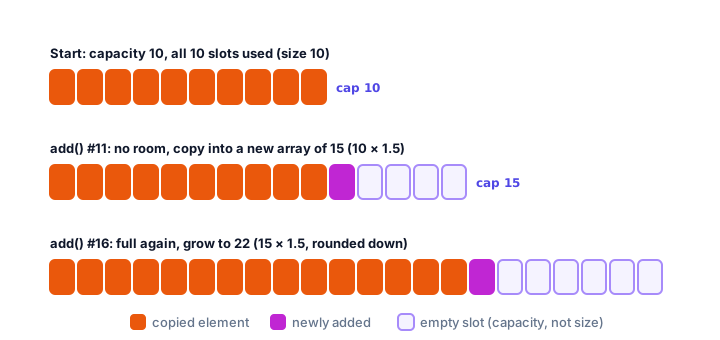
You never see this happen; size() just goes up by one. If you know you'll add, say, 10,000 elements, you can skip the repeated copying by reserving room up front: new ArrayList<>(10_000). That number is the starting capacity, not the size: the list is still empty.
ArrayList vs array: what's the difference?
| Array | ArrayList | |
|---|---|---|
| Size | Fixed when created | Grows and shrinks automatically |
| Holds primitives? | Yes (int[]) | No, uses wrappers (ArrayList<Integer>) |
| Read / write | a[i], a[i] = x | list.get(i), list.set(i, x) |
| Length | a.length | list.size() |
| Insert or remove in the middle | Write your own shifting loop | add(i, x), remove(i) |
| Printing | Needs Arrays.toString(a) | System.out.println(list) |
| Best for | Fixed-size data, raw speed, primitives | Almost every everyday list |
Real-world example: a shopping cart
Here's an ArrayList holding records. Each CartItem has a name, price and quantity. The customer removes one item and adds another, then the program prints a receipt using printf formatting:
import java.util.ArrayList;
import java.util.List;

public class ShoppingCart {
    public static void main(String[] args) {
        List<CartItem> cart = new ArrayList<>();
        cart.add(new CartItem("Running shoes", 79.99, 1));
        cart.add(new CartItem("Sports socks", 4.50, 3));
        cart.add(new CartItem("Water bottle", 12.00, 2));

        // The customer removes the bottle and adds a cap
        cart.remove(2);
        cart.add(new CartItem("Cap", 15.00, 1));

        double total = 0;
        for (CartItem item : cart) {
            double lineTotal = item.price() * item.quantity();
            System.out.printf("%-14s x%d  $%7.2f%n", item.name(), item.quantity(), lineTotal);
            total += lineTotal;
        }
        System.out.printf("Items in cart: %d%n", cart.size());
        System.out.printf("Total:             $%7.2f%n", total);
    }
}

record CartItem(String name, double price, int quantity) {
}
Running shoes x1 $ 79.99
Sports socks x3 $ 13.50
Cap x1 $ 15.00
Items in cart: 3
Total: $ 108.49An ArrayList can hold any object type, so "a list of cart items", "a list of students" or "a list of flights" all work the same way.
Common mistakes with ArrayList
1. Using square brackets or length
list[0] and list.length don't compile on an ArrayList. Use list.get(0) and list.size().
2. Removing a number by value with remove(int)
On a List<Integer>, remove(3) removes index 3. Write remove(Integer.valueOf(3)) to remove the value 3.
3. Removing inside a for-each loop
This throws ConcurrentModificationException. Use removeIf or an Iterator instead.
4. Reading past the end
Valid indexes are 0 to size() - 1. get(size()) throws IndexOutOfBoundsException.
5. Thinking new ArrayList<>(50) has 50 elements
The number is only the starting capacity. The list is empty, so get(0) still fails until you add something.
Practice exercise
🏋️ Try it yourself
Build a to-do list. Add "Buy groceries", "Pay rent" and "Book dentist". Then insert "Fix bike" at the top, remove "Pay rent" by value, and print the tasks numbered from 1. Finally print how many tasks are left and whether "Book dentist" is still on the list.
Show solution
import java.util.ArrayList;

public class TodoList {
    public static void main(String[] args) {
        ArrayList<String> todo = new ArrayList<>();
        todo.add("Buy groceries");
        todo.add("Pay rent");
        todo.add("Book dentist");

        todo.add(0, "Fix bike");
        todo.remove("Pay rent");

        for (int i = 0; i < todo.size(); i++) {
            System.out.println((i + 1) + ". " + todo.get(i));
        }
        System.out.println("Tasks left: " + todo.size());
        System.out.println("Need to book dentist? " + todo.contains("Book dentist"));
    }
}
1. Fix bike
2. Buy groceries
3. Book dentist
Tasks left: 3
Need to book dentist? truePrinting i + 1 turns the zero-based index into a friendly number starting at 1.
What's next?
ArrayList is great for reading by index, but inserting at the front of a huge list means shifting every element. Next, meet a list built from linked nodes that's quick at both ends: Java LinkedList.
Key takeaways
- An ArrayList is a resizable, ordered list that allows duplicates and uses zero-based indexes.
- Use add, get, set, remove and size instead of square brackets and length.
- remove(int) removes by index; on a List of Integer, use remove(Integer.valueOf(x)) to remove a value.
- contains, indexOf and lastIndexOf search the list using equals().
- Never call list.remove inside a for-each loop; use removeIf or an Iterator.
- When full, an ArrayList copies its elements into a new array about 1.5 times bigger.
Frequently asked questions
What is the difference between an array and an ArrayList in Java?
An array has a fixed size and can hold primitives such as int. An ArrayList grows automatically, offers methods like add and remove, and stores objects, so numbers are kept as Integer, Double and so on.
How do I get the size of an ArrayList?
Call size(), for example list.size(). The length field only exists on arrays.
Why does remove(2) remove the wrong number from my ArrayList of Integers?
Because remove(2) passes an int, Java calls remove(int index) and removes the element at index 2. To remove the value 2, call remove(Integer.valueOf(2)).
What is the default capacity of an ArrayList?
A new ArrayList created with new ArrayList<>() reserves 10 slots when the first element is added. When it fills up, it grows by about 50 percent, to 15, then 22, and so on.
How do I remove elements from an ArrayList while looping?
Use list.removeIf(condition), or loop with an Iterator and call iterator.remove(). Calling list.remove inside a for-each loop throws ConcurrentModificationException, and removing inside an index loop skips elements.