Java Optional
Updated 10 min read Aimerscrew
Java Optional is a box that either contains a value or is empty. Methods return an Optional when a result might honestly be missing, such as "find the customer with this email" or "find the first flight to Tokyo". The type itself tells the caller "check before you use this", which helps prevent the most famous bug in Java: the NullPointerException. In this lesson, you'll learn how to create Optionals, get values out safely, transform them with map and filter, use them with streams, and see when not to use them.
🌍 Real-life example
Think of a parcel locker. When you open your locker, it either has a package in it or it's empty, and you know that before you reach in. A method that returns null is like a locker with no door: you only find out it's empty when your hand hits the back wall. Optional is the locker door that makes you look first.
The null problem
In Java, null means "no object". Many methods return null when they can't find something. For example, Map.get returns null for a missing key (see Java HashMap). The danger is that nothing forces you to check:
String nickname = nicknames.get("sam");   // sam isn't in the map, so this is null
System.out.println(nickname.toUpperCase());  // crash!
Exception in thread "main" java.lang.NullPointerException: Cannot invoke "String.toUpperCase()" ...The compiler happily accepts this code, and the program crashes at runtime. You could add if (nickname != null) everywhere, but it's easy to forget one. Optional moves the "might be missing" information into the type, where you can't overlook it.
What is Optional in Java?
Optional<T> (in java.util, since Java 8) is a container that holds either one value of type T, or nothing. An empty Optional replaces null. Here's a coffee shop's loyalty program that returns an Optional instead of null for unknown customers:
import java.util.Map;
import java.util.Optional;
import java.util.TreeMap;

public class LoyaltyCard {
    private static final Map<String, Integer> POINTS = new TreeMap<>(Map.of(
            "ava@mail.com", 340,
            "noah@mail.com", 0));

    public static void main(String[] args) {
        Optional<Integer> ava = findPoints("ava@mail.com");
        Optional<Integer> stranger = findPoints("zed@mail.com");

        System.out.println(ava);
        System.out.println(stranger);
        System.out.println("Ava has a card? " + ava.isPresent());
        System.out.println("Stranger has no card? " + stranger.isEmpty());
    }

    // Returns an Optional instead of null when the customer is unknown
    static Optional<Integer> findPoints(String email) {
        return Optional.ofNullable(POINTS.get(email));
    }
}
Optional[340]
Optional.empty
Ava has a card? true
Stranger has no card? truePrinting an Optional shows Optional[340] when it holds a value and Optional.empty when it doesn't. isPresent() answers "is there a value?" and isEmpty() (Java 11+) answers the opposite.
How to create an Optional
| Method | Use it when |
|---|---|
Optional.of(value) | You're sure the value is not null. Throws if it is. |
Optional.ofNullable(value) | The value might be null. Null becomes an empty Optional. |
Optional.empty() | You want to say "no result" on purpose. |
import java.util.Optional;

public class CreateOptionals {
    public static void main(String[] args) {
        String coupon = "SAVE10";
        String noCoupon = null;

        Optional<String> a = Optional.of(coupon);           // value must not be null
        Optional<String> b = Optional.ofNullable(noCoupon); // null becomes empty
        Optional<String> c = Optional.empty();              // empty on purpose

        System.out.println(a + " " + b + " " + c);

        try {
            Optional<String> broken = Optional.of(noCoupon);
            System.out.println(broken);
        } catch (NullPointerException e) {
            System.out.println("Optional.of(null) throws NullPointerException");
        }
    }
}
Optional[SAVE10] Optional.empty Optional.empty
Optional.of(null) throws NullPointerExceptionGetting the value out: orElse, orElseGet and orElseThrow
The whole point of Optional is to decide what happens when the box is empty. A ride-sharing app with saved addresses shows the three main choices:
import java.util.Optional;

public class RideApp {
    public static void main(String[] args) {
        Optional<String> savedHome = Optional.of("221B Baker Street");
        Optional<String> savedWork = Optional.empty();

        // orElse: a ready-made fallback value
        System.out.println("Home: " + savedHome.orElse("Enter an address"));
        System.out.println("Work: " + savedWork.orElse("Enter an address"));

        // orElseGet: the fallback is computed only when needed
        System.out.println("Work: " + savedWork.orElseGet(() -> lookUpGps()));

        // orElseThrow: no value is an error
        System.out.println("Home: " + savedHome.orElseThrow());
        try {
            savedWork.orElseThrow(() -> new IllegalStateException("No work address saved"));
        } catch (IllegalStateException e) {
            System.out.println("Error: " + e.getMessage());
        }
    }

    static String lookUpGps() {
        System.out.println("(asking the GPS...)");
        return "Current location";
    }
}
Home: 221B Baker Street
Work: Enter an address
(asking the GPS...)
Work: Current location
Home: 221B Baker Street
Error: No work address savedorElse(fallback)returns the value, or the fallback if empty.orElseGet(supplier)does the same, but the fallback comes from aSupplierlambda that runs only when needed.orElseThrow()returns the value or throwsNoSuchElementException. Pass a lambda to throw your own exception instead, like theIllegalStateExceptionabove.
Notice that "(asking the GPS...)" is printed before "Work:". Java must finish computing the whole string, including orElseGet, before println can print it.
What is the difference between orElse and orElseGet?
The argument of orElse is always evaluated, even when the Optional has a value. The lambda in orElseGet runs only when the Optional is empty:
import java.util.Optional;

public class OrElseVsOrElseGet {
    public static void main(String[] args) {
        Optional<String> nickname = Optional.of("Ace");

        System.out.println("orElse:    " + nickname.orElse(makeDefault()));
        System.out.println("orElseGet: " + nickname.orElseGet(() -> makeDefault()));
    }

    static String makeDefault() {
        System.out.println("  makeDefault() ran");
        return "Player1";
    }
}
makeDefault() ran
orElse: Ace
orElseGet: AcemakeDefault() ran once, for orElse, even though its result was thrown away. If the fallback is a simple value like "Guest" or 0, use orElse. If it's expensive (a database call, a calculation), use orElseGet.
⚠️ Be careful
Avoid optional.get(). It throws NoSuchElementException on an empty Optional, which just swaps one crash for another. If you truly expect a value, orElseThrow() does the same thing but says so clearly in its name.
Transforming values with map, filter and ifPresent
Like a stream with at most one element, an Optional has map and filter. They work on the value if there is one, and do nothing if the box is empty. That lets you chain steps without a single null check:
import java.util.Optional;

public class ProfileGreeting {
    public static void main(String[] args) {
        greet(Optional.of("  maya  "));
        greet(Optional.of("   "));
        greet(Optional.empty());

        Optional<Integer> discount = Optional.of(15);
        discount.ifPresent(d -> System.out.println("You have a " + d + "% discount!"));

        Optional<String> parcel = Optional.empty();
        parcel.ifPresentOrElse(
                id -> System.out.println("Tracking parcel " + id),
                () -> System.out.println("No parcel on the way"));
    }

    static void greet(Optional<String> rawName) {
        String greeting = rawName
                .map(String::trim)                 // "  maya  " -> "maya"
                .filter(name -> !name.isEmpty())   // blank names become empty
                .map(name -> "Hi, " + name + "!")
                .orElse("Hi, guest!");
        System.out.println(greeting);
    }
}
Hi, maya!
Hi, guest!
Hi, guest!
You have a 15% discount!
No parcel on the way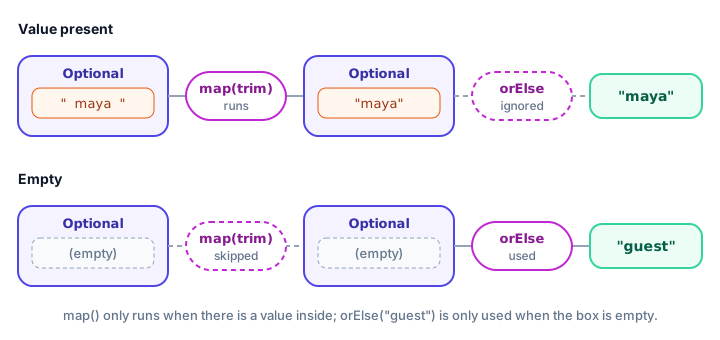
map(function)transforms the value inside. An empty Optional stays empty.filter(predicate)keeps the value only if it passes the test; otherwise the result is empty. That's how the blank name" "became "guest".ifPresent(consumer)runs an action only when there's a value.ifPresentOrElse(consumer, runnable)(Java 9+) handles both cases in one call.
Optional from streams: findFirst, min and max
You met Optional briefly in Java streams. Terminal operations that might find nothing, like findFirst(), min() and max(), return an Optional:
import java.util.Comparator;
import java.util.List;
import java.util.Optional;

public class FlightSearch {
    public static void main(String[] args) {
        List<Flight> flights = List.of(
                new Flight("BA117", "London", 540),
                new Flight("AF023", "Paris", 495),
                new Flight("LH401", "Frankfurt", 610),
                new Flight("BA175", "London", 480));

        Optional<Flight> firstToLondon = flights.stream()
                .filter(f -> f.destination().equals("London"))
                .findFirst();
        System.out.println("First to London: " + firstToLondon.map(Flight::code).orElse("none"));

        Optional<Flight> toTokyo = flights.stream()
                .filter(f -> f.destination().equals("Tokyo"))
                .findFirst();
        System.out.println("First to Tokyo: " + toTokyo.map(Flight::code).orElse("none"));

        flights.stream()
                .min(Comparator.comparingInt(Flight::price))
                .ifPresent(f -> System.out.println("Cheapest: " + f.code() + " for $" + f.price()));
    }
}

record Flight(String code, String destination, int price) {
}
First to London: BA117
First to Tokyo: none
Cheapest: BA175 for $480There are no flights to Tokyo, but the code doesn't crash and doesn't need an if. The empty Optional flows through map untouched and orElse supplies "none".
When should you not use Optional?
Optional was designed for one job: return values that might be missing. Using it everywhere makes code heavier, not safer.
- Not for fields. Inside a class, a plain field that may be null is fine and simpler. Return an Optional from the getter if you like:
Optional<String> getMiddleName(). - Not for method parameters.
void ship(Optional<String> note)forces every caller to wrap values. Use method overloading or allow null with a clear comment instead. - Not for collections. Return an empty list rather than
Optional<List<...>>. An empty list already means "nothing found". - Never return null from a method declared to return Optional. That defeats the whole purpose.
// Good: the result might be missing
Optional<Customer> findByEmail(String email)

// Avoid: Optional as a field or parameter
private Optional<String> phone;
void sendInvoice(Optional<String> note)
📝 Note
For numbers there are primitive versions: OptionalInt, OptionalDouble and OptionalLong. You get them from number streams like IntStream and DoubleStream, such as the average() you used on mapToDouble in the streams lesson.
Common mistakes with Optional
1. Calling get() without checking
findPoints("zed@mail.com").get() throws NoSuchElementException. Use orElse, orElseGet or orElseThrow.
2. Using Optional.of with a value that might be null
Optional.of(map.get(key)) throws NullPointerException when the key is missing. Use Optional.ofNullable.
3. Writing isPresent() + get() like a null check
if (opt.isPresent()) { use(opt.get()); } works, but it's just a longer null check. Prefer opt.ifPresent(v -> use(v)) or map(...).orElse(...).
4. Expensive work inside orElse
orElse(loadFromServer()) calls the server every time, even when a value exists. Use orElseGet(() -> loadFromServer()).
Practice exercise
🏋️ Try it yourself
A hotel has rooms as a record Room(int number, String type, boolean free): 101 single (free), 102 double (taken), 201 double (free), 305 suite (taken). Write a method findFree(rooms, type) that returns an Optional<Room> using a stream. Then write book(rooms, type) that returns "Booked room 201" or "Sorry, no free suite rooms" using map and orElse, with no if statements.
Show solution
import java.util.List;
import java.util.Optional;

public class HotelBooking {
    public static void main(String[] args) {
        List<Room> rooms = List.of(
                new Room(101, "single", true),
                new Room(102, "double", false),
                new Room(201, "double", true),
                new Room(305, "suite", false));

        System.out.println(book(rooms, "double"));
        System.out.println(book(rooms, "suite"));
    }

    static Optional<Room> findFree(List<Room> rooms, String type) {
        return rooms.stream()
                .filter(r -> r.type().equals(type) && r.free())
                .findFirst();
    }

    static String book(List<Room> rooms, String type) {
        return findFree(rooms, type)
                .map(r -> "Booked room " + r.number())
                .orElse("Sorry, no free " + type + " rooms");
    }
}

record Room(int number, String type, boolean free) {
}
Booked room 201
Sorry, no free suite roomsWhat's next?
You've now met lambdas, functional interfaces, streams and Optional, the core of modern Java. The last lesson of this chapter covers another modern API every program needs: working with dates, times and time zones in Java date and time.
Key takeaways
- Optional is a container that holds either one value or nothing, and it replaces returning null for results that might be missing.
- Create one with Optional.of (never null), Optional.ofNullable (might be null) or Optional.empty().
- Get the value safely with orElse, orElseGet or orElseThrow; avoid get().
- orElse always evaluates its argument, while orElseGet runs its lambda only when the Optional is empty.
- map and filter transform the value if present and pass an empty Optional through untouched; ifPresent and ifPresentOrElse run actions.
- Stream operations like findFirst, min and max return an Optional.
- Use Optional for return types only, not for fields, parameters or collections.
Frequently asked questions
What is Optional in Java?
Optional is a class in java.util, added in Java 8, that wraps a value which may or may not be present. An empty Optional takes the place of null, so callers are reminded to handle the missing case.
What is the difference between Optional.of and Optional.ofNullable?
Optional.of requires a non-null value and throws NullPointerException if you pass null. Optional.ofNullable accepts null and turns it into an empty Optional, so use it whenever the value might be missing.
What is the difference between orElse and orElseGet?
orElse takes a ready value that is always computed, even when the Optional is full. orElseGet takes a Supplier lambda that only runs when the Optional is empty, which is better for expensive fallbacks.
Does Optional prevent NullPointerException?
It helps a lot by making missing values visible in method signatures and offering safe methods like orElse and map. It cannot stop every null, for example if code calls get() on an empty Optional or a method returns null anyway.
Should I use Optional for class fields or method parameters?
No. Optional was designed for return values. For fields and parameters, a plain reference that may be null, or method overloading, keeps code simpler.