Java Threads
Updated 12 min read Aimerscrew
Every program you've written so far did one thing at a time, one line after another. Java threads let a program do several things at once: download a file while the screen stays responsive, or split a big calculation across all the cores of your computer's processor. In this lesson you'll learn what a thread is, the three ways to create one, the difference between start() and run(), how to wait for a thread with join(), the thread lifecycle, and the classic bug that appears when threads share data.
🌍 Real-life example
Picture a restaurant kitchen. With one cook, every dish is made one after another: soup, then pasta, then dessert. Hire three cooks and they work on different dishes at the same time, so food comes out much faster. But they share the same fridge and the same order board. If two cooks grab the last tomato at the same moment, there's trouble. Threads are the cooks; your program's data is the shared fridge.
What is a thread in Java?
A thread is a single path of execution inside a program: a sequence of instructions that runs from start to finish. Every Java program starts with one thread, called main, which runs your main method:
public class MainThread {
    public static void main(String[] args) {
        Thread current = Thread.currentThread();
        System.out.println("This code runs on the thread called: " + current.getName());
    }
}
This code runs on the thread called: mainA program with several threads is called multithreaded. All its threads share the same memory, so they can work on the same objects. That's what makes threads powerful, and also what makes them tricky.
Threads are useful when a program must:
- Stay responsive: a music app keeps playing while you search for the next song.
- Wait for slow things: a weather app requests data from three servers at once instead of one after another.
- Use every processor core: a photo editor splits a big image into parts and processes them in parallel.
How to create a thread by extending Thread
The first way is to write a class that extends Thread and overrides its run() method. run() holds the work the new thread should do. You then call start() to launch it:
public class KitchenThread {
    public static void main(String[] args) throws InterruptedException {
        PastryCook cook = new PastryCook();

        System.out.println("Head chef: starting the pastry cook");
        cook.start();          // run() now happens on a new thread
        cook.join();           // wait until the cook is finished
        System.out.println("Head chef: dessert is ready, time to serve");
    }
}

class PastryCook extends Thread {
    @Override
    public void run() {
        System.out.println("Pastry cook: mixing batter");
        System.out.println("Pastry cook: baking the cake");
    }
}
Head chef: starting the pastry cook
Pastry cook: mixing batter
Pastry cook: baking the cake
Head chef: dessert is ready, time to serveThe output is always in this order: the head chef prints before calling start(), and join() makes the main thread wait until the pastry cook is completely done before printing the last line.
How to create a thread with Runnable
The second, more flexible way is to put the work in a class that implements the Runnable interface, then hand it to a Thread. Runnable has a single method, run(). The second argument to the Thread constructor is an optional name:
public class OvenTimer {
    public static void main(String[] args) throws InterruptedException {
        Runnable task = new PreheatTask(200);
        Thread worker = new Thread(task, "oven-thread");

        worker.start();
        worker.join();
        System.out.println(Thread.currentThread().getName() + " thread: oven is hot");
    }
}

class PreheatTask implements Runnable {
    private final int degrees;

    PreheatTask(int degrees) {
        this.degrees = degrees;
    }

    @Override
    public void run() {
        String name = Thread.currentThread().getName();
        System.out.println(name + ": preheating to " + degrees + " C");
    }
}
oven-thread: preheating to 200 C
main thread: oven is hotWhy is this usually better than extending Thread? Java only allows a class to extend one parent class. If PreheatTask extended Thread, it couldn't extend anything else. With Runnable, the task (what to do) is kept separate from the thread (who does it), and you'll be able to hand the same task to a thread pool in the next lesson.
How to create a thread with a lambda
Because Runnable has just one method, it's a functional interface, so you can write the task as a lambda expression. This is the shortest and most common style in modern Java. Here two threads each add up half of a shop's daily sales:
public class SplitTheWork {
    public static void main(String[] args) throws InterruptedException {
        int[] dailySales = {120, 95, 210, 180, 75, 160, 140, 250};
        long[] results = new long[2];

        Thread firstHalf = new Thread(() -> {
            for (int i = 0; i < 4; i++) {
                results[0] += dailySales[i];
            }
        });
        Thread secondHalf = new Thread(() -> {
            for (int i = 4; i < 8; i++) {
                results[1] += dailySales[i];
            }
        });

        firstHalf.start();
        secondHalf.start();
        firstHalf.join();
        secondHalf.join();

        System.out.println("Days 1-4: " + results[0]);
        System.out.println("Days 5-8: " + results[1]);
        System.out.println("Total sales: " + (results[0] + results[1]));
    }
}
Days 1-4: 605
Days 5-8: 625
Total sales: 1230Each thread writes to its own slot of the results array, so they never touch the same data. The main thread joins both before reading the results, so it always prints the finished totals.
| Way | Example | When to use it |
|---|---|---|
Extend Thread | class Cook extends Thread | Rarely; it uses up your one parent class |
Implement Runnable | new Thread(new Task()) | The task is big enough for its own class |
| Lambda | new Thread(() -> ...) | Short tasks; the most common choice |
What is the difference between start() and run()?
This is the most common thread mistake. start() creates a brand-new thread, and that new thread calls run(). Calling run() yourself is just a normal method call: the code runs on the current thread, and no new thread is created.
public class StartVsRun {
    public static void main(String[] args) throws InterruptedException {
        Thread helper = new Thread(
                () -> System.out.println("Running on: " + Thread.currentThread().getName()),
                "helper");

        helper.run();     // just a normal method call on the main thread
        helper.start();   // a real new thread
        helper.join();
    }
}
Running on: main
Running on: helperThe first line proves that run() executed on main. Only start() put the work on the helper thread. Also note: you can call start() only once per thread. A second call throws IllegalThreadStateException.
How to wait and pause: join() and sleep()
Waiting for a thread with join()
join() makes the current thread pause until another thread has finished. It's how you collect results safely: start the work, do other things if you like, then join() before you use the answer.
public class PhotoUpload {
    public static void main(String[] args) throws InterruptedException {
        String[] status = new String[1];

        Thread upload = new Thread(() -> {
            try {
                Thread.sleep(500);   // pretend the upload takes half a second
                status[0] = "beach.jpg uploaded";
            } catch (InterruptedException e) {
                status[0] = "upload cancelled";
            }
        });

        upload.start();
        System.out.println("Upload started, waiting...");
        upload.join();
        System.out.println("Result: " + status[0]);
    }
}
Upload started, waiting...
Result: beach.jpg uploadedWithout join(), the main thread would print the result immediately, and it would see null because the upload hadn't finished yet.
Pausing a thread with Thread.sleep
Thread.sleep(milliseconds) pauses the current thread for at least that long. 1,000 milliseconds is one second. It's handy for countdowns, retries or simulating slow work:
public class Liftoff {
    public static void main(String[] args) throws InterruptedException {
        for (int seconds = 3; seconds >= 1; seconds--) {
            System.out.println(seconds + "...");
            Thread.sleep(1000);   // pause this thread for 1000 ms = 1 second
        }
        System.out.println("Liftoff!");
    }
}
3...
2...
1...
Liftoff!sleep and join both throw InterruptedException, a checked exception. It happens if another thread politely asks this one to stop waiting by calling interrupt(). In small programs you can add throws InterruptedException to main. Inside a lambda's run() you can't add throws, so catch it there instead, as PhotoUpload does above.
The Java thread lifecycle
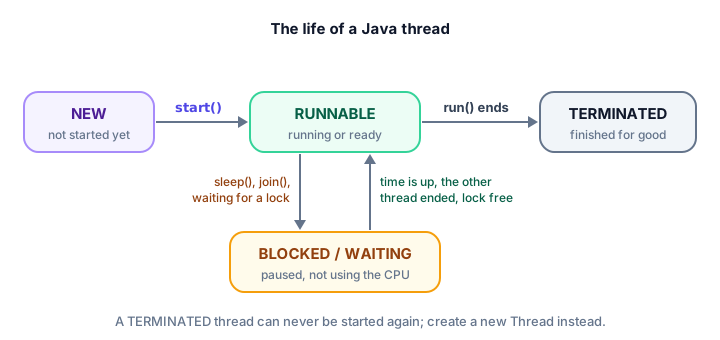
A thread moves through a few states during its life. You can check the current state with getState():
- NEW: the
Threadobject exists, butstart()hasn't been called. - RUNNABLE: the thread is running, or ready to run as soon as a processor core is free.
- BLOCKED: waiting to get a lock that another thread holds (more on locks below).
- WAITING / TIMED_WAITING: paused by
join()orsleep()until something happens or time runs out. - TERMINATED:
run()has finished. The thread can never be started again.
public class ThreadStates {
    public static void main(String[] args) throws InterruptedException {
        Thread delivery = new Thread(() -> {
            Thread.State inside = Thread.currentThread().getState();
            System.out.println("While working: " + inside);
        });

        System.out.println("After new:     " + delivery.getState());
        delivery.start();
        delivery.join();
        System.out.println("After join:    " + delivery.getState());
    }
}
After new: NEW
While working: RUNNABLE
After join: TERMINATEDThe middle line is printed by the thread itself, so it's always RUNNABLE: a thread that's running code is, by definition, running.
What is a race condition?
Threads get dangerous when they change the same data. Here, a box office and a website both sell tickets for the same concert and update one shared counter. Each sells 100,000 tickets, so the total should be 200,000:
public class RaceCondition {
    public static void main(String[] args) throws InterruptedException {
        TicketCounter counter = new TicketCounter();

        Runnable sellTickets = () -> {
            for (int i = 0; i < 100_000; i++) {
                counter.sellOne();
            }
        };

        Thread boxOffice = new Thread(sellTickets);
        Thread website = new Thread(sellTickets);
        boxOffice.start();
        website.start();
        boxOffice.join();
        website.join();

        System.out.println("Expected: 200000");
        System.out.println("Counted:  " + counter.getSold());
    }
}

class TicketCounter {
    private int sold = 0;

    void sellOne() {
        sold++;
    }

    int getSold() {
        return sold;
    }
}
Run it a few times and you'll get a different wrong number almost every time. Here is one possible output:
Expected: 200000
Counted:  150038
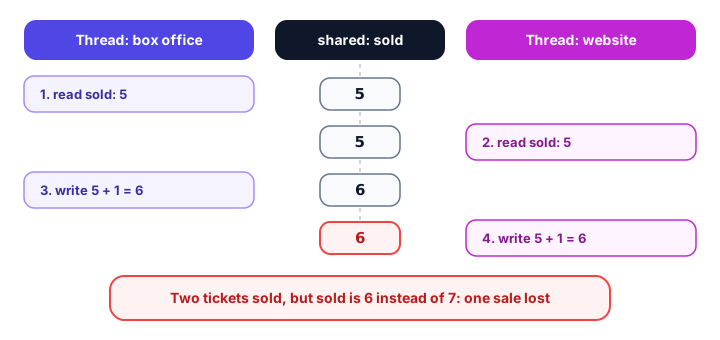
This bug is called a race condition: the result depends on the exact timing of the threads, which you can't control. The problem is that sold++ looks like one step but is really three: read the value, add 1, write it back. If both threads read the same value before either writes, one sale is lost:
Fixing a race condition with synchronized
The fix is to make sure only one thread at a time can run the read-add-write steps. Adding the synchronized keyword to a method does exactly that. Every object has a built-in lock; a thread must take the lock before entering a synchronized method and hands it back when it leaves. Other threads wait (in the BLOCKED state) until the lock is free:
public class RaceFixed {
    public static void main(String[] args) throws InterruptedException {
        TicketCounter counter = new TicketCounter();

        Runnable sellTickets = () -> {
            for (int i = 0; i < 100_000; i++) {
                counter.sellOne();
            }
        };

        Thread boxOffice = new Thread(sellTickets);
        Thread website = new Thread(sellTickets);
        boxOffice.start();
        website.start();
        boxOffice.join();
        website.join();

        System.out.println("Expected: 200000");
        System.out.println("Counted:  " + counter.getSold());
    }
}

class TicketCounter {
    private int sold = 0;

    synchronized void sellOne() {   // only one thread at a time may run this
        sold++;
    }

    synchronized int getSold() {
        return sold;
    }
}
Expected: 200000
Counted: 200000Now the answer is correct on every run. The only change is the word synchronized on the two methods. You'll learn more tools for this, like AtomicInteger, in Java concurrency.
💡 Tip
The safest shared data is data that isn't shared. When you can, give each thread its own variables or its own array slot (like SplitTheWork does), and only combine the results after join().
Common mistakes with Java threads
1. Calling run() instead of start()
run() just runs the code on the current thread. Use start() to actually create a new thread.
2. Forgetting join()
If you read a thread's result without join(), you may get an unfinished or empty value.
3. Starting a thread twice
A finished thread is TERMINATED forever. Calling start() again throws IllegalThreadStateException; create a new Thread instead.
4. Sharing data without synchronization
Two threads changing the same variable cause race conditions that may only show up once in a while, which makes them very hard to find.
5. Expecting threads to run in order
If two threads print at the same time, their lines can come out in any order, and the order can change between runs. Collect results and print them after join().
Practice exercise
🏋️ Try it yourself
An online shop wants to count the words in three product reviews at the same time. Start one thread per review, have each thread store its word count in its own slot of an int[] array, wait for all threads, then print the counts in review order. Use split(" ") to count the words.
Show solution
public class WordCounter {
    public static void main(String[] args) throws InterruptedException {
        String[] reviews = {
            "Great phone and the battery lasts all day",
            "Arrived late but works fine",
            "Best headphones I have ever owned honestly"
        };
        int[] counts = new int[reviews.length];
        Thread[] workers = new Thread[reviews.length];

        for (int i = 0; i < reviews.length; i++) {
            int index = i;   // a lambda can only use effectively final variables
            workers[i] = new Thread(() -> counts[index] = reviews[index].split(" ").length);
            workers[i].start();
        }

        for (Thread worker : workers) {
            worker.join();
        }

        for (int i = 0; i < reviews.length; i++) {
            System.out.println("Review " + (i + 1) + ": " + counts[i] + " words");
        }
    }
}
Review 1: 8 words
Review 2: 5 words
Review 3: 7 wordsThe threads may finish in any order, but because each one writes to its own slot and we print only after joining them all, the output is always the same.
What's next?
Creating threads by hand works, but real apps use higher-level tools. Next, learn thread pools, Future, atomic variables and more in Java concurrency.
Key takeaways
- A thread is a separate path of execution; every Java program starts with the main thread.
- Create a thread by extending Thread, by passing a Runnable to new Thread(...), or most simply with a lambda.
- start() creates a new thread that calls run(); calling run() directly just runs the code on the current thread.
- join() waits for a thread to finish, so read a thread's results only after joining it.
- Thread.sleep(ms) pauses the current thread; sleep and join can throw the checked InterruptedException.
- A thread moves through NEW, RUNNABLE, BLOCKED or WAITING, and TERMINATED, and can be started only once.
- When threads change shared data, a race condition can lose updates; synchronized methods fix it by letting one thread in at a time.
Frequently asked questions
What is a thread in Java?
A thread is a single path of execution inside a program. Every Java program starts with the main thread, and you can create more threads so that several tasks run at the same time while sharing the same memory.
What is the difference between extending Thread and implementing Runnable?
Extending Thread puts the task inside a Thread subclass and uses up your class's single parent. Implementing Runnable keeps the task separate from the thread, lets your class extend something else, and lets the same task be used with thread pools. Runnable, often written as a lambda, is usually preferred.
What happens if I call run() instead of start()?
No new thread is created. run() executes like any normal method on the current thread, so nothing happens in parallel. Always call start() to launch a new thread.
What does join() do in Java?
join() makes the current thread wait until the thread you call it on has finished. It is the simplest way to make sure a thread's work is complete before you use its results.
What is a race condition?
A race condition is a bug where the result depends on the unpredictable timing of threads, usually because two threads read and update the same variable at once and one update gets lost. Fix it with synchronized, locks or atomic classes such as AtomicInteger.