How Java Works: Compiler, Bytecode and the JVM
Updated 8 min read Aimerscrew
You typed java HelloWorld.java and text appeared, but what happened in between? Understanding how Java works helps you read error messages, explains why Java runs on any operating system, and shows why Java programs are fast. In this lesson, you'll follow a program from the code you type all the way to the processor, and you'll learn the difference between the JDK, the JRE and the JVM.
🌍 Real-life example
Think of flat-pack furniture. The designer writes the assembly instructions once, using simple pictures instead of words, so the same leaflet works in Canada, Germany or Brazil. In each home, a person reads the pictures and builds the bookshelf. In Java, the compiler writes the "picture instructions" (bytecode) once, and the JVM in each computer reads them and does the building.
How does Java work? The short answer
Java works in two stages: the javac compiler translates your source code into bytecode, and the Java Virtual Machine (JVM) runs that bytecode on your computer. Step by step:
- Write source code in a
.javafile. - Compile it with
javac. The compiler checks for mistakes and produces a.classfile full of bytecode. - Load and verify. The JVM loads the
.classfile and checks that the bytecode is safe. - Execute. The JVM runs the bytecode, first by interpreting it, then by compiling busy parts into native machine code with the JIT compiler.
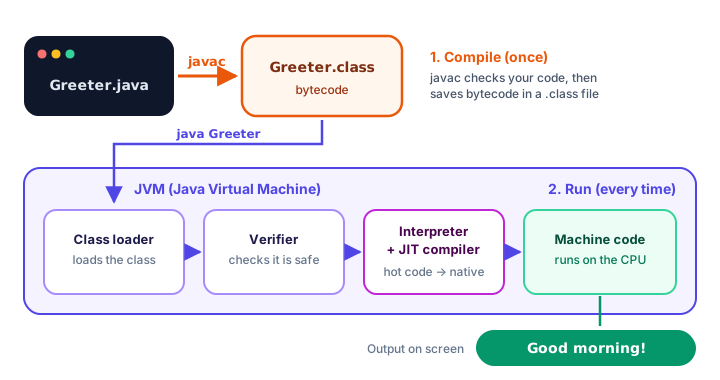
Step 1: You write source code
Source code is the human-readable program you type, saved in a file ending in .java. Here's a small one:
public class Greeter {
    public static void main(String[] args) {
        System.out.println("Good morning!");
    }
}
Good morning!Your computer's processor can't understand this text directly. It needs to be translated first.
Step 2: javac compiles it into bytecode
A compiler is a program that translates code from one form into another. Java's compiler is called javac:
javac Greeter.javaIf there are no mistakes, javac prints nothing and creates a new file, Greeter.class, next to your source file. One .class file is created for each class in your code.
The compiler is also your first safety net. Before creating any bytecode, it checks that your code follows Java's grammar, that names are spelled correctly, and that types make sense (for example, that you don't try to multiply a piece of text). If it finds a problem, it stops and tells you the file name and line number.
What is bytecode?
Bytecode is a set of compact instructions designed for the JVM rather than for any real processor. That's why the same .class file can run on Windows, macOS and Linux: bytecode doesn't belong to any one of them.
You can peek inside a class file with javap, a tool that comes with the JDK:
javap -c GreeterFor the main method above, it lists just four instructions:
| Bytecode instruction | What it does |
|---|---|
getstatic | Fetches System.out, the standard output |
ldc | Loads the text "Good morning!" |
invokevirtual | Calls println with that text |
return | Ends the method |
A fun fact: every compiled class file begins with the same four bytes, written in hexadecimal as CA FE BA BE. The JVM uses this "magic number" to recognize a real class file.
Step 3: The JVM loads and checks the bytecode
The Java Virtual Machine (JVM) is a program that runs Java bytecode. "Virtual machine" means it acts like a pretend computer whose machine language is bytecode. Each operating system has its own JVM, but they all understand exactly the same bytecode.
When you run java Greeter, the JVM starts and gets to work:
- Class loader: finds
Greeter.classand loads it into memory, along with any library classes it uses, such asSystemandString. - Bytecode verifier: checks that the bytecode follows the rules and can't do anything unsafe, such as reaching into memory it doesn't own. This is one reason Java has a reputation for security.
Step 4: The JVM runs the code (interpreter and JIT)
The JVM's execution engine now runs your program. It uses two tools together:
- The interpreter reads bytecode instructions one at a time and carries them out immediately. Starting this way is quick.
- The JIT (just-in-time) compiler watches which methods run often. When a piece of code becomes "hot", the JIT translates it into native machine code, the 1s and 0s your processor runs directly, and keeps that version for next time.
This is why long-running Java programs, like web servers, get faster after they warm up. While all this happens, the JVM's garbage collector also cleans up memory your program no longer uses, so you never have to free memory by hand as you do in C with malloc and free.
📝 Note
Is Java compiled or interpreted? Both! javac compiles source code to bytecode ahead of time, and the JVM then interprets that bytecode and JIT-compiles the hot parts into machine code while the program runs.
What happens with java Hello.java?
When you use the single-file shortcut, java Greeter.java, the very same steps happen. The only difference is that the compiler runs inside the java command and keeps the bytecode in memory, so no .class file appears in your folder. It's perfect for learning; bigger projects compile with javac (usually through a build tool) so the compile step isn't repeated on every run.
JDK vs JRE vs JVM: what's the difference?
These three terms are easy to mix up. They fit inside each other like nesting boxes:
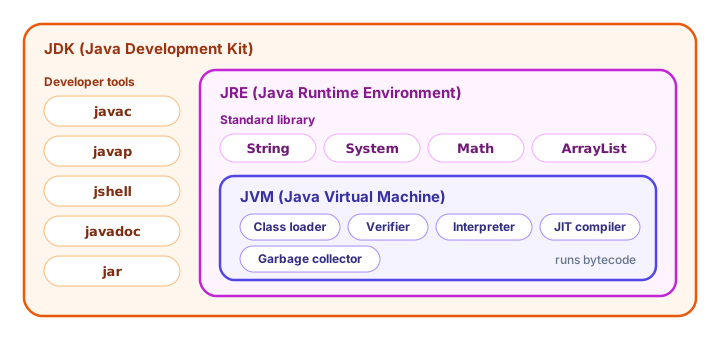
| JVM | JRE | JDK | |
|---|---|---|---|
| Stands for | Java Virtual Machine | Java Runtime Environment | Java Development Kit |
| What it is | The engine that runs bytecode | JVM + standard library | JRE + developer tools |
| Can run programs? | Yes (with the library) | Yes | Yes |
| Can compile programs? | No | No | Yes, with javac |
| Who needs it | Comes inside the others | People who only run Java apps | Programmers (you!) |
Modern Java is usually installed simply as a JDK, which you did in How to Install Java.
Compile-time errors vs runtime errors
Because Java compiles before it runs, mistakes show up at two different moments:
- A compile-time error is found by
javac, before your program starts. Spelling mistakes, missing semicolons and type mix-ups are caught here. - A runtime error happens while the program is running, such as dividing a number by zero. Lines before the problem have already run. You'll learn to handle these in Java Exceptions.
Look at this program. Line 3 is fine, but line 4 misspells println:
public class Typo {
    public static void main(String[] args) {
        System.out.println("Step 1");
        System.out.printn("Step 2");
    }
}
Running it prints nothing at all, not even Step 1. The compiler stops first and reports:
Typo.java:4: error: cannot find symbol
        System.out.printn("Step 2");
                  ^
No bytecode means nothing to run. This is a big advantage: many bugs are caught before a user ever sees your program.
💡 Tip
Always fix the first compiler error first. One small mistake, like a missing brace, can confuse the compiler and cause a whole list of follow-up errors that disappear once the first one is fixed.
Common mistakes and misconceptions
1. Editing code but running an old .class file
If you use javac and java separately, changing Greeter.java does nothing until you compile again. The JVM runs the .class file, not your source. Run javac after every change (the single-file launch does this for you).
2. Thinking bytecode is machine code
Bytecode is for the JVM, not the processor. You can't double-click a .class file to run it; you need java.
3. Believing "Java is slow because it's interpreted"
That was partly true in the 1990s. Thanks to the JIT compiler, today's Java often runs nearly as fast as languages compiled straight to machine code.
4. Opening a .class file in a text editor
It looks like garbage because it's binary data. Use javap -c if you're curious about what's inside.
Practice exercise
🏋️ Try it yourself
Write a program FlightStatus.java that prints three lines about a flight. Compile it with javac, list the files in your folder to find the new .class file, and run it with java. Then change one line of text and run java FlightStatus without compiling. What do you see, and why?
Show solution
public class FlightStatus {
    public static void main(String[] args) {
        System.out.println("Flight AC 852 to London");
        System.out.println("Status: Boarding");
        System.out.println("Gate: D14");
    }
}
Flight AC 852 to London
Status: Boarding
Gate: D14After javac FlightStatus.java, your folder contains FlightStatus.java and FlightStatus.class. If you edit the text and run java FlightStatus without compiling, you still see the old output, because the JVM runs the old bytecode in FlightStatus.class. Run javac again and the new text appears.
What's next?
Now you know what happens behind the scenes when Java runs your code. Next, learn the grammar rules the compiler checks for: statements, semicolons, braces, naming conventions and keywords in Java Syntax.
Key takeaways
- Java runs in two stages: javac compiles source code to bytecode, and the JVM runs the bytecode.
- Bytecode lives in .class files and is designed for the JVM, not for a specific processor, so it runs on any operating system.
- The JVM loads classes with the class loader, checks them with the bytecode verifier and runs them with its execution engine.
- The JIT compiler turns frequently used bytecode into native machine code, which makes Java programs fast.
- The JDK contains the JRE, and the JRE contains the JVM; programmers install the JDK.
- Compile-time errors stop the program before it starts; runtime errors happen while it runs.
Frequently asked questions
How does Java work step by step?
You write a .java file, javac compiles it into bytecode in a .class file, the JVM loads and verifies that bytecode, and then the interpreter and JIT compiler execute it as machine code on your processor.
Is Java compiled or interpreted?
Both. Java source code is compiled to bytecode by javac, and the JVM then interprets the bytecode and uses a just-in-time (JIT) compiler to turn frequently run parts into native machine code.
What is the difference between JDK, JRE and JVM?
The JVM runs bytecode. The JRE is the JVM plus the standard class library, enough to run programs. The JDK is the JRE plus developer tools such as the javac compiler, so it is what programmers install.
What is a .class file in Java?
A .class file is the output of the javac compiler. It contains bytecode for one class and starts with the magic number CAFEBABE. The JVM reads and runs it.
What is the JIT compiler in Java?
The just-in-time compiler is part of the JVM. It watches which code runs often and compiles that bytecode into native machine code while the program runs, so the program gets faster over time.