Java StringBuilder
Updated 8 min read Aimerscrew
Sometimes you need to build a long piece of text bit by bit: a receipt with many lines, a report row by row, or a list of thousands of items. Doing that with + works, but it wastes time and memory. Java StringBuilder is the tool designed for this job. In this lesson, you'll learn why it's faster, how to use its most important methods, and when to choose it over a plain String.
🌍 Real-life example
Think of writing a shopping list. With a String, every time you add an item you'd have to copy the whole list onto a fresh sheet of paper, then add the new line. With a StringBuilder, you keep one whiteboard and simply write the next item at the bottom, erase a line, or squeeze a word in. Same result, far less copying.
What is StringBuilder in Java?
StringBuilder is a built-in class that holds a mutable (changeable) sequence of characters. Remember from Java strings that a String is immutable: it can never change, so every "change" creates a new object. A StringBuilder keeps one object and edits it in place. You create one with the new keyword, and it lives in java.lang, so no import is needed.
StringBuilder empty = new StringBuilder();               // starts empty
StringBuilder greeting = new StringBuilder("Hi there"); // starts with text
Why is string concatenation in a loop slow?
A loop repeats a block of code many times. You'll learn loops properly in the Java for loop lesson; for now, read the for line below as "repeat this for i = 5, 4, 3, 2, 1".
public class CountdownString {
    public static void main(String[] args) {
        String result = "";
        for (int i = 5; i >= 1; i--) {
            result = result + i + " "; // a brand-new String every time
        }
        System.out.println(result + "Liftoff!");
    }
}
5 4 3 2 1 Liftoff!The output is fine, but look at what happens behind the scenes. Because strings are immutable, each pass through the loop copies all the existing characters into a new String, then throws the old one away. With 5 passes that's nothing. With 100,000 passes, Java copies the growing text 100,000 times, and the program slows to a crawl.
Here's the same program with a StringBuilder. It appends to one object that simply grows:
public class CountdownBuilder {
    public static void main(String[] args) {
        StringBuilder result = new StringBuilder();
        for (int i = 5; i >= 1; i--) {
            result.append(i).append(" "); // the same object grows
        }
        result.append("Liftoff!");
        System.out.println(result);
    }
}
5 4 3 2 1 Liftoff!📝 Note
For a single line such as "Hello, " + name + "!", plain + is perfectly fine; the Java compiler optimizes it for you. Reach for StringBuilder when you build text across many steps, especially inside loops.
append(): adding to the end
append() adds text to the end of the builder. It accepts strings, numbers, characters, booleans and more. It also returns the builder itself, so you can chain several calls in one statement.
public class PlaylistBuilder {
    public static void main(String[] args) {
        StringBuilder playlist = new StringBuilder("Road Trip Mix: ");

        playlist.append("Africa");
        playlist.append(", ");
        playlist.append("Dreams");
        playlist.append(", ").append("Holiday").append(" (")
                .append(3).append(" songs)");

        System.out.println(playlist);
        System.out.println("Length: " + playlist.length());
    }
}
Road Trip Mix: Africa, Dreams, Holiday (3 songs)
Length: 48Notice there's no playlist = ... assignment. Unlike String methods, StringBuilder methods change the object directly.
insert(), delete(), replace(), setCharAt() and reverse()
A StringBuilder can edit text anywhere, not just at the end. All positions are indexes counted from 0, and, like substring(), ranges include the start index but exclude the end index.
| Method | What it does |
|---|---|
insert(index, value) | Inserts a value before the given index |
delete(start, end) | Removes characters from start up to (not including) end |
deleteCharAt(index) | Removes one character |
replace(start, end, text) | Swaps a range of characters for new text |
setCharAt(index, ch) | Changes one character (returns nothing, so it can't be chained) |
reverse() | Reverses the whole sequence |
public class EditBuilder {
    public static void main(String[] args) {
        StringBuilder order = new StringBuilder("pizza with cheese");

        order.insert(0, "Large ");
        System.out.println("insert:       " + order);

        order.setCharAt(6, 'P');
        System.out.println("setCharAt:    " + order);

        order.replace(17, 23, "olives");
        System.out.println("replace:      " + order);

        order.delete(0, 6);
        System.out.println("delete:       " + order);

        order.deleteCharAt(order.length() - 1);
        System.out.println("deleteCharAt: " + order);

        order.reverse();
        System.out.println("reverse:      " + order);
    }
}
insert: Large pizza with cheese
setCharAt: Large Pizza with cheese
replace: Large Pizza with olives
delete: Pizza with olives
deleteCharAt: Pizza with olive
reverse: evilo htiw azziPStep by step: insert(0, ...) puts "Large " at the very front; setCharAt(6, 'P') capitalizes the "p" at index 6; replace(17, 23, ...) swaps "cheese" (indexes 17 to 22) for "olives"; delete(0, 6) removes "Large "; and deleteCharAt chops off the last character.
toString(): getting a String back
A StringBuilder is not a String, so it doesn't have String-only methods such as endsWith() or equals() for text. When you're done building, call toString() to get a normal, immutable String. Here, a payment page masks a card number:
public class MaskCard {
    public static void main(String[] args) {
        String cardNumber = "4111222233334444";

        StringBuilder masked = new StringBuilder(cardNumber);
        masked.replace(0, 12, "*".repeat(12));
        masked.insert(4, ' ').insert(9, ' ').insert(14, ' ');

        String shown = masked.toString();
        System.out.println("Card: " + shown);
        System.out.println("Ends with 4444: " + shown.endsWith("4444"));
    }
}
Card: **** **** **** 4444
Ends with 4444: trueA classic use of reverse() plus toString() is checking for a palindrome, a word that reads the same backward:
public class Palindrome {
    public static void main(String[] args) {
        String word = "racecar";
        String backwards = new StringBuilder(word).reverse().toString();

        System.out.println(word + " backwards is " + backwards);
        System.out.println("Palindrome: " + word.equals(backwards));
    }
}
racecar backwards is racecar
Palindrome: trueHow does StringBuilder capacity grow?
Inside, a StringBuilder stores characters in a block of memory with some spare room. The number of characters in use is its length; the room reserved is its capacity. A new, empty builder starts with a capacity of 16. When an append doesn't fit, Java creates a bigger block (roughly double: old capacity × 2 + 2), copies the characters over, and carries on.
public class CapacityGrowth {
    public static void main(String[] args) {
        StringBuilder sb = new StringBuilder();
        System.out.println("length " + sb.length() + ", capacity " + sb.capacity());

        sb.append("Order #10045 ok"); // 15 characters
        System.out.println("length " + sb.length() + ", capacity " + sb.capacity());

        sb.append("!!");              // now 17 characters
        System.out.println("length " + sb.length() + ", capacity " + sb.capacity());

        sb.append(" Shipped to Oslo, Norway."); // now 42 characters
        System.out.println("length " + sb.length() + ", capacity " + sb.capacity());
    }
}
length 0, capacity 16
length 15, capacity 16
length 17, capacity 34
length 42, capacity 70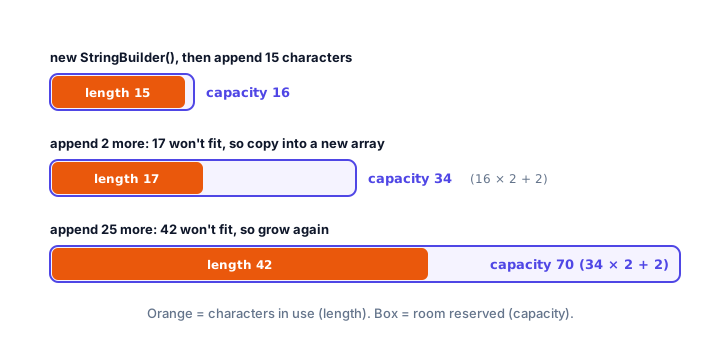
Because the capacity roughly doubles each time, copying happens rarely, and most appends are instant. That's the secret behind StringBuilder's speed. If you know roughly how big the text will get, you can reserve the room up front and skip the growing entirely:
public class PresizedBuilder {
    public static void main(String[] args) {
        StringBuilder report = new StringBuilder(200);
        System.out.println("capacity " + report.capacity());

        report.append("Daily sales: $1,240");
        System.out.println("length " + report.length() + ", capacity " + report.capacity());
    }
}
capacity 200
length 19, capacity 200StringBuilder vs StringBuffer vs String
Java also has an older class called StringBuffer. It has the same methods as StringBuilder, but every method is synchronized, meaning it's safe when several threads (parts of a program running at the same time) edit it at once. That safety costs speed, so in ordinary code you'll almost always want StringBuilder.
public class BufferDemo {
    public static void main(String[] args) {
        StringBuffer log = new StringBuffer();
        log.append("[10:00] Server started. ");
        log.append("[10:05] 3 users online.");
        System.out.println(log);
    }
}
[10:00] Server started. [10:05] 3 users online.String | StringBuilder | StringBuffer | |
|---|---|---|---|
| Can it change? | No (immutable) | Yes (mutable) | Yes (mutable) |
| Safe for multiple threads? | Yes | No | Yes (synchronized) |
| Speed for repeated edits | Slow (copies every time) | Fastest | Fast, a little slower |
| Typical use | Fixed text, comparing, map keys | Building text in a loop | Older code, shared between threads |
| Available since | Java 1.0 | Java 5 | Java 1.0 |
Common mistakes with StringBuilder
1. Comparing builders with equals()
StringBuilder doesn't compare text with equals(); it only checks whether both are the same object, just like ==. Convert first, or use compareTo():
public class BuilderEquals {
    public static void main(String[] args) {
        StringBuilder first = new StringBuilder("gate B12");
        StringBuilder second = new StringBuilder("gate B12");

        System.out.println(first.equals(second));
        System.out.println(first.toString().equals(second.toString()));
        System.out.println(first.compareTo(second) == 0);
    }
}
false
true
true2. Assigning a StringBuilder to a String variable
String text = builder; doesn't compile. Write String text = builder.toString();.
3. Using + inside append()
sb.append(a + ", " + b) builds a temporary String first. Chain instead: sb.append(a).append(", ").append(b).
4. Mixing up length and capacity
length() is the number of characters you've added; capacity() is just reserved space. Use length() for indexes, such as deleteCharAt(sb.length() - 1).
5. Using StringBuilder for everything
For fixed text and simple one-line joins, a plain String is clearer. Use StringBuilder when text is built in many steps.
Practice exercise
🏋️ Try it yourself
A delivery app stores phone numbers as plain digits, like "5550134889". Use a StringBuilder and insert() to format it as (555) 013-4889, then print it. Hint: each insert shifts the characters after it, so work out the indexes in order.
Show solution
public class PhoneFormat {
    public static void main(String[] args) {
        String digits = "5550134889";

        StringBuilder phone = new StringBuilder(digits);
        phone.insert(0, '(');
        phone.insert(4, ") ");
        phone.insert(9, '-');

        System.out.println(phone);
    }
}
(555) 013-4889After inserting (, the text is (5550134889, so the closing ") " goes at index 4. Then (555) 0134889 needs the dash at index 9.
What's next?
Congratulations, you've finished the Strings chapter! Now it's time to make your programs take decisions, for example showing a different message when a password is wrong, with Java if-else statements.
Key takeaways
- StringBuilder holds a mutable sequence of characters, so its methods change the same object instead of creating new strings.
- Concatenating Strings with + inside a loop copies the text on every pass; StringBuilder avoids that copying.
- append() adds to the end and can be chained; insert(), delete(), deleteCharAt(), replace(), setCharAt() and reverse() edit anywhere.
- A new StringBuilder has capacity 16 and grows to about double (old × 2 + 2) when it runs out of room.
- Call toString() to turn a StringBuilder back into a regular String.
- StringBuffer has the same methods but is synchronized for threads and slightly slower; prefer StringBuilder in normal code.
Frequently asked questions
What is the difference between String and StringBuilder in Java?
A String is immutable, so every change creates a new object. A StringBuilder is mutable, so append(), insert() and similar methods change the same object, which is much faster when building text in many steps.
When should I use StringBuilder instead of +?
Use StringBuilder when you build text across many steps, especially inside a loop. For a single line such as "Hi, " + name, plain + is fine because the compiler optimizes it.
What is the default capacity of a StringBuilder?
An empty StringBuilder starts with a capacity of 16 characters. When it runs out of room, it grows to old capacity × 2 + 2, so 16 becomes 34 and then 70.
What is the difference between StringBuilder and StringBuffer?
They have the same methods, but StringBuffer is synchronized, which makes it safe for several threads at once and a little slower. StringBuilder, added in Java 5, is the usual choice.
How do I convert a StringBuilder to a String?
Call toString(), for example String text = builder.toString();. You need this before using String-only methods such as equals() for text comparison.