Java Inheritance
Updated 10 min read Aimerscrew
Java inheritance lets you build a new class on top of an existing one, so you don't have to write the same code twice. With a single keyword, extends, a class gets all the fields and methods of another class and can then add or change whatever it needs. In this lesson, you'll learn how inheritance works, how to call the parent class with super, how to override methods safely, and when inheritance is not the right tool.
🌍 Real-life example
Think of a car rental company. Every vehicle in the fleet has a brand, a license plate and a mileage counter. Cars also have a number of doors, trucks have a maximum load, and bikes have a basket size. Instead of writing "brand, plate, mileage" three times, the company defines a general Vehicle once, then says "a Car is a Vehicle, plus doors". That's inheritance.
What is inheritance in Java?
Inheritance is a way for one class to receive the fields and methods of another class. The class that gives is called the superclass (also parent class or base class). The class that receives is called the subclass (also child class or derived class).
Inheritance models an "is-a" relationship: a Car is a Vehicle, a Truck is a Vehicle. If the sentence "X is a Y" sounds right, inheritance might fit.
You create a subclass with the extends keyword:
public class Garage {
    public static void main(String[] args) {
        Car sedan = new Car();
        sedan.brand = "Toyota";
        sedan.doors = 4;

        sedan.honk();          // inherited from Vehicle
        sedan.openTrunk();     // defined in Car
        System.out.println(sedan.brand + " has " + sedan.doors + " doors");
    }
}

class Vehicle {
    String brand;

    void honk() {
        System.out.println(brand + " says: Beep beep!");
    }
}

class Car extends Vehicle {
    int doors;

    void openTrunk() {
        System.out.println("The trunk of the " + brand + " is open");
    }
}
Toyota says: Beep beep!
The trunk of the Toyota is open
Toyota has 4 doorsThe Car class never declares brand or honk(), yet a Car object has both. It inherited them from Vehicle. It also adds its own field (doors) and method (openTrunk()).
📝 Note
All our examples keep several classes in one file so you can run them with java Garage.java. Only the first class (the one with main) is public. In a real project, each public class usually gets its own file, as you saw in Java classes and objects.
A class hierarchy
A superclass can have many subclasses. Together they form a class hierarchy, a family tree of classes. Common features live at the top; special features live lower down.
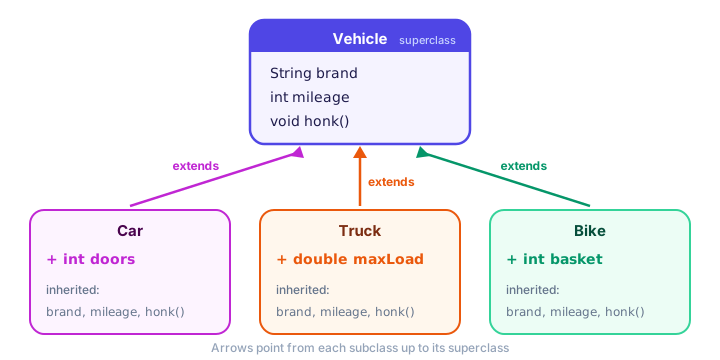
The arrows point from the subclass up to the superclass. That's the usual way to draw it: "Car extends Vehicle".
How does super() work in constructors?
When you create a subclass object, Java must first build the "parent part" of it. So the superclass constructor always runs first. You choose which parent constructor to call with super(...), and it has to be the first statement in the subclass constructor.
public class RentalFleet {
    public static void main(String[] args) {
        Truck truck = new Truck("Volvo", 18.5);
        System.out.println(truck.describe());
    }
}

class Vehicle {
    private String brand;

    Vehicle(String brand) {
        this.brand = brand;
        System.out.println("1. Vehicle constructor runs");
    }

    String getBrand() {
        return brand;
    }

    String describe() {
        return "Vehicle made by " + brand;
    }
}

class Truck extends Vehicle {
    private double maxLoadTons;

    Truck(String brand, double maxLoadTons) {
        super(brand);                 // must be the first line
        this.maxLoadTons = maxLoadTons;
        System.out.println("2. Truck constructor runs");
    }

    @Override
    String describe() {
        return super.describe() + ", carries up to " + maxLoadTons + " tons";
    }
}
1. Vehicle constructor runs
2. Truck constructor runs
Vehicle made by Volvo, carries up to 18.5 tonsNotice that brand is private in Vehicle. The Truck can't touch it directly, but it doesn't need to: it passes the value to super(brand) and lets the parent store it. That keeps the parent's data encapsulated.
If you don't write super(...) yourself, Java quietly inserts super() with no arguments. That only works if the parent has a no-argument constructor (see Common mistakes below).
📝 Note
Up to Java 24, super(...) must be the very first statement, or you get call to super must be first statement in constructor. Java 25 relaxed this a little, but putting super(...) first is still the clearest style and works on every version.
Method overriding with @Override
Sometimes the inherited behavior isn't right for the subclass. Method overriding means writing a method in the subclass with the same name, same parameters and same return type as a method in the superclass. The subclass version replaces the parent version for objects of that subclass.
public class SoundCheck {
    public static void main(String[] args) {
        Vehicle basic = new Vehicle();
        Car car = new Car();
        Bike bike = new Bike();

        basic.horn();
        car.horn();
        bike.horn();
    }
}

class Vehicle {
    void horn() {
        System.out.println("Generic vehicle: Honk!");
    }
}

class Car extends Vehicle {
    @Override
    void horn() {
        System.out.println("Car: Beep beep!");
    }
}

class Bike extends Vehicle {
    @Override
    void horn() {
        System.out.println("Bike: Ring ring!");
    }
}
Generic vehicle: Honk!
Car: Beep beep!
Bike: Ring ring!The @Override line is an annotation, a label for the compiler. It says "I intend to override a parent method". If you misspell the name (say, horne()), the compiler stops with method does not override or implement a method from a supertype instead of silently creating a brand-new method.
💡 Tip
Always write @Override when you override. It costs one line and catches typos that would otherwise give you confusing bugs.
Calling the parent version with super.method()
Overriding doesn't have to throw the parent's work away. Inside the subclass, super.methodName() calls the superclass version, so you can add extra steps before or after it. You already saw super.describe() in the truck example. Here's a bigger one:
public class ParkingLot {
    public static void main(String[] args) {
        ElectricCar ev = new ElectricCar("Tesla", 72);
        ev.drive(150);
        ev.drive(200);
        ev.drive(50);
    }
}

class Car {
    protected String brand;
    protected int mileage;

    Car(String brand) {
        this.brand = brand;
    }

    void drive(int km) {
        mileage += km;
        System.out.println(brand + " drove " + km + " km (total " + mileage + " km)");
    }
}

class ElectricCar extends Car {
    private int batteryPercent;

    ElectricCar(String brand, int batteryPercent) {
        super(brand);
        this.batteryPercent = batteryPercent;
    }

    @Override
    void drive(int km) {
        int needed = km / 5;    // 1% battery for every 5 km
        if (needed > batteryPercent) {
            System.out.println(brand + " can't go " + km + " km, only " + batteryPercent + "% battery left");
            return;
        }
        batteryPercent -= needed;
        super.drive(km);        // reuse the parent's logic
        System.out.println("Battery: " + batteryPercent + "%");
    }
}
Tesla drove 150 km (total 150 km)
Battery: 42%
Tesla drove 200 km (total 350 km)
Battery: 2%
Tesla can't go 50 km, only 2% battery leftThe electric car adds a battery check, then hands the mileage counting to super.drive(km). The mileage logic lives in one place only.
What does protected mean in inheritance?
In the example above, brand and mileage are protected. You met this modifier in Java access modifiers: a protected member is visible to subclasses (even in other packages) and to classes in the same package. That's why ElectricCar can read brand directly.
| Modifier in the superclass | Can the subclass use it directly? |
|---|---|
public | Yes |
protected | Yes |
| no modifier (package-private) | Only if the subclass is in the same package |
private | No. It exists inside the object, but only the superclass's own methods can touch it |
A good habit: keep fields private and give subclasses access through methods (like getBrand()). Use protected fields only when subclasses truly need them.
Java supports single inheritance only
A Java class can extend exactly one class. This is not allowed:
class FlyingCar extends Car, Airplane { } // compile errorThe compiler stops at the comma with '{' expected. Java's designers chose this to avoid confusion when two parents have a method with the same name. A chain is fine, though: SportsCar extends Car and Car extends Vehicle, so a SportsCar gets members from both. If you need a class to have several "abilities", you'll use interfaces, coming up in this chapter.
Stopping inheritance with final
The final keyword (which you used for constants) also works on classes and methods:
- A final class can't be extended. Java's own
Stringclass is final, so nobody can change how strings behave. - A final method can't be overridden, but the class can still have subclasses.
final class Receipt { }
class FancyReceipt extends Receipt { }   // error: cannot inherit from final Receipt

class Account {
    final String accountNumber() { return "ACC-001"; }
}
class SavingsAccount extends Account {
    @Override
    String accountNumber() { return "HACKED"; }   // error: overridden method is final
}
Use final when changing the behavior in a subclass would break something important, such as a security check or an ID format.
Inheritance vs composition: "is-a" or "has-a"?
Inheritance is powerful, but it's not the only way to reuse code. Composition means a class contains another object as a field. It models a "has-a" relationship: a scooter has an engine; it is not an engine.
public class FoodDelivery {
    public static void main(String[] args) {
        DeliveryScooter scooter = new DeliveryScooter("SC-12");
        scooter.start();
        scooter.deliver("Pizza Margherita");
    }
}

class Engine {
    void turnOn() {
        System.out.println("Engine: vroom");
    }
}

class DeliveryScooter {
    private String plate;
    private Engine engine = new Engine();   // a scooter HAS an engine

    DeliveryScooter(String plate) {
        this.plate = plate;
    }

    void start() {
        System.out.println("Starting scooter " + plate);
        engine.turnOn();
    }

    void deliver(String order) {
        System.out.println("Delivering: " + order);
    }
}
Starting scooter SC-12
Engine: vroom
Delivering: Pizza Margherita| Inheritance | Composition | |
|---|---|---|
| Relationship | "is-a" (Car is a Vehicle) | "has-a" (Scooter has an Engine) |
| Java syntax | class Car extends Vehicle | a field: private Engine engine; |
| How many? | One parent only | As many parts as you like |
| Coupling | Tight: parent changes affect every child | Loose: swap the part without touching the rest |
A popular rule of thumb is "favor composition over inheritance". Use inheritance when the "is-a" sentence is truly correct and the subclass really is a special kind of the parent.
Common mistakes with inheritance
1. Forgetting super(...) when the parent has no empty constructor
class Person {
    Person(String name) { }
}
class Student extends Person {
    Student() { }   // error: constructor Person in class Person cannot be applied to given types
}
Java tries to insert super(), but Person has no constructor without arguments. Fix it by calling super("some name") yourself.
2. Overloading by accident instead of overriding
If the parent has void drive(int km) and you write void drive(double km) in the child, that's a new method (an overload), not an override. Adding @Override turns this silent bug into a compile error.
3. Using inheritance for "has-a" relationships
class Car extends Engine compiles, but it's wrong: a car is not an engine. Your Car would suddenly have every Engine method. Use a field instead.
4. Trying to read a private parent field
Writing brand inside a subclass when brand is private in the parent gives brand has private access in Vehicle. Use a getter like getBrand(), or make the field protected if subclasses really need it.
Practice exercise
🏋️ Try it yourself
Create an Employee class with a name and a monthly salary, a method monthlyPay() and a method printPay() that prints Name earns $amount. Then create a Manager subclass that also has a bonus and overrides monthlyPay() to return salary plus bonus. Use super(...) and super.monthlyPay(). Test with Priya (salary 5000) and Liam (salary 6000, bonus 1500).
Show solution
public class Payroll {
    public static void main(String[] args) {
        Employee dev = new Employee("Priya", 5000);
        Manager boss = new Manager("Liam", 6000, 1500);

        dev.printPay();
        boss.printPay();
    }
}

class Employee {
    protected String name;
    protected double salary;

    Employee(String name, double salary) {
        this.name = name;
        this.salary = salary;
    }

    double monthlyPay() {
        return salary;
    }

    void printPay() {
        System.out.println(name + " earns $" + monthlyPay());
    }
}

class Manager extends Employee {
    private double bonus;

    Manager(String name, double salary, double bonus) {
        super(name, salary);
        this.bonus = bonus;
    }

    @Override
    double monthlyPay() {
        return super.monthlyPay() + bonus;
    }
}
Priya earns $5000.0
Liam earns $7500.0Notice that printPay() lives only in Employee, yet for Liam it used the overridden monthlyPay(). That's a sneak peek at polymorphism.
What's next?
You've seen that a parent method can end up calling the child's overridden version. That idea has a name: polymorphism. Next, learn how Java polymorphism lets one variable hold many kinds of objects and still call the right method. Coming from Python? Compare with Python inheritance.
Key takeaways
- Inheritance lets a subclass reuse the fields and methods of a superclass with class Sub extends Super.
- Use inheritance only for true "is-a" relationships; use composition (a field) for "has-a" relationships.
- The superclass constructor always runs first; call a specific one with super(...) as the first statement.
- Overriding replaces a parent method in a subclass; always mark it with @Override so the compiler checks it.
- super.method() calls the parent version from inside an override, so you can extend behavior instead of copying it.
- A Java class can extend only one class; final classes cannot be extended and final methods cannot be overridden.
Frequently asked questions
What is inheritance in Java?
Inheritance is a feature where one class (the subclass) gets the fields and methods of another class (the superclass) by using the extends keyword. The subclass can add new members and override inherited methods.
Does Java support multiple inheritance?
Not for classes. A Java class can extend only one class. However, a class can implement many interfaces, which gives you a safe form of multiple inheritance of behavior.
What is the difference between super and this in Java?
this refers to the current object and its own members, while super refers to the parent part of the object. super(...) calls a parent constructor and super.method() calls the parent version of an overridden method.
Are private fields inherited in Java?
A subclass object still contains the private fields of its superclass, but the subclass code cannot access them directly. It must use public or protected methods of the superclass, such as getters.
Is @Override required in Java?
No, overriding works without it. But @Override asks the compiler to check that you really are overriding a parent method, which catches typos and wrong parameter types, so you should always use it.