Java Multidimensional Arrays
Updated 10 min read Aimerscrew
Some data doesn't fit in a single row. A cinema has rows of seats, a spreadsheet has rows and columns, and a weather report has a temperature for every city on every day. A Java 2D array stores this kind of data as a grid. In this lesson, you'll learn how to create two-dimensional arrays, read and change cells, walk through them with nested loops, calculate row and column totals, and build "jagged" arrays whose rows have different lengths.
🌍 Real-life example
When you book a cinema ticket online, the app shows a seat map: rows go back from the screen, and each row has numbered seats. To pick your seat, you say "row 5, seat 12". A 2D array works exactly the same way: you give a row number and a column number to reach one cell.
What is a 2D array in Java?
A two-dimensional (2D) array is an array whose elements are themselves arrays. You can picture it as a table: the outer array holds the rows, and each row holds the values in its columns. Arrays with two or more levels are called multidimensional arrays.
You write the type with two pairs of square brackets, and fill it with nested curly braces, one inner pair per row:
public class CinemaSeats {
    public static void main(String[] args) {
        char[][] seats = {
            {'O', 'X', 'X', 'O'},
            {'O', 'O', 'X', 'X'},
            {'X', 'O', 'O', 'O'}
        };

        System.out.println("Rows: " + seats.length);
        System.out.println("Seats per row: " + seats[0].length);
        System.out.println("Row 1, seat 3: " + seats[1][3]);
        System.out.println("Row 2, seat 1: " + seats[2][1]);

        seats[2][1] = 'X';   // a customer books row 2, seat 1
        System.out.println("Row 2, seat 1 now: " + seats[2][1]);
    }
}
Rows: 3
Seats per row: 4
Row 1, seat 3: X
Row 2, seat 1: O
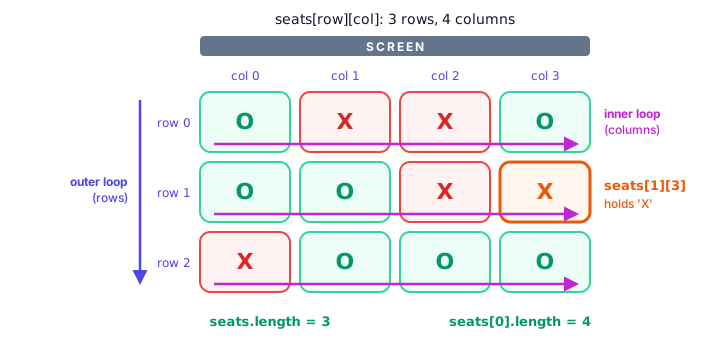
Row 2, seat 1 now: XHere 'O' means a free seat and 'X' means a taken one. The first index picks the row and the second picks the column: seats[row][col]. Both start at 0, just like in Java arrays.
Rows, columns and length
Because a 2D array is an array of rows, it has two different lengths:
seats.lengthis the number of rows (3).seats[0].lengthis the number of columns in row 0 (4). In general,seats[row].lengthis the length of that row.
💡 Tip
Say it out loud as "row first, then column", the same order you'd use for a seat ticket: "row 1, seat 3" is seats[1][3].
How do you create an empty 2D array?
When you know the size but not the values, use new with two sizes: the number of rows, then the number of columns. Every cell starts with its type's default value (0, 0.0, false or null).
int[][] scoreboard = new int[4][3];      // 4 rows, 3 columns, all 0
String[][] menu = new String[2][5];      // 2 rows, 5 columns, all null
This parking garage has 3 levels with 5 spots each. Every spot starts as false (free), a few cars park, and then the program counts the free spots:
public class ParkingGarage {
    public static void main(String[] args) {
        boolean[][] taken = new boolean[3][5];   // 3 levels, 5 spots each

        taken[0][0] = true;
        taken[0][1] = true;
        taken[1][4] = true;
        taken[2][2] = true;

        int freeSpots = 0;
        for (boolean[] level : taken) {
            for (boolean spot : level) {
                if (!spot) {
                    freeSpots++;
                }
            }
        }

        int totalSpots = taken.length * taken[0].length;
        System.out.println("Free spots: " + freeSpots + " of " + totalSpots);
    }
}
Free spots: 11 of 15Look at the outer for-each loop: each element of taken is a boolean[], a whole row. The inner loop then visits each boolean in that row. This shows clearly that a 2D array really is an array of arrays.
How do you loop through a 2D array?
You use nested loops: an outer loop that goes through the rows and an inner loop that goes through the columns of the current row. For every single row, the inner loop runs all the way through.
public class SeatMap {
    public static void main(String[] args) {
        char[][] seats = {
            {'O', 'X', 'X', 'O'},
            {'O', 'O', 'X', 'X'},
            {'X', 'O', 'O', 'O'}
        };

        for (int row = 0; row < seats.length; row++) {
            System.out.print("Row " + row + ":");
            for (int col = 0; col < seats[row].length; col++) {
                System.out.print(" " + seats[row][col]);
            }
            System.out.println();
        }
    }
}
Row 0: O X X O
Row 1: O O X X
Row 2: X O O ONotice the inner condition: col < seats[row].length. Using the length of the current row, instead of a fixed number, makes the loop safe for any grid, including jagged ones (more on those below). The println() after the inner loop ends each row on its own line.
Example: a weekly temperature table
Here's a realistic table with labels. Each row is a city and each column is a day. While the inner loop prints a row, it also adds up that row so you can show the city's average at the end of the line:
public class CityTemperatures {
    public static void main(String[] args) {
        String[] cities = {"London", "Tokyo", "Sydney"};
        String[] days = {"Mon", "Tue", "Wed", "Thu", "Fri"};
        double[][] temps = {
            {14.0, 15.5, 13.0, 12.5, 16.0},
            {22.5, 24.0, 23.5, 21.0, 25.0},
            {19.0, 18.5, 20.0, 22.5, 21.0}
        };

        System.out.printf("%-8s", "");
        for (String day : days) {
            System.out.printf("%6s", day);
        }
        System.out.printf("%7s%n", "Avg");

        for (int row = 0; row < temps.length; row++) {
            System.out.printf("%-8s", cities[row]);
            double sum = 0;
            for (int col = 0; col < temps[row].length; col++) {
                System.out.printf("%6.1f", temps[row][col]);
                sum += temps[row][col];
            }
            System.out.printf("%7.1f%n", sum / temps[row].length);
        }
    }
}
Mon Tue Wed Thu Fri Avg
London 14.0 15.5 13.0 12.5 16.0 14.2
Tokyo 22.5 24.0 23.5 21.0 25.0 23.2
Sydney 19.0 18.5 20.0 22.5 21.0 20.2The width numbers in %6.1f and %-8s line up the columns, as you learned in Java output formatting. Note how the regular 1D arrays cities and days label the rows and columns of the 2D array.
How do you calculate row and column totals?
A row total adds across one row, so the outer loop goes over rows and the inner loop over columns. A column total adds down one column, so you swap the loops: the outer loop goes over columns and the inner loop over rows.
public class RestaurantOrders {
    public static void main(String[] args) {
        String[] restaurants = {"Pizza Place", "Noodle Bar", "Taco Truck"};
        int[][] orders = {
            {42, 38, 51, 60},
            {30, 35, 28, 44},
            {25, 31, 40, 52}
        };

        System.out.println("Orders per restaurant (Thu to Sun):");
        for (int row = 0; row < orders.length; row++) {
            int rowTotal = 0;
            for (int col = 0; col < orders[row].length; col++) {
                rowTotal += orders[row][col];
            }
            System.out.println("  " + restaurants[row] + ": " + rowTotal);
        }

        String[] days = {"Thu", "Fri", "Sat", "Sun"};
        System.out.println("Orders per day (all restaurants):");
        for (int col = 0; col < orders[0].length; col++) {
            int colTotal = 0;
            for (int row = 0; row < orders.length; row++) {
                colTotal += orders[row][col];
            }
            System.out.println("  " + days[col] + ": " + colTotal);
        }
    }
}
Orders per restaurant (Thu to Sun):
Pizza Place: 191
Noodle Bar: 137
Taco Truck: 148
Orders per day (all restaurants):
Thu: 97
Fri: 104
Sat: 119
Sun: 156Each total variable is reset to 0 at the start of every outer loop pass. If you created it once, before both loops, the totals would keep piling up from one row to the next.
| Goal | Outer loop | Inner loop |
|---|---|---|
| Print the grid / row totals | rows (row < grid.length) | columns (col < grid[row].length) |
| Column totals | columns (col < grid[0].length) | rows (row < grid.length) |
| Grand total | either order | either order |
What is a jagged array in Java?
Since each row is a separate array, rows don't have to be the same length. A 2D array with rows of different lengths is called a jagged array. In this bowling league, each player has played a different number of games:
public class BowlingLeague {
    public static void main(String[] args) {
        String[] players = {"Maya", "Leo", "Priya"};
        int[][] games = {
            {180, 210},
            {150, 165, 172, 190},
            {205}
        };

        for (int p = 0; p < games.length; p++) {
            int total = 0;
            System.out.print(players[p] + " (games: " + games[p].length + "):");
            for (int score : games[p]) {
                System.out.print(" " + score);
                total += score;
            }
            System.out.println(" | average " + total / games[p].length);
        }
    }
}
Maya (games: 2): 180 210 | average 195
Leo (games: 4): 150 165 172 190 | average 169
Priya (games: 1): 205 | average 205The averages use integer division, so they're rounded down, which is how many bowling leagues report them anyway. Here's what the jagged array looks like in memory:
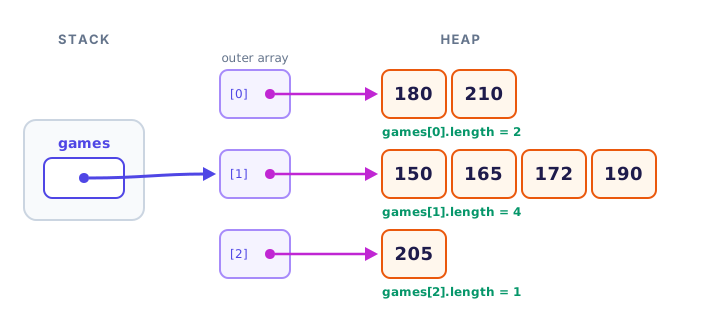
You can also create a jagged array in steps: give only the number of rows first, then create each row with its own size.
public class ShiftSchedule {
    public static void main(String[] args) {
        String[][] shifts = new String[3][];   // 3 days, row sizes decided later

        shifts[0] = new String[] {"Ana", "Ben"};
        shifts[1] = new String[] {"Chen"};
        shifts[2] = new String[] {"Dev", "Eli", "Fay"};

        for (int day = 0; day < shifts.length; day++) {
            System.out.print("Day " + (day + 1) + ":");
            for (String name : shifts[day]) {
                System.out.print(" " + name);
            }
            System.out.println();
        }
    }
}
Day 1: Ana Ben
Day 2: Chen
Day 3: Dev Eli FayUntil a row is created, its slot in shifts is null, so make sure every row exists before you loop over it.
Arrays with more than two dimensions
Java allows as many dimensions as you need. A hotel could store room status by building, floor and room:
boolean[][][] occupied = new boolean[2][10][20];   // 2 buildings, 10 floors, 20 rooms
occupied[1][4][12] = true;                         // building 1, floor 4, room 12
Three-dimensional arrays are rare in everyday code, and anything deeper usually means it's time for a better design, such as classes, which you'll meet in Java classes and objects.
Common mistakes with 2D arrays
1. Swapping row and column
seats[3][1] is not the same as seats[1][3]. In a 3-row grid, seats[3][1] doesn't even exist and throws an ArrayIndexOutOfBoundsException. Always put the row first.
2. Using grid.length for the columns
grid.length counts rows. For columns, use grid[row].length. In a square grid both happen to match, which hides the bug until the grid changes shape.
3. Assuming every row has the same length
Writing col < grid[0].length in the inner loop breaks on jagged arrays. Prefer col < grid[row].length.
4. Forgetting to reset a total
Declare row or column totals inside the outer loop so each one starts at 0.
Practice exercise
🏋️ Try it yourself
Three friends, Sam, Aisha and Tom, are in a 4-week step challenge. Their weekly steps are: Sam 52000, 61000, 48000, 70500; Aisha 66000, 59000, 72000, 68000; Tom 45000, 50500, 58000, 62000. Store the steps in a 2D array (one row per friend). Print each friend's total, then find the week in which the group walked the most steps together.
Show solution
public class StepChallenge {
    public static void main(String[] args) {
        String[] friends = {"Sam", "Aisha", "Tom"};
        int[][] steps = {
            {52000, 61000, 48000, 70500},
            {66000, 59000, 72000, 68000},
            {45000, 50500, 58000, 62000}
        };

        for (int row = 0; row < steps.length; row++) {
            int total = 0;
            for (int col = 0; col < steps[row].length; col++) {
                total += steps[row][col];
            }
            System.out.println(friends[row] + ": " + total + " steps");
        }

        int bestWeek = 0;
        int bestTotal = 0;
        for (int col = 0; col < steps[0].length; col++) {
            int weekTotal = 0;
            for (int row = 0; row < steps.length; row++) {
                weekTotal += steps[row][col];
            }
            if (weekTotal > bestTotal) {
                bestTotal = weekTotal;
                bestWeek = col;
            }
        }
        System.out.println("Best week: week " + (bestWeek + 1) + " with " + bestTotal + " steps");
    }
}
Sam: 231500 steps
Aisha: 265000 steps
Tom: 215500 steps
Best week: week 4 with 200500 stepsFriend totals are row totals; weekly totals are column totals, so the second pair of loops is swapped.
What's next?
You've been writing loops for printing, copying and searching arrays by hand. Java has a built-in toolbox that does many of these jobs in one line. Next, meet the Java Arrays class and its methods for printing, sorting, searching, filling and copying arrays.
Key takeaways
- A Java 2D array is an array of arrays that stores data in rows and columns.
- Declare one with two pairs of brackets, such as int[][] grid = new int[3][4] or with nested braces.
- Reach a cell with grid[row][col]; both indexes start at 0.
- grid.length is the number of rows, and grid[row].length is the number of columns in that row.
- Use nested loops: the outer loop for rows and the inner loop for columns; swap them for column totals.
- A jagged array has rows of different lengths, created with new int[rows][] and then one array per row.
Frequently asked questions
How do you declare a 2D array in Java?
Use two pairs of brackets: int[][] grid = new int[3][4]; creates 3 rows and 4 columns filled with 0. You can also give the values directly with nested braces, such as int[][] grid = {{1, 2}, {3, 4}};
How do you get the number of rows and columns of a 2D array?
grid.length gives the number of rows. grid[0].length gives the number of columns in the first row, and grid[r].length gives the length of row r.
What is a jagged array in Java?
A jagged array is a 2D array whose rows have different lengths. It works because each row is a separate array. Create it with new int[3][] and then assign each row, for example grid[0] = new int[5];
How do you print a 2D array in Java?
Use nested loops: the outer loop goes through rows and the inner loop prints each element of the current row, followed by a line break. For a quick debug print, Arrays.deepToString(grid) prints the whole grid in one line.
Is a Java 2D array stored as one block of memory?
No. The outer array holds references to separate row arrays on the heap. That is why rows can have different lengths and why a row can even be replaced with a new array.