Java Math Class
Updated 10 min read Aimerscrew
You've written your own methods for tips, totals and factorials. For everyday math, though, you don't have to start from scratch: the Java Math class already contains dozens of well-tested methods for square roots, powers, rounding, random numbers and more. In this lesson, you'll learn the most useful ones, see exactly how rounding behaves with negative numbers, and learn the right way to round money to two decimal places.
🌍 Real-life example
A school is booking buses for a trip: 130 students, 50 seats per bus. 130 ÷ 50 = 2.6, but you can't book 2.6 buses, and booking 2 would leave 30 students behind. You need to round up to 3. That's Math.ceil. Apps do small calculations like this all day: ride fares, delivery distances, discount percentages, and the Math class handles them.
What is the Math class in Java?
Math is a class in the java.lang package, which Java imports automatically, so it's always available. All its methods are static, which means you call them on the class name itself, without creating anything first: Math.sqrt(25). (Your own public static methods work the same way; Java static explains this in depth.)
public class MathIntro {
    public static void main(String[] args) {
        System.out.println(Math.sqrt(25));
        System.out.println(Math.max(12, 30));
        System.out.println(Math.abs(-7));
    }
}
5.0
30
7Here's a quick map of the methods covered in this lesson:
| Method | What it does | Example | Result |
|---|---|---|---|
Math.abs(x) | Absolute value (distance from zero) | Math.abs(-8) | 8 |
Math.max(a, b) | The larger value | Math.max(3, 9) | 9 |
Math.min(a, b) | The smaller value | Math.min(3, 9) | 3 |
Math.pow(a, b) | a to the power of b | Math.pow(2, 5) | 32.0 |
Math.sqrt(x) | Square root | Math.sqrt(81) | 9.0 |
Math.cbrt(x) | Cube root | Math.cbrt(27) | 3.0 |
Math.round(x) | Nearest whole number | Math.round(4.6) | 5 |
Math.floor(x) | Round down | Math.floor(4.6) | 4.0 |
Math.ceil(x) | Round up | Math.ceil(4.1) | 5.0 |
Math.hypot(x, y) | Length of the diagonal, √(x² + y²) | Math.hypot(3, 4) | 5.0 |
Math.random() | Random double from 0.0 up to (not including) 1.0 | Math.random() | varies |
Math.abs, Math.max and Math.min
Math.abs removes the minus sign, which is handy for differences where only the size matters. Math.max and Math.min pick the larger or smaller of two values. Like println, they're overloaded, so they work with int, long, float and double.
public class Weather {
    public static void main(String[] args) {
        int london = 9;
        int oslo = -4;

        System.out.println("Difference: " + Math.abs(london - oslo) + " degrees");
        System.out.println("Warmer: " + Math.max(london, oslo));
        System.out.println("Colder: " + Math.min(london, oslo));

        int volume = 130;
        int safeVolume = Math.max(0, Math.min(volume, 100));   // keep between 0 and 100
        System.out.println("Volume: " + safeVolume);
    }
}
Difference: 13 degrees
Warmer: 9
Colder: -4
Volume: 100The last two lines show a common trick called clamping: nesting min inside max keeps a value inside a range.
Math.pow, Math.sqrt and Math.cbrt
Math.pow(base, exponent) raises a number to a power; Math.sqrt and Math.cbrt take square and cube roots. All three return a double, even when the answer is a whole number.
public class Savings {
    public static void main(String[] args) {
        System.out.println(Math.pow(2, 10));
        System.out.println(Math.sqrt(144));
        System.out.println(Math.cbrt(64));

        double deposit = 1000.0;
        double yearlyRate = 0.05;
        int years = 10;
        double balance = deposit * Math.pow(1 + yearlyRate, years);
        System.out.printf("After %d years: $%.2f%n", years, balance);

        int squareTiles = (int) Math.sqrt(50);
        System.out.println("A 50-tile set makes a square of side " + squareTiles);
    }
}
1024.0
12.0
4.0
After 10 years: $1628.89
A 50-tile set makes a square of side 7To store a result in an int, cast it, as in (int) Math.sqrt(50). The cast cuts off the decimals (7.07... becomes 7). The square root of a negative number isn't a real number, so Math.sqrt(-4) returns the special value NaN ("not a number").
How do round, floor and ceil work in Java?
These three methods all turn a decimal into a whole number, but in different directions:
Math.floor(x)rounds down, toward negative infinity. Returns adouble.Math.ceil(x)rounds up, toward positive infinity ("ceiling"). Returns adouble.Math.round(x)rounds to the nearest whole number, and exact halves go up. Returns alongfor adoubleargument (and anintfor afloat).
Negative numbers are where people get surprised, so let's print a full comparison:
public class Rounding {
    public static void main(String[] args) {
        double[] values = {2.4, 2.5, 2.6, -2.4, -2.5, -2.6};

        System.out.println("value  round  floor  ceil");
        for (double v : values) {
            System.out.printf("%5.1f  %5d  %5.1f  %4.1f%n",
                    v, Math.round(v), Math.floor(v), Math.ceil(v));
        }
    }
}
value round floor ceil
2.4 2 2.0 3.0
2.5 3 2.0 3.0
2.6 3 2.0 3.0
-2.4 -2 -3.0 -2.0
-2.5 -2 -3.0 -2.0
-2.6 -3 -3.0 -2.0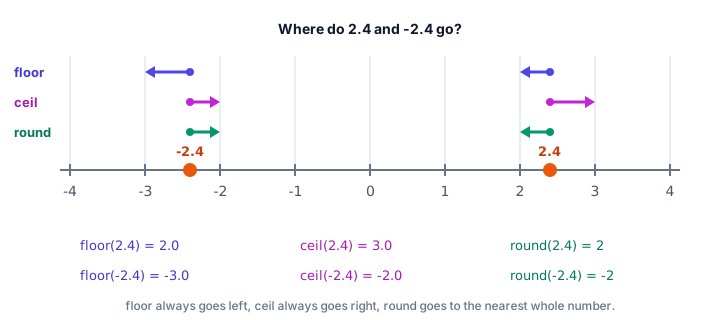
Look closely at the negative rows. Math.floor(-2.4) is -3.0, not -2.0, because -3 is below -2.4 on the number line. And Math.round(-2.5) is -2, because "halves go up" means toward positive infinity.
Back to the bus trip: ceil is perfect for "how many containers do I need?" questions.
public class SchoolTrip {
    public static void main(String[] args) {
        int students = 130;
        int seatsPerBus = 50;

        int buses = (int) Math.ceil((double) students / seatsPerBus);
        System.out.println("Buses needed: " + buses);

        int pages = (int) Math.ceil(47 / 10.0);
        System.out.println("Pages for 47 results (10 per page): " + pages);
    }
}
Buses needed: 3
Pages for 47 results (10 per page): 5⚠️ Divide with doubles first
Write Math.ceil((double) students / seatsPerBus), not Math.ceil(students / seatsPerBus). With two ints, 130 / 50 is integer division and gives 2 before ceil even runs, so you'd get 2 buses.
How do you round to 2 decimal places in Java?
Math.round only rounds to whole numbers, but you can shift the decimal point first: multiply by 100, round, then divide by 100.0.
public class PriceRounding {
    public static void main(String[] args) {
        double price = 19.99;
        double withTax = price * 1.0825;
        System.out.println("Raw: " + withTax);

        double rounded = Math.round(withTax * 100) / 100.0;
        System.out.println("Rounded: " + rounded);

        System.out.printf("Displayed: $%.2f%n", withTax);
    }
}
Raw: 21.639174999999998
Rounded: 21.64
Displayed: $21.64Dividing by 100.0 (not 100) matters: Math.round returns a long, and dividing a long by the int 100 would chop off the cents. If you only need to display two decimals, printf("%.2f") from output formatting is simpler and leaves the value unchanged.
📝 Note
A double can't store most decimal fractions exactly (that's why 0.1 + 0.2 prints 0.30000000000000004). It can even make rounding go the "wrong" way: Math.round(1.005 * 100) / 100.0 gives 1.0, because 1.005 is really stored as 1.00499999.... For practice programs, double is fine. Real banking and shopping software uses the BigDecimal class, or stores amounts as whole cents in a long.
How does Math.random() work?
Math.random() returns a random double that is at least 0.0 and less than 1.0. Each call gives a different value, so the output changes every time you run the program. To get a random whole number in a range, you scale and shift it with this formula:
int roll = (int) (Math.random() * 6) + 1;          // 1 to 6, like a die
int seat = (int) (Math.random() * (max - min + 1)) + min;   // min to max, inclusive
Why does that work? Let's plug in the smallest and largest values Math.random() could give instead of calling it, so we can see the formula's range:
public class DiceFormula {
    public static void main(String[] args) {
        double[] possibleRandoms = {0.0, 0.25, 0.5, 0.999999};

        for (double r : possibleRandoms) {
            int roll = (int) (r * 6) + 1;
            System.out.println("random " + r + " -> die shows " + roll);
        }
    }
}
random 0.0 -> die shows 1
random 0.25 -> die shows 2
random 0.5 -> die shows 4
random 0.999999 -> die shows 6Multiplying by 6 stretches the range to 0.0 up to (not including) 6.0, the cast chops it down to 0 through 5, and + 1 shifts it to 1 through 6. Since Math.random() never returns exactly 1.0, the die can never show 7.
💡 Tip
For games and simulations that need lots of random values, the java.util.Random class offers handy methods like nextInt(6). You'll build a game with it in the number guessing game project.
Math.PI and Math.E
The Math class also provides two constants: Math.PI (π ≈ 3.14159, the ratio of a circle's circumference to its diameter) and Math.E (e ≈ 2.71828, used for growth and interest calculations). They're constants, so there are no parentheses.
public class PizzaSize {
    public static void main(String[] args) {
        double smallDiameter = 10;    // inches
        double largeDiameter = 14;

        double smallArea = Math.PI * Math.pow(smallDiameter / 2, 2);
        double largeArea = Math.PI * Math.pow(largeDiameter / 2, 2);

        System.out.printf("10-inch pizza: %.1f sq in%n", smallArea);
        System.out.printf("14-inch pizza: %.1f sq in%n", largeArea);
        System.out.printf("The large one is %.2f times bigger%n", largeArea / smallArea);
        System.out.println("PI = " + Math.PI);
        System.out.println("E = " + Math.E);
    }
}
10-inch pizza: 78.5 sq in
14-inch pizza: 153.9 sq in
The large one is 1.96 times bigger
PI = 3.141592653589793
E = 2.718281828459045Only 4 inches wider, but almost twice the pizza!
Math.hypot: distance between two points
Math.hypot(x, y) returns √(x² + y²), the length of a right triangle's longest side. That's exactly the straight-line distance between two points on a map grid:
public class DroneDelivery {
    public static void main(String[] args) {
        double shopX = 2, shopY = 1;
        double homeX = 8, homeY = 9;

        double distance = Math.hypot(homeX - shopX, homeY - shopY);
        System.out.println("Flight distance: " + distance + " km");
    }
}
Flight distance: 10.0 kmMath.floorDiv and Math.floorMod
With negative numbers, Java's / rounds toward zero and % can return a negative remainder. Math.floorDiv and Math.floorMod round toward negative infinity instead, which is often what you want for things that "wrap around", like hours on a clock.
public class WorldClock {
    public static void main(String[] args) {
        System.out.println(-7 / 2 + " vs " + Math.floorDiv(-7, 2));
        System.out.println(-7 % 2 + " vs " + Math.floorMod(-7, 2));

        int londonHour = 2;      // 2 AM in London
        int offset = -5;         // New York is 5 hours behind
        System.out.println("With %: " + (londonHour + offset) % 24);
        System.out.println("With floorMod: " + Math.floorMod(londonHour + offset, 24));
    }
}
-3 vs -4
-1 vs 1
With %: -3
With floorMod: 21With %, the answer is -3, which isn't a valid hour. Math.floorMod wraps it correctly to 21, which is 9 PM the previous evening in New York.
Common mistakes with the Math class
1. Integer division before the Math method
Math.sqrt(9 / 2) is Math.sqrt(4), because 9 / 2 is already 4. Use 9 / 2.0.
2. Storing Math.round in an int without a cast
int stars = Math.round(4.6); fails with incompatible types: possible lossy conversion from long to int, because Math.round(double) returns a long. Write int stars = (int) Math.round(4.6);.
3. Forgetting that pow, sqrt, floor and ceil return double
Math.pow(2, 3) is 8.0, not 8. Cast to int when you need a whole number.
4. Expecting floor to "remove the decimals" from negatives
Math.floor(-2.4) is -3.0. To simply drop the decimals, cast instead: (int) -2.4 is -2.
Practice exercise
🏋️ Try it yourself
A ride-sharing app charges a $2.50 base fare plus $1.75 per km, with a minimum fare of $8.00. Write a method double fare(double km) that returns the fare rounded to 2 decimal places, using Math.max for the minimum and Math.round for rounding. Then calculate the trip distance from point (1, 2) to point (4, 6) with Math.hypot and print the distance and its fare. Also print the fare for a 1.2 km trip.
Show solution
public class RideFare {
    public static void main(String[] args) {
        double km = Math.hypot(4 - 1, 6 - 2);
        System.out.printf("Distance: %.1f km, fare: $%.2f%n", km, fare(km));
        System.out.printf("Short trip fare: $%.2f%n", fare(1.2));
    }

    public static double fare(double km) {
        double price = 2.50 + 1.75 * km;
        price = Math.max(price, 8.00);
        return Math.round(price * 100) / 100.0;
    }
}
Distance: 5.0 km, fare: $11.25
Short trip fare: $8.00The 1.2 km trip would cost $4.60, so the minimum fare of $8.00 applies.
What's next?
Congratulations on finishing the Methods chapter! You can now break programs into reusable pieces, pass data in, get results out and use Java's built-in Math toolbox. Next, you'll take the biggest step in Java: creating your own types with Java classes and objects.
Key takeaways
- The Math class is in java.lang, so it needs no import; call its static methods like Math.sqrt(25).
- Math.abs, Math.max and Math.min work with int, long, float and double; nest min inside max to clamp a value.
- Math.pow, Math.sqrt, Math.cbrt, Math.floor and Math.ceil return double; cast when you need an int.
- floor rounds toward negative infinity, ceil toward positive infinity, and round to the nearest (halves go up), so Math.round(-2.5) is -2.
- Round money to 2 decimals with Math.round(x * 100) / 100.0, or just format it with printf("%.2f").
- Math.random() returns a double from 0.0 up to but not including 1.0; scale it with (int) (Math.random() * n) + min.
- Math.PI, Math.E, Math.hypot and Math.floorMod cover circles, growth, distances and wrap-around values.
Frequently asked questions
Do I need to import the Math class in Java?
No. Math is in the java.lang package, which Java imports automatically. You can use Math.sqrt, Math.pow and the other methods in any program.
How do I round a number to 2 decimal places in Java?
Use Math.round(value * 100) / 100.0 to get a rounded double, or System.out.printf("%.2f", value) if you only need to display it. For exact money calculations, professional code uses BigDecimal.
What is the difference between Math.round, Math.floor and Math.ceil?
Math.floor always rounds down, Math.ceil always rounds up, and Math.round goes to the nearest whole number with halves rounded up. floor and ceil return double, while round returns long for a double argument.
How do I generate a random number between 1 and 10 in Java?
Use (int) (Math.random() * 10) + 1. Math.random() gives a value from 0.0 up to but not including 1.0, so multiplying by 10, casting and adding 1 gives a whole number from 1 to 10.
Why does Math.pow return a double?
Powers can produce fractions (like Math.pow(2, -1) = 0.5) or very large numbers, so the method always works with double. Cast the result to int or long when you know it is a whole number that fits.