Java Comments
Updated 7 min read Aimerscrew
Code tells the computer what to do; comments tell people why. Java comments are notes you write inside your code that the compiler completely ignores. They help teammates (and your future self) understand tricky parts, and they let you switch off lines of code while testing. In this lesson, you'll learn the three kinds of Java comments, how to write Javadoc, and how to tell a helpful comment from a useless one.
🌍 Real-life example
Think of sticky notes on a shared office fridge: "Leftover pizza, help yourself!" or "Don't touch, Maya's birthday cake". The fridge doesn't read the notes and works the same with or without them, but the notes save everyone from mistakes. Comments are sticky notes for your code.
What are comments in Java?
A comment in Java is text in your source code that the compiler skips, so it has no effect on how the program runs. Comments exist only for human readers. Java has three kinds:
| Type | Syntax | Used for |
|---|---|---|
| Single-line comment | // text | Short notes on one line |
| Multi-line comment | /* text */ | Longer explanations over several lines |
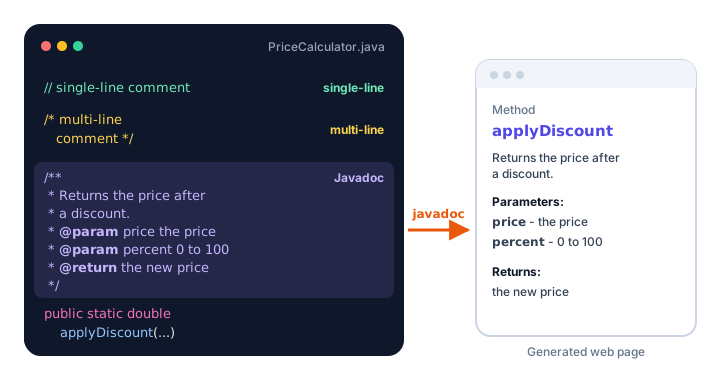
| Javadoc comment | /** text */ | Official documentation for classes and methods |
Single-line comments (//)
A single-line comment starts with two forward slashes //. Everything after them, up to the end of that line, is ignored. You can put one on its own line or at the end of a line of code:
public class CoffeeOrder {
    public static void main(String[] args) {
        // Print the order summary for the barista
        System.out.println("1 x Oat latte");     // large size
        System.out.println("1 x Blueberry muffin");
        System.out.println("Total: $8.75");      // tax included
    }
}
1 x Oat latte
1 x Blueberry muffin
Total: $8.75The output shows no trace of the comments. They're only in the source file.
Multi-line comments (/* */)
A multi-line comment starts with /* and ends with */. Everything between them is ignored, however many lines it covers. Programmers often start each middle line with a * to line things up, but that's just style.
public class LibraryReminder {
    public static void main(String[] args) {
        /*
         * Reminder messages are sent three days before a book is due.
         * The library closes on public holidays, so the due date on
         * the slip may be moved to the next opening day.
         */
        System.out.println("Your book \"Ocean Giants\" is due on Friday.");
        System.out.println("Renew online to keep it 14 more days.");
    }
}
Your book "Ocean Giants" is due on Friday.
Renew online to keep it 14 more days.You can also use /* */ for a short comment in the middle of a line, like System.out.println(/* greeting */ "Hi");, though it's rarely needed.
Javadoc comments (/** */)
A Javadoc comment starts with /** (two stars) and ends with */. You place it directly above a class or a method to describe what it does. Special tags starting with @ describe the details:
@param name descriptionexplains one input of a method.@return descriptionexplains the value the method gives back.
The program below has a small method of its own, applyDiscount, with a Javadoc comment above it. Methods are reusable blocks of code that you'll learn in Java Methods; for now, focus on the comment.
/**
 * Calculates prices for an online clothing store.
 */
public class PriceCalculator {
    public static void main(String[] args) {
        System.out.println(applyDiscount(80.0, 25));
        System.out.println(applyDiscount(19.99, 0));
    }

    /**
     * Returns the price after a percentage discount.
     *
     * @param price   the original price in dollars
     * @param percent the discount, from 0 to 100
     * @return the price after the discount
     */
    public static double applyDiscount(double price, int percent) {
        return price - price * percent / 100;
    }
}
60.0
19.99Why the special format? The JDK includes a tool called javadoc that reads these comments and builds a website of documentation from them:
javadoc -d docs PriceCalculator.javaThis creates a docs folder (javadoc may also print a warning or two about parts that have no comment yet, such as main; the pages are still created). Open its index.html in a browser to see your class described like an official reference page. The official documentation for Java's own classes, such as String, is generated exactly this way. Editors like IntelliJ IDEA and VS Code also show Javadoc in a pop-up when you hover over a method name.
💡 Tip
In most editors, type /** above a method and press Enter. The editor fills in a Javadoc skeleton with an @param line for each input and an @return line for you to complete.
How to comment out code
Comments are also handy for temporarily switching off code without deleting it. This is called commenting out. Here, the line with the promo message is disabled:
public class Checkout {
    public static void main(String[] args) {
        System.out.println("Cart: 3 items");
        // System.out.println("Promo: free shipping today!");
        System.out.println("Proceed to payment");
    }
}
Cart: 3 items
Proceed to paymentRemove the // and the line runs again. Most editors toggle comments on the selected lines with Ctrl + / (Cmd + / on a Mac).
⚠️ Be careful
Commented-out code is fine while you're testing, but don't leave piles of it in finished programs. It confuses readers ("is this needed?"). If you might need old code later, a version control tool like Git keeps the history for you.
Comment symbols inside a string are just text
Inside double quotes, // and /* are ordinary characters, not comments:
public class WebAddress {
    public static void main(String[] args) {
        System.out.println("Visit https://example.com/help");
        System.out.println("/* This is printed, not ignored */");
    }
}
Visit https://example.com/help
/* This is printed, not ignored */When should you write a comment?
Good comments explain why the code does something, or warn about something surprising. Bad comments repeat what the code already says clearly.
| Unhelpful comment | Helpful comment |
|---|---|
// print the total above a line that prints the total | // Total includes the $2 bag fee required by city law |
// set count to 0 | // Start at 0 because the first seat row is row 0 |
| A comment that no longer matches the code | A Javadoc comment on each public method |
The best first step is clear naming (see Java Syntax). A variable called secondsUntilBoarding needs no comment; one called s does.
Common mistakes with Java comments
1. Forgetting to close a multi-line comment
If you start /* and never write */, everything after it becomes part of the comment, including your closing braces. The compiler reports error: unclosed comment.
2. Nesting multi-line comments
/* outer /* inner */ still outer */Java doesn't support nested /* */ comments. The first */ ends the whole comment, so still outer */ is treated as code and causes an error. Use // on each line if you need to comment out code that already contains a /* */ comment.
3. Writing \u in a comment
This one surprises even experienced developers. Java reads \u followed by four hexadecimal digits as a special Unicode character code, even inside comments. So a comment like // saved in C:\users\sam fails with error: illegal unicode escape. Write paths in comments with forward slashes, such as C:/users/sam.
4. Letting comments go stale
If you change the code, update the comment too. A comment that says "10% discount" above code that applies 15% is worse than no comment at all.
Practice exercise
🏋️ Try it yourself
Write a program WeatherReport.java that prints three lines of a weather report. Add a Javadoc comment above the class, a multi-line comment explaining where the data comes from, a single-line comment at the end of one statement, and comment out a fourth line about the UV index so it doesn't print.
Show solution
/**
 * Prints today's weather report for the city dashboard.
 */
public class WeatherReport {
    public static void main(String[] args) {
        /*
         * Values are copied from the morning forecast.
         * They will come from a weather service later.
         */
        System.out.println("City: Toronto");
        System.out.println("Temperature: 12 C");  // feels like 9 C
        System.out.println("Chance of rain: 40%");
        // System.out.println("UV index: 3");
    }
}
City: Toronto
Temperature: 12 C
Chance of rain: 40%All three comment types are ignored by the compiler, and the commented-out UV line doesn't print.
What's next?
Congratulations, you've finished the Getting Started chapter! You can install Java, write and run programs, explain how the JVM works, follow the syntax rules and document your code. Next, start storing data in your programs with Java Variables.
Key takeaways
- Comments are notes for humans; the Java compiler ignores them completely.
- Use // for a single-line comment, either on its own line or at the end of a line of code.
- Use /* and */ for a comment that spans several lines; these comments cannot be nested.
- Javadoc comments start with /** and use tags like @param and @return; the javadoc tool turns them into HTML documentation.
- Commenting out code with // is a quick way to disable lines while testing.
- Good comments explain why the code does something; clear names often make "what" comments unnecessary.
Frequently asked questions
How do you write a comment in Java?
Start a single-line comment with //, or wrap a multi-line comment between /* and */. For documentation, use a Javadoc comment that starts with /** and ends with */.
What is the difference between /* */ and /** */ in Java?
Both are ignored by the compiler. /* */ is a regular multi-line comment, while /** */ is a Javadoc comment that the javadoc tool reads to generate HTML documentation for classes and methods.
Do comments slow down a Java program?
No. The compiler throws comments away before creating bytecode, so they are not in the .class file and have no effect on speed or size at runtime.
Can you nest comments in Java?
You cannot nest /* */ comments, because the first */ ends the comment. You can, however, put // inside a /* */ comment or comment out several lines with // on each line.
What is the shortcut to comment out code in Java?
In IntelliJ IDEA, VS Code and Eclipse, select the lines and press Ctrl + / (Cmd + / on a Mac) to add or remove // at the start of each line.