Java If Else
Updated 7 min read Aimerscrew
Every useful program has to make decisions. Should the heater turn on? Did the student pass? Does this order get free shipping? In Java, you make decisions with the if else statement. In this lesson, you'll learn how Java if else works, how to chain several choices with else if, when to nest one if inside another, and which small mistakes cause the biggest headaches.
🌍 Real-life example
A smart thermostat follows simple rules all day long: if the room is colder than 19°C, turn the heating on; else if it's warmer than 24°C, turn the cooling on; else do nothing. That is exactly the shape of an if, else if, else chain in Java.
What is an if statement in Java?
An if statement runs a block of code only when a condition is true. The condition goes inside parentheses and must be a boolean expression, which means something that is either true or false, such as temperature < 19. The code to run goes inside curly braces { }, which form a block.
if (condition) {
    // runs only when condition is true
}
Here's a complete program. Try changing temperature to 22 and run it again.
public class Thermostat {
    public static void main(String[] args) {
        int temperature = 16;

        if (temperature < 19) {
            System.out.println("It's chilly. Heating ON.");
        }

        System.out.println("Thermostat check complete.");
    }
}
It's chilly. Heating ON.
Thermostat check complete.The last line always prints, because it sits outside the if block. Only the line inside the braces depends on the condition. The conditions themselves use the comparison operators you already know: <, >, <=, >=, == and !=.
How do you add an else block?
Often you want to do one thing when the condition is true and something different when it's false. That's what else is for. Exactly one of the two blocks runs, never both and never neither.
public class LoginCheck {
    public static void main(String[] args) {
        int failedAttempts = 3;

        if (failedAttempts >= 3) {
            System.out.println("Account locked. Please reset your password.");
        } else {
            System.out.println("You can try again.");
        }
    }
}
Account locked. Please reset your password.Using else if for more than two choices
When there are three or more possible paths, chain them with else if. Java tests each condition from top to bottom. As soon as one is true, it runs that block and skips the rest of the chain. The final else is optional and catches everything that didn't match.
public class ThermostatModes {
    public static void main(String[] args) {
        int temperature = 26;

        if (temperature < 19) {
            System.out.println("Mode: HEATING");
        } else if (temperature > 24) {
            System.out.println("Mode: COOLING");
        } else {
            System.out.println("Mode: IDLE");
        }
    }
}
Mode: COOLING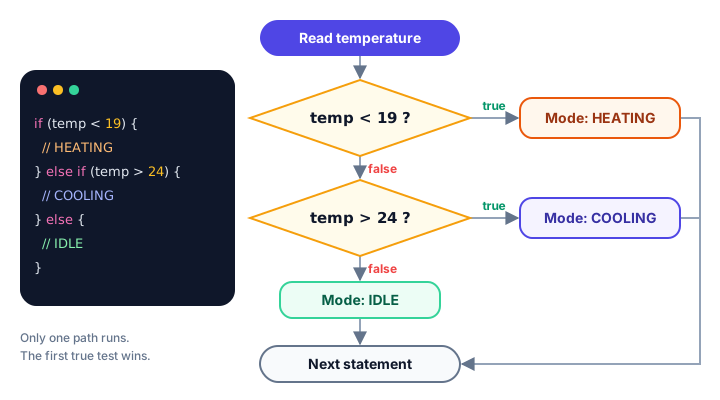
Why does the order of conditions matter?
Because Java stops at the first true condition, the order of your else if branches changes the result. A grading program is the classic example. Start with the highest score and work down:
public class GradeBook {
    public static void main(String[] args) {
        int score = 84;
        char grade;

        if (score >= 90) {
            grade = 'A';
        } else if (score >= 80) {
            grade = 'B';
        } else if (score >= 70) {
            grade = 'C';
        } else if (score >= 60) {
            grade = 'D';
        } else {
            grade = 'F';
        }

        System.out.println("Score " + score + " earns a " + grade);
    }
}
Score 84 earns a BA score of 84 fails the first test (84 >= 90) and passes the second, so the grade is B. Java never even looks at the >= 70 branch. If you had put score >= 60 first, every passing student would get a D!
Notice also that grade is declared before the chain without a value. That's fine, because the final else guarantees one branch always assigns it. Remove the else and the compiler complains that grade "might not have been initialized".
Combining conditions with && and ||
One condition can check several things at once using the logical operators: && (and), || (or) and ! (not).
public class RideCheck {
    public static void main(String[] args) {
        int heightCm = 128;
        boolean withAdult = true;

        if (heightCm >= 140 || (heightCm >= 120 && withAdult)) {
            System.out.println("Enjoy the roller coaster!");
        } else {
            System.out.println("Sorry, not tall enough yet.");
        }
    }
}
Enjoy the roller coaster!What is a nested if statement?
A nested if is an if statement placed inside another if or else block. Use it when the second question only makes sense after the first one is answered. For example, a store might first ask "is this a domestic order?" and only then look at the order total.
public class ShippingCost {
    public static void main(String[] args) {
        boolean domestic = true;
        double orderTotal = 42.50;
        double shipping;

        if (domestic) {
            if (orderTotal >= 50) {
                shipping = 0.0;
            } else {
                shipping = 4.99;
            }
        } else {
            shipping = 19.99;
        }

        System.out.println("Order total: $" + orderTotal);
        System.out.println("Shipping:    $" + shipping);
        System.out.println("You pay:     $" + (orderTotal + shipping));
    }
}
Order total: $42.5
Shipping: $4.99
You pay: $47.49Indent each nested level by four spaces so you can see at a glance which else belongs to which if. If you find yourself three or four levels deep, it's usually clearer to flatten the logic into an else if chain with &&.
💡 Tip
To print money nicely as $42.50 instead of $42.5, use System.out.printf("%.2f", orderTotal), which you met in Java output formatting.
Do you always need curly braces?
Technically, no. If an if or else block contains a single statement, Java lets you leave out the braces:
if (score >= 60) System.out.println("Passed");
else System.out.println("Try again");
But it's a trap. Without braces, only the first statement belongs to the if. Look at this program, where the indentation lies about what the code does:
public class MissingBraces {
    public static void main(String[] args) {
        int balance = 500;

        if (balance < 100)
            System.out.println("Low balance warning!");
            System.out.println("Sending alert email...");

        System.out.println("Balance: " + balance);
    }
}
Sending alert email...
Balance: 500The balance is fine, yet the alert email line still runs, because it was never part of the if. Most professional teams have a simple rule: always use braces, even for one line.
How do you compare Strings in an if?
Use .equals(), not ==. As you saw in Java string comparison, == checks whether two variables point to the same object, not whether the text matches.
public class CouponCheck {
    public static void main(String[] args) {
        String coupon = "save10";
        double price = 80.0;

        if (coupon.equalsIgnoreCase("SAVE10")) {
            price = price * 0.90;
            System.out.println("Coupon applied!");
        } else {
            System.out.println("Unknown coupon.");
        }
        System.out.println("Price: " + price);
    }
}
Coupon applied!
Price: 72.0Common mistakes with Java if else
1. Using = instead of ==
A single = assigns; it doesn't compare. Writing if (count = 5) with an int doesn't even compile:
error: incompatible types: int cannot be converted to booleanJava requires a boolean condition, which saves you from a bug that is common in C.
2. A semicolon right after the condition
if (temperature < 19); {
    System.out.println("Heating ON");   // always runs!
}
The semicolon ends the if statement with an empty body. The block below then runs every time. Never put ; between ) and {.
3. Conditions in the wrong order
In an else if chain, put the most specific (or highest) test first. A broad test at the top swallows every case below it.
4. Comparing Strings with ==
if (answer == "yes") may work in a quick test and then fail with text typed by a user. Always write answer.equals("yes").
Practice exercise
🏋️ Try it yourself
A cinema prices tickets by age: children under 12 pay $6, people aged 65 or over pay $7, and everyone else pays $12. On Tuesdays, everyone gets $2 off. Write a program with an int age and a boolean isTuesday that prints the ticket price. Test it with age 70 on a Tuesday.
Show solution
public class CinemaTicket {
    public static void main(String[] args) {
        int age = 70;
        boolean isTuesday = true;
        int price;

        if (age < 12) {
            price = 6;
        } else if (age >= 65) {
            price = 7;
        } else {
            price = 12;
        }

        if (isTuesday) {
            price = price - 2;
        }

        System.out.println("Ticket price: $" + price);
    }
}
Ticket price: $5What's next?
Long else if chains that compare one variable against many fixed values can get repetitive. Next, learn the Java switch statement, a cleaner way to pick one option out of many.
Key takeaways
- An if statement runs its block only when its boolean condition is true.
- Add else to run a different block when the condition is false; exactly one of the two runs.
- In an else if chain, Java checks conditions top to bottom and runs only the first one that is true.
- The order of else if branches matters: put the most specific or highest test first.
- A nested if is an if inside another if; keep nesting shallow and indent clearly.
- Always use curly braces, even for one statement, and never put a semicolon right after the condition.
- Compare Strings in conditions with equals(), not ==.
Frequently asked questions
What is the syntax of if else in Java?
Write if (condition) { ... } else { ... }. The condition must be a boolean expression. The first block runs when it is true and the else block runs when it is false.
How many else if blocks can I use in Java?
As many as you need. Java checks them in order and runs only the first block whose condition is true. If none match, the final else runs, if there is one.
Is else required after if in Java?
No. An if can stand alone. Without else, nothing special happens when the condition is false; the program simply continues with the next statement.
Can I use an int as an if condition in Java?
No. Unlike C, Java only accepts boolean conditions. Write if (count != 0) instead of if (count).
When should I use switch instead of if else in Java?
Use switch when you compare one value against several fixed options, such as a day name or a menu number. Use if else for ranges and for conditions that combine several variables.