Java Method Overloading
Updated 8 min read Aimerscrew
Imagine having to remember printInt, printDouble, printString and printBoolean just to show different kinds of values. Luckily, Java lets you write System.out.println for all of them. The trick behind this is Java method overloading: giving several methods the same name as long as their parameter lists differ. In this lesson, you'll learn how to overload your own methods, exactly how Java decides which version to call, and the rules that trip beginners up.
🌍 Real-life example
At a supermarket self-checkout, you can "pay" by card, with cash, or with card plus a coupon. It's always the same action, "pay", but the machine does something slightly different depending on what you hand it. Overloaded methods work the same way: one name, several versions, chosen by the inputs.
What is method overloading in Java?
Method overloading means having two or more methods in the same class with the same name but a different parameter list. The parameter lists can differ in:
- the number of parameters,
- the types of the parameters, or
- the order of the parameter types.
The method name plus its parameter types is called the method's signature. Overloaded methods share a name but have different signatures.
public class AreaCalculator {
    public static void main(String[] args) {
        System.out.println("Square: " + area(4.0));
        System.out.println("Rectangle: " + area(4.0, 2.5));
        System.out.println("Box floor: " + area(3, 5));
    }

    public static double area(double side) {
        return side * side;
    }

    public static double area(double width, double height) {
        return width * height;
    }

    public static int area(int width, int height) {
        return width * height;
    }
}
Square: 16.0
Rectangle: 10.0
Box floor: 15All three methods are called area. Java looks at the arguments in each call and runs the version that fits: one double, two doubles, or two ints.
Overloading by number of parameters
A common use is offering a "short" version with sensible defaults and a "full" version with more control. Here, a playlist method can play one song, or a song a certain number of times:
public class Playlist {
    public static void main(String[] args) {
        play("Blinding Lights");
        play("Levitating", 2);
    }

    public static void play(String song) {
        play(song, 1);
    }

    public static void play(String song, int times) {
        for (int i = 1; i <= times; i++) {
            System.out.println("Now playing: " + song + " (" + i + "/" + times + ")");
        }
    }
}
Now playing: Blinding Lights (1/1)
Now playing: Levitating (1/2)
Now playing: Levitating (2/2)Notice that the one-parameter version simply calls the two-parameter version with 1. This is a neat pattern: the real work lives in one place, and the shorter overload just fills in a default value.
Overloading by parameter type
Methods can also share a name and number of parameters as long as the types differ:
public class Describer {
    public static void main(String[] args) {
        describe(42);
        describe("parking lot");
        describe(true);
        describe(9.75);
    }

    public static void describe(int number) {
        System.out.println("An int: " + number);
    }

    public static void describe(String text) {
        System.out.println("A String with " + text.length() + " characters");
    }

    public static void describe(boolean flag) {
        System.out.println("A boolean: " + flag);
    }

    public static void describe(double number) {
        System.out.println("A double: " + number);
    }
}
An int: 42
A String with 11 characters
A boolean: true
A double: 9.75Changing the order of differently typed parameters also counts, so book(String name, int seats) and book(int seats, String name) can live side by side. It's legal, but it makes calls easy to confuse, so use it sparingly.
println: overloading you already use
System.out.println isn't one method; it's a family of overloads. The Java library defines separate versions for int, long, double, float, char, boolean, char[], String, Object, and one with no parameters at all that just prints a line break.
public class PrintlnFamily {
    public static void main(String[] args) {
        char[] letters = {'J', 'a', 'v', 'a'};

        System.out.println(7);          // println(int)
        System.out.println(7.5);        // println(double)
        System.out.println('A');        // println(char)
        System.out.println(false);      // println(boolean)
        System.out.println(letters);    // println(char[])
        System.out.println();           // println() - empty line
        System.out.println("Done");     // println(String)
    }
}
7
7.5
A
false
Java
DoneThe char[] version prints the characters as a word. That's why println(letters) shows Java instead of something unreadable.
How does Java choose which overloaded method to call?
When you call an overloaded method, the compiler picks the version before the program runs, using the types of the arguments. It searches in steps and stops at the first step that finds a match:
- Exact match: a version whose parameter types are exactly the argument types.
- Widening: a version that works if Java widens a primitive to a bigger type (
byte→short→int→long→float→double, andchar→int). If several work, it picks the closest one. - Boxing: turning a primitive into its wrapper object (like
inttoInteger; you'll meet these in wrapper classes). - Varargs: a version with a
...parameter, as a last resort.
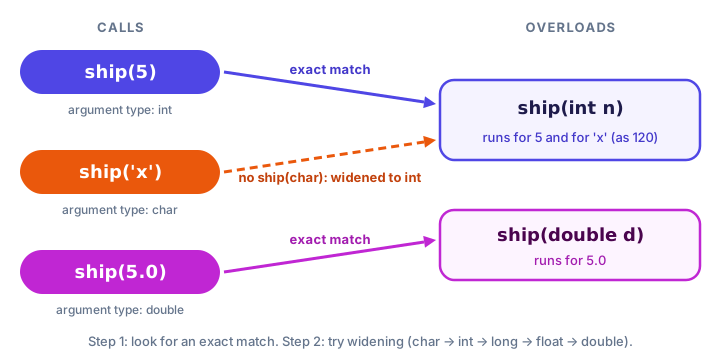
char argument widens to int, the closest fit.Let's watch the rules in action. There's no show(int) here, so the int arguments must be widened:
public class WideningPicker {
    public static void main(String[] args) {
        int seats = 5;
        float price = 9.5f;
        char grade = 'B';

        show(seats);
        show(price);
        show(grade);
        show(10_000_000_000L);
    }

    public static void show(long value) {
        System.out.println("show(long): " + value);
    }

    public static void show(double value) {
        System.out.println("show(double): " + value);
    }
}
show(long): 5
show(double): 9.5
show(long): 66
show(long): 10000000000An int can widen to long or double; long is closer, so it wins. A float can only widen to double. A char widens to int, then long, so it prints as the number 66 (the character code of 'B'). That surprise is worth remembering!
⚠️ Ambiguous calls
If two versions fit equally well, Java refuses to guess. With add(int a, double b) and add(double a, int b), the call add(1, 2) fails with error: reference to add is ambiguous. Fix it by passing arguments that match one version exactly, such as add(1, 2.0).
Can you overload a method by return type only?
No. Two methods that differ only in their return type are not overloads; Java treats them as the same method defined twice:
public static int parse(String text) { ... }
public static double parse(String text) { ... }   // error
error: method parse(String) is already defined in class ParserThe reason is simple: a call like parse("42"); on its own line doesn't use the result, so Java would have no way to know which one you meant. The same goes for parameter names: area(double w) and area(double side) have the same signature and clash.
| Change between two methods | Valid overload? |
|---|---|
| Number of parameters | Yes |
| Types of parameters | Yes |
| Order of parameter types | Yes (but can be confusing) |
| Only the return type | No |
| Only the parameter names | No |
Real-world example: formatting a delivery time
Here's a small food delivery helper with three overloads. Each one builds on the others, so the formatting logic is written once:
public class DeliveryEta {
    public static void main(String[] args) {
        System.out.println(formatEta(45));
        System.out.println(formatEta(1, 20));
        System.out.println(formatEta(95, "Rider Sam"));
    }

    public static String formatEta(int minutes) {
        return formatEta(minutes / 60, minutes % 60);
    }

    public static String formatEta(int hours, int minutes) {
        if (hours == 0) {
            return "Arriving in " + minutes + " min";
        }
        return "Arriving in " + hours + " h " + minutes + " min";
    }

    public static String formatEta(int minutes, String rider) {
        return formatEta(minutes) + " with " + rider;
    }
}
Arriving in 45 min
Arriving in 1 h 20 min
Arriving in 1 h 35 min with Rider SamCommon mistakes with method overloading
1. Trying to overload by return type
Different return types alone produce "already defined" errors. Change the parameter list, or give the methods different names such as parseInt and parseDouble.
2. Being surprised by widening
As you saw, a char argument can silently end up in an int or long version. If a call prints a number where you expected a letter, check which overload actually ran.
3. Overloads that do unrelated things
Overloads should all do the same job with different inputs. If save(String) saves a file but save(int) deletes a record, give them different names.
Practice exercise
🏋️ Try it yourself
Create three overloaded methods named biggest: one returns the larger of two ints, one returns the largest of three ints (reuse the first!), and one returns the larger of two doubles. Call each version and print the results for these game scores: (310, 275), (310, 275, 402) and (88.5, 91.25).
Show solution
public class HighScore {
    public static void main(String[] args) {
        System.out.println(biggest(310, 275));
        System.out.println(biggest(310, 275, 402));
        System.out.println(biggest(88.5, 91.25));
    }

    public static int biggest(int a, int b) {
        if (a > b) {
            return a;
        }
        return b;
    }

    public static int biggest(int a, int b, int c) {
        return biggest(biggest(a, b), c);
    }

    public static double biggest(double a, double b) {
        if (a > b) {
            return a;
        }
        return b;
    }
}
310
402
91.25What's next?
You've seen that parameters and local variables only live inside their method. Next, learn exactly where each variable can be used, and for how long, in Java variable scope.
Key takeaways
- Method overloading means several methods with the same name but different parameter lists.
- Parameter lists can differ in number, types or order of types.
- Java chooses the overload at compile time: exact match first, then widening, then boxing, then varargs.
- When two overloads fit equally well, the call is ambiguous and will not compile.
- Return type alone, or parameter names alone, cannot distinguish overloads.
- System.out.println is a real example: it has separate versions for int, double, char, boolean, String and more.
Frequently asked questions
What is method overloading in Java?
It is defining multiple methods with the same name in one class, each with a different parameter list. Java picks which one to run based on the arguments in the call.
Can we overload a method by changing only the return type?
No. Methods that differ only in return type have the same signature, so Java reports that the method is already defined. The parameter list must be different.
Can the main method be overloaded?
Yes, you can write other methods named main with different parameters. However, the JVM only starts the program from public static void main(String[] args).
What is the difference between overloading and overriding?
Overloading is several methods with the same name and different parameters in the same class, chosen at compile time. Overriding is a subclass replacing an inherited method with the same signature, which you will learn in the inheritance and polymorphism lessons.
Why is my overloaded method call ambiguous?
Two or more overloads fit the arguments equally well after widening, so the compiler cannot choose. Pass arguments whose types match one version exactly, or use a cast.