Java Break and Continue
Updated 7 min read Aimerscrew
Loops normally run until their condition becomes false. But sometimes you find what you were looking for halfway through, or you hit an item you want to ignore. Java break and continue give you that control: break leaves a loop early, and continue skips just one round. In this lesson, you'll learn both, see how break behaves inside a switch, and use a labeled break to escape nested loops.
🌍 Real-life example
Walking down a parking garage looking for a space: when you find a free one, you stop searching. That's break. Checking your email inbox and skipping every spam message without reading it, but carrying on with the rest: that's continue.
What does break do in a Java loop?
The break statement ends the loop it's in immediately. Java jumps to the first line after the loop, ignoring the condition and any remaining iterations.
In the examples below, a row of airplane seats is stored as a String: X means taken and O means open. The loop checks seats one by one and stops at the first open one.
public class FirstFreeSeat {
    public static void main(String[] args) {
        String row = "XXXOXXOX";   // X = taken, O = open
        int freeSeat = -1;

        for (int i = 0; i < row.length(); i++) {
            System.out.println("Checking seat " + (i + 1));
            if (row.charAt(i) == 'O') {
                freeSeat = i + 1;
                break;
            }
        }

        System.out.println("First free seat: " + freeSeat);
    }
}
Checking seat 1
Checking seat 2
Checking seat 3
Checking seat 4
First free seat: 4Seats 5 to 8 were never checked. Why waste time once you have an answer? The value -1 is a common way to say "not found yet", since no real seat has that number.
What does continue do in a Java loop?
The continue statement skips the rest of the current iteration and jumps to the next one. In a for loop, the update (i++) still runs, then the condition is checked as usual. The loop itself keeps going.
public class OpenSeats {
    public static void main(String[] args) {
        String row = "XXXOXXOX";

        for (int i = 0; i < row.length(); i++) {
            if (row.charAt(i) == 'X') {
                continue;   // taken: skip to the next seat
            }
            System.out.println("Seat " + (i + 1) + " is open");
        }
    }
}
Seat 4 is open
Seat 7 is open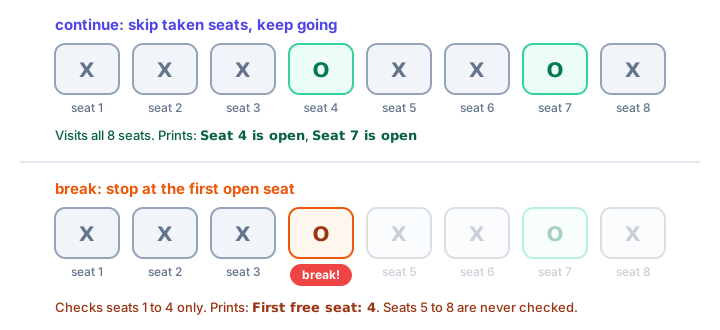
break vs continue at a glance
break | continue | |
|---|---|---|
| What it does | Ends the loop completely | Skips to the next iteration |
| Code after it in the body | Skipped | Skipped (this iteration only) |
| Remaining iterations | Never run | Still run |
| Works in switch | Yes, leaves the switch | No (only in loops) |
| Typical use | Stop searching once found | Ignore items you don't care about |
Using break with while (true)
Some loops are easiest to write as "repeat forever" with the exit condition in the middle. while (true) creates an intentional infinite loop, and break is the way out. Here's the savings goal from the while loop lesson written that way:
public class SavingsBreak {
    public static void main(String[] args) {
        int balance = 0;
        int months = 0;

        while (true) {
            balance += 150;
            months++;
            if (balance >= 1000) {
                break;
            }
        }

        System.out.println("Reached $" + balance + " after " + months + " months");
    }
}
Reached $1050 after 7 monthsThis style shines in game loops and menus where the exit can happen in several places. When there's one clear condition, a normal while (balance < 1000) is easier to read.
Using continue in a while loop
In a while loop, continue jumps straight back to the condition. That means any update written after the continue is skipped too. Put the update first:
public class OddTickets {
    public static void main(String[] args) {
        int ticket = 0;

        while (ticket < 10) {
            ticket++;               // update first!
            if (ticket % 2 == 0) {
                continue;           // even tickets go to the other queue
            }
            System.out.println("Now serving ticket " + ticket);
        }
    }
}
Now serving ticket 1
Now serving ticket 3
Now serving ticket 5
Now serving ticket 7
Now serving ticket 9If ticket++ were at the bottom of the body, the first even number would trigger continue forever and the program would never end.
break inside a switch inside a loop
Here's a trap. In a classic switch, break leaves the switch, not the loop around it. This music player is supposed to stop at Q, but it doesn't:
public class MusicPlayerBug {
    public static void main(String[] args) {
        String buttons = "PNQN";   // Play, Next, Quit, Next

        for (int i = 0; i < buttons.length(); i++) {
            switch (buttons.charAt(i)) {
                case 'P':
                    System.out.println("Playing");
                    break;
                case 'N':
                    System.out.println("Next track");
                    break;
                case 'Q':
                    System.out.println("Quit pressed");
                    break;   // only leaves the switch!
            }
        }
    }
}
Playing
Next track
Quit pressed
Next trackAfter "Quit pressed", the loop happily carried on. To leave the loop from inside a switch, you need a labeled break.
What is a labeled break in Java?
A label is a name followed by a colon, placed right before a loop, such as player:. Writing break player; ends that loop, no matter how deeply nested the break is.
public class MusicPlayer {
    public static void main(String[] args) {
        String buttons = "PNQN";

        player:
        for (int i = 0; i < buttons.length(); i++) {
            switch (buttons.charAt(i)) {
                case 'P' -> System.out.println("Playing");
                case 'N' -> System.out.println("Next track");
                case 'Q' -> {
                    System.out.println("Quitting player");
                    break player;
                }
                default -> System.out.println("Unknown button");
            }
        }
        System.out.println("Player closed");
    }
}
Playing
Next track
Quitting player
Player closedBreaking out of nested loops
The most common use of a label is escaping nested loops (a loop inside a loop). A plain break only ends the inner loop. Here, a small cinema has 3 rows of 4 seats stored in one String, row after row, so the seat at row r, column c sits at position r * 4 + c. We want the first free seat, then stop completely:
public class CinemaSearch {
    public static void main(String[] args) {
        String seats = "XXXX" + "XXOX" + "XXXO";
        int rows = 3;
        int cols = 4;
        int checks = 0;

        search:
        for (int r = 0; r < rows; r++) {
            for (int c = 0; c < cols; c++) {
                checks++;
                if (seats.charAt(r * cols + c) == 'O') {
                    System.out.println("Free seat: row " + (r + 1) + ", seat " + (c + 1));
                    break search;
                }
            }
        }

        System.out.println("Seats checked: " + checks);
    }
}
Free seat: row 2, seat 3
Seats checked: 7Without the label, break would only end the inner loop for row 2, and the outer loop would move on to row 3 and report a second seat. You'll practice more with nested loops in the next lesson. (There's also a labeled continue label;, which skips to the next iteration of the labeled outer loop. It's rarer, but good to recognize.)
💡 Tip
Use break and continue to make loops simpler, not cleverer. If a loop has three different breaks and two continues, it's probably time to rethink the condition. Later, when you learn Java methods, a return from a search method is often the cleanest way out of nested loops.
Common mistakes with break and continue
1. Expecting break in a switch to end the loop
It only ends the switch. Use a labeled break, or a boolean flag that the loop condition checks.
2. Skipping the update with continue
In a while loop, an update placed after continue never runs on skipped rounds, which can cause an infinite loop.
3. Using continue outside a loop
continue is only allowed inside loops. Using it in a plain switch or if causes the error continue outside of loop.
4. Code after break that never runs
A statement right after break; in the same block can never be reached, and Java refuses to compile it with unreachable statement.
Practice exercise
🏋️ Try it yourself
A delivery driver has stops numbered 1 to 10. Stops 4 and 7 are cancelled and must be skipped. The van runs out of fuel after stop 8, so the route must end there. Use continue and break to print each stop delivered, then print how many deliveries were made.
Show solution
public class DeliveryRoute {
    public static void main(String[] args) {
        int delivered = 0;

        for (int stop = 1; stop <= 10; stop++) {
            if (stop == 4 || stop == 7) {
                continue;
            }
            System.out.println("Delivered to stop " + stop);
            delivered++;
            if (stop == 8) {
                System.out.println("Out of fuel!");
                break;
            }
        }

        System.out.println("Deliveries made: " + delivered);
    }
}
Delivered to stop 1
Delivered to stop 2
Delivered to stop 3
Delivered to stop 5
Delivered to stop 6
Delivered to stop 8
Out of fuel!
Deliveries made: 6What's next?
You've seen a loop inside a loop with the labeled break. Next, dive into Java nested loops to print patterns, build grids and understand how quickly loops inside loops add up.
Key takeaways
- break ends the nearest loop or switch immediately and continues after it.
- continue skips the rest of the current iteration and moves on to the next one.
- In a for loop, continue still runs the update; in a while loop, put the update before continue.
- Inside a classic switch, break only leaves the switch, not the surrounding loop.
- A labeled break such as break search; ends the labeled outer loop, which is handy for nested loops.
- while (true) with break is a common pattern when the exit condition sits in the middle of the loop.
Frequently asked questions
What is the difference between break and continue in Java?
break ends the whole loop immediately. continue only skips the rest of the current iteration and lets the loop carry on with the next one.
Does break exit all loops in Java?
No. A plain break exits only the innermost loop or switch it is in. To exit an outer loop, label it and use break label;.
What is a labeled break in Java?
A break that names a loop label, for example outer: for (...) { for (...) { break outer; } }. It ends the labeled loop, even from inside nested loops.
Can I use continue in a switch statement?
Only if the switch is inside a loop; then continue moves to the next iteration of that loop. A continue outside any loop is a compile error.
Is using break in a loop bad practice?
No. break is the clearest way to stop a search once you have found the answer. Just avoid many scattered breaks that make the loop hard to follow.