Java String Methods
Updated 10 min read Aimerscrew
Real-world text is messy. Users type their names in ALL CAPS, add stray spaces to email addresses, and paste product codes with dashes in odd places. Java string methods are the built-in tools that clean up, search and reshape that text. In this lesson, you'll learn the methods you'll use almost every day, each with a short, practical example.
🌍 Real-life example
When you sign up for an online store, the site quietly tidies up what you typed. It strips the spaces around your email, turns Maya@Example.COM into lowercase, checks that it contains an @, and splits your full name into first and last name. Every one of those steps is a string method.
How do you call a string method?
A method is a named action that an object can perform. You call a string method by writing the string (or a variable holding it), a dot, the method name and parentheses: city.toUpperCase(). Some methods need extra information inside the parentheses, called arguments, such as email.indexOf("@").
Remember from Java strings that strings are immutable. None of these methods change the original string; they all return a new value that you can print or store.
Changing case and removing spaces
toUpperCase() and toLowerCase()
These two methods return a copy of the string with every letter in uppercase or lowercase. They're perfect for displaying headings or for comparing text without worrying about capitals.
public class ChangeCase {
    public static void main(String[] args) {
        String city = "New York";

        System.out.println(city.toUpperCase());
        System.out.println(city.toLowerCase());
        System.out.println(city); // the original is unchanged
    }
}
NEW YORK
new york
New Yorktrim() and strip(): removing extra spaces
Both trim() and strip() remove whitespace (spaces, tabs, line breaks) from the start and end of a string. Spaces in the middle stay. stripLeading() removes only the front, and stripTrailing() only the back.
public class TrimAndStrip {
    public static void main(String[] args) {
        String typed = "   jordan_88   ";

        System.out.println("[" + typed + "]");
        System.out.println("[" + typed.trim() + "]");
        System.out.println("[" + typed.strip() + "]");
        System.out.println("[" + typed.stripLeading() + "]");
        System.out.println("[" + typed.stripTrailing() + "]");
    }
}
[ jordan_88 ]
[jordan_88]
[jordan_88]
[jordan_88 ]
[ jordan_88]So what's the difference? trim() is older and only removes basic characters such as the regular space. strip() (added in Java 11) understands all kinds of Unicode whitespace, such as the wide "em space" that often sneaks in when people copy text from documents or websites:
public class UnicodeSpace {
    public static void main(String[] args) {
        String pasted = "\u2003Lisbon\u2003"; // em spaces, common in copied text

        System.out.println("trim():  length " + pasted.trim().length());
        System.out.println("strip(): length " + pasted.strip().length());
    }
}
trim(): length 8
strip(): length 6💡 Tip
In new code, prefer strip(). It does everything trim() does and handles international text correctly.
isEmpty() and isBlank()
isEmpty() returns true only when a string has zero characters. isBlank() returns true when a string is empty or contains only whitespace. A form field where someone just pressed the space bar is blank, but not empty.
public class EmptyOrBlank {
    public static void main(String[] args) {
        String nothing = "";
        String spaces = "    ";
        String note = "Leave at the door";

        System.out.println(nothing.isEmpty() + " " + nothing.isBlank());
        System.out.println(spaces.isEmpty() + " " + spaces.isBlank());
        System.out.println(note.isEmpty() + " " + note.isBlank());
    }
}
true true
false true
false falseHow do you find and cut out text in a Java string?
indexOf() and lastIndexOf(): finding text
indexOf() returns the index where a character or piece of text first appears. lastIndexOf() returns where it appears last. If the text isn't found at all, both return -1.
public class FindText {
    public static void main(String[] args) {
        String file = "beach.trip.2024.jpg";

        System.out.println(file.indexOf('.'));
        System.out.println(file.lastIndexOf('.'));
        System.out.println(file.substring(file.lastIndexOf('.') + 1));
        System.out.println(file.indexOf("trip"));
        System.out.println(file.indexOf("png"));
    }
}
5
15
jpg
6
-1Finding the last dot is the reliable way to get a file extension, because file names can contain several dots. The third line uses substring(), which is next.
substring(): cutting out part of a string
substring(start, end) returns the characters from index start up to, but not including, index end. With only one argument, substring(start) returns everything from start to the end. Combined with indexOf(), it can split an email address into its two halves.
public class EmailParts {
    public static void main(String[] args) {
        String email = "maya.ross@example.com";
        int at = email.indexOf('@');

        String user = email.substring(0, at);
        String domain = email.substring(at + 1);

        System.out.println("@ is at index " + at);
        System.out.println("User: " + user);
        System.out.println("Domain: " + domain);
    }
}
@ is at index 9
User: maya.ross
Domain: example.com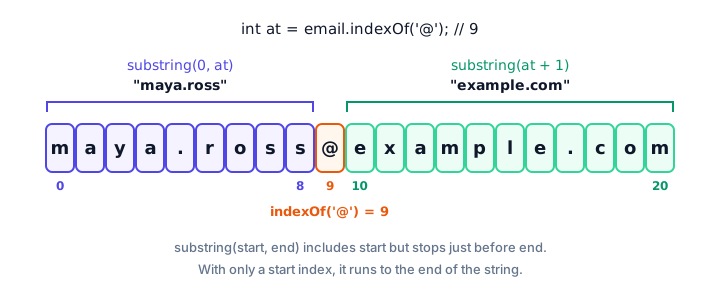
A handy rule: the length of substring(start, end) is always end - start. Here, 9 - 0 = 9 characters.
contains(), startsWith() and endsWith()
These methods answer yes-or-no questions about a string and return a boolean. Warehouses and online shops use them all the time to check product codes.
public class ProductCode {
    public static void main(String[] args) {
        String code = "UK-ELEC-2041";

        System.out.println(code.contains("ELEC"));
        System.out.println(code.startsWith("UK-"));
        System.out.println(code.startsWith("US-"));
        System.out.println(code.endsWith("2041"));
        System.out.println(code.contains("elec")); // case matters
    }
}
true
true
false
true
falseAll string searches are case-sensitive. To search without caring about capitals, convert both sides first: code.toLowerCase().contains("elec").
replace(): swapping text
replace(old, new) returns a new string where every match of old is swapped for new. It works with single characters or whole pieces of text.
public class ReplaceText {
    public static void main(String[] args) {
        String phone = "555-013-4889";
        System.out.println(phone.replace("-", ""));
        System.out.println(phone.replace('-', ' '));

        String message = "Your order is late. Sorry, it is late again.";
        System.out.println(message.replace("late", "on its way"));
    }
}
5550134889
555 013 4889
Your order is on its way. Sorry, it is on its way again.📝 Note
You may also see replaceAll(). It treats its first argument as a regular expression (a pattern language), where characters like . and * have special meanings. For plain text, replace() is simpler and safer.
Splitting, joining and repeating strings
split() and String.join()
split() breaks a string into pieces wherever a separator appears and returns them as an array: a numbered list of values. You'll study arrays properly in Java arrays; for now, know that items[0] is the first piece and items.length is how many pieces there are.
public class SplitList {
    public static void main(String[] args) {
        String groceries = "milk,eggs,bread,coffee";
        String[] items = groceries.split(",");

        System.out.println("Number of items: " + items.length);
        System.out.println("First item: " + items[0]);
        System.out.println("Last item: " + items[items.length - 1]);
    }
}
Number of items: 4
First item: milk
Last item: coffeeString.join() does the opposite: it glues several strings together with a separator between them. Notice that you call it on the String class itself, not on a particular string.
public class JoinWords {
    public static void main(String[] args) {
        String breadcrumb = String.join(" > ", "Home", "Electronics", "Headphones");
        System.out.println(breadcrumb);

        String[] tags = "java beginner strings".split(" ");
        System.out.println(String.join(", ", tags));
    }
}
Home > Electronics > Headphones
java, beginner, stringsrepeat(): repeating a string
repeat(n) returns the string glued to itself n times. It's great for dividers and simple text progress bars.
public class RepeatText {
    public static void main(String[] args) {
        int done = 7;
        int total = 10;

        String bar = "#".repeat(done) + "-".repeat(total - done);
        System.out.println("[" + bar + "] " + done + "/" + total);
        System.out.println("=".repeat(20));
        System.out.println("ha".repeat(3));
    }
}
[#######---] 7/10
====================
hahahatoCharArray(): turning a string into characters
toCharArray() returns all the characters of a string as a char[], an array of char values. This is useful when you want to work with each character on its own, which you'll do with loops in looping through arrays.
public class CharArray {
    public static void main(String[] args) {
        String pin = "4096";
        char[] digits = pin.toCharArray();

        System.out.println("Digits: " + digits.length);
        System.out.println("First digit: " + digits[0]);
        System.out.println("Last digit: " + digits[digits.length - 1]);
    }
}
Digits: 4
First digit: 4
Last digit: 6Chaining methods: cleaning up a username
Because each method returns a new string, you can call another method on the result straight away. This is called method chaining, and it reads like a list of steps from top to bottom.
public class CleanUsername {
    public static void main(String[] args) {
        String signup = "  Sam.Taylor 99  ";

        String username = signup.strip()
                .toLowerCase()
                .replace(" ", "_");

        System.out.println("Typed:    [" + signup + "]");
        System.out.println("Username: [" + username + "]");
        System.out.println("Length:   " + username.length());
    }
}
Typed: [ Sam.Taylor 99 ]
Username: [sam.taylor_99]
Length: 13Java string methods cheat sheet
| Method | What it returns | Example result |
|---|---|---|
toUpperCase() / toLowerCase() | Copy in upper / lower case | "Hi".toUpperCase() → "HI" |
strip() / trim() | Copy without outer whitespace | " hi ".strip() → "hi" |
isEmpty() / isBlank() | true if no characters / only whitespace | " ".isBlank() → true |
indexOf(x) / lastIndexOf(x) | First / last position, or -1 | "a.b.c".lastIndexOf('.') → 3 |
substring(s, e) | Characters from s up to (not including) e | "London".substring(0, 3) → "Lon" |
contains(x), startsWith(x), endsWith(x) | true or false | "photo.png".endsWith(".png") → true |
replace(a, b) | Copy with every a swapped for b | "a-b".replace("-", "+") → "a+b" |
split(sep) | Array of pieces | "x,y".split(",") → ["x", "y"] |
String.join(sep, ...) | Pieces glued with sep | String.join("-", "a", "b") → "a-b" |
repeat(n) | String repeated n times | "ab".repeat(2) → "abab" |
toCharArray() | Array of characters | "hi".toCharArray() → ['h', 'i'] |
Common mistakes with string methods
1. Not storing the result
email.strip(); on its own changes nothing. Write email = email.strip();.
2. Expecting substring() to include the end index
"Berlin".substring(0, 3) is "Ber", not "Berl". The end index is always excluded.
3. Forgetting that searches are case-sensitive
"Hello".contains("hello") is false. Lowercase both sides first when case shouldn't matter.
4. Using -1 from indexOf() as an index
If indexOf() doesn't find anything, it returns -1, and substring(0, -1) throws StringIndexOutOfBoundsException. You'll learn to check for this with if-else statements in the next chapter.
5. Splitting on a dot with split(".")
split() uses a regular expression, where a dot means "any character", so "a.b".split(".") gives an empty array. Write split("\\.") to split on a real dot.
Practice exercise
🏋️ Try it yourself
A warehouse scanner reads the messy product code " us-book-0042 ". Write a program that strips the spaces and converts it to uppercase, then splits it on - and prints the region, category and number on separate lines. Finally, print whether the code contains BOOK.
Show solution
public class ProductLabel {
    public static void main(String[] args) {
        String raw = "  us-book-0042  ";

        String code = raw.strip().toUpperCase();
        String[] parts = code.split("-");

        System.out.println("Code: " + code);
        System.out.println("Region: " + parts[0]);
        System.out.println("Category: " + parts[1]);
        System.out.println("Number: " + parts[2]);
        System.out.println("Is a book: " + code.contains("BOOK"));
    }
}
Code: US-BOOK-0042
Region: US
Category: BOOK
Number: 0042
Is a book: trueWhat's next?
You now have a toolbox for cleaning and reshaping text. Next, learn the right way to check whether two strings are the same, and how to sort them alphabetically, in Java string comparison.
Key takeaways
- String methods are called with a dot, like name.toUpperCase(), and always return a new value because strings are immutable.
- strip() removes outer whitespace, including Unicode spaces; isBlank() is true for empty or whitespace-only strings.
- indexOf() and lastIndexOf() return a position, or -1 if the text is not found.
- substring(start, end) includes start but excludes end, so its length is end - start.
- contains(), startsWith() and endsWith() return true or false, and every search is case-sensitive.
- split() breaks a string into an array, String.join() glues pieces back together, and repeat(n) repeats a string.
- Chain methods, such as text.strip().toLowerCase(), to clean up input in readable steps.
Frequently asked questions
What is the difference between trim() and strip() in Java?
Both remove whitespace from the start and end of a string. trim() only removes basic characters such as the regular space, while strip(), added in Java 11, also removes Unicode whitespace like the em space. Prefer strip() in new code.
Does substring() include the end index?
No. substring(start, end) returns characters from start up to but not including end. For example, "London".substring(0, 3) returns "Lon".
What does indexOf() return if the text is not found?
It returns -1. Always make sure the result is not -1 before using it as an index, or methods like substring() will throw an exception.
How do I split a string in Java?
Call split() with a separator, such as "a,b,c".split(","), which returns an array of three strings. Because split() uses regular expressions, escape special characters, for example split("\\.") to split on a dot.
Do Java string methods change the original string?
No. Strings are immutable, so every method returns a new string or value. To keep the result, assign it to a variable, such as name = name.strip();.