Java try-with-resources
Updated 8 min read Aimerscrew
Some objects hold on to something that must be given back when you're done: a file, a network connection, a database link, or a Scanner. Forgetting to close them wastes memory and can lock files. Java try-with-resources solves this neatly: it closes those objects for you automatically, even when an exception is thrown. In this lesson you'll learn what a resource is, how the syntax works, in which order multiple resources close, and why it's better than closing things in finally.
🌍 Real-life example
Think of a hotel key card that's linked to your room's electricity. When you walk in, you slot the card in and the lights turn on. When you leave and take the card with you, everything switches off automatically, whether you left calmly or rushed out because of a fire alarm. You never have to remember to turn off each light. Try-with-resources is that card slot: whatever happens inside, the resources get switched off on the way out.
What is a resource in Java?
A resource is an object that must be closed after use, so it can release whatever it's holding. In Java, a resource is any object whose class implements the AutoCloseable interface. That interface has just one method:
void close() throws Exception;Many built-in classes are resources: Scanner, file readers and writers, and network and database connections. You can also make your own by implementing AutoCloseable, just like any other interface.
Try-with-resources syntax
You create the resource in parentheses right after try. When the block ends, Java calls close() on it automatically:
try (ResourceType name = new ResourceType()) {
    // use the resource
}   // close() is called here automatically
Let's make a resource of our own, so we can see exactly when Java closes it. A gym locker opens when you create it and locks when it's closed:
public class GymVisit {
    public static void main(String[] args) {
        try (Locker locker = new Locker("B12")) {
            locker.store("backpack");
        }
        System.out.println("Workout finished");
    }
}

class Locker implements AutoCloseable {
    private final String id;

    Locker(String id) {
        this.id = id;
        System.out.println("Locker " + id + " opened");
    }

    void store(String item) {
        System.out.println("Stored " + item + " in " + id);
    }

    @Override
    public void close() {
        System.out.println("Locker " + id + " locked");
    }
}
Locker B12 opened
Stored backpack in B12
Locker B12 locked
Workout finishedWe never called close() ourselves. Java did it the moment the try block ended, before moving on to the next line.
📝 Note
AutoCloseable says close() may throw Exception, a checked exception. Our Locker overrides it without throws Exception, which is allowed. That's why we don't need a catch block here. If your close() keeps the throws Exception, callers must catch or declare it.
Using try-with-resources with Scanner
Scanner is a resource too. It can read from the keyboard, but it can also read from a plain String, which makes it handy for splitting up text. Here a food delivery app reads an order line:
import java.util.Scanner;

public class OrderReader {
    public static void main(String[] args) {
        String order = "3 burgers 2 fries 1 milkshake";

        try (Scanner scanner = new Scanner(order)) {
            while (scanner.hasNextInt()) {
                int quantity = scanner.nextInt();
                String item = scanner.next();
                System.out.println(quantity + " x " + item);
            }
        }
    }
}
3 x burgers
2 x fries
1 x milkshakeThe scanner is closed as soon as the loop finishes. You'll use the same pattern with files in reading files in Java.
⚠️ Be careful
Don't put new Scanner(System.in) in a try-with-resources block if you'll need keyboard input again later. Closing that scanner also closes System.in, and you can't reopen it for the rest of the program.
Multiple resources and closing order
You can open several resources in one try, separated by semicolons. Java closes them in the reverse order they were opened: the last one opened is the first one closed. This matters when one resource depends on another, like a reader built on top of a file.
public class MovieNight {
    public static void main(String[] args) {
        try (Device projector = new Device("Projector");
             Device speakers = new Device("Speakers")) {
            projector.use();
            speakers.use();
            System.out.println("Movie is playing...");
        }
        System.out.println("Room is dark and quiet");
    }
}

class Device implements AutoCloseable {
    private final String name;

    Device(String name) {
        this.name = name;
        System.out.println(name + " on");
    }

    void use() {
        System.out.println(name + " in use");
    }

    @Override
    public void close() {
        System.out.println(name + " off");
    }
}
Projector on
Speakers on
Projector in use
Speakers in use
Movie is playing...
Speakers off
Projector off
Room is dark and quiet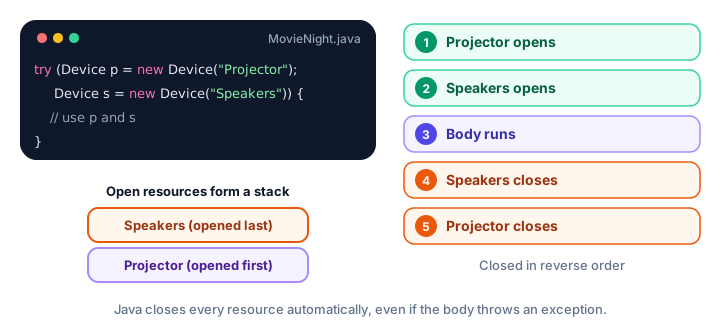
What happens when an exception is thrown?
This is where try-with-resources really shines. If the body throws an exception, Java first closes the resources, then runs the matching catch block, and finally the finally block if there is one:
public class Kitchen {
    public static void main(String[] args) {
        int temperature = 260;

        try (Device oven = new Device("Oven")) {
            oven.use();
            if (temperature > 250) {
                throw new IllegalStateException("Smoke detected!");
            }
            System.out.println("Pizza is ready");
        } catch (IllegalStateException e) {
            System.out.println("Caught: " + e.getMessage());
        } finally {
            System.out.println("Kitchen check complete");
        }
    }
}

class Device implements AutoCloseable {
    private final String name;

    Device(String name) {
        this.name = name;
        System.out.println(name + " on");
    }

    void use() {
        System.out.println(name + " in use");
    }

    @Override
    public void close() {
        System.out.println(name + " off");
    }
}
Oven on
Oven in use
Oven off
Caught: Smoke detected!
Kitchen check completeThe oven was switched off before the catch block ran. By the time your code handles the problem, the resource is already safely closed.
Try-with-resources vs finally
Before Java 7, the only way to guarantee closing was a finally block (see try-catch). It works, but compare the two:
// The old way: try-finally
Device printer = new Device("Printer");
try {
    printer.use();
} finally {
    printer.close();
}

// The modern way: try-with-resources
try (Device printer = new Device("Printer")) {
    printer.use();
}| try-finally | try-with-resources | |
|---|---|---|
| Closing | You write close() yourself | Automatic |
| Several resources | Nested try blocks, easy to get wrong | List them, separated by ; |
| Order | You must get it right yourself | Always reverse order |
| If close() also fails | Its exception can hide the original one | The original is kept; the other is "suppressed" |
| Readability | Longer | Short and clear |
For anything that implements AutoCloseable, prefer try-with-resources. Keep finally for other kinds of clean-up, such as resetting a status message.
Suppressed exceptions
What if the body throws an exception and then close() throws one too? Java can only throw one at a time. Try-with-resources keeps the original exception from the body (it's usually the more useful one) and attaches the one from close() to it as a suppressed exception. You can read them with getSuppressed(), which returns an array:
public class BackupJob {
    public static void main(String[] args) {
        try (UsbDrive drive = new UsbDrive()) {
            drive.save("photos.zip");
        } catch (IllegalStateException e) {
            System.out.println("Main problem: " + e.getMessage());
            for (Throwable extra : e.getSuppressed()) {
                System.out.println("Also happened: " + extra.getMessage());
            }
        }
    }
}

class UsbDrive implements AutoCloseable {
    void save(String fileName) {
        throw new IllegalStateException("Drive full, could not save " + fileName);
    }

    @Override
    public void close() {
        throw new IllegalStateException("Drive could not be ejected");
    }
}
Main problem: Drive full, could not save photos.zip
Also happened: Drive could not be ejectedWith an old-style finally, the "could not be ejected" exception would have replaced the "Drive full" one, and you'd never learn the real cause. You won't need suppressed exceptions often, but it's good to know nothing gets lost.
Common mistakes with try-with-resources
1. Using a class that isn't AutoCloseable
Only objects that implement AutoCloseable can go in the parentheses. Anything else is a compile error.
2. Using the resource after the try block
The variable only exists inside the try block, and by then the resource is closed anyway. Do all your work with it inside the block.
3. Closing the resource yourself as well
Calling close() inside the block is unnecessary, because Java will call it again at the end. Let try-with-resources do its job.
4. Wrapping Scanner(System.in) too early
Closing a keyboard scanner closes System.in for good. Create one keyboard scanner for the whole program instead.
Practice exercise
🏋️ Try it yourself
Create a class Valve that implements AutoCloseable. Its constructor prints Water valve opened or Gas valve opened (based on a name you pass in), and close() prints ... valve closed. In main, open a water valve and then a gas valve in one try-with-resources, print the names of both valves inside the block, and check the closing order.
Show solution
public class Plumbing {
    public static void main(String[] args) {
        try (Valve water = new Valve("Water");
             Valve gas = new Valve("Gas")) {
            System.out.println("Checking " + water.getName()
                    + " and " + gas.getName());
        }
    }
}

class Valve implements AutoCloseable {
    private final String name;

    Valve(String name) {
        this.name = name;
        System.out.println(name + " valve opened");
    }

    String getName() {
        return name;
    }

    @Override
    public void close() {
        System.out.println(name + " valve closed");
    }
}
Water valve opened
Gas valve opened
Checking Water and Gas
Gas valve closed
Water valve closedThe gas valve was opened last, so it's closed first.
What's next?
Congratulations, you've finished the exceptions chapter! Next, start working with groups of objects in the Java collections framework, where you'll meet lists, sets and maps.
Key takeaways
- A resource is an object that must be closed after use; any class that implements AutoCloseable is one.
- try (Type name = new Type()) { ... } calls close() automatically when the block ends.
- Resources are closed even if the body throws, and they are closed before the catch block runs.
- Several resources are separated by semicolons and closed in reverse order of opening.
- If both the body and close() throw, the body exception is kept and the other becomes suppressed, available via getSuppressed().
- Prefer try-with-resources over a manual close() in finally for anything AutoCloseable.
- Avoid closing a Scanner on System.in until the program no longer needs keyboard input.
Frequently asked questions
What is try-with-resources in Java?
It is a try statement that declares one or more resources in parentheses, such as try (Scanner sc = new Scanner(text)). Java automatically calls close() on each resource when the block ends, whether it ends normally or with an exception.
Which classes can be used with try-with-resources?
Any class that implements the AutoCloseable interface, or its sub-interface Closeable. This includes Scanner, file readers and writers, streams and database connections, as well as your own classes that implement AutoCloseable.
In what order are resources closed in try-with-resources?
In reverse order of creation. If you open A and then B, Java closes B first and A last, so a resource that depends on another is always closed before the one it depends on.
Do I still need catch or finally with try-with-resources?
No, both are optional. Add catch if you want to handle exceptions from the body or from close(), and finally for any extra clean-up. Resources are already closed by the time catch and finally run.
What is a suppressed exception?
If the try block throws an exception and closing a resource throws another, Java keeps the first one and attaches the second to it as a suppressed exception. You can get them with getSuppressed(), which returns an array of Throwable.