Java Switch
Updated 8 min read Aimerscrew
When one variable can hold many possible values and each value needs different code, a long else if chain gets tiring to read. The Java switch statement solves this: you name the value once, then list the cases. In this lesson, you'll learn the classic switch with break, the surprising behavior called fall-through, and the modern arrow syntax and switch expressions that make switch shorter and safer.
🌍 Real-life example
Think of an elevator panel. You press one button, and the elevator goes to exactly that floor. It doesn't test "is it floor 1? is it floor 2?" in a long chain of questions; it jumps straight to the matching button. A switch works the same way: one value in, one matching case runs.
What is a switch statement in Java?
A switch statement takes a single value, called the selector, and compares it with a list of case labels. When a label matches, Java runs the code under that label. The optional default label runs when nothing matches, a bit like the final else in an if chain.
switch (selector) {
    case VALUE1:
        // code for VALUE1
        break;
    case VALUE2:
        // code for VALUE2
        break;
    default:
        // code when nothing matched
}
Here's a real program that turns a floor number into a store directory message:
public class MallElevator {
    public static void main(String[] args) {
        int floor = 2;

        switch (floor) {
            case 0:
                System.out.println("Ground floor: food court");
                break;
            case 1:
                System.out.println("Floor 1: clothing");
                break;
            case 2:
                System.out.println("Floor 2: electronics");
                break;
            case 3:
                System.out.println("Floor 3: cinema");
                break;
            default:
                System.out.println("No such floor");
        }
    }
}
Floor 2: electronicsWhat does break do in a switch?
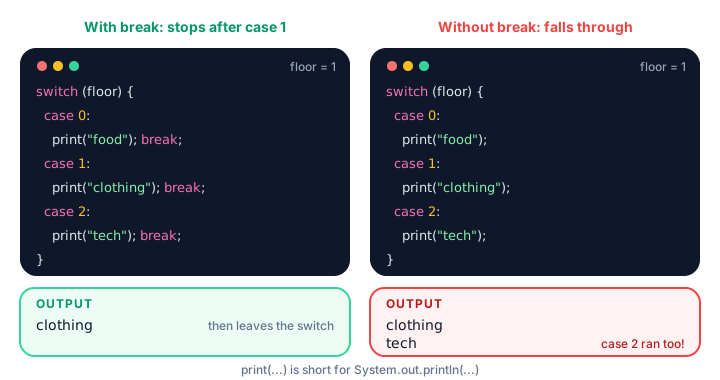
The break keyword means "leave the switch now". Without it, Java doesn't stop at the end of the matching case. It keeps running the code of the following cases too, without checking their labels. This is called fall-through.
public class ForgotBreak {
    public static void main(String[] args) {
        int floor = 1;

        switch (floor) {
            case 0:
                System.out.println("Ground floor: food court");
            case 1:
                System.out.println("Floor 1: clothing");
            case 2:
                System.out.println("Floor 2: electronics");
            case 3:
                System.out.println("Floor 3: cinema");
        }
    }
}
Floor 1: clothing
Floor 2: electronics
Floor 3: cinemaThe selector matched case 1, and then execution "fell" through cases 2 and 3 as well. If you compile this with javac -Xlint:all, Java even warns you: possible fall-through into case.
Grouping cases on purpose
Fall-through is usually a bug, but it has one handy use: several labels that share the same code. Stack the labels with no code between them:
public class DayType {
    public static void main(String[] args) {
        int dayOfWeek = 6;   // 1 = Monday ... 7 = Sunday

        switch (dayOfWeek) {
            case 1:
            case 2:
            case 3:
            case 4:
            case 5:
                System.out.println("Weekday: the gym opens at 6 am");
                break;
            case 6:
            case 7:
                System.out.println("Weekend: the gym opens at 8 am");
                break;
            default:
                System.out.println("Invalid day number");
        }
    }
}
Weekend: the gym opens at 8 amWhich types can you switch on?
A classic switch works with int, short, byte, char, String and enums (you'll learn enums in Java enums). It does not work with long, float, double or boolean. Each case label must be a constant, such as 3, 'B' or "PAID", and no label may appear twice.
Switching on a String compares the text with equals() behind the scenes, so it's case-sensitive:
public class DeliveryStatus {
    public static void main(String[] args) {
        String status = "OUT_FOR_DELIVERY";

        switch (status) {
            case "PLACED":
                System.out.println("The restaurant has your order.");
                break;
            case "COOKING":
                System.out.println("Your food is being prepared.");
                break;
            case "OUT_FOR_DELIVERY":
                System.out.println("Your rider is on the way!");
                break;
            case "DELIVERED":
                System.out.println("Enjoy your meal.");
                break;
            default:
                System.out.println("Unknown status: " + status);
        }
    }
}
Your rider is on the way!And here's a char selector:
public class SeatClass {
    public static void main(String[] args) {
        char seatCode = 'B';

        switch (seatCode) {
            case 'F':
                System.out.println("First class: lounge access included");
                break;
            case 'B':
                System.out.println("Business class: two checked bags");
                break;
            case 'E':
                System.out.println("Economy: one carry-on bag");
                break;
            default:
                System.out.println("Unknown seat code");
        }
    }
}
Business class: two checked bagsThe modern arrow switch (case X ->)
Since Java 14, you can write case VALUE -> instead of case VALUE:. The arrow form never falls through, so you don't need break at all. You can also list several labels in one case, separated by commas.
public class ParkingRates {
    public static void main(String[] args) {
        String day = "SUN";

        switch (day) {
            case "MON", "TUE", "WED", "THU", "FRI" -> System.out.println("Parking: $3 per hour");
            case "SAT", "SUN" -> System.out.println("Parking: $2 per hour");
            default -> System.out.println("Unknown day");
        }
    }
}
Parking: $2 per hourIf a case needs more than one statement, wrap them in braces: case "SAT", "SUN" -> { ... }.
What is a switch expression?
A switch expression is a switch that produces a value, which you can store in a variable or print directly. Put the switch on the right side of = and end the whole thing with a semicolon.
public class MonthDays {
    public static void main(String[] args) {
        int month = 4;

        int days = switch (month) {
            case 4, 6, 9, 11 -> 30;
            case 2 -> 28;
            default -> 31;
        };

        System.out.println("Month " + month + " has " + days + " days");
    }
}
Month 4 has 30 daysA switch expression must be exhaustive: every possible value must lead somewhere. With an int or String selector, that means you need a default. Leave it out and the compiler stops with "the switch expression does not cover all possible input values".
Using yield for multi-line cases
When a case in a switch expression needs a few statements before it has its answer, use a block and hand back the value with yield:
public class ShippingQuote {
    public static void main(String[] args) {
        String zone = "INTERNATIONAL";
        double weightKg = 3.0;

        double cost = switch (zone) {
            case "LOCAL" -> 2.50;
            case "NATIONAL" -> 5.00;
            case "INTERNATIONAL" -> {
                double base = 15.00;
                double perKg = 4.00;
                yield base + perKg * weightKg;
            }
            default -> 0.0;
        };

        System.out.println("Shipping to " + zone + ": $" + cost);
    }
}
Shipping to INTERNATIONAL: $27.0Think of yield as "this is the value of the switch". It's different from return, which would leave the whole method.
Classic switch vs arrow switch
| Feature | Classic case X: | Arrow case X -> |
|---|---|---|
| Falls through to the next case | Yes, unless you write break | Never |
| Several labels per case | Stack labels: case 6: case 7: | Commas: case 6, 7 -> |
| Can produce a value | Only with yield inside a switch expression | Yes, directly: case 2 -> 28; |
| Typical length | Longer (a break per case) | Shorter |
| Available since | Java 1.0 | Java 14 |
For new code, prefer the arrow form. You'll still meet the classic form in older code and in many interviews, so it pays to understand both. Don't mix both styles inside one switch; Java doesn't allow it.
When should you use switch instead of if else?
Use a switch when you compare one value against several exact constants: menu choices, day names, status codes. Use if else when you need ranges (score >= 90), conditions on several variables, or types a switch can't handle, like double.
💡 Tip
Always include a default case, even when you "know" it can't happen. It catches typos such as "Delivered" instead of "DELIVERED" and makes bugs visible instead of silent.
Common mistakes with Java switch
1. Forgetting break in a classic switch
This causes the fall-through you saw above. Either add break to every case or switch to the arrow form.
2. Trying to switch on a range
case score >= 90: is not valid Java. Case labels must be constant values. Use an if else chain for ranges.
3. Forgetting the semicolon after a switch expression
int days = switch (month) {
    case 2 -> 28;
    default -> 31;
};   // this semicolon ends the assignment statement
4. Switching on a null String
If the selector String is null, the switch throws a NullPointerException before checking any case. Make sure the variable has a value first.
Practice exercise
🏋️ Try it yourself
A coffee shop sells sizes "S" ($2.80), "M" ($3.40) and "L" ($3.90). Write a program that uses a switch expression to set the price for a given size. For any other size, use a block that prints Unknown size and yields 0.0. Print the price for size "L".
Show solution
public class CoffeeOrder {
    public static void main(String[] args) {
        String size = "L";

        double price = switch (size) {
            case "S" -> 2.80;
            case "M" -> 3.40;
            case "L" -> 3.90;
            default -> {
                System.out.println("Unknown size");
                yield 0.0;
            }
        };

        System.out.println("Size " + size + " costs $" + price);
    }
}
Size L costs $3.9What's next?
Sometimes you only need to choose between two values in a single line. Next, meet the Java ternary operator, a compact shortcut for simple if else decisions.
Key takeaways
- A switch compares one selector value against constant case labels and runs the matching case.
- In a classic switch, break leaves the switch; without it, execution falls through into the next cases.
- You can switch on int, short, byte, char, String and enums, but not long, float, double or boolean.
- The arrow form (case X ->) never falls through and allows several labels separated by commas.
- A switch expression returns a value; it must be exhaustive, so int and String selectors need a default.
- Use yield to return a value from a multi-statement block inside a switch expression.
- Prefer if else for ranges and complex conditions, and switch for one value against fixed options.
Frequently asked questions
Is break required in a Java switch?
In the classic case X: form, you need break to stop execution from falling through to the next case. In the arrow form case X ->, no break is needed because it never falls through.
Can you use a String in a Java switch?
Yes. Since Java 7 you can switch on a String. Java compares the text with equals(), so the match is case-sensitive, and a null String throws a NullPointerException.
What is the difference between a switch statement and a switch expression?
A switch statement just runs code for the matching case. A switch expression produces a value, for example int days = switch (month) { ... };, and must cover every possible input.
What does yield do in Java?
yield gives the value of a switch expression from inside a block of statements. It ends that case and makes the switch evaluate to the given value.
Can a Java switch case check a range of numbers?
No. Case labels must be constants, so you cannot write case score >= 90. Use an if else chain for ranges.