Java String Comparison
Updated 8 min read Aimerscrew
Checking whether a password is correct, whether a coupon code is valid, or which of two names comes first in a contact list: all of these need Java string comparison. It looks simple, but it hides one of the most famous beginner traps in Java. In this lesson, you'll learn why == gives surprising answers, and which methods to use instead.
🌍 Real-life example
Imagine two identical paperback copies of the same novel on a library shelf. Ask "Are these the same physical book?" and the answer is no: there are two copies. Ask "Do they contain the same words?" and the answer is yes. Java strings work the same way: == asks the first question, and equals() asks the second.
Why doesn't == work for comparing strings?
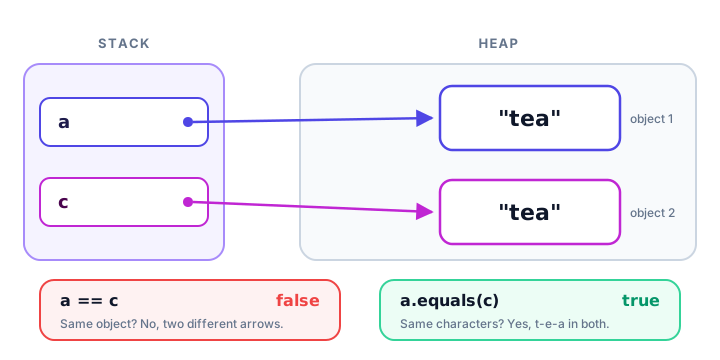
As you saw in Java strings, a String variable doesn't hold the text itself. It holds a reference: an arrow pointing to a String object in memory. The == operator compares those arrows. It returns true only when both variables point to the very same object.
That causes real bugs when text comes from outside your code, such as a user's typing. Text read with Scanner (from Java user input) is always a brand-new object, so == fails even when the user typed exactly the right word.
import java.util.Scanner;

public class ReplyCheck {
    public static void main(String[] args) {
        Scanner input = new Scanner(System.in);
        System.out.print("Confirm booking? (yes/no): ");
        String reply = input.nextLine();

        System.out.println("Using == : " + (reply == "yes"));
        System.out.println("Using equals: " + reply.equals("yes"));
    }
}
Here's a sample run (the user typed yes):
Confirm booking? (yes/no): yes
Using == : false
Using equals: true
The user typed "yes", yet == says false. That's because reply and the literal "yes" are two different objects that happen to contain the same letters.
How equals() compares string content
The equals() method compares the characters of two strings, one by one. It returns true only if both strings have the same length and the same characters in the same order, including upper and lower case.
public class SameContent {
    public static void main(String[] args) {
        String a = "tea";
        String b = "tea";
        String c = new String("tea");

        System.out.println("a == b      " + (a == b));
        System.out.println("a == c      " + (a == c));
        System.out.println("a.equals(c) " + a.equals(c));
        System.out.println("a.equals(\"Tea\") " + a.equals("Tea"));
    }
}
a == b true
a == c false
a.equals(c) true
a.equals("Tea") falsea == b is true only because both literals were reused from the string pool. That's a lucky accident, not something to rely on. a.equals(c) is the reliable answer.
💡 Rule of thumb
For strings, always use equals() to compare text. Keep == for primitive values such as int, char and boolean.
equalsIgnoreCase(): comparing without caring about case
Sometimes capital letters shouldn't matter. A shopper who types a coupon code in lowercase still deserves the discount. equalsIgnoreCase() works like equals() but treats A and a as the same.
public class CouponCode {
    public static void main(String[] args) {
        String validCode = "SPRING25";
        String typed = "spring25";

        System.out.println("equals:           " + typed.equals(validCode));
        System.out.println("equalsIgnoreCase: " + typed.equalsIgnoreCase(validCode));
    }
}
equals: false
equalsIgnoreCase: true⚠️ Not for passwords
Usernames and email addresses are usually compared without case, but passwords must always be compared exactly with equals(). Sunset!42 and sunset!42 are different passwords.
A realistic example: checking a login
This program combines what you've learned. The username is cleaned with strip() and compared ignoring case, while the password must match exactly. The && operator from logical operators requires both checks to pass.
import java.util.Scanner;

public class LoginCheck {
    public static void main(String[] args) {
        String savedUser = "maya_r";
        String savedPassword = "Sunset!42";

        Scanner input = new Scanner(System.in);
        System.out.print("Username: ");
        String user = input.nextLine().strip();
        System.out.print("Password: ");
        String password = input.nextLine();

        boolean userOk = user.equalsIgnoreCase(savedUser);
        boolean passwordOk = password.equals(savedPassword);

        System.out.println("Username matches: " + userOk);
        System.out.println("Password matches: " + passwordOk);
        System.out.println("Logged in: " + (userOk && passwordOk));
    }
}
Here's a sample run (the user typed Maya_R, then Sunset!42):
Username: Maya_R
Password: Sunset!42
Username matches: true
Password matches: true
Logged in: true
In a real app, you'd use an if-else statement to show a welcome screen or an error. You'll learn that in the next chapter.
compareTo(): putting strings in alphabetical order
equals() only says "same" or "different". To find out which string comes first, use compareTo(). It returns an int:
Result of a.compareTo(b) | Meaning |
|---|---|
| Negative number | a comes before b |
0 | a and b are equal |
| Positive number | a comes after b |
public class AlphabeticalOrder {
    public static void main(String[] args) {
        System.out.println("apple vs banana: " + "apple".compareTo("banana"));
        System.out.println("banana vs apple: " + "banana".compareTo("apple"));
        System.out.println("kiwi vs kiwi:    " + "kiwi".compareTo("kiwi"));
        System.out.println("car vs cart:     " + "car".compareTo("cart"));
        System.out.println("Zoe vs adam:     " + "Zoe".compareTo("adam"));
        System.out.println("Zoe vs adam (ignore case): "
                + "Zoe".compareToIgnoreCase("adam"));
    }
}
apple vs banana: -1
banana vs apple: 1
kiwi vs kiwi: 0
car vs cart: -1
Zoe vs adam: -7
Zoe vs adam (ignore case): 25Java compares the strings character by character until it finds a difference. Then it subtracts the two character codes: 'a' (97) minus 'b' (98) gives -1. When one string is the start of the other, like "car" and "cart", the shorter one comes first.
Look at "Zoe" and "adam". Every uppercase letter has a smaller code than every lowercase letter, so plain compareTo() puts "Zoe" first ('Z' is 90, 'a' is 97). For a human-friendly order, use compareToIgnoreCase().
📝 Note
Only the sign of the result matters (negative, zero or positive). Don't write code that expects exactly -1 or 1. To turn the result into a yes-or-no answer, compare it with 0:
public class ShelfOrder {
    public static void main(String[] args) {
        String bookA = "Dune";
        String bookB = "Emma";

        boolean aFirst = bookA.compareTo(bookB) < 0;
        System.out.println(bookA + " goes before " + bookB + ": " + aFirst);
    }
}
Dune goes before Emma: trueHow do you compare strings that might be null?
A String variable can hold null, which means "no object at all", for example when a customer leaves an optional coupon field empty. Calling any method on null crashes the program:
String coupon = null;
System.out.println(coupon.equals("SPRING25")); // crashes
Exception in thread "main" java.lang.NullPointerException: Cannot invoke "String.equals(Object)" because "<local1>" is null(When you compile with javac -g, the message names the variable, coupon, instead of <local1>.) There are two easy, null-safe fixes:
- Put the literal first:
"SPRING25".equals(coupon). A literal is never null, andequals(null)simply returnsfalse. - Use
Objects.equals(a, b)fromjava.util. It returnstrueif both are null,falseif only one is null, and otherwise callsequals().
import java.util.Objects;

public class NullSafe {
    public static void main(String[] args) {
        String coupon = null; // the customer did not enter a coupon

        System.out.println("SPRING25".equals(coupon));
        System.out.println(Objects.equals(coupon, "SPRING25"));
        System.out.println(Objects.equals(coupon, null));
    }
}
false
false
trueWhich comparison method should you use?
| You want to know… | Use | Returns |
|---|---|---|
| Do two strings have the same text? | a.equals(b) | boolean |
| Same text, ignoring capitals? | a.equalsIgnoreCase(b) | boolean |
| Same text, when either might be null? | Objects.equals(a, b) or "literal".equals(a) | boolean |
| Which comes first alphabetically? | a.compareTo(b) / a.compareToIgnoreCase(b) | int (negative, 0, positive) |
| Are they the exact same object? | a == b (rarely what you want) | boolean |
Common mistakes with string comparison
1. Using == to compare text
It may pass your quick tests with literals, then fail with user input. Use equals().
2. Calling equals() on a variable that can be null
input.equals("yes") crashes if input is null. Write "yes".equals(input) instead.
3. Expecting compareTo() to return exactly 1 or -1
It can return any positive or negative number, such as -7. Check the sign with < 0, == 0 or > 0.
4. Forgetting that uppercase sorts before lowercase
With compareTo(), "Zoe" comes before "adam". Use compareToIgnoreCase() for a natural order.
5. Comparing with stray spaces
"yes ".equals("yes") is false. Clean user input with strip() from Java string methods before comparing.
Practice exercise
🏋️ Try it yourself
A library catalog holds the title "The Hobbit". A visitor searches for "the hobbit". Print whether the titles match exactly, whether they match ignoring case, and whether "Matilda" comes before "The Hobbit" on an alphabetical shelf.
Show solution
public class TitleCheck {
    public static void main(String[] args) {
        String onShelf = "The Hobbit";
        String searched = "the hobbit";
        String other = "Matilda";

        System.out.println("Exact match: " + onShelf.equals(searched));
        System.out.println("Match ignoring case: " + onShelf.equalsIgnoreCase(searched));
        System.out.println(other + " comes first: " + (other.compareTo(onShelf) < 0));
    }
}
Exact match: false
Match ignoring case: true
Matilda comes first: trueWhat's next?
You can now compare strings safely and sort them. Next, learn how to build long strings efficiently, piece by piece, with Java StringBuilder.
Key takeaways
- Use equals() to check whether two strings contain the same text; == only checks whether they are the same object.
- Strings from user input are new objects, so == can return false even when the text matches.
- equalsIgnoreCase() ignores capital letters; use it for usernames or codes, never for passwords.
- compareTo() returns a negative number, 0 or a positive number to show alphabetical order; only the sign matters.
- Uppercase letters sort before lowercase with compareTo(); use compareToIgnoreCase() for a natural order.
- For values that may be null, write "literal".equals(x) or use Objects.equals(a, b) to avoid a NullPointerException.
Frequently asked questions
What is the difference between == and equals() in Java?
For strings, == checks whether two variables refer to the same object in memory, while equals() checks whether the two strings contain the same characters. To compare text, always use equals().
Why does == sometimes work with Java strings?
Identical string literals share one object in the string pool, so == returns true for them by coincidence. Strings created at run time, such as user input, are separate objects, so == returns false.
How do I compare strings in Java ignoring case?
Use equalsIgnoreCase(), for example typed.equalsIgnoreCase("SPRING25"). To sort while ignoring case, use compareToIgnoreCase().
What does compareTo() return in Java?
It returns a negative int if the first string comes before the second, 0 if they are equal, and a positive int if it comes after. The exact number depends on the first differing characters, so only check the sign.
How do I avoid a NullPointerException when comparing strings?
Call equals() on a value that cannot be null, such as a literal: "yes".equals(answer). Or use Objects.equals(a, b) from java.util, which handles null on either side.